Go-flutter: No text widgets visible in Linux
When I run a Flutter app as desktop application on Ubuntu/Linux 18.04, I cannot see any of the text widgets. Tested with my own apps as well as the provided examples.
Desktop:

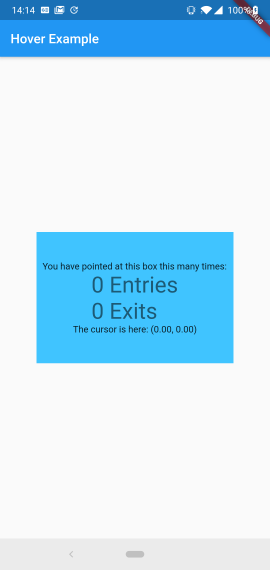
Android device:
Not sure if terminal output shows any relevant information, but this is the output from the terminal when running hover run
Using engine from cache
Running "flutter packages get" in pointer_demo...                   0.2s
go: finding github.com/go-gl/glfw latest
[ERROR:flutter/shell/platform/embedder/embedder_surface_gl.cc(95)] Could not create a resource context for async texture uploads. Expect degraded performance. Set a valid make_resource_current callback on FlutterOpenGLRendererConfig.
flutter: Observatory listening on http://127.0.0.1:50300/
[ERROR:flutter/shell/platform/embedder/embedder_surface_gl.cc(95)] Could not create a resource context for async texture uploads. Expect degraded performance. Set a valid make_resource_current callback on FlutterOpenGLRendererConfig.
go-flutter: calculated pixelRatio limited to a minimum of 1.0. metrics: {"dpi":140.9479768786127,"monitorWidthMm":346,"monitorWidthSc":1920,"mscpi":140.9479768786127,"pixelRatio":0.8809248554913294,"ppsc":1,"windowWidthPx":800,"windowWidthSc":800}
go-flutter: no method handler registered for method 'SystemChrome.setSystemUIOverlayStyle' on channel 'flutter/platform'
Wrong full snapshot version, expected '9a66dcb2da955dffdbdb0eafa0288784' found
'9e1fa667daca1ecf538db8507091794e'
Isolate creation failed
Syncing files to device Flutter test device...                     123ms

🔥  To hot reload changes while running, press "r". To hot restart (and rebuild state), press "R".
An Observatory debugger and profiler on Flutter test device is available at: http://127.0.0.1:50300/
For a more detailed help message, press "h". To detach, press "d"; to quit, press "q".
Flutter version
Flutter 1.3.8 • channel beta • https://github.com/flutter/flutter.git
Framework • revision e5b1ed7a7f (5 weeks ago) • 2019-03-06 14:23:37 -0800
Engine • revision f4951df193
Tools • Dart 2.2.1 (build 2.2.1-dev.0.0 571ea80e11)
Also tried with this version, just to make sure it was not Flutter version, with the same result.
Flutter 1.4.18 • channel dev • https://github.com/flutter/flutter.git
Framework • revision 8bea3fb2eb (16 hours ago) • 2019-04-11 13:11:22 -0700
Engine • revision 72986c39ea
Tools • Dart 2.2.1 (build 2.2.1-dev.3.1 None)
Linux version
Icon name: computer-laptop
Chassis: laptop
Operating System: Ubuntu 18.04.2 LTS
Kernel: Linux 4.15.0-47-generic
Architecture: x86-64
Steps to Reproduce
- Set up according to readme
apt install libgl1-mesa-dev xorg-devgo get -u github.com/go-flutter-desktop/hover
- Download examples repo
git clone https://github.com/go-flutter-desktop/examples.git - Cd into pointer demo
hover runandflutter run
 lohnn
lohnn
All 6 comments
I suspect perhaps a font is missing. To confirm, could you let me know if the font used in the app is installed on your machine?
 GeertJohan
on 15 Apr 2019
GeertJohan
on 15 Apr 2019
Seems like I did not have the font installed on the machine. But I installed Roboto font and tried again without success.
However, it looks like you are correct about missing fonts, since when I'm running stocks example, which has fonts defined in pubspec and ships with a font folder, I do get text just as expected.
Does this mean that the default font is not Roboto?
lohnn
on 15 Apr 2019
The default font for a MaterialApp should indeed be Roboto. It's possible that after installation of the font you still need to run fc-cache -f -v to clear the font cache on your machine. Does that help?
GeertJohan
on 15 Apr 2019
Argh. Last time I installed fonts from .ttf files downloaded from Google fonts. After installing with apt install fonts-roboto it all works.
Closing this, thank you very much!
lohnn
on 15 Apr 2019
I've added a note to the README.md of hover about Fonts. It's best to include them with a project, so that the application works regardless of whether a font is available on a system or not.
GeertJohan
on 15 Apr 2019
(Sorry for commenting in this closed ticket if anyone is bothered)
For those who don't want to install Roboto (and use Ubuntu),
MaterialApp(
      title: 'Flutter Demo',
      theme: ThemeData(
          primarySwatch: Colors.blue,
          fontFamily: 'Ubuntu'),
      home: MyHomePage(title: 'Flutter Demo Home Page'),
Having the fontFamily Ubuntu as the sample above in main_desktop.dart shows good result for me.
 bus710
on 31 Jul 2019
bus710
on 31 Jul 2019
Related issues
 Fireprufe15
·
6Comments
Fireprufe15
·
6Comments
 Tokenyet
·
7Comments
Tokenyet
·
7Comments
 MathiasDeWeerdt
·
4Comments
MathiasDeWeerdt
·
4Comments
 pchampio
·
8Comments
pchampio
·
3Comments
pchampio
·
8Comments
pchampio
·
3Comments
Most helpful comment
I've added a note to the README.md of hover about Fonts. It's best to include them with a project, so that the application works regardless of whether a font is available on a system or not.