System information
Geth version: 1.8.0-unstable-9d187f02
OS & Version: Windows
When I try to attach to the running local node, I get an unexpected error message:
PS C:\Users\mutexin> geth attach
Fatal: Unable to attach to remote geth: no known transport for URL scheme "c"
PS C:\Users\mutexin> geth attach --datadir "D:\Programs\Ethereum"
Fatal: Unable to attach to remote geth: no known transport for URL scheme "d"
 dpisarewski
All 26 comments
I think you should:
geth attach http://host:port
or
geth attach /xxxx/geth.ipc
xxxx is your datadir path
 wcw84
on 25 Dec 2017
wcw84
on 25 Dec 2017
I'm getting the same error in the stable release of Geth 1.8, but only on Windows. On MacOS everything seems to be fine.
 sarbogast
on 16 Feb 2018
sarbogast
on 16 Feb 2018
Apparently on Windows we now have to specify the IPC path, and it was not necessary in Geth 1.7.3:
geth attach ipc:\\.\pipe\geth.ipc
sarbogast
on 16 Feb 2018
geth attach ipc:\\.\pipe\geth.ipc
This solution works for Win10 and v1.8.0-stable
 oragious
on 16 Feb 2018
oragious
on 16 Feb 2018
It does. But once again an undocumented change, and a discrepancy between Windows and other platforms. As an online instructor trying to keep my cours material up-to-date, these things are a PITA
sarbogast
on 16 Feb 2018
Quick Q - where do you find the IPC file? I'm running geth without installing it (just unzipped the folder)
 FrozenKiwi
on 16 Feb 2018
FrozenKiwi
on 16 Feb 2018
never mind - just run the command in the same folder as the other instance and it seems to work
FrozenKiwi
on 16 Feb 2018
Is that expected behavior or will that be reverted to auto-discover the pipe on windows? I couldn't find anything in the changelogs, did I miss it?
 tomw1808
on 18 Feb 2018
tomw1808
on 18 Feb 2018
BTW, within Git Bash (for Windows) it is also possible to connect as well as
./geth attach ipc:\\\\.\\pipe\\geth.ipc

but the console output is not colored.
 paulvi
on 23 Mar 2018
paulvi
on 23 Mar 2018
Hi, specifying port worked for me. I had two nodes running in different ports and below attach command worked
geth attach http://localhost:8545
geth attach http://localhost:8547
 philipmatty
on 7 May 2018
philipmatty
on 7 May 2018
confirmed geth attach ipc:\.\pipe\geth.ipc works for win env
 nukec
on 16 May 2018
nukec
on 16 May 2018
Hi Team,
I am using windows 32 bit GoEth.
Receiving below issue please help out.
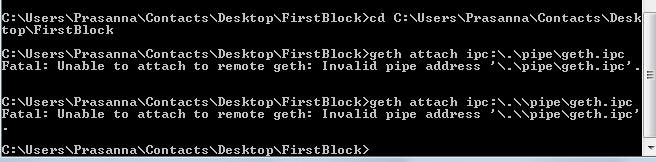
Regards,
Ravi Shankar .L
 FirstBlockChain
on 17 May 2018
FirstBlockChain
on 17 May 2018
@FirstBlockChain This is not Q&A, go to https://ethereum.stackexchange.com/
For a new bug report or on stackexchange , specify used version, and the way you launched.
At first glance, you may have missed \ before .
Seen
geth attach ipc:\.\pipe\geth.ipc
Should be
geth attach ipc:\\.\pipe\geth.ipc
paulvi
on 17 May 2018
Can this be made by default in windows? geth attach ipc:\\.\pipe\geth.ipc
 3esmit
on 17 May 2018
3esmit
on 17 May 2018
Same error with this conditions:
- Win7 @ x32
- mintty 2.8.5
Only works with
./geth attach ipc:\\.\pipe\geth.ipc
 uhuhh
on 31 May 2018
uhuhh
on 31 May 2018
can you give me 2 enthereum in the testnet..it's hard to get them ..my wallet address is:0x341453f0026b436b6f506626f74191e2461bbe16
 unicornyang
on 24 Jul 2018
unicornyang
on 24 Jul 2018
can you give me 2 enthereum in the testnet..it's hard to get them in china.my wallet address is:0x341453f0026b436b6f506626f74191e2461bbe16
unicornyang
on 24 Jul 2018
how can i find my ipc path on windows?
 davoodmood
on 27 Sep 2018
davoodmood
on 27 Sep 2018
It always was geth attach ipc:\\.\pipe\geth.ipc, never a plain path. @davoodmood use the one mentioned previously. Geth also prints the path on startup.
 karalabe
on 4 Oct 2018
karalabe
on 4 Oct 2018
@karalabe Why not make it default on windows?
 gumb0
on 4 Oct 2018
gumb0
on 4 Oct 2018
Hmmm, it isn't? Then it should definitely be changed.
karalabe
on 4 Oct 2018
when we use : geth attach ipc:\.\pipe\geth.ipc ,we need to keep our startnode.cmd or geth --networkid 123 --dev --datadir data1 --rpc --rpcaddr 192.168.1.5 --rpc port 8545 --port 30303 running.
 Rbchi
on 30 Oct 2018
Rbchi
on 30 Oct 2018
Apparently on Windows we now have to specify the IPC path, and it was not necessary in Geth 1.7.3:
geth attach ipc:\\.\pipe\geth.ipc
This is not working for me on Windows 10, Geth version 1.8.17-stable-8bbe7207. I get the error "Fatal: Unable to attach to remote geth: Timed out waiting for pipe '\.\pipe\geth.ipc' to come available"
 Aristophanes888
on 4 Nov 2018
Aristophanes888
on 4 Nov 2018
After a long time I found out how to solve this.
First initialize your geth like this (if you want to use rinkeby):
geth --rinkeby --rpc --rpcapi="personal,eth,network,web3,net" --ipcpath "\.\pipe\geth.ipc"
And then open the console with the command:
geth attach ipc:\.\pipe\geth.ipc
 Hanafubuki
on 7 Jun 2019
Hanafubuki
on 7 Jun 2019
After a long time I found out how to solve this.
First initialize your geth like this (if you want to use rinkeby):
geth --rinkeby --rpc --rpcapi="personal,eth,network,web3,net" --ipcpath ".\pipe\geth.ipc"And then open the console with the command:
geth attach ipc:.\pipe\geth.ipc
still not helping
 KobbyRainworth
on 10 Aug 2020
KobbyRainworth
on 10 Aug 2020
Tried all the above but got "unable to attach to remote geth: Access is denied."
What else can i do about this?
KobbyRainworth
on 10 Aug 2020
Related issues
 cheershendtco
·
3Comments
cheershendtco
·
3Comments
 leonzhao
·
3Comments
leonzhao
·
3Comments
 VenusHu
·
3Comments
VenusHu
·
3Comments
 wighawag
·
3Comments
wighawag
·
3Comments
 phpsamsb
·
3Comments
phpsamsb
·
3Comments
Most helpful comment
Apparently on Windows we now have to specify the IPC path, and it was not necessary in Geth 1.7.3:
geth attach ipc:\\.\pipe\geth.ipc