Gns3-gui: Key Error :'vendor_id' on GNS3 2.2.11 with VirtualBox on Ubuntu 20.04
Hi,
By trying to configure Virtualbox on GNS3 I get the following error :
Error while listing vms: Traceback (most recent call last):
File "/usr/share/gns3/gns3-server/lib/python3.8/site-packages/gns3server/web/route.py", line 198, in control_schema
await func(request, response)
File "/usr/share/gns3/gns3-server/lib/python3.8/site-packages/gns3server/handlers/api/controller/gns3_vm_handler.py", line 52, in get_vms
vms = await Controller.instance().gns3vm.list(request.match_info["engine"])
File "/usr/share/gns3/gns3-server/lib/python3.8/site-packages/gns3server/utils/asyncio/__init__.py", line 163, in wrapper
return await f(oself, args, *kwargs)
File "/usr/share/gns3/gns3-server/lib/python3.8/site-packages/gns3server/controller/gns3vm/__init__.py", line 262, in list
for vm in (await engine.list()):
File "/usr/share/gns3/gns3-server/lib/python3.8/site-packages/gns3server/controller/gns3vm/virtualbox_gns3_vm.py", line 216, in list
await self._check_requirements()
File "/usr/share/gns3/gns3-server/lib/python3.8/site-packages/gns3server/controller/gns3vm/virtualbox_gns3_vm.py", line 95, in _check_requirements
vendor_id = cpu_info['vendor_id']
KeyError: 'vendor_id'
 medharrak
All 8 comments
Getting a similar error while trying to setup GNS3 with VirtualBox in Windows 10 Version 1909 Build 18363.418
Error while listing vms: Traceback (most recent call last):
File "./gns3-server\gns3server\web\route.py", line 198, in control_schema
File "./gns3-server\gns3server\handlers\api\controller\gns3_vm_handler.py", line 52, in get_vms
File "./gns3-server\gns3server\utils\asyncio__init__.py", line 163, in wrapper
File "./gns3-server\gns3server\controller\gns3vm__init__.py", line 262, in list
File "./gns3-server\gns3server\controller\gns3vm\virtualbox_gns3_vm.py", line 216, in list
File "./gns3-server\gns3server\controller\gns3vm\virtualbox_gns3_vm.py", line 95, in _check_requirements
KeyError: 'vendor_id'
 zebrajr
on 10 Jul 2020
zebrajr
on 10 Jul 2020
I found the issue, starting with version 6.0.0, the "vendor_id" field returned by get_cpu_info() from the py-cpuinfo module has been renamed to "vendor_id_raw"
https://github.com/workhorsy/py-cpuinfo/commit/9e79e59682acc127446bebec27f716e3e10e961e#diff-edb26df606454fa32fe0d745d893abdf
One workaround, depending how you installed GNS3, may be to downgrade to py-cpuinfo version 5.0.0
sudo python3 -m pip install py-cpuinfo==5.0.0
 grossmj
on 10 Jul 2020
grossmj
on 10 Jul 2020
I did the install using GNS3 doc : install from repository sudo add-apt-repository ppa:gns3/ppa
medharrak
on 10 Jul 2020
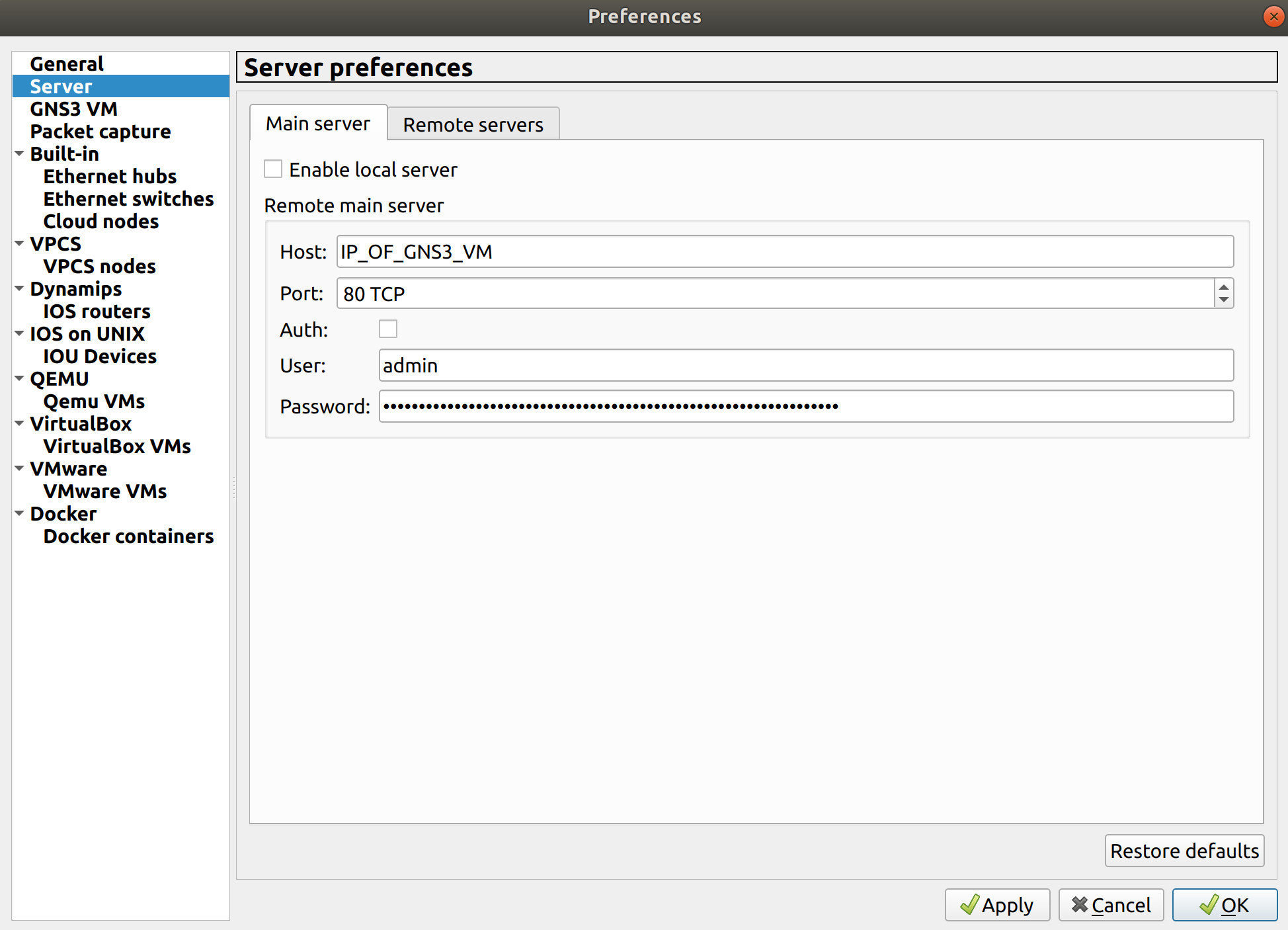
This should be fixed now however you will probably have to wait for the next release to use the GNS3 VM directly. In the meantime you can manually start the GNS3 VM in VirtualBox before you start GNS3.
Then configure as a remote GNS3 VM in the preferences:


OR just use the GNS3 VM as the main server (easier as everything will run inside the VM).
grossmj
on 10 Jul 2020
Thank you
medharrak
on 10 Jul 2020
Thank you
I can confirm that the workaround is functional on
Intel i7-4790k
GNS3 2.2.11
VirtualBox 6.1.10
Win10 Pro Ver 2004
 MrWolf1973
on 12 Jul 2020
MrWolf1973
on 12 Jul 2020
Thanks a lot - temporary fix worked for me too.
Intel i9-9880H
GNS3 2.2.11
VirtualBox 6.1
Win10 Pro Build 18363
 izharkazmi
on 12 Jul 2020
izharkazmi
on 12 Jul 2020
I followed the exact instructions and the damn think still do not want to connect (connection timeout). Am I missing sth?
Intel(R) Core(TM) i7-7700HQ CPU @ 2.80GHz
GNS3 2.2.11
Virtual Box 6.1
Win 10 Pro 20H2 Ver19042.300
 akyumurkov
on 20 Jul 2020
akyumurkov
on 20 Jul 2020
Related issues
 syndgr
·
8Comments
syndgr
·
8Comments
 TangraM3
·
4Comments
TangraM3
·
4Comments
 jJit0
·
6Comments
jJit0
·
6Comments
 adosztal
·
4Comments
adosztal
·
4Comments
 arash88
·
7Comments
arash88
·
7Comments
Most helpful comment
This should be fixed now however you will probably have to wait for the next release to use the GNS3 VM directly. In the meantime you can manually start the GNS3 VM in VirtualBox before you start GNS3.
Then configure as a remote GNS3 VM in the preferences:
OR just use the GNS3 VM as the main server (easier as everything will run inside the VM).