Gnome-shell-system-monitor-applet: Extension failed to load on gnome 3.36.2

Debian 10 Sid
 prhmnik
All 14 comments
I had the same problem with Manjaro Testing when it went to gdm 3.36.2.
I found a solution.
Somehow, my system got reset to use the 'C' locale. Once I set it back to UTF-8, this extension loads and runs correctly
 dpriedel
on 17 May 2020
dpriedel
on 17 May 2020
Had the same issue after upgrading Ubuntu and setting back the locale to UTF-8 worked.
cf. https://askubuntu.com/q/89976/7567
 blaze33
on 4 Jun 2020
blaze33
on 4 Jun 2020
I'm already the locale on UTF-8 but my problem is not solved.
prhmnik
on 5 Jun 2020
I'm also already on UTF-8:
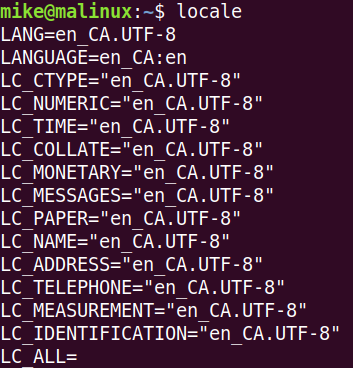
but getting the same error:

I did just now update from 19.10 to 20.04. Could that be related?
 mike-lawrence
on 6 Jun 2020
mike-lawrence
on 6 Jun 2020
Installed Ubuntu 20.04 LTS which has Gnome 3.36.2 and I can also confirm that this is broken, even with proper locals set. Hopefully someone knows how to resolve this issue.
 supercom32
on 6 Jun 2020
supercom32
on 6 Jun 2020
same here. already on UTF-8 & ubuntu 20.04 and same error. Which is a shame as this plugin was the best by far...
 semteXKG
on 8 Jun 2020
semteXKG
on 8 Jun 2020
COPY-PASTING
@dpriedel 's solution worked for me!! Here is a wrapper for the solution
create file named locale.txt and set it's contents as -
LANG=en_US.UTF-8
LC_CTYPE="en_US.UTF-8"
LC_NUMERIC="en_US.UTF-8"
LC_TIME="en_US.UTF-8"
LC_COLLATE="en_US.UTF-8"
LC_MONETARY="en_US.UTF-8"
LC_MESSAGES="en_US.UTF-8"
LC_PAPER="en_US.UTF-8"
LC_NAME="en_US.UTF-8"
LC_ADDRESS="en_US.UTF-8"
LC_TELEPHONE="en_US.UTF-8"
LC_MEASUREMENT="en_US.UTF-8"
LC_IDENTIFICATION="en_US.UTF-8"
LC_ALL=
then run
for l in $(cat locale.txt)
do
sudo update-locale $l
done
Log out and log back in to find the system monitor extension back. :)
 markroxor
on 9 Jun 2020
markroxor
on 9 Jun 2020
did not work, switching to the system-monitor-next project did the trick (also i don't wanna set en_US if i'm from austria.)
semteXKG
on 10 Jun 2020
FWIW, after setting the locale back to UTF-8, I removed the extension using https://extensions.gnome.org/local/ and reinstalled it. Rebooting may also have helped.
Anyway it works now.
blaze33
on 10 Jun 2020
Not sure what I did, but after rebooting, it’s working for me now too.
mike-lawrence
on 10 Jun 2020
ISTM that after setting your locale, the least one needs to do is to log out and log in again. Possibly, a reboot depending on the system
dpriedel
on 10 Jun 2020
It seems that restarting gnome (alt-f2, then run 'r' as the command to run and hit enter) is enough. In my case the locale was OK, but I was missing some dependencies.
 chfritz
on 4 Aug 2020
chfritz
on 4 Aug 2020
Could it be, that the locales should not have quotes around them?
I had some locales with and some without quotes. Now I removed all quotes and it works.
I'm not 100% sure that I didn't change anything else.
 finsterwalder
on 31 Aug 2020
finsterwalder
on 31 Aug 2020
Restarting gnome like @chfritz said worked for me.
 jvanheugten
on 11 Dec 2020
jvanheugten
on 11 Dec 2020
Related issues
 Jerther
·
10Comments
Jerther
·
10Comments
 jakethelizard99
·
4Comments
jakethelizard99
·
4Comments
 motoshkov
·
11Comments
motoshkov
·
11Comments
 udovdh
·
12Comments
udovdh
·
12Comments
 Strykar
·
12Comments
Strykar
·
12Comments
Most helpful comment
I had the same problem with Manjaro Testing when it went to gdm 3.36.2.
I found a solution.
Somehow, my system got reset to use the 'C' locale. Once I set it back to UTF-8, this extension loads and runs correctly