Gnome-shell-extension-gsconnect: GSConnect, send files from laptop and mount option don't work
Describe the bug
I install GSConnect from Firefox gnome extensions web page. Everything works well (send files from smartphone, move mouse over my laptop desktop, type keyboard and control multimedia, send sms...) but cannot send files from laptop to smartphone and can't open mounted folder from android.
I see notification on my laptop that transfer goes well but on my smartphone I see that don't send.
When I open mounted folder on nautilus I see error:
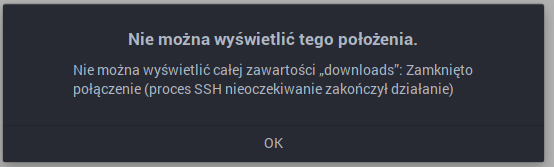
[that means: This position cannot be displayed. Cannot display all content on downloads. Connection closed (SSH process terminated unexpectedly)
in terminal:
[mariank@marian-dell sftp:host=192.168.1.133,port=1739]$ ls
downloads
[mariank@marian-dell sftp:host=192.168.1.133,port=1739]$ cd downloads/
[mariank@marian-dell downloads]$
[mariank@marian-dell downloads]$ ls
ls: czytanie katalogu '.': Błąd wejścia/wyjścia [Error input / output]
[mariank@marian-dell downloads]$
Steps To Reproduce:
Reboot android smartphone and laptop.
Support Log
GSConnect Version: 39
GSConnect Install: user
GJS: 16404
XDG_SESSION_TYPE: x11
GDMSESSION: gnome
--------------------------------------------------------------------------------
-- Logs begin at Thu 2020-07-02 11:52:01 CEST, end at Wed 2020-08-12 11:53:18 CEST. --
sie 12 11:53:06 gnome-shell[7632]: setup_framebuffers: assertion 'width > 0' failed
sie 12 11:53:06 gnome-shell[7632]: setup_framebuffers: assertion 'width > 0' failed
sie 12 11:53:06 gnome-shell[7632]: setup_framebuffers: assertion 'width > 0' failed
sie 12 11:53:18 tracker-miner-f[8668]: g_str_has_suffix: assertion 'str != NULL' failed
System Details (please complete the following information):
- GSConnect version: 39
- Installed from: GNOME Extensions Website
- GNOME/Shell version: 3.36.4
Distro/Release: EndevourOS [arch-based]
Paired Device(s): Motorola One Vision, Android 10
- KDE Connect app version: 1.14.2
Regards Przemek
 PrzemekSkw
All 8 comments
This sounds like a duplicate of #746. Are you sure all the ports (1716 & 1739-1764) are open for both your phone and desktop? This seems like its probably a networking problem.
 andyholmes
on 13 Aug 2020
andyholmes
on 13 Aug 2020
@andyholmes Hi, I don't have any firewall in my laptop. Do You mean I have to open ports on my router?
PrzemekSkw
on 13 Aug 2020
If your router is blocking any of those ports between your phone and your desktop, then that will definitely prevent those plugins from working.
andyholmes
on 13 Aug 2020
OK, I'm in work now and I don't have access to router so I will check in my home.
Regards.
PrzemekSkw
on 13 Aug 2020
I'm experiencing the same problem on my Fedora machine. This is my log when attempting to send a file from laptop to phone
log.txt
.
System Details (please complete the following information):
GSConnect version: 41
    Installed from: GNOME Extensions Website

GNOME/Shell version: 3.36.5

Distro/Release: Fedora 32

Paired Device(s): Huawei P20 Pro, Android 10

KDE Connect app version: 1.14.2
In the firewalld app I added exceptions for kdeconnect, however it doesnt seem to have any effect...
 ThracianKnight1907
on 10 Sep 2020
ThracianKnight1907
on 10 Sep 2020
Have you configured a location for received files in the Android app?
andyholmes
on 10 Sep 2020
Part of #746 was also the discovery that some devices won't allow you to share certain directories as the exported filesystem path in KDE Connect. (Oh, they'll _allow_ you to select it, but the remote access won't work.)
In the last comment at that other issue, a user reported that creating a dedicated "KDE Connect" directory in the root of their device's user storage space (/sdcard) and exporting that worked, while trying to share their existing /sdcard/Download/ dir had only led to strange failures.
 ferdnyc
on 10 Sep 2020
ferdnyc
on 10 Sep 2020
There is an upstream MR that's probably related as well: SharePlugin: Configure receiving directory in plugin permission mechanism
I'm going to close this one up in any case, as the logs seem to confirm this is not a problem in GSConnect. Feel free to re-open if you can provide logs showing GSConnect doing something wrong.
andyholmes
on 10 Sep 2020
Related issues
 jorgecodecom
·
6Comments
jorgecodecom
·
6Comments
 jeetsrs
·
4Comments
jeetsrs
·
4Comments
 amivaleo
·
4Comments
amivaleo
·
4Comments
 ricvelozo
·
4Comments
ricvelozo
·
4Comments
 wada3n
·
7Comments
wada3n
·
7Comments