Gnome-shell-extension-gsconnect: GSConnect can't find any devices
Describe the bug
Since a few weeks GSConnect can't see any device on any network I've been in the last couple of weeks. (It used to work before that, but I can't say when it exactly stopped)
I have 2 Android devices that can see each other but GSConnect can't see any of them and they can't see GSConnect.
I already tried with a disabled firewalld and also added kdeconnectd to the allowed services of the firewall but still nothing.
Steps To Reproduce:
- Go to Settings
- Click on Refresh
Expected behavior
Devices on my network should show up.
Support Log
there is nothing else printed in the support log than this:
GSConnect Version: 36
GSConnect Install: user
GJS: 16400
XDG_SESSION_TYPE: wayland
GDMSESSION: gnome
--------------------------------------------------------------------------------
-- Logs begin at Wed 2019-10-16 18:16:00 CEST, end at Tue 2020-03-31 10:27:55 CEST. --
System Details (please complete the following information):
- GSConnect version: 36
- Installed from: GNOME Extensions Website
- GNOME/Shell version: 3.34/3.36
- Distro/Release: Fedora 31/32
GSConnect environment (if applicable):
- Paired Device(s): Samsung Galaxy S9
- KDE Connect app version: 1.13.7
Additional Notes:
Also adding directly via the IP has no effect, after pressing on connect nothing happens.
 taaem
taaem
All 18 comments
This is most likely a network problem, since nothing's changed in GSConnect or kdeconnect-android in that code path for awhile.
You should be sure you can ping your phone from your laptop, and then generate a support log showing what happens when you hit the Refresh button to be sure the packet is being broadcast:
GSConnect Version: 36
GSConnect Install: user
GJS: 16400
XDG_SESSION_TYPE: x11
GDMSESSION: gnome-xorg
--------------------------------------------------------------------------------
-- Logs begin at Wed 2020-03-04 00:41:32 PST, end at Tue 2020-03-31 16:50:14 PDT. --
Mar 31 16:50:14 org.gnome.Shell.Extensions.GSConnect[476576]: [/service/protocol/lan.js:broadcast:385]: "Broadcasting to LAN"
If there are no errors there, then GSConnect is doing everything properly and there's something else going wrong.
 andyholmes
on 1 Apr 2020
andyholmes
on 1 Apr 2020
I can ping my phone:
ping 192.168.1.189
PING 192.168.1.189 (192.168.1.189) 56(84) bytes of data.
64 bytes from 192.168.1.189: icmp_seq=1 ttl=64 time=39.0 ms
64 bytes from 192.168.1.189: icmp_seq=1 ttl=64 time=39.4 ms (DUP!)
64 bytes from 192.168.1.189: icmp_seq=1 ttl=64 time=39.4 ms (DUP!)
64 bytes from 192.168.1.189: icmp_seq=1 ttl=64 time=39.4 ms (DUP!)
^C
--- 192.168.1.189 ping statistics ---
1 packets transmitted, 1 received, +3 duplicates, 0% packet loss, time 0ms
rtt min/avg/max/mdev = 38.971/39.313/39.427/0.197 ms
(I know the duplicated packets indicate something wrong is going on, but I can ping other devices from my laptop just fine, and the phone can see other phones via kdeconnect, so that shouldn't be an issue)
Okay, so I opened the GSConnect Settings and clicked on generate support log, and while the dialog window was open, I clicked on refresh a few times, but nonetheless there is nothing in the log:
GSConnect Version: 36
GSConnect Install: user
GJS: 16400
XDG_SESSION_TYPE: wayland
GDMSESSION: gnome
--------------------------------------------------------------------------------
-- Logs begin at Wed 2019-10-16 18:16:00 CEST, end at Wed 2020-04-01 09:17:57 CEST. --
Apr 01 09:17:57 earlyoom[1229]: mem avail:  9800 of 15768 MiB (62 %), swap free: 8029 of 8031 MiB (99 %)
No debug message whatsoever, I think there may lay the issue.
If it helps in any way I'm running Fedora Silverblue, but I don't think that should matter for this.
taaem
on 1 Apr 2020
What does lsof -i UDP:1716 output?
andyholmes
on 1 Apr 2020
That just outputs nothing.
I suppose there is nothing listerning on that port :thinking:
taaem
on 1 Apr 2020
That most likely means GSConnect failed to bind to that port. Usually there should be an error notification, unless it was granted that port in some kind of isolation.
andyholmes
on 1 Apr 2020
Is there any way to track that?
Can I enable debug mode from the start? Maybe something would get logged while loading the extension?
taaem
on 1 Apr 2020
You can call:
$ dconf write /org/gnome/shell/extensions/gsconnect/debug true
But you can also just leave the dialog open while restarting the service. Otherwise you'll have to remember to turn that off manually later.
andyholmes
on 1 Apr 2020
I got a meaningful log:
Apr 01 23:07:26 x1-yoga gjs[2290]: ../gobject/gsignal.c:2735: instance '0x56468f03a7a0' has no handler with id '84'
Apr 01 23:07:26 x1-yoga gjs[2290]: ../gobject/gsignal.c:2735: instance '0x56468f03a7a0' has no handler with id '82'
Apr 01 23:07:26 x1-yoga gjs[2290]: ../gobject/gsignal.c:2735: instance '0x56468f03a7a0' has no handler with id '80'
Apr 01 23:07:27 x1-yoga systemd[1436]: dbus-:[email protected]: Succeeded.
Apr 01 23:07:27 x1-yoga systemd[1436]: dbus-:[email protected]: Consumed 3.253s CPU time.
Apr 01 23:07:35 x1-yoga systemd[1436]: selinux: avc:  received setenforce notice (enforcing=0)
Apr 01 23:07:35 x1-yoga systemd[1436]: selinux: avc:  received setenforce notice (enforcing=1)
Apr 01 23:07:35 x1-yoga systemd[1436]: Started dbus-:[email protected].
Apr 01 23:07:35 x1-yoga gjs[15603]: JS ERROR: GLib.SpawnError: Kindprozess »openssl« konnte nicht ausgeführt werden (Datei oder Verzeichnis nicht gefunden)
                                    get@/var/home/taaem/.local/share/gnome-shell/extensions/[email protected]/service/protocol/__init__.js:89:22
                                    _initCertificate@/var/home/taaem/.local/share/gnome-shell/extensions/[email protected]/service/protocol/lan.js:144:35
                                    _init@/var/home/taaem/.local/share/gnome-shell/extensions/[email protected]/service/protocol/lan.js:84:14
                                    _initBackends@/var/home/taaem/.local/share/gnome-shell/extensions/[email protected]/service/daemon.js:480:31
                                    vfunc_startup@/var/home/taaem/.local/share/gnome-shell/extensions/[email protected]/service/daemon.js:628:14
                                    vfunc_handle_local_options@/var/home/taaem/.local/share/gnome-shell/extensions/[email protected]/service/daemon.js:1053:18
                                    @/var/home/taaem/.local/share/gnome-shell/extensions/[email protected]/service/daemon.js:1120:17
Apr 01 23:07:35 x1-yoga gjs[15603]: JS WARNING: [/var/home/taaem/.local/share/gnome-shell/extensions/[email protected]/service/daemon.js 545]: reference to undefined property "name"
Apr 01 23:07:35 x1-yoga gjs[15603]: JS ERROR: TypeError: error.name is undefined
                                    notify_error@/var/home/taaem/.local/share/gnome-shell/extensions/[email protected]/service/daemon.js:566:21
                                    _initBackends@/var/home/taaem/.local/share/gnome-shell/extensions/[email protected]/service/daemon.js:492:22
                                    vfunc_startup@/var/home/taaem/.local/share/gnome-shell/extensions/[email protected]/service/daemon.js:628:14
                                    vfunc_handle_local_options@/var/home/taaem/.local/share/gnome-shell/extensions/[email protected]/service/daemon.js:1053:18
                                    @/var/home/taaem/.local/share/gnome-shell/extensions/[email protected]/service/daemon.js:1120:17
Apr 01 23:07:35 x1-yoga gjs[15603]: g_variant_new_string: assertion 'string != NULL' failed
Are you using openssl? It seems the Fedora base doesn't ship that anymore :thinking:
taaem
on 1 Apr 2020
Yes, openssl is required to create a TLS certificate for the LAN backend.
andyholmes
on 1 Apr 2020
Installed openssl and now everything is working, thanks for the help!
taaem
on 2 Apr 2020
Okay, I guess I should make a note in the wiki and maybe a notification pointing to it. I guess you can't count on anything being installed these days :wink:
andyholmes
on 2 Apr 2020
For the record, it's only the openssl command line utility that may not be included (libssl.so.1.1 is installed, for sure), and even then that's a pretty unusual case. It would mean that _none_ of these are installed:
sudo dnf repoquery --whatrequires openssl
$ sudo dnf repoquery --whatrequires openssl |grep -v i686
RdRand-0:2.1.1-8.fc31.x86_64
Simple-Fuzzer-0:0.7.1-11.fc31.x86_64
WALinuxAgent-0:2.2.40-2.fc31.noarch
acme-tiny-core-0:4.0.4-4.fc31.noarch
acme-tiny-core-0:4.1.0-1.fc31.noarch
authd-0:1.4.4-3.fc31.x86_64
bpkg-0:0.11.0-1.fc31~bootstrap.x86_64
bpkg-0:0.12.0-1.fc31~bootstrap.x86_64
ciphertest-0:0.2.2-7.fc31.noarch
cobbler-web-0:3.0.1-1.fc31.noarch
cobbler-web-0:3.1.1-1.fc31.noarch
cockpit-ws-0:203-1.fc31.x86_64
cockpit-ws-0:215-1.fc31.x86_64
community-mysql-test-0:8.0.17-2.fc31.x86_64
community-mysql-test-0:8.0.19-1.fc31.x86_64
coturn-0:4.5.1.1-1.fc31.x86_64
coturn-0:4.5.1.1-3.fc31.x86_64
coturn-client-libs-0:4.5.1.1-1.fc31.x86_64
coturn-client-libs-0:4.5.1.1-3.fc31.x86_64
cqrlog-0:2.3.0-5.fc31.x86_64
cqrlog-0:2.4.0-2.fc31.x86_64
dehydrated-0:0.6.5-2.fc31.noarch
dnssec-tools-libs-0:2.2.3-5.fc31.x86_64
dnssec-trigger-0:0.15-9.fc31.x86_64
dovecot-1:2.3.7.2-1.fc31.x86_64
dovecot-1:2.3.9.3-1.fc31.x86_64
dpsearch-0:4.54-0.17.20161203snap.fc31.x86_64
easy-rsa-0:3.0.6-2.fc31.noarch
ejabberd-0:19.05-2.fc31.noarch
ejabberd-0:19.09.1-1.fc31.noarch
euca2ools-0:3.4.1-8.fc31.noarch
fastback-0:0.4-18.fc31.x86_64
fetch-crl-0:3.0.20-3.fc31.noarch
freeipa-server-0:4.8.1-2.fc31.x86_64
freeipa-server-0:4.8.4-2.fc31.x86_64
freeradius-0:3.0.19-5.fc31.x86_64
freeradius-0:3.0.20-2.fc31.x86_64
globus-gsi-cert-utils-progs-0:10.3-1.fc31.noarch
globus-simple-ca-0:5.1-1.fc31.noarch
gnome-shell-extension-gsconnect-0:26-1.fc31.x86_64
gnome-shell-extension-gsconnect-0:33-1.fc31.x86_64
gnupg-pkcs11-scd-0:0.9.1-6.fc31.x86_64
gnupg-pkcs11-scd-0:0.9.2-1.fc31.x86_64
gsoap-0:2.8.75-3.fc31.x86_64
hitch-0:1.5.0-3.fc31.x86_64
hitch-0:1.5.2-1.fc31.x86_64
hylafax+-0:7.0.0-2.fc31.x86_64
hylafax+-0:7.0.1-1.fc31.x86_64
jabberd-0:2.6.1-12.fc31.x86_64
libbutl-0:0.11.0-1.fc31~bootstrap.x86_64
libbutl-0:0.12.0-1.fc31~bootstrap.x86_64
libkcapi-tests-0:1.1.5-1.fc31.x86_64
meiga-0:0.4.3-14.fc31.x86_64
mosh-0:1.3.2-1.fc31.x86_64
nagios-plugins-http-0:2.2.2-2.20190926git1b8ad57.fc31.x86_64
nagios-plugins-http-0:2.3.3-1.fc31.x86_64
nagios-plugins-ldap-0:2.2.2-2.20190926git1b8ad57.fc31.x86_64
nagios-plugins-ldap-0:2.3.3-1.fc31.x86_64
nagios-plugins-mysql-0:2.2.2-2.20190926git1b8ad57.fc31.x86_64
nagios-plugins-mysql-0:2.3.3-1.fc31.x86_64
nagios-plugins-smtp-0:2.2.2-2.20190926git1b8ad57.fc31.x86_64
nagios-plugins-smtp-0:2.3.3-1.fc31.x86_64
nagios-plugins-ssl_validity-0:2.3.3-1.fc31.x86_64
nagios-plugins-tcp-0:2.2.2-2.20190926git1b8ad57.fc31.x86_64
nagios-plugins-tcp-0:2.3.3-1.fc31.x86_64
nginx-1:1.16.1-1.fc31.x86_64
nodejs-1:12.10.0-1.fc31.x86_64
nodejs-1:12.16.1-1.fc31.x86_64
nordugrid-arc-0:6.5.0-1.fc31.x86_64
nordugrid-arc-arex-0:6.5.0-1.fc31.x86_64
ocaml-ssl-0:0.5.5-11.fc31.x86_64
openssl-perl-1:1.1.1d-2.fc31.x86_64
openssl-pkcs11-0:0.4.10-2.fc31.x86_64
openvswitch-0:2.12.0-1.fc31.x86_64
ovn-0:2.12.0-1.fc31.x86_64
ovn-0:20.03.0-2.fc31.x86_64
pcs-0:0.10.3-1.fc31.x86_64
pcs-0:0.10.5-1.fc31.x86_64
perl-Crypt-DSA-0:1.17-26.fc31.noarch
pki-server-0:10.7.3-3.fc31.noarch
pki-server-0:10.8.3-1.fc31.noarch
pki-tools-0:10.7.3-3.fc31.x86_64
pki-tools-0:10.8.3-1.fc31.x86_64
postfix-2:3.4.10-1.fc31.x86_64
postfix-2:3.4.7-1.fc31.x86_64
prosody-0:0.11.2-3.fc31.x86_64
prosody-0:0.11.4-1.fc31.x86_64
python3-lib389-0:1.4.1.8-3.fc31.noarch
python3-lib389-0:1.4.2.9-1.fc31.noarch
rear-0:2.4-4.fc31.x86_64
rng-tools-0:6.7-3.fc31.x86_64
rudesocket-0:1.3.0-25.fc31.x86_64
sendmail-0:8.15.2-39.fc31.x86_64
sendmail-0:8.15.2-40.fc31.x86_64
shellinabox-0:2.20-9.fc31.x86_64
systemtap-server-0:4.2-0.20190827git8ffab23ff.fc31.x86_64
systemtap-server-0:4.2-1.fc31.x86_64
tarantool-0:2.1.2.54-2.fc31.x86_64
tcl-trf-0:2.1.4-21.fc31.x86_64
testssl-0:2.9.5-5.fc31.noarch
tlssled-0:1.3-13.fc31.noarch
tog-pegasus-2:2.14.1-49.fc31.x86_64
tpm2-tss-engine-0:1.0.1-2.fc31.x86_64
tss2-0:1331-2.fc31.x86_64
uw-imap-0:2007f-24.fc31.x86_64
virt-who-0:0.24.2-1.fc31.2.noarch
x509viewer-0:0.1.0-6.fc31.noarch
x509watch-0:0.6.1-7.fc31.noarch
xrdp-1:0.9.11-5.fc31.x86_64
xrdp-1:0.9.11-5.ferd30.x86_64
xrdp-1:0.9.13-1.fc31.x86_64
 ferdnyc
on 3 Apr 2020
ferdnyc
on 3 Apr 2020
Just to pipe in – Silverblue (F32) does not include the openssl binary, and I guess most Silverblue systems therefore don’t have it installed, since you’d have to layer it.
@andyholmes could the library be used directly possibly? Or at least a ‘Cannot find openssl binary; please install it’ error would come in handy, it hasn’t worked for me for months and only now had I had the time to debug it, never realised it could be fixed so simply (although I’d still prefer using the library, I only layer packages as a final resource, which is how Silverblue should be used).
 jurf
on 13 Jul 2020
jurf
on 13 Jul 2020
Since openssl is not GObject-based there are no bindings available, and writing them would require some wrapper library. I'm not the first to want functions in GLib/Gio for generating certificates and private keys, but as it stands we just have to offload the work to a binary.
@jurf As of the fix in b9b96e8 (v37 I think) there should be an error notification that opens a dialog like this when clicked (I had to fake not having openssl):
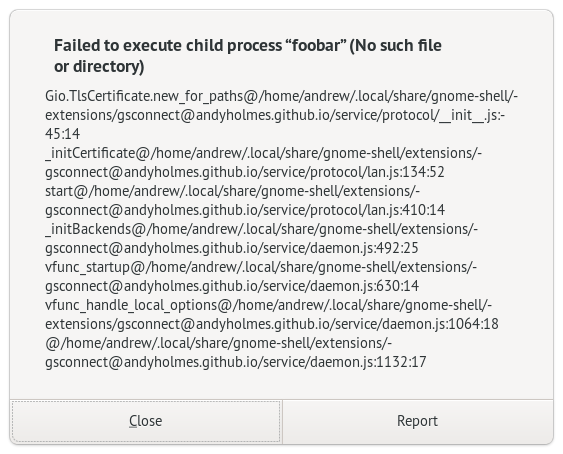
Did the notification not show, or did you maybe not notice it when it moved to the notification tray? Silverblue is getting more common and we already have some code to help NixOS, so I don't have a problem improving this.
andyholmes
on 14 Jul 2020
Oh yeah, I did see the notification, but I meant something more human-readable, since it’s an expected error in this context. I just thought something went seriously wrong until I stumbled on the wiki.
jurf
on 14 Jul 2020
Okay, I see. Probably we should just make the error notification urgent (so it doesn't sneakily hide or get replaced) and have it link to the Wiki somewhere like other "known" errors.
I'll open a new issue for this (#893), so I remember to get it done. Might be time to clean up our little error handling framework to make this easier in the future.
andyholmes
on 15 Jul 2020
I'm still lost. I am so new to all of this. I have tried all I can think of and all I read to do. Also, be gentle with me, as I am so new and do not understand still. I'm on a hands on type person. I can read and it'll still go above my head. I want to learn though, so why I am here. :D
 klawrence74
on 2 Jan 2021
klawrence74
on 2 Jan 2021
Please see the help page in the Wiki, Connecting an Android Device.
andyholmes
on 16 Jan 2021
Related issues
 wada3n
·
7Comments
wada3n
·
7Comments
 aia832003
·
6Comments
aia832003
·
6Comments
 neumannjan
·
3Comments
neumannjan
·
3Comments
 paulo8448
·
4Comments
paulo8448
·
4Comments
 AngusLogan02
·
4Comments
AngusLogan02
·
4Comments
Most helpful comment
Installed openssl and now everything is working, thanks for the help!