Gnome-shell-extension-gsconnect: Duplicate Items in Context Menu
I have a duplicate Sent to mobile device context menu in my file browser.
- Open Nautilus file browser.
- Go to any file I want to transfer to my mobile device.
- Right click.
- A duplicate context menu appears.
_Expected behavior_
Just one item for the context menu.
Screenshots

System Details:
- GSConnect version: 31
- Installed from: GNOME Extensions Website
- GNOME/Shell version: 3.34.1
- Distro/Release: Ubuntu 19.10
- Paired Device(s): Samsung S6
- KDE Connect app version: 1.13.6
 cocaybica
All 21 comments
This seems like you might have two version of the script installed somehow. There should be one copy in the extension directory, and one soft-link in the nautilus directory. Is your output of locate similar to this?
$ locate nautilus-gsconnect.py
/home/andrew/.local/share/gnome-shell/extensions/[email protected]/nautilus-gsconnect.py
/home/andrew/.local/share/nautilus-python/extensions/nautilus-gsconnect.py
 andyholmes
on 24 Jan 2020
andyholmes
on 24 Jan 2020
Ok. My locate command output:
/home/ramiro/.local/share/gnome-shell/extensions/[email protected]/nautilus-gsconnect.py
/home/ramiro/.local/share/nautilus-python/extensions/nautilus-gsconnect.py
/home/ramiro/.local/share/nautilus-python/extensions/nautilus-gsconnect.pyc
cocaybica
on 25 Jan 2020
Hmm. The .pyc file is strange. It could be that Nautilus is loading _both_ the .pyc and the .py file as extensions.
Do you _also_ have a directory /home/ramiro/.local/share/nautilus-python/extensions/__pycache__/? Does it contain something like: nautilus-gsconnect.cpython-37.pyc? (The 37 number or other details might be slightly different.)
If so, then removing /home/ramiro/.local/share/nautilus-python/extensions/nautilus-gsconnect.pyc will probably fix this.
 ferdnyc
on 27 Jan 2020
ferdnyc
on 27 Jan 2020
That directory doesn't exist in my _extensions_ folder. Also I deleted the pyc file but after a reset (or closing the session) the file is there again.
cocaybica
on 27 Jan 2020
Not sure what could be causing this, as the script itself is fairly straight-forward. My best guess is you have both python2 and python3 nautilus-extension support installed, causing it to be loaded as a Python2 and Python3 script.
andyholmes
on 28 Jan 2020
It _appears_ that in 19.10 python-nautilus (linked to libpython2.7) _should_ be the available Nautilus extension — the switch to python3-nautilus doesn't happen until 20.04. (But the Python 2 python-nautilus also still exists in 20.04, so perhaps python3-nautilus was backported to 19.10.)
Whichever version is installed, it _should_ exist as /usr/lib/x86_64-linux-gnu/nautilus/extensions-3.0/libnautilus-python.so — so, it should (in theory) be impossible to install them both together. But if there's a rogue and/or test and/or backported Python3 version, it might be named something different.
Regardless, if you have more than one Nautilus extension in /usr/lib/x86_64-linux-gnu/nautilus/extensions-3.0/ that mentions nautilus-python (or even just python, period), that'd be a red flag.
ferdnyc
on 28 Jan 2020
Here the content of: /usr/lib/x86_64-linux-gnu/nautilus/extensions-3.0/

cocaybica
on 28 Jan 2020
Not sure how to fix this, since I can't reproduce it locally. There don't seem to be any related bug reports upstream in Nautilus and so far there's only one report of it happening.
We'll have to wait for more information before anything can be done about this.
andyholmes
on 1 Feb 2020
Yeah, I'm at a loss here.
As a last resort, @cocaybica, you could try running lsof -c nautilus | grep -i python to see if the list that's dumped provides any insights. You won't see any signs of gsconnect on the list, but if there are dueling Python libraries you'd definitely see that. And it might provide other clues. For instance, when I just ran that command I discovered that Nautilus is looking in _both_ of these paths for nautilus-python extensions:
nautilus 1447735 ferd   24r      DIR              253,2       4096 13803633
/home/ferd/.local/share/nautilus-python/extensions
nautilus 1447735 ferd   27r      DIR              253,0       4096  2495575
/usr/share/nautilus-python/extensions
So, now I know to suggest that it's also worth checking /usr/share/nautilus-python/extensions/ for a copy of nautilus-gsconnect.py, which could also cause this.
ferdnyc
on 1 Feb 2020
So, now I know to suggest that it's also worth checking
/usr/share/nautilus-python/extensions/for a copy ofnautilus-gsconnect.py, which could also cause this.
(Oh, wait, that was already covered in https://github.com/andyholmes/gnome-shell-extension-gsconnect/issues/755#issuecomment-578416125 so that's not it.)
ferdnyc
on 1 Feb 2020
Here the output of lsof
nautilus 2695 ramiro  mem       REG               8,21   110376 1050851 /usr/lib/python2.7/lib-dynload/_ssl.x86_64-linux-gnu.so
nautilus 2695 ramiro  mem       REG               8,21   344504 1050185 /usr/lib/python2.7/dist-packages/gi/_gi.x86_64-linux-gnu.so
nautilus 2695 ramiro  mem       REG               8,21  3439056  917575 /usr/lib/x86_64-linux-gnu/libpython2.7.so.1.0
nautilus 2695 ramiro  mem       REG               8,21    34728 1835031 /usr/lib/x86_64-linux-gnu/nautilus/extensions-3.0/libnautilus-python.so
nautilus 2695 ramiro   23r      DIR               8,22     4096 3289367 /home/ramiro/.local/share/nautilus-python/extensions
nautilus 2695 ramiro   24r      DIR               8,21     4096 2888878 /usr/share/nautilus-python/extensions
Welp, unsurprisingly (at this point) that's no help at all.
I'm completely stumped. Maybe we all just agree to go with, "Your computer is haunted!", eh?
(Seriously, though, I really am out of ideas. Sorry!)
ferdnyc
on 4 Feb 2020
One thing you could try is killing Nautilus and starting it in a terminal to see if there are any errors:
$ killall -9 nautilus
$ nautilus
You should make sure you don't have any ongoing operations in Nautilus before doing that. You could also try re-installing python-nautilus with apt, but I'm out of ideas as well :/
andyholmes
on 4 Feb 2020
Do both of the menu entries _work_, BTW? Do they both show the same device in their submenu, and allow you to transfer files to it when it's connected?
Just curious whether they're both actively "wired in" to the same running GSConnect instance, though I expect the answer is probably yes.
ferdnyc
on 5 Feb 2020
These are the messages after launching nautilus from terminal:
Nautilus-Share-Message: 13:08:20.676: Called "net usershare info" but it failed: La «red compartida» devolvió el error 255: info_fn: file /var/lib/samba/usershares/cache is not a well formed usershare file.
info_fn: Error was Path is not a directory.
info_fn: file /var/lib/samba/usershares/historial is not a well formed usershare file.
info_fn: Error was Path is not a directory.
Just curious whether they're both actively "wired in" to the same running GSConnect instance, though I expect the answer is probably yes.
Yes, both shows the same device and are fully functional.
I didn't try reinstalling python-nautilus yet.
cocaybica
on 5 Feb 2020
Ooh, I can't believe we never thought to ask this basic question, and it's probably a dumb question because I imagine you'd have noticed already, but: Have you checked the entire contents of /home/ramiro/.local/share/nautilus-python/extensions/? I know you mentioned the nautilus-gsconnect.py and nautilus-gsconnect.pyc files, but anything _else_ in there? Or, for that matter, in /usr/share/nautilus-python/extensions?
If somehow nautilus-gsconnect.py was duplicated under a different name, that would absolutely cause this.
(I bring this up as I notice I've _created_ the issue for myself, by making a copy of nautilus-gsconnect.py in my own extensions directory as debug.py, intending to edit it into... I don't know, something that can analyze the Nautilus setup "from the inside", to hopefully find some signs of what's going on there. Unfortunately, I haven't come up with any good ideas for how exactly it would go about doing that, yet, so all it does right now is create a duplicate context menu entry.)
ferdnyc
on 5 Feb 2020
Attached screenshots of both paths:
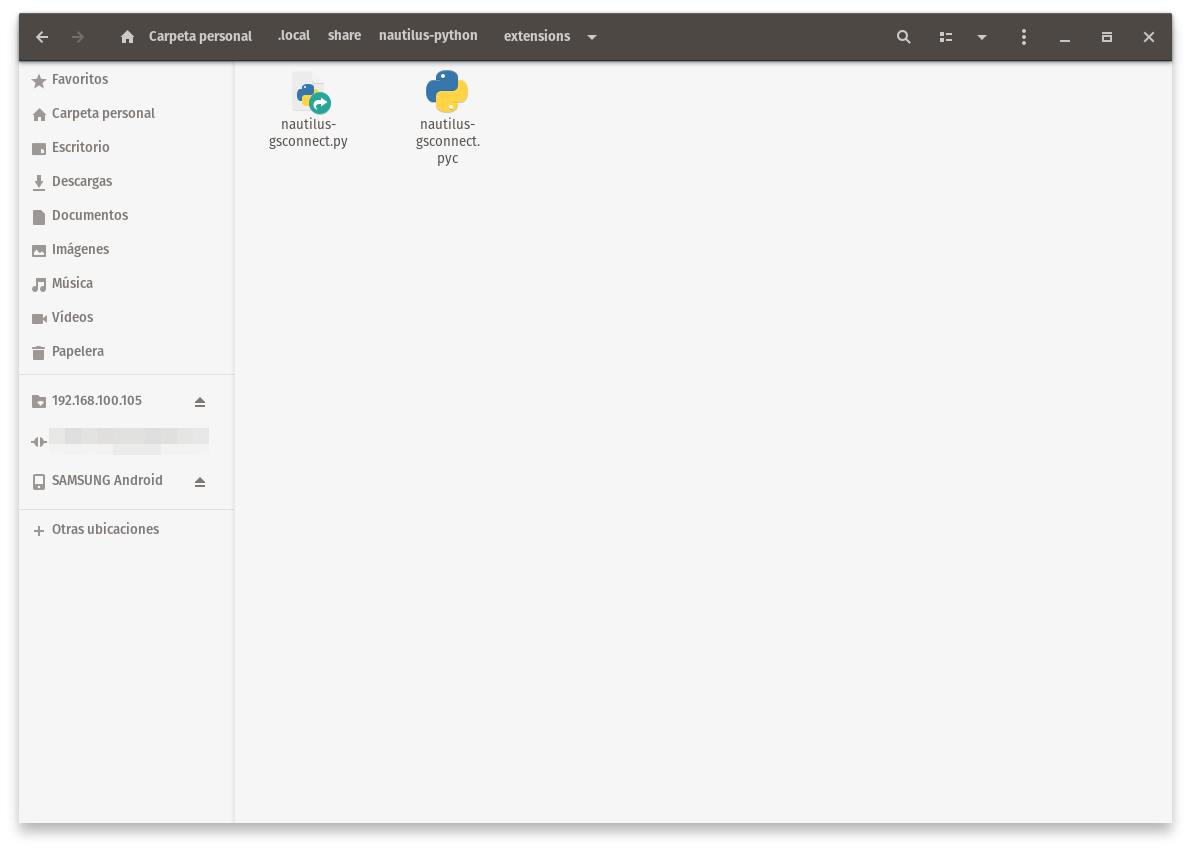
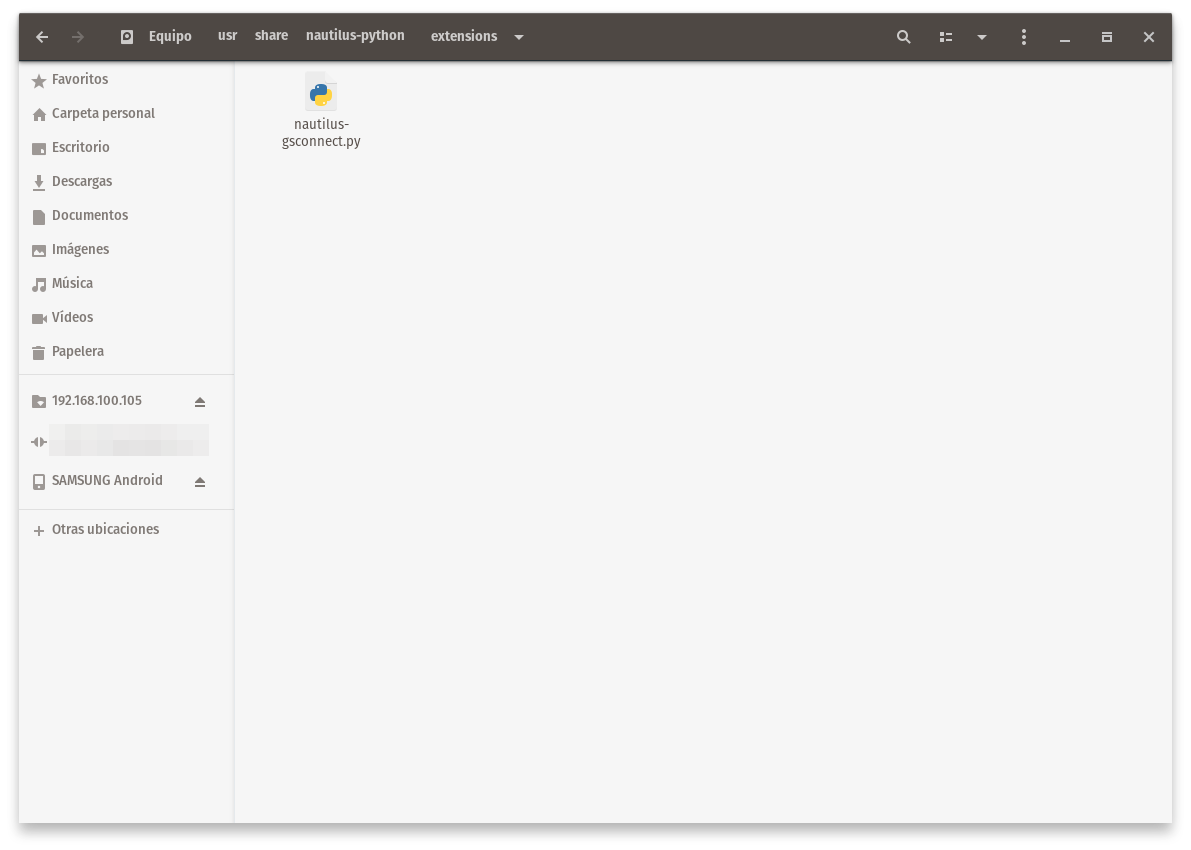
The pyc file was too in both directories, I deleted from /usr/share/nautilus-python/extensions thinking that way maybe the file isn't restored again if it is deleted from home/ramiro/.local/share/nautilus-python/extensions/ but is still there and I don't know how to permanent delete it.
cocaybica
on 6 Feb 2020
Okay, so you do have the extension installed twice :) You should probably uninstall the system version.
andyholmes
on 6 Feb 2020
Yeah, it's definitely the nautilus-gsconnect.py in /usr/share/nautilus-python/extensions/ that's causing the problem. It shouldn't be in both the system dir and your user dir.
I don't understand why that wasn't found by the locate command when you posted the results in the third comment (https://github.com/andyholmes/gnome-shell-extension-gsconnect/issues/755#issuecomment-578416125), though. Unless it was just recently installed, and updatedb hadn't been run on your system yet.
ferdnyc
on 7 Feb 2020
(Removing the .pyc has no effect, because that's just the compiled version of the Python code.1 Python will re-create it if it's not there, whenever it loads and compiles the corresponding .py file.)
Notes
- (In Python 2; Python 3 moved the
.pycfiles to a__pycache__subdir.)
ferdnyc
on 7 Feb 2020
Ok. After removing the system version now one context menu is showed. Thank you.
cocaybica
on 7 Feb 2020
Related issues
 jeetsrs
·
4Comments
jeetsrs
·
4Comments
 siegfriedhuber
·
6Comments
siegfriedhuber
·
6Comments
 sk0gen
·
4Comments
sk0gen
·
4Comments
 Noobsai
·
4Comments
Noobsai
·
4Comments
 ricvelozo
·
4Comments
ricvelozo
·
4Comments