Gnome-shell-extension-gsconnect: Panel menus not displayed with gnome-shell 3.31
The panel device-menus aren't displayed when using GSConnect extension with current gnome-shell development branch (version 3.31). This affects both the panel- and user-menu device-menus. Apart from missing menus, the extension seems to remain functional (e.g. I can adjust audio volume from KDE Connect on my phone, and access the extension preferences from gnome-tweaks). I tested with latest GSConnect master.
The issue appeared after this gnome-shell commit, which was part of this merge request.
Attached is the generated support log: gsconnect.URZTWZ.txt
 jnsh
jnsh
All 23 comments
Thanks for the report and the link to the MR, give me a few minutes and I may be able to get this fixed.
 andyholmes
on 2 Feb 2019
andyholmes
on 2 Feb 2019
Could you give this Zip a try for me and if it works I'll push the changes to master?
andyholmes
on 2 Feb 2019
I tested the zip, and it partly fixes the issue, but there are still a few rough edges.
With "User menu" display mode, the menu displays and works correctly, apart from the missing icon from the panel and the menu item:
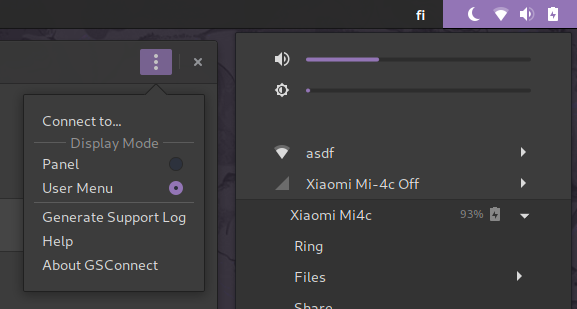
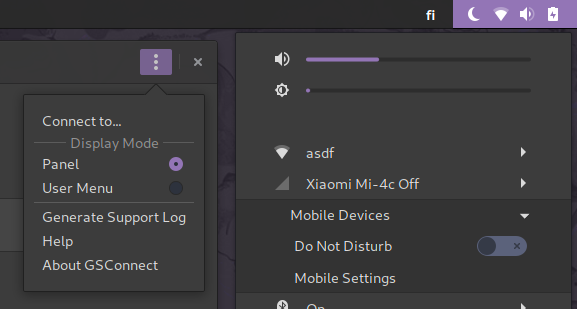
With "Panel", the menu is displayed, but it appears in the user-menu instead of panel, and doesn't display any connected devices. Also the icons are missing here too
jnsh
on 2 Feb 2019
I believe this Zip should fix the device indicators. Unfortunately I don't see an obvious reason why the service icon is not being shown in the User Menu or Panel since those classes haven't changed. Maybe this fix will fix that:
andyholmes
on 2 Feb 2019
I tested the second zip, but it doesn't solve any of the issues with the first zip unfortunately.
jnsh
on 3 Feb 2019
Could you check the journal for gnome-shell to see if their are any relevant errors? It's hard to know what's going wrong.
journalctl -f -o cat /usr/bin/gnome-shell
And then restart gnome shell to see if there are any errors related to this.
andyholmes
on 3 Feb 2019
I tried restarting the shell via the 'Alt+F2' dialog, disabling and re-enabling the GSConnect extension from gnome-tweaks, and switching between 'Panel' and 'User Menu' display modes, but none of that produced any errors related to GSConnect.
IIRC GSConnect used to have a debug mode you could enable from preferences. Is there still such option somewhere and could it be helpful in this case?
EDIT.
I just figured out that the panel and menu icons are visible if I use gnome-shell commit bacfdbbb, which first introduced this issue, but they aren't displayed with latest gnome-shell master. I'll bisect the commit that broke those. However, the panel-display-mode still seems to be broken regardless of the gnome-shell commit.
EDIT2.
This is the gnome-shell commit that broke the icons. (The same commit is causing another regression, so I'm thinking there's a chance this is an actual gnome-shell bug.)
jnsh
on 3 Feb 2019
Good find, I think you're probably right. Although I don't see anything obviously wrong, I bet it has something to do with this new StSettings object where the icon theme is now taken from.
andyholmes
on 3 Feb 2019
There's a fix for the gnome-shell issue that I mentioned above, where custom icon themes weren't applied at startup.
However that didn't solve the issue with GSConnect icons.
jnsh
on 4 Feb 2019
Just for fun, could you give this Zip a shot? I'm not sure if I've found a good solution to this problem, but this might fix most of the problem:
andyholmes
on 4 Feb 2019
The latest zip fully fixes the GSConnect panel icons.
The panel-display-mode still doesn't seem to work as it should though. I'm not sure whether you tried to address that issue yet?
jnsh
on 5 Feb 2019
Not sure what you mean? What's not working with the panel display mode?
andyholmes
on 5 Feb 2019
Sorry my earlier explanation may have been unclear.
If you select the "Panel" from "Display Mode" from GSConnect settings, the GSConnect menu is not displayed as its own menu on the top panel, as to my understanding it's supposed to. Instead it is displayed as a sub-menu in the top-right user-menu, just as with the "User Menu" display mode option. Only difference is, that with Panel display mode connected devices are never displayed.
The screenshot I posted earlier demonstrates this behavior:
jnsh
on 5 Feb 2019
Turns out that the panel-display-mode issue is resulting from gnome-shell MR 153, which removed the Shell.GenericContainer.
Therefore it's been broken since October, and is technically a separate issue that I just had not noticed before this.
jnsh
on 7 Feb 2019
This is a guess, but I might have just been passing the wrong parameter to the PanelMenu.Button class when constructing. If you get a moment, could you paste the output of
gjs -c 'print(imports.system.version);'
since that's how I'll be detecting whether to apply these changes? Here's the Zip:
andyholmes
on 7 Feb 2019
I should've mentioned, that I'm not using the full gnome 3.31 stack, but only testing mutter and gnome-shell 3.31. Therefore I was still using gjs version 1.54.3, and gjs -c 'print(imports.system.version);' reported 15403.
After updating to gjs 1.55.90, and with the latest zip, the GSConnect panel menu is displayed again, and seems to be working properly.
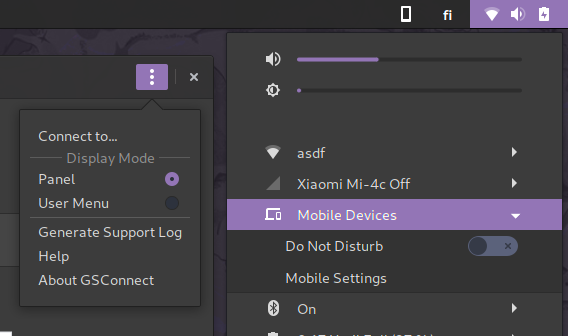
Only issue left, is that with panel-display-mode, in addition to the panel-menu being displayed, the GSConnect user-menu-sub-menu also remains visible:
jnsh
on 7 Feb 2019
@jnsh
That's expected (and intended) behavior, as the panel icon only contains the per-device menu options.
 ferdnyc
on 7 Feb 2019
ferdnyc
on 7 Feb 2019
I see. In that case I think everything should be in order with the latest zip.
jnsh
on 7 Feb 2019
I still have to find a decent way to solve the icon theme issue, but I'll push the rest of the changes. Thanks for testing this, I probably wouldn't have done it until after 3.32 came out otherwise :+1:
andyholmes
on 7 Feb 2019
🚀 : (I don't know what that's even supposed to mean!)
ferdnyc
on 7 Feb 2019
Closing this one since I think it's been fixed. :samoa: issues to deal with in #459 though.
andyholmes
on 6 Mar 2019
I guess this change isn't in the latest downloadable zipfile (v2, I think)? I've got the panel icon now that I'm using gsconnect from git (and gjs 1.55.92), but I didn't see it when I tried gsconnect from the latest zipfile.
 rockorequin
on 12 Mar 2019
rockorequin
on 12 Mar 2019
This is in v21-rc1, but not in a stable release yet (extensions.gnome.org: v19, current stable: v20).
andyholmes
on 12 Mar 2019
Related issues
 danieldeng2
·
4Comments
danieldeng2
·
4Comments
 jorgecodecom
·
6Comments
jorgecodecom
·
6Comments
 rugk
·
4Comments
rugk
·
4Comments
 AngusLogan02
·
4Comments
AngusLogan02
·
4Comments
 paulo8448
·
4Comments
paulo8448
·
4Comments
Most helpful comment
I still have to find a decent way to solve the icon theme issue, but I'll push the rest of the changes. Thanks for testing this, I probably wouldn't have done it until after 3.32 came out otherwise :+1: