Gnome-shell-extension-gsconnect: Shell extension gets stuck and doesn't register device/UI changes
Ubuntu 18.04.1, GNOME shell 3.28.3, gsconnect 15.
I have four android devices each running the latest version of kdeconnect.
Ever since upgrading to gsconnect 15, the android devices' icons appear just fine in the panel when the gsconnect display mode is set to "panel". But, when I set the display mode to "user menu", _some_ of the android devices' icons remain showing in the panel, and _none_ of the android devices' icons appear in the menu.
This problem did not exist prior to installing gsconnect 15.
Why is it doing this? How do I fix this?
 dln949
All 40 comments
Have you restarted your session since upgrading, as described in #316?
 andyholmes
on 13 Nov 2018
andyholmes
on 13 Nov 2018
What I had done was to (properly) shutdown my computer, and then restart it - _after_ upgrading to gsconnect 15. I had done that prior to posting my first message above. I still had the problem after the shutdown/restart sequence.
dln949
on 13 Nov 2018
I'm not sure how they could appear in the panel at all when in _User Menu_ mode. The code for that is here:
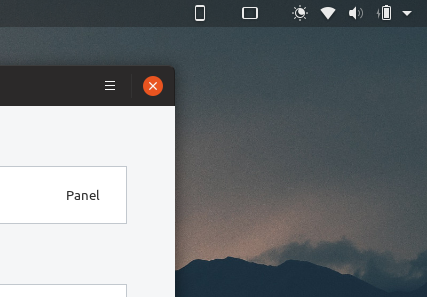
Panel indicators are only shown if _Panel Mode_ is enabled, devices are connected and paired. In this case there is no service indicator:
Likewise, menus items are only shown if Panel Mode is disabled, devices are connected and paired. In this case a service indicator will be shown, but only if at least one device is connected and paired; like with bluetooth.
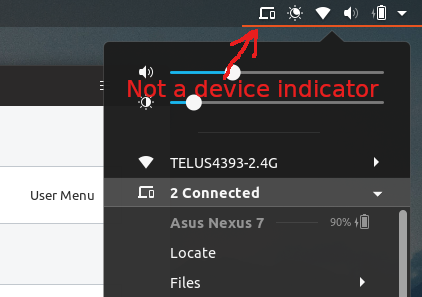
Is the service indicator visible and menu item visible when User Menu mode is enabled? If so, does the menu item indicate that devices are connected?
andyholmes
on 13 Nov 2018
In "user menu" mode, the service indicator IS visible, but the menu item for connected devices IS NOT visible. (The menu item for gsconnect settings, and the do not disturb toggle are ALWAYS visible.)
dln949
on 13 Nov 2018
Does the service menu item (above as 2 Connected) say the number of devices connected, or does it just say Mobile Devices?
Are there any errors for gnome-shell in GNOME Logs/journalctl? What is the gnome-shell theme you are using?
andyholmes
on 14 Nov 2018
To answer your first question, all it said was "Mobile Devices". Also, FYI I am using the Radiance GTK theme, and the ubuntu-mono-dark icon theme. However.......
Yesterday, when I submitted the original question, I had actually tried rebooting my computer three times. Each time I still had the problem that I originally asked about. Finally, I shut down the computer for the final time for the day yesterday.
Today, when I got home from work, I started the computer, and all the gsconnect menu and panel items are behaving perfectly. I had installed/changed NOTHING between yesterday and today.
So, now I'm really confused why it did not work yesterday, and today it works EXACTLY as expected.
dln949
on 14 Nov 2018
To answer your first question, all it said was "Mobile Devices"
Ah, in that case I bet the extension had somehow stalled and wasn't registering changes. This is actually helpful, because it makes me think that this is related to the upstream bug in gnome-shell #177.
This was resulting in multiple copies of the Shell extension being loaded, and then when that was fixed multiple error notifications when I added a clause to prevent it. I think maybe what has happened is "later" attempts to reload the extension are prevented while an "earlier" attempt is in progress, so the upgraded version is not being loaded when installed.
So, now I'm really confused why it did not work yesterday, and today it works EXACTLY as expected.
This I just don't know. There's definitely nothing I could think of that could cause that to happen...even if you wanted to do it on purpose...:confused:
Maybe I need to make a "self-fixing bug" label :stuck_out_tongue_closed_eyes:
mention for #316
andyholmes
on 14 Nov 2018
"This was resulting in multiple copies of the Shell extension being loaded...."
I had mentioned that I had originally rebooted my computer three times when I first saw this problem. I never thought to mention to you, but one of the times when I set gsconnect to user menu mode, I saw _two_ entries in the user menu for gsconnect..... in case that might help you.
dln949
on 14 Nov 2018
This morning I started my computer, and gsconnect is back to the same problem I described in my original post.
dln949
on 14 Nov 2018
Are you sure you don't have two versions of GSConnect installed? Ubuntu does have a package for gnome-shell-extension-gsconnect and having both installed will definitely cause problems.
andyholmes
on 14 Nov 2018
Thanks.
I'm sorry to have to admit to this: How do I verify whether I have multiple versions of gsconnect installed?
dln949
on 14 Nov 2018
No problem. It's likely you have in under home (where e.g.o installs them), but /usr would be the other place:
$ ls ~/.local/share/gnome-shell/extensions/[email protected]
extension.js  _gsconnect.js  locale  metadata.json  nautilus-gsconnect.py  org.gnome.Shell.Extensions.GSConnect.gresource  prefs.js  schemas  service  shell  stylesheet.css

$ ls /usr/share/gnome-shell/extensions/[email protected]
ls: cannot access '/usr/share/gnome-shell/extensions/[email protected]': No such file or directory
If that's not the case...I'm not sure what's causing this. I'm not on 18.04 anymore, but I don't think I did anything special to gnome-shell 3.30, at least I try not use anything not in the latest Ubuntu LTS, since it's usually the oldest in use.
I definitely can't reproduce this myself, but honestly that's 95% of issues that are reported.
andyholmes
on 14 Nov 2018
I ran the two commands you suggested, I got the exact same output as you showed in your message. So, it looks like I have only one version of gsconnect installed (in my home directory).
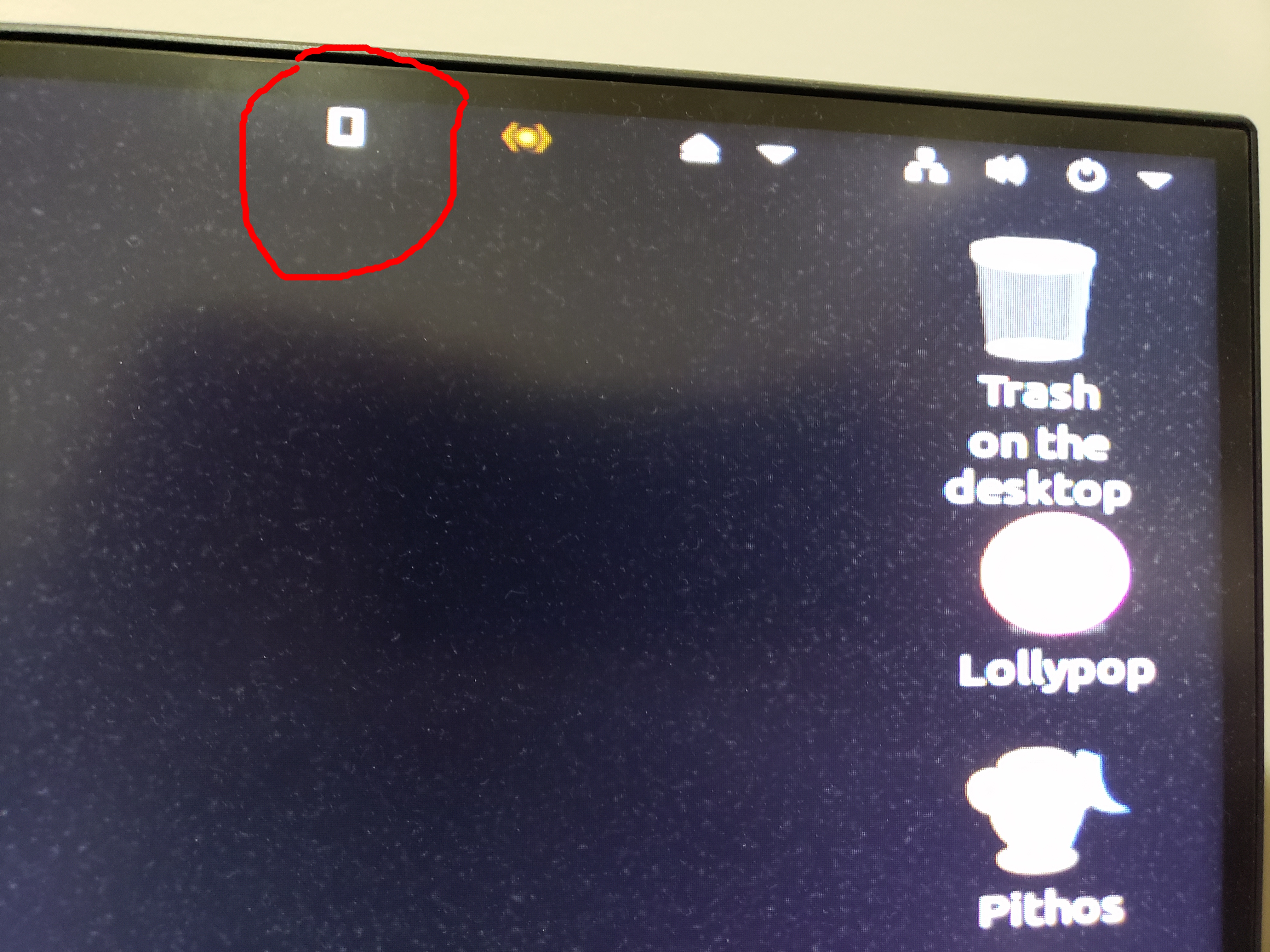
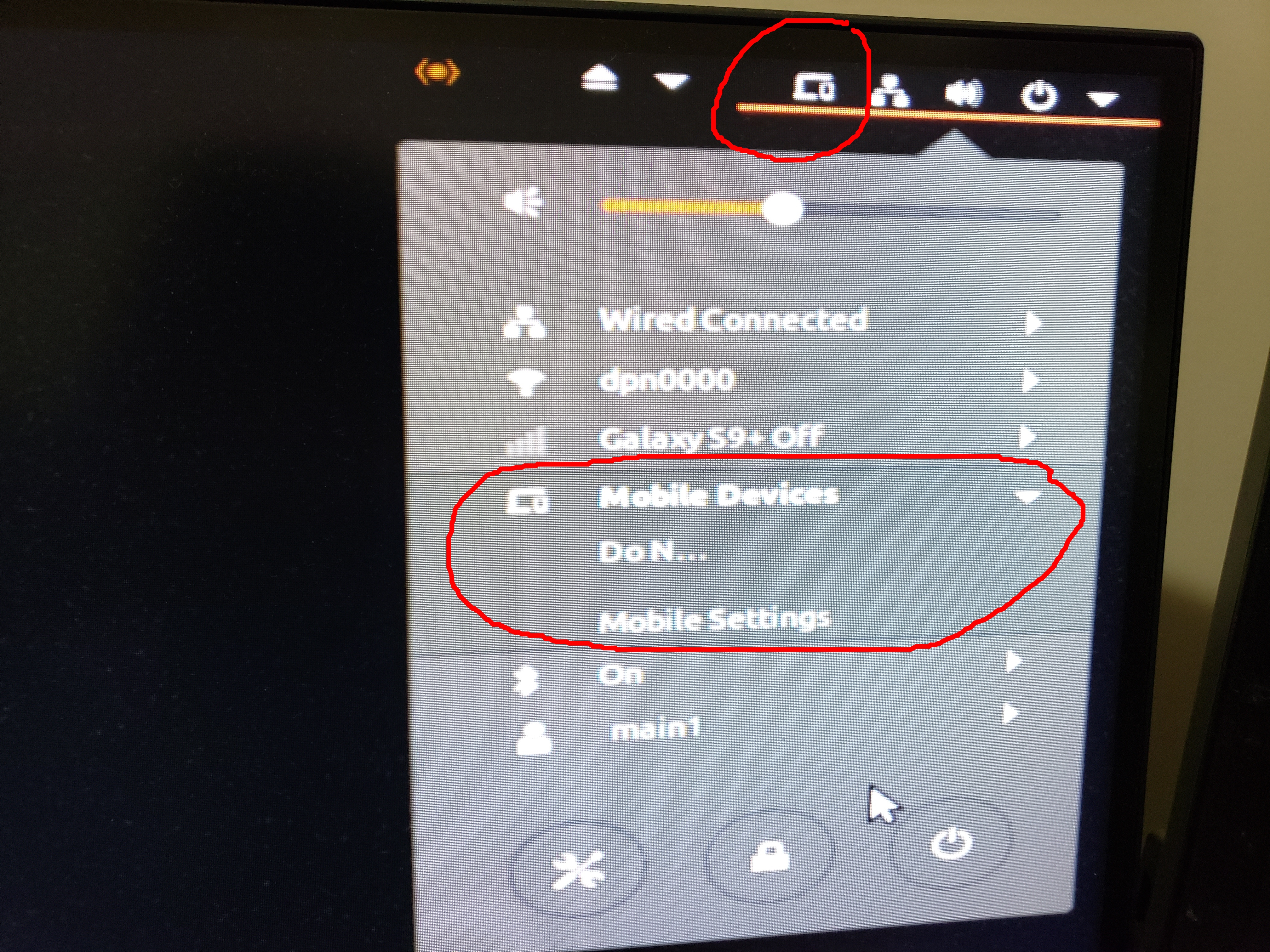
I have attached two jpg image files to show exactly what I am facing. The first - 1.jpg - shows what I see in panel mode. As you can see, it shows the icon for only one of the four android devices. The second - 2.jpg - shows what I see in user menu mode. As you can see, none of the four android devices appears.
I did not see this behavior prior to gsconnect 15.
(I realize you wrote that you're out of ideas, I just thought to put this out there in case it helps someone else down the road.)
dln949
on 15 Nov 2018
What happens if you open the setting window and restart the service?
andyholmes
on 15 Nov 2018
I have tried restarting gsconnect as you suggest several times. Sadly, restarting the service never "fixed" things. However.....
Just now - for a reason unrelated to any gsconnect stuff - I logged out of my user, and then logged back in. And now gsconnect is working perfectly.
Could this indicate that there is something in the computer's booting and/or user logging in processes that's messing up gsconnect? Because sometimes - _sometimes_ - rebooting the computer "fixed" gsconnect.
dln949
on 15 Nov 2018
I think this is probably gnome-shell's #177 and the fix I tried to implement to handle it. I might just have to revert that fix and deal with the occasional fallout.
andyholmes
on 15 Nov 2018
Thanks for all the help, I appreciate it.
Unfortunately, I am too ignorant of such matters - I don't understand what is being described in #177 , nor how it relates to the problem I'm seeing. Nor what steps I should be taking. I am sure you are busy, when you have a moment to explain it in simple terms I would be very grateful.
dln949
on 15 Nov 2018
Oh, the criticism is actually really easy, it's the "cause" of the bug that's complicated. A lot of the gnome-shell extension subsystem is quite old, and the part loads extensions basically repetitively loads extensions for no good reason (no one seems to remember or know why it did that in the first place).
So for example: load 1, unload 1, load 1 & 2, unload 1 & 2, load 1 & 2 & 3...(actually more complicated, but you get it).
For most extensions, that's really slow especially if you have a lot of them installed, but doesn't cause any errors. For GSConnect, one of the first things that happens is the Shell extension starts the DBus service. But GSConnect was loading and unloading faster than the service activation was resolving. Another user posted this screenshot of what can happen:
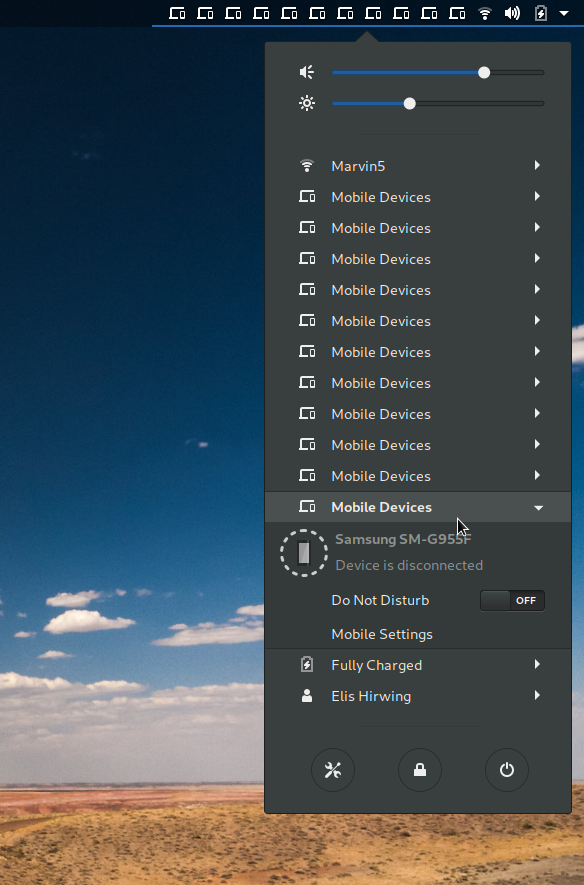
So the solution I came up with was to just cancel any in progress service activation, which allowed the Shell extension to exit quick enough. Apparently what is happening is, one of the old instances of the extension loaded is what is left over, instead of the last instance which is presumably the one we want.
andyholmes
on 15 Nov 2018
Thank you for that.
After going to gsconnect 15 there were times when I also saw multiple "Mobile Device" items in the menu as you show in your image.
Based on what you just wrote, I am understanding that the problem we're talking about is _not_ specific to HIDPI screens (which is the impression I got from the reference to issue #177 ).
dln949
on 15 Nov 2018
Going to close this as a duplicate of #316 and #324. Copied some relevant info there.
duplicate of #316
andyholmes
on 15 Nov 2018
Maybe I need to make a "self-fixing bug" label
I hate those. Problems that fix themselves _always_ break themselves again... eventually.
The Audacity team use three non-standard bug severities in their project bugzilla. "Heisenbug" has become fairly common parlance, the other two not so much:
- A moonphase bug is a bug which there is no reasonably reliable strategy for reproducing on a developer's machine. A bug that happens 50% of the time is not automatically moonphase. A developer has the patience to try twice!
- Heisenbugs are technically bugs that disappear when you try to debug them. Most commonly a bug that occurs in a release build but not in a debug build. We incorrectly used the term for a while for moonphase bugs.
- A comet returns bug is a bug so rare that we have no hope of observing it and besides which it affects so few of our users, perhaps users with steam powered machines that are puffing along on their last tender load of coal, that it isn't a worry. We need to be supremely careful that we don't classify a moonphase bug as a comet returns bug just from wishful thinking. A feature of our recent moonphase bugs is that on some user's machines they can actually be near-repeatable. That should indicate caution about a "comet returns" classification. In rare cases an exceptional bug like bug 1714 is designated 'comet returns', when it has become quite predictable and reproducable, if you know when and where to wait for it - like a real comet.
(Their bug 1714 is a real doozy. Short version):
- Someone reported an issue where MIDI output just stopped working completely on Linux, in _all_ versions of the Audacity code, apropos of nothing.
- Discussions about the bug consumed their -devel mailing list for a solid month, with the developers picking apart, like, their _entire_ threading model, assuming that among the various threads involved, something must be deadlocking, or they were violating memory safety, something along those lines.
- In the end, it turned out PortMidi timestamps were computed in Epoch time at _millisecond_ resolution, and stored in a 32-bit integer — so instead of overflowing a 32-bit int in the year 2038, like the seconds-since-epoch
time_twill, it was happening to them every 49.7 days. The high-order bit would flip from0to1, and MIDI would stop working. Or it would flip back to0, and MIDI worked again. But only for 49.7 days. - (...I think it might've actually taken 49.7 days, and the bug "fixing itself", to finally pinpoint the cause.)
 ferdnyc
on 16 Nov 2018
ferdnyc
on 16 Nov 2018
I know this is closed, but just in case this might help......
The past couple days I have followed the practice of turning the gsconnect extension off before I shutdown the computer. Then, I only turn the gsconnect extension on after the computer has completely finished booting up. Ever since I began following this process gsconnect has worked perfectly.
dln949
on 17 Nov 2018
A little bit, maybe. I'm starting the think this bug, #316 and #307 are all related. Are you using Wayland by chance? Either way, I've just posted a build on #307 you might want to try (delay service activation for 5s during startup, if necessary):
andyholmes
on 17 Nov 2018
Not using Wayland.
Yes, basically right now I've been keeping gsconnect v 15 turned off during boot, and have now had no problems.
I will try the fix when I can later today.
dln949
on 17 Nov 2018
Okay, sounds good. I think it should avoid the problems caused by gnome-shell's #177 and multi-loading. It's not an ideal workaround, but I think it will have the same effect as your current approach, and 5s isn't so bad.
andyholmes
on 17 Nov 2018
(Should I continue reporting this stuff in this issue or a different one?)
I installed the zip file. The result was that when gsconnect started, I was back to my original problem: The gsconnect menu items appeared, but none of the connected devices appeared in the menu.
If I then stopped the gsconnect extension, and then restarted the gsconnect extension, all was fine.
(So, I removed what was installed from your zip file, and reverted back to the files I had originally. Now I am back to manually turning off the gsconnect extension before I shut down the computer, and after the computer completely starts up only then do I manually start the gsconnect extension.)
dln949
on 17 Nov 2018
Should I continue reporting this stuff in this issue or a different one?
Yep, that's fine. I just wanted new people to see the one issue and start there.
Did you restart gnome-shell with the new Zip? I might not have made it clear that the changes were in the Shell extension. When you first login what happens is the shell extension starts the (DBus) service, service connects to devices etc, and then the shell extension gets updates from the daemon.
I changed the shell extension to wait 5s after being loaded before it tries to start the service, which seems to have solved the similar problem for Wayland users. I'm guessing there is some race condition that's especially bad for Wayland and causes a big lag.
andyholmes
on 18 Nov 2018
What I had done, in this order: Installed your zip file; shutdown the computer; started the computer; checked the gsconnect menu; saw that there were no connected devices appearing in the gsconnect menu.
dln949
on 18 Nov 2018
Is it possible that the devices had simply not yet connected? As I said, on first login the service won't be started until 5 seconds after login has completed, and then the devices will have to begin connecting.
I just want to make sure this is not a different issue than the one the patch addresses. If it is, then this probably _is_ a different issue and we should re-open it.
andyholmes
on 18 Nov 2018
I waited a full three minutes after login. The devices still did not appear in the gsconnect menu. But if I then manually stopped gsconnect, and then manually restarted it, they appeared.
dln949
on 18 Nov 2018
I've labelled this "help wanted" because I just can't reproduce it or figure out why it's happening. I bet this is pretty aggravating for you, but I'm at a dead end for ideas. I was sure this was the same as #307 but that seems to be fixed and this isn't.
What might help is if you get GSConnect up and running, then enabled debug mode as described here : Debugging.
Then make a note of the time, reproduce the problem (eg. log out & log in with the extension enabled, confirm the problem exists) and dump the journalctl log from that period.
andyholmes
on 27 Nov 2018
I thank you for your help, I am able to get by so this problem isn't ruining my peace of mind.
I tried to follow the debugging instructions. I could not figure out how to produce/dump a journalctl log. In fact, I didn't see anything on the gsconnect screen that even refers to something/anything labeled "journalctl log". In addition, the instructions themselves never refer to such a log either, all they talk about is opening up a terminal with two tabs in it, but not anything about producing something called a "journalctl log".
What am I missing?
dln949
on 27 Nov 2018
Oh no problem. Basically you want to make a note of the time, say 21:30 (before logging out), then do your login thing, wait until you're sure the problem has happened (or GSConnect hasn't worked). Then run this:
journalctl --since=21:30 > gsconnect.log
Then you can share that here, or if it might have sensitive information you can e-mail it to me at the address on my profile page (or censor it, whichever). While you're doing that I might as well add an option for that to the Debugger window :wink:
andyholmes
on 27 Nov 2018
emailing it to you now......
dln949
on 1 Dec 2018
Thanks for log and the trust :+1:. I was mostly worried their might be some private notifications from your phone or something. I wasn't looking for that anyways, but best to keep it off the internet :wink:.
So I can see that the Shell extension is loading properly, so it's not that. The Shell extension then activates the service properly and your devices connect, so it's not that either.
What's missing is the Shell extension picking up the "device added" signal from the service. So this line:
DEBUG: [daemon.js:vfunc_startup:714]: Loading 5 device(s) from cache
Should have corresponding messages like this:
DEBUG: [extension.js:_onInterfaceAdded:321]: GSConnect: Adding PhoneName
EDIT
Scratch that, I just didn't see it in the log. This is even more puzzling now, because it seems like the extension is picking up these devices and it's not logging any errors at all...
If it's not too much trouble, could you try completely removing GSConnect using these instructions and then reinstall? I really can't understand how this problem...could be a problem, because all indications are that there is no problem :confused:
andyholmes
on 1 Dec 2018
ok, I shall try this, it might be a couple days though.....
dln949
on 1 Dec 2018
No problem, I really appreciate you time on this. I might seem like the pro, but I can't fix this without your help.
andyholmes
on 1 Dec 2018
I have uninstalled and then reinstalled gsconnect as you instructed above. So, now over the next few days as I boot/login I'll see how things work. I am hopeful this solves the problem! And, thanks for helping me with this. I will let you know how things go after a few days of testing.
dln949
on 1 Dec 2018
It has been almost one week, I have started the computer about 15 times, I have had no problems with gsconnect. I guess uninstalling and reinstalling gsconnect fixed whatever the problem was. Thanks again for all your help.
dln949
on 7 Dec 2018
Good news! Thanks for sticking with it all this time :)
andyholmes
on 7 Dec 2018
Related issues
 mavit
·
6Comments
mavit
·
6Comments
 danieldeng2
·
4Comments
danieldeng2
·
4Comments
 Noobsai
·
4Comments
Noobsai
·
4Comments
 rugk
·
4Comments
rugk
·
4Comments
 wada3n
·
7Comments
wada3n
·
7Comments