Gnome-shell-extension-gsconnect: Send Keyboard to Android
First of all I would like to mention that I really love GSConnect. Makes life so much nicer and sometimes even a lot easier.
One thing that I could not find though, and I'm not sure if it is possible, is that I send keyboard input from my computer to my Android device. This would be great, then I could use my phone as a second screen where I have my messengers running.
 select
All 12 comments
This is fixed by c26a866 and will be released with v14.
 andyholmes
on 18 Oct 2018
andyholmes
on 18 Oct 2018
Nice! Thanks.
select
on 18 Oct 2018
I am quite positive I have at least version 14 installed but I'm still struggeling with getting the keyboard to work. I open the kdeConnect keyboard on Android and it calims with the right icon it is connected but it does not send keys.
Also the "about" button in GSConnect settings is not doing anything.
select
on 14 Nov 2018
Well, v15 was the first version with keyboard support, not sure when the About bug resurfaced exactly. If you're using keyboard stuff, might as well install v16 since there was a really bad crash (even though it was Android->Desktop):
Are you talking about Android->GSConnect, or GSConnect->Android?
If it is Android->GSConnect you do that in the Remote Input screen:
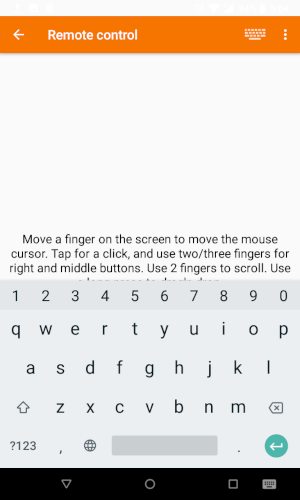
If it is GSConnect->Android, you have to switch the keyboard on Android, and to open the dialog you'll have to set a keyboard shortcut in Settings to open it:
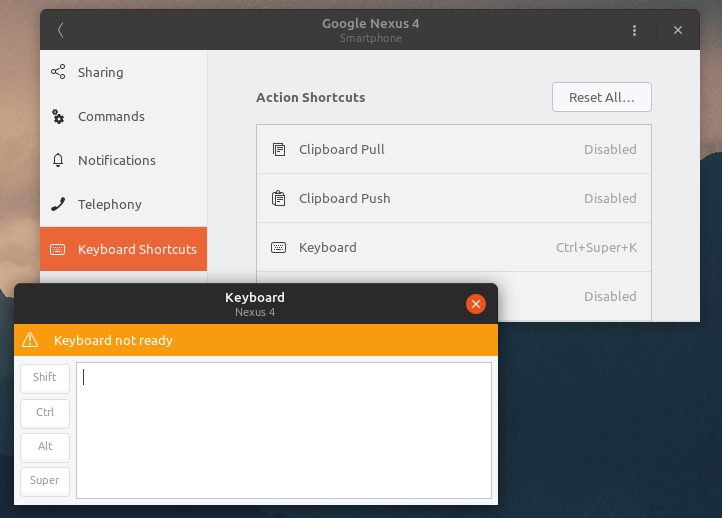
Once the KDE Connect keyboard is enabled and a text entry is active, the keyboard will report it is ready to accept input.
andyholmes
on 14 Nov 2018
Ah yes thanks, it was from GSConnect to Android, and it was not clear to me how to initiate it. I only saw that I have to switch on the KDEConnect keyboard in Android but did not see what to enable on my Desktop. This docu helped alot! Thanks!
select
on 14 Nov 2018
Hi, does anyone frequently use this function? I followed the instruction of this thread and I found that I must set a shortcut for the keyboard first and then invoke the input window by the shortcut. It seems the input window must be initiated by the shortcut. And another problem I found is that it seems it only supports inputting English, if I want to input Chinese, it does not work.
 qqlovekerry
on 26 Apr 2020
qqlovekerry
on 26 Apr 2020
Are there any errors? Can you generate a support log and open a new issue?
andyholmes
on 26 Apr 2020
Hi, I think it is more like limitations rather than errors. First, it seems if I want to input from PC to Android, I must set a shortcut for invoking the keyboard. The input window can only be initiated by the shortcut, there are no other ways to initiate the window. Second, it seems it only supports English, it does not work for Chinese. Maybe this function can be improved in the future?
qqlovekerry
on 27 Apr 2020
Without a support log, I don't know what version you're using. GSConnect has had a menu item for the keyboard dialog since v29.
The keyboard dialog and the remote input plugin both operate in unicode, so there's nothing English specific about it. So without having a log for what happens when you try to use it, there's not much I can do.
andyholmes
on 27 Apr 2020
Hi, I think I am using version 28. I installed GSConnect by the Firefox addon and it seems I can not choose which version to be installed. I found that the GNOME Shell version is 3.28.4 on my Ubuntu 18.04. Does the GNOME Shell version limit the GSConnect version that is installed?
Here are the first several lines of the support log.
GSConnect Version: 28
GSConnect Install: user
GJS: 15205
XDG_SESSION_TYPE: x11
GDMSESSION: ubuntu
--------------------------------------------------------------------------------
-- Logs begin at Fri 2019-12-27 15:15:52 CST, end at Tue 2020-04-28 17:44:02 CST. --
4月 28 17:44:01 gjs[24891]: GtkDialog mapped without a transient parent. This is discouraged.
Yes, the last version released with support for GNOME 3.28 was v28. This version of GNOME is over two years old now, so supporting it is beyond the resources I have available.
andyholmes
on 28 Apr 2020
Thanks very much for your explanation! I think I can not use the newer version of GSConnect until I update my PC to Ubuntu 20.04.
qqlovekerry
on 29 Apr 2020
Related issues
 paulo8448
·
4Comments
paulo8448
·
4Comments
 jorgecodecom
·
6Comments
jorgecodecom
·
6Comments
 siegfriedhuber
·
6Comments
siegfriedhuber
·
6Comments
 sk0gen
·
4Comments
sk0gen
·
4Comments
 ricvelozo
·
4Comments
ricvelozo
·
4Comments
Most helpful comment
Ah yes thanks, it was from GSConnect to Android, and it was not clear to me how to initiate it. I only saw that I have to switch on the KDEConnect keyboard in Android but did not see what to enable on my Desktop. This docu helped alot! Thanks!