Gmscore: [ENF] Persistent Notification Icon is Warning Triangle -> should not be attention grabbing
Describe the bug
I'm using the Corona Tracing Germany app, just downloaded the new preview release v1.9.1 (I don't have MicroG itself installed, use the bundled MicroG coming with CCTG).
For the first time, I'm getting a persistent foreground notification from MicroG. That's good, that should help keep the app collect beacons at all times.
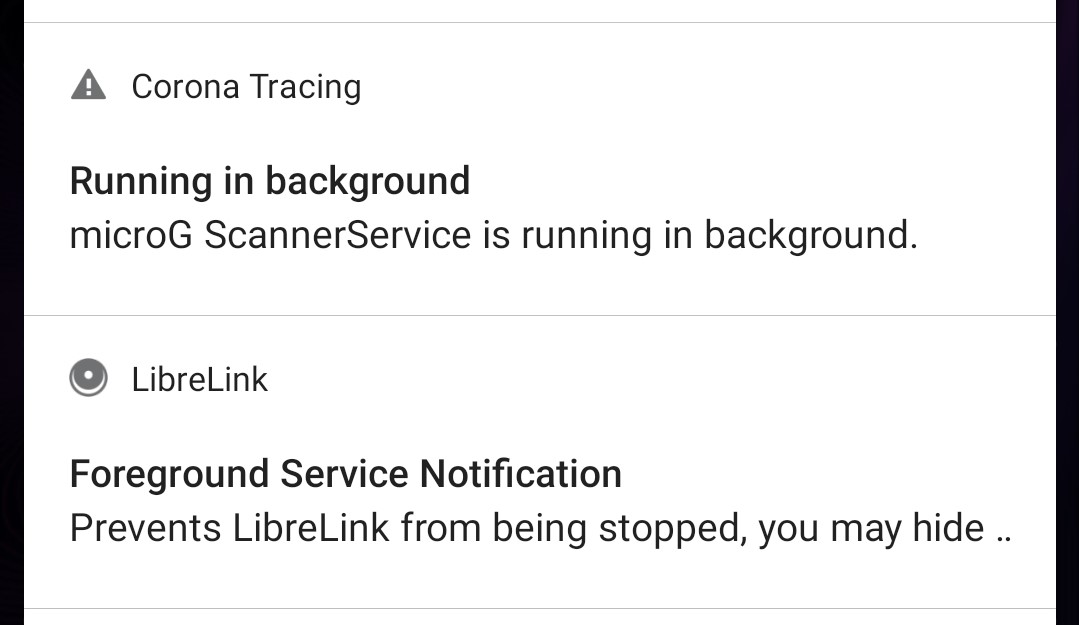
However, the icon at the top left of the notification is shown as a warning triangle ⚠️. This isn't appropriate for this type of notification. It should be all but a warning. The fact that it appears is good, it means all is functioning well. Maybe this is the default notification.
I use Android 11 on Oneplus 8.
Right below the MicroG notification I have another persistent foreground notification from another app. There you can see a better icon (in this case it's the normal app icon in grey).
Maybe this is not a MicroG issue but due to the way MicroG is bundled with CCTG. Please let me know if that's the case.
 corneliusroemer
All 5 comments
After reboot, the notification is gone.
corneliusroemer
on 19 Dec 2020
The notification is only displayed when you don't exempt microG (or in this case CCTG) from battery optimization as it's not required otherwise. I agree though that the icon is not perfect.
 mar-v-in
on 20 Dec 2020
mar-v-in
on 20 Dec 2020
Thanks! I got the same explanation from Bubu over at the CCTG repo. Turns out you're actually checking whether the app is exempted or not and show the notification only in case there's no exemption. That's smart!
In my case, it was enough to reboot, the notification was gone, thereafter.
My dad and gf are still complaining though 👀
Is the notification a fix that prevents background killing, or is it a warning that there's a problem and exemption is needed? Depending on the answer to this question the icon and text should be changed. In the former case: "Ignore, you can get rid if you exempt". In the latter: "Please exempt MicroG/CCTG from battery, see how at dontkillmyapp.com" or something like that. Though we don't have that much space. But that's the spirit.
corneliusroemer
on 21 Dec 2020
68a16af changes the notification icon and adds some explanation how to get rid of it.
mar-v-in
on 21 Dec 2020
Very cool, thanks! I'll check with my family how they find it once they get the update.
corneliusroemer
on 22 Dec 2020
Related issues
 Trumeet
·
3Comments
mar-v-in
·
3Comments
Trumeet
·
3Comments
mar-v-in
·
3Comments
 ale5000-git
·
4Comments
ale5000-git
·
4Comments
 patrickdrd
·
5Comments
patrickdrd
·
5Comments
 rugk
·
6Comments
rugk
·
6Comments