Gluon: [RFC] Use zram-swap to save memory on 32 MiB devices
Has anyone tested it, yet? This might mitigate #1243 further.
 CodeFetch
All 43 comments
At some places zram is not suggested e.g. on devices with 4 MB flash, only.
Do not use zram-swap for 4MB flash devices as it increases the amount of firmware space used. It is listed here as it is helpful on machines with very little RAM memory.
https://openwrt.org/docs/guide-user/additional-software/saving_space#excluding_packages
But i didn't test zram on Openwrt based devices, yet.
 bobcanthelpyou
on 4 Apr 2019
bobcanthelpyou
on 4 Apr 2019
According to https://openwrt.org/packages/table/start?dataflt%5BName_pkg-dependencies*%7E%5D=zram we talk about 15 KB of flash space.
 txt-file
on 21 Apr 2019
txt-file
on 21 Apr 2019
Including missing dependencies (kmod-lib-lz4, swap-utils, block-mount, libssp, possibly more I overlooked), I count about 90KB for the default zram-swap solution. It might be possible to work with less, but I haven't looked into it in detail.
 NeoRaider
on 21 Apr 2019
NeoRaider
on 21 Apr 2019
Unfortunately I don't have any 8/32 MiB device deployed or I would test it.
@skorpy2009 As you're unable to phrase your opinion, I assume you're just a negative person.
While I do bootloader development and write an article for upgrading 4/32 MiB devices to 16/64 MiB for the long term, you're just trolling. I've already upgraded more than 50 WR841Ns and they work better than ever without memory pressure. I'm working on Layer 2 WireGuard which gives 40 MBit/s throughput with these devices. So if you are thinking of trashing your routers, give them to me, please and you're doing good for Freifunk and the environment.
CodeFetch
on 21 Apr 2019
I have deployed zram-swap on a few devices as well and did see positive effects on runtime behavior.
Given it needs quite a bit of space - I am not sure it should be on by default. How do you feel about building a package such that there is a choice to include it or not?
 christf
on 25 May 2019
christf
on 25 May 2019
@christf Can't we just add packages zram-swap to the device definition of 8/32 MiB devices?
CodeFetch
on 29 May 2019
@CodeFetch Can this be done via site.mk for ar7xx-tiny-Target?
 Adorfer
on 17 Jun 2019
Adorfer
on 17 Jun 2019
@Adorfer Yes, I think so, but I haven't tested it:
ifeq ($(GLUON_TARGET),ar71xx-tiny)
GLUON_SITE_PACKAGES += zram-swap
endif
But I'm not sure whether it makes sense for the tiny target as flash memory is sparse. I think it makes more sense for 8/32 MiB devices... Actually I really dislike the idea of compressing RAM, but as a last resort it might be reasonable.
CodeFetch
on 17 Jun 2019
I am currently testing this package. I would like to use the existing respondd / yanic / influxdb / grafana setup to get reliable data.
I am building this for all targets, and plan to roll out to 150 devices soon.
Can someone share his grafana RAM usage dashboard?
Nvm: Have been able to create it myself.
 kevin-olbrich
on 17 Jun 2019
kevin-olbrich
on 17 Jun 2019
I've applied the update to an Ubiquiti Nanostation M XW (Update at 2pm):
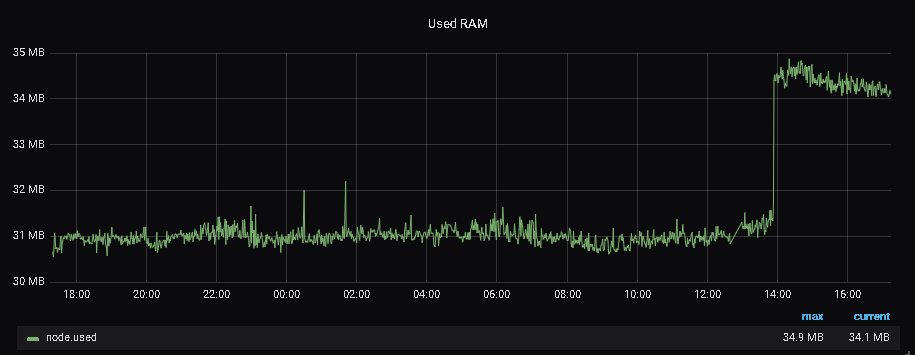
root@dc-687251721d0d:~# free -h
             total       used       free     shared    buffers     cached
Mem:         59648      30996      28652        232       2316       8628
-/+ buffers/cache:      20052      39596
Swap:        29692          0      29692
root@dc-687251721d0d:~# dmesg | grep zram
[    8.288819] zram: Added device: zram0
[   15.878349] zram0: detected capacity change from 0 to 30408704
[   15.927335] Adding 29692k swap on /dev/zram0.  Priority:-1 extents:1 across:29692k SS

Load has increased which might be caused by compression.
I will test another device with less RAM.
kevin-olbrich
on 18 Jun 2019
from these metrics i understand that the zram had the opposite of the expected effect on 64MB devices?
the following question(s) could be: even if metrics are not looking good:
- Does it perhaps reduce high load (>1) scenarios?
- does it prevent/reduce reboots under memmory preassure on "some nodes"
Adorfer
on 18 Jun 2019
TP-Link TL-WR841N/ND v8 (update ~6pm)

root@dolphin-de01-a0f3c18fc3fc:~# free -h
             total       used       free     shared    buffers     cached
Mem:         27684      24240       3444         76       2076       5424
-/+ buffers/cache:      16740      10944
Swap:        13308         52      13256
root@dolphin-de01-a0f3c18fc3fc:~# dmesg | grep zram
[   10.168613] zram: Added device: zram0
[   13.113622] zram0: detected capacity change from 0 to 13631488
[   13.155239] Adding 13308k swap on /dev/zram0.  Priority:-1 extents:1 across:13308k SS
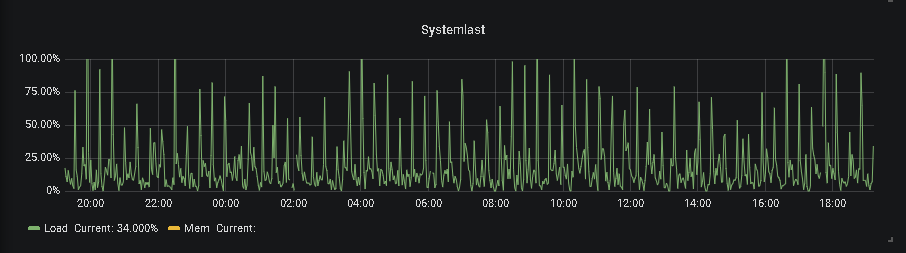
root@dolphin-de01-a0f3c18fc3fc:~# uptime
 19:18:51 up  1:34,  load average: 0.20, 0.41, 0.27
This node has four mesh partners, (88%, 77%, 73% and 2%) and no clients.
@Adorfer
I never had the problem of sudden reboots (most nodes are permanently online after each update - backed by Respondd statistics).
Maybe Zram allocates the space in RAM (like a ballooning device). This would mean, only data that needs to swap will be compressed (which is fine). This would also confirm why 4/32 devices look better.
kevin-olbrich
on 18 Jun 2019
Another Ubiquiti Nanostation M XW with non-zram firmware:
root@dolphin-de01-hw-802aa86eecbf:~# free -h
             total       used       free     shared    buffers     cached
Mem:         59648      26616      33032        104       2272       7256
-/+ buffers/cache:      17088      42560
Swap:            0          0          0
Same total RAM, less used, no swap.
kevin-olbrich
on 18 Jun 2019
TP-Link TL-WR1043N/ND v2

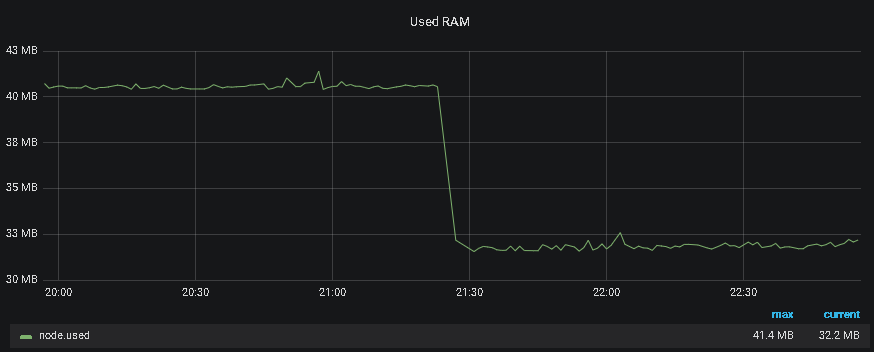
Currently about ~150 devices received the new update including zram (all targets).
kevin-olbrich
on 18 Jun 2019
I've applied the update to an Ubiquiti Nanostation M XW (Update at 2pm):
root@dc-687251721d0d:~# free -h
             total       used       free     shared    buffers     cached
Mem:         59648      30996      28652        232       2316       8628
-/+ buffers/cache:      20052      39596
Swap:        29692          0      29692
root@dc-687251721d0d:~# dmesg | grep zram [ 8.288819] zram: Added device: zram0 [ 15.878349] zram0: detected capacity change from 0 to 30408704 [ 15.927335] Adding 29692k swap on /dev/zram0. Priority:-1 extents:1 across:29692k SS
Load has increased which might be caused by compression.
I will test another device with less RAM.
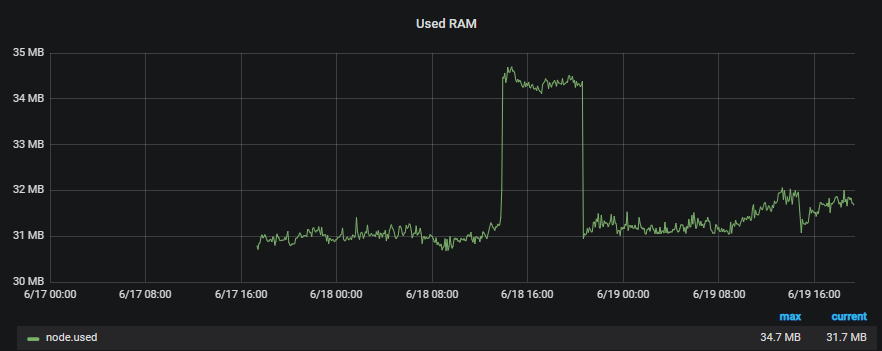
Same device but RAM usage settled down.
kevin-olbrich
on 19 Jun 2019
The output of free is more or less meaningless, what you really want is MemAvailable in /proc/meminfo.
NeoRaider
on 19 Jun 2019
The output of
freeis more or less meaningless, what you really want is MemAvailable in /proc/meminfo.
The diagrams should be fine then:
SELECT mean("memory.total") - mean("memory.available") as used FROM "node" WHERE ("nodeid" =~ /$node$/) AND $timeFilter GROUP BY time($interval)
kevin-olbrich
on 19 Jun 2019
how did you apply the zram? Just by site.mk or by patching gluon/target-files?
Adorfer
on 19 Jun 2019
how did you apply the zram? Just by site.mk or by patching gluon/target-files?
I‘ve used the site.mk-packages approach.
kevin-olbrich
on 19 Jun 2019
TP-Link TL-WR842NDv2 (8 MB Flash, 32 MB RAM)
Left without zram, right with zram.
No clients were connected to the device during the testing period.

Let's say this saves us roughly 8% (2.1M) memory.
The average load goes up from 0.2 to 0.3, peak load is multiple times around 1.0 up from 0.5.
Does that sound like it's worth it? What result would we expect from zram-swap to make use of it?
 mweinelt
on 20 Jun 2019
mweinelt
on 20 Jun 2019
evaluating those free/memavail/load-values "as long as it's non critical" is one metric.
accounting for "reduction of reboots and permanent high-load-scenarios" may be another.
i will try it out on some nodes facing regular "reboots after high load" (OOM and whatever is happening).
in other words: even if the base load-peaking increases, if the lockups or lockup-alike-situations are reduced, that would help.
Adorfer
on 20 Jun 2019
When I've made tests with the SquashFS thrashing situation it was sometimes a question of 0.5 MB.
2.8 MB will prevent this situation in networks that have grown too big, until people have splitted it into different domains.
CodeFetch
on 20 Jun 2019
I tested on some devices and most 32B "wifimesh-only-devices in local clouds" look like that:
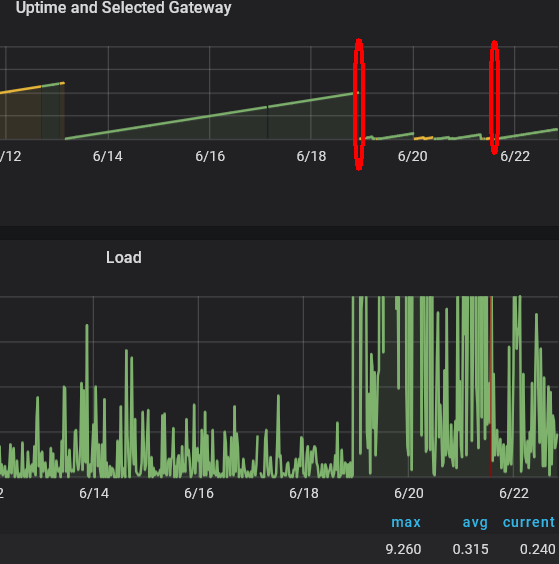
1st circle: migration from 2016.2 to 2018.2, a
2nd circle: migration from 2018.2 to 2018.2 with zram enabled.
Adorfer
on 22 Jun 2019
@adorfer So it's still bad, but better with zram-swap? Can you post a link to the Grafana page? I can't recognize how high the load is as the graph is cut.
CodeFetch
on 22 Jun 2019
https://map.eulenfunk.de/stats/d/000000004/node-byid?orgId=1&var-nodeid=60e327c6f834&from=1559832353091&to=1561228144453
basically all nodes from this cloud which are now on "2019062101-exp / gluon-v2018.2.1-26-g3ae816d"
https://map.ffdus.de/#!v:g;n:60e327c6f834
Adorfer
on 22 Jun 2019
Your perspective is somewhat skewed and zram-swap does not look like an improvement on this device at all.
The CPU graph is visually limited to 1.0, while the load peaks above 8.0
The memory usage has increased after enabling zram-swap
Uptime has gotten worse, down from days to hours
mweinelt
on 22 Jun 2019
@mweinelt I think you interpreted it wrong. Until the 19.06 they were running v2016, on 20.06 19.06 they were updated to v2018.2 which resulted in high load, memory usage and reboots on 21.06 they were updated to v2018.2 with zram-swap, which resulted in lower load, memory usage and no reboots. Thus zram-swap improved the situation, but it is still worse than v2016.
CodeFetch
on 22 Jun 2019
i agree, the timeframe has to be changed to see the difference (but this comment does NOT comment on the actual impact)
 rotanid
on 23 Jun 2019
rotanid
on 23 Jun 2019
Left half v2018.2 w/o zram-swap Right half with zram-swap
CodeFetch
on 23 Jun 2019
The reason why this should mitigate the load issue is that the load issue is a thrashing issue caused by the flash read and decompression of LZMA blocks in SquashFS on a page fault.
Decompressing RAM is bad (but it's swap and thus infrequently used pages), but reading from flash and decompressing big LZMA blocks is worse. Thus I recommend enabling this package for at least all devices with 32 MiB RAM. As swap is only used if there is a lack of memory or to cache infrequently used pages and because zram-swap is very fast compared to a hard drive I'd even go further and say: It should not hurt to enable it on all devices.
As you can see here:
https://map.eulenfunk.de/stats/d/000000004/node-byid?orgId=1&var-nodeid=60e327c6f834&from=1561139843410&to=1561228144453
the load has decreased from average 1.8 (peak 9.3) without zram-swap to average 0.4 (peak 2.2) with zram-swap enabled.
Furthermore you can see that the load peak of 2.2 of the device with zram-swap is not due to a lack of memory, but because of a high traffic volume.
CodeFetch
on 23 Jun 2019
My interpretaion of this is a buffer is geeting filled because of many packets, the slab or slub cache needs more space and frees pages and in the middle pages needs to be reread which causes high load. I guess it's slab that needs space, because the traffic goes down. Likely many small packets...
Thus there is still a thrashing-problem, but it's better with zram-swap as the router can recover from it.
Edit: Another topic: We should consider decreasing the ag71xx NAPI weight and ring buffer size. This might help in such situations, too. Better drop packets than thrashing as it will trigger fq_codel on client devices which support it and throttle the rate. But what I can see from this: 32 MiB is not enough in the long-run and domains need to get smaller. zram-swap is a quick fix for getting the network in a state again for doing the needed steps.
CodeFetch
on 23 Jun 2019
A little bit OT but might be helpful for others who want to test this:
Adding this package to site.mk (which means it is included for all targets) has low to none risk of bricking nodes.
I ran this upgrade last week for a total of 170 nodes, all came back online after the upgrade.
Another rollout with 340 nodes over 8 domains (2017.x -> 2018.2.1 upgrade) also has been flawless.
IMHO this is safe to try in production.
kevin-olbrich
on 23 Jun 2019
CodeFetch
on 7 Jul 2019
If there would be some flag in targets to enable this by default on all 32MB-RAM devices via site.mk: Would be great
As long as i do not have this selection, i turn it on for all devices for the moment. since it seems to have no visible negative effect on 200+ production nodes. And it definitly helps the routers in dense (multi-link) wifimesh scenarios with several uplinks per local cloud.
Adorfer
on 7 Jul 2019
so we change the default then? It'd have my vote.
christf
on 25 Aug 2019
@mweinelt @NeoRaider ?
rotanid
on 26 Aug 2019
FYI:
In our community (ffffm) we provided the ar71xx-tiny target with this package since mid July (~250 4/32 nodes, gluon 2018.2.2). So far there have been no abnormalities.
 oszilloskop
on 5 Sep 2019
oszilloskop
on 5 Sep 2019
@mweinelt @NeoRaider ?
@blocktrron @christf @T-X ?
ACK for 4/32, for 8/32 or NACK?
i can live with either decision, tendency to 8/32
rotanid
on 7 Sep 2019
@rotanid ACK for 8/32, NACK for 4/32, as flash space is precious there (and the target is deprecated anyway)
 blocktrron
on 7 Sep 2019
blocktrron
on 7 Sep 2019
@blocktrron
1) are there any tests showing problem in flashsize related to zram-swap activated in 4/32-dedevices?
(Since most of /32 devices are with only 4MB of flash, only puttem them to the few 8MB devices would not be a great help)
2) why not give it to /64 devices running dualband (which can run into near-OOM/high load situations)
Adorfer
on 7 Sep 2019
@Adorfer
- are there any tests showing problem in flashsize related to zram-swap activated in 4/32-dedevices?
It just means it should not be a default for 4/32 MB devices in Gluon (and I agree with that). People can still select it manually in their firmware builds.
CodeFetch
on 9 Sep 2019
Ich habe auf Basis dieser Liste
https://openwrt.org/toh/views/toh_gluon_supported?dataflt%5BRAM+MB%7E%5D=32&dataflt%5BFlash+MB%7E%5D=8
nun einen PR angelegt:
1819
rotanid
on 10 Sep 2019
merged #1819 , closing.
rotanid
on 23 Sep 2019
Related issues
 lephisto
·
5Comments
mweinelt
·
3Comments
mweinelt
·
3Comments
lephisto
·
5Comments
mweinelt
·
3Comments
mweinelt
·
3Comments
 RalfJung
·
5Comments
CodeFetch
·
5Comments
RalfJung
·
5Comments
CodeFetch
·
5Comments
Most helpful comment
Unfortunately I don't have any 8/32 MiB device deployed or I would test it.
@skorpy2009 As you're unable to phrase your opinion, I assume you're just a negative person.
While I do bootloader development and write an article for upgrading 4/32 MiB devices to 16/64 MiB for the long term, you're just trolling. I've already upgraded more than 50 WR841Ns and they work better than ever without memory pressure. I'm working on Layer 2 WireGuard which gives 40 MBit/s throughput with these devices. So if you are thinking of trashing your routers, give them to me, please and you're doing good for Freifunk and the environment.