Gluon-ts: When I use the #898 code, there are some problems
Description
In the past, when I used gluon-ts-0.5.0, num_workers>1 could not be set. I saw the code lostella released in #898 the other day and pulled it down for use. Num_workers can be set to greater than 1, but there are some problems.
Problem 1: when epoch reaches about 200, the training will end.
Problem 2: CUDA initialization error occurs when training the next target.
I made a demo to reproduce the problem, and some of the data will be uploaded. Thanks! @lostella
To Reproduce
#!/usr/bin/env python3
# -*- coding:utf-8 -*-
import os
import mxnet as mx
import numpy as np
import pandas as pd
from gluonts.dataset import common
from gluonts.evaluation import Evaluator
from gluonts.evaluation.backtest import make_evaluation_predictions
from gluonts.model import deepar
from gluonts.trainer import Trainer


def model_train(df):
    param_list = {
            'epochs': [10000],
            'num_layers': [4],
            'learning_rate': [1e-2],
            'mini_batch_size': [32],
            'num_cells': [40],
            'cell_type': ['lstm'],
        }
    prediction_length = 12
    freq = '2H'
    re_day = 7
    train_time = df.iloc[-1 + (-24) * re_day].monitor_time
    end_time = df.iloc[-1].monitor_time
    test_time = pd.date_range(start=train_time, end=end_time, freq='H')[1:]
    df = df.set_index('monitor_time')
    model_i = 0
    a = []
    for i, _ in enumerate(test_time):
        a.append({"start": df.index[0], "target": df.Measured[:str(test_time[i])]})
    data = common.ListDataset([{"start": df.index[0],
                                    "target": df.Measured[:train_time]}],
                                  freq=freq)

    val_data = common.ListDataset(a, freq=freq)
    for epochs_i in param_list['epochs']:
        for batch_i in param_list['mini_batch_size']:
            for lr_i in param_list['learning_rate']:
                for cells_i in param_list['num_cells']:
                    for layers_i in param_list['num_layers']:
                        for type_i in param_list['cell_type']:
                            estimator = deepar.DeepAREstimator(
                                prediction_length=prediction_length,
                                context_length=prediction_length,
                                freq=freq,
                                num_layers=layers_i,
                                num_cells=cells_i,
                                cell_type=type_i,

                                trainer=Trainer(
                                    ctx=mx.gpu(),
                                    epochs=epochs_i,
                                    learning_rate=lr_i,
                                    hybridize=True,
                                    batch_size=batch_i,
                                ),
                            )

                            predictor = estimator.train(training_data=data, num_workers=2, num_prefetch=96)
                            forecast_it, ts_it = make_evaluation_predictions(val_data, predictor=predictor,
                                                                             num_samples=100)
                            forecasts = list(forecast_it)
                            tss = list(ts_it)

                            evaluator = Evaluator(quantiles=[0.5], seasonality=2016)
                            agg_metrics, item_metrics = evaluator(iter(tss), iter(forecasts), num_series=len(val_data))

                            if model_i == 0:
                                df_metrics = pd.DataFrame(columns=list(agg_metrics))

                            values_metrics = []
                            for k in agg_metrics:
                                values_metrics.append(agg_metrics[k])

                            df_metrics.loc[model_i, :] = values_metrics
                            model_i = model_i + 1


    best_model_ind = np.argmin(df_metrics['RMSE'].values)
    print('The best model index is {}, mae {}, rmese {}'.format(
        best_model_ind, df_metrics.loc[best_model_ind, 'abs_error'] / prediction_length,
        df_metrics.loc[best_model_ind, 'RMSE']))
    return df_metrics, best_model_ind

def file_name_get(item, spe_file):
    for root, dirs, files in os.walk(spe_file):
        file = []
        for i in files:
            if item in i:
                file.append(i)
        return file


if __name__=='__main__':
    data_file = 'data'
    files = file_name_get('data', data_file)
    for file in files:
        df = pd.read_csv(file)
        df_metrics, best_model_ind = model_train(df)
Error message or code output
100%|███| 50/50 [00:01<00:00, 31.63it/s, epoch=194/10000, avg_epoch_loss=-.0183]
100%|███| 50/50 [00:01<00:00, 31.55it/s, epoch=195/10000, avg_epoch_loss=0.0884]
WARNING:root:Serializing RepresentableBlockPredictor instances does not save the prediction network structure in a backwards-compatible manner. Be careful not to use this method in production.
Running evaluation: 100%|████████████████████| 336/336 [00:02<00:00, 112.13it/s]
Train process 0 ,Epochs 10000, Batch_size: 32, Learning_rate: 0.01, Num_cells: 40, Num_layers: 4, cell_type: lstm
0%| | 0/50 [00:00<?, ?it/s][06:25:22] src/engine/threaded_engine_perdevice.cc:101: Ignore CUDA Error [06:25:22] /home/ubuntu/mxnet-distro/mxnet-build/3rdparty/mshadow/mshadow/./tensor_gpu-inl.h:35: Check failed: e == cudaSuccess: CUDA: initialization error
Stack trace:
[bt] (0) /home/cjk/anaconda3/lib/python3.7/site-packages/mxnet/libmxnet.so(+0x6b8b5b) [0x7ff3de97fb5b]
[bt] (1) /home/cjk/anaconda3/lib/python3.7/site-packages/mxnet/libmxnet.so(+0x37ab842) [0x7ff3e1a72842]
[bt] (2) /home/cjk/anaconda3/lib/python3.7/site-packages/mxnet/libmxnet.so(+0x37ceece) [0x7ff3e1a95ece]
[bt] (3) /home/cjk/anaconda3/lib/python3.7/site-packages/mxnet/libmxnet.so(+0x37c19d1) [0x7ff3e1a889d1]
[bt] (4) /home/cjk/anaconda3/lib/python3.7/site-packages/mxnet/libmxnet.so(+0x37b74a1) [0x7ff3e1a7e4a1]
[bt] (5) /home/cjk/anaconda3/lib/python3.7/site-packages/mxnet/libmxnet.so(+0x37b83f4) [0x7ff3e1a7f3f4]
[bt] (6) /home/cjk/anaconda3/lib/python3.7/site-packages/mxnet/libmxnet.so(mxnet::NDArray::Chunk::~Chunk()+0x3c2) [0x7ff3e1cada42]
[bt] (7) /home/cjk/anaconda3/lib/python3.7/site-packages/mxnet/libmxnet.so(+0x6bc30a) [0x7ff3de98330a]
[bt] (8) /home/cjk/anaconda3/lib/python3.7/site-packages/mxnet/libmxnet.so(MXNDArrayFree+0x54) [0x7ff3e19e89c4]
Environment
- Operating system: Ubuntu 18.04.2
- Python version: Python 3.7.4
- GluonTS version: the code released in #898
- MXNet version: mxnet-cu101 1.6.0
- CPU cores: 14
- GPU information:
3b:00.0 3D controller: NVIDIA Corporation GV100 [Tesla V100 PCIe] (rev a1)
b1:00.0 3D controller: NVIDIA Corporation GV100 [Tesla V100 PCIe] (rev a1)
 k-user
All 21 comments
Thanks @k-user, as you realized #898 is a rather critical change but is still work in progress, so bug reports like this are very useful!
 lostella
on 21 Jul 2020
lostella
on 21 Jul 2020
Thanks @k-user, as you realized #898 is a rather critical change but is still work in progress, so bug reports like this are very useful!
You're welcome. It helps me at the same time.
k-user
on 21 Jul 2020
Have you tried using MXNet version: mxnet-cu92==1.6.0, or do you have CUDA 10.1 installed?
 AaronSpieler
on 27 Jul 2020
AaronSpieler
on 27 Jul 2020
Have you tried using MXNet version:
mxnet-cu92==1.6.0, or do you have CUDA 10.1 installed?
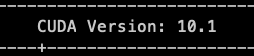
Thanks @AaronSpieler .My CUDA Version is 10.1 ,When i install MXNet , I pay attention to that.
k-user
on 28 Jul 2020
Thanks @k-user, as you realized #898 is a rather critical change but is still work in progress, so bug reports like this are very useful!
Hey bro, I found something different, It might be helpful. When i use following versions of the package. Everything work normally except num_workers can't set.
Environment
MXNet version: mxnet 1.4.1
GluonTS version: 0.3.2
k-user
on 28 Jul 2020
Thanks @k-user, as you realized #898 is a rather critical change but is still work in progress, so bug reports like this are very useful!
Hey bro, I found something different, It might be helpful. When i use following versions of the package. Everything work normally except num_workers can't set.
Environment
MXNet version: mxnet 1.4.1
GluonTS version: 0.3.2
So problem 1 & 2 disappeared, but again, multiprocessing doesn't work?
AaronSpieler
on 28 Jul 2020
Thanks @k-user, as you realized #898 is a rather critical change but is still work in progress, so bug reports like this are very useful!
Hey bro, I found something different, It might be helpful. When i use following versions of the package. Everything work normally except num_workers can't set.
Environment
MXNet version: mxnet 1.4.1
GluonTS version: 0.3.2So problem 1 & 2 disappeared, but again, multiprocessing doesn't work?
Yes, but this time I use cpu, it is very slow
k-user
on 28 Jul 2020
@k-user does the problem still occur?
lostella
on 22 Oct 2020
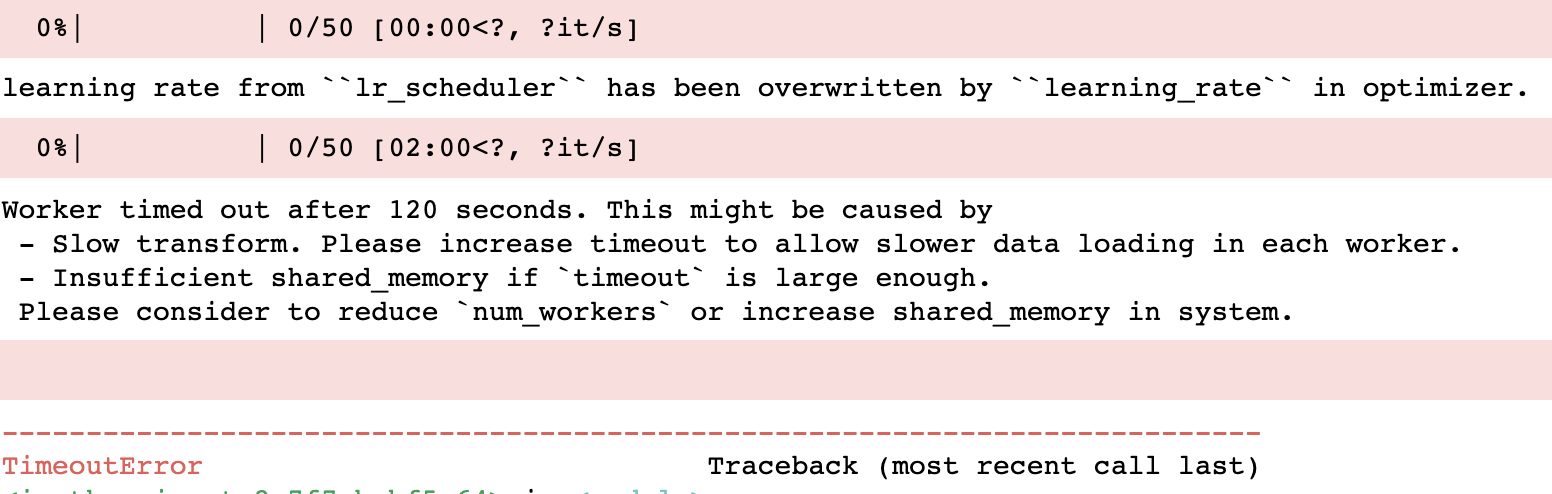
I wrote a little demo to test it, but it still gave me an error.
Could it be that there is not enough Shared memory,The Shared memory is too large every time it is created
? I don't know.
This is data:
This is my code:
import pandas as pd
from gluonts.dataset import common
from gluonts.model import deepar
from gluonts.trainer import Trainer

df = pd.read_csv('deepar_test.csv')
df['monitor_time'] = pd.to_datetime(df['monitor_time'])
df = df.set_index('monitor_time')
data = common.ListDataset([{"start": df.index[0],
                                "target": df.Measured[:]}],
                              freq='H')

estimator = deepar.DeepAREstimator( prediction_length=24,
                                                                num_parallel_samples=100,
                                                                freq="H",
                                                                trainer=Trainer(ctx="gpu", epochs=200, learning_rate=1e-3))
predictor = estimator.train(training_data=data, num_workers=2)
Error log:
k-user
on 23 Oct 2020
Hey @k-user,
Thank you for the report.
If I run your code I get the cuda initialization error which we discuss here: #1054
Could you try putting:
import multiprocessing
multiprocessing.set_start_method("spawn", force=True)
at the beginning of your script? For me, your code works fine using this.
Let me know if that resolves your issue.
 PascalIversen
on 9 Nov 2020
PascalIversen
on 9 Nov 2020
Hey @k-user,
Thank you for the report.
If I run your code I get the cuda initialization error which we discuss here: #1054Could you try putting:
import multiprocessing
multiprocessing.set_start_method("spawn", force=True)
at the beginning of your script? For me, your code works fine using this.
Let me know if that resolves your issue.
Ok,i will try it and report result here.Thanks!
k-user
on 9 Nov 2020
@PascalIversen I tried this method, but it seems to cause another error.
This my code:
import multiprocessing
multiprocessing.set_start_method("spawn", force=True)
import pandas as pd
from gluonts.dataset import common
from gluonts.model import deepar
from gluonts.trainer import Trainer


df = pd.read_csv('deepar_test.csv')
df['monitor_time'] = pd.to_datetime(df['monitor_time'])
df = df.set_index('monitor_time')
data = common.ListDataset([{"start": df.index[0],
                            "target": df.monitor_value[:]}],
                            freq='H')

estimator = deepar.DeepAREstimator( prediction_length=24,
                                   num_parallel_samples=100,
                                   freq="H",
                                   trainer=Trainer(ctx="gpu",
                                                   epochs=200,
                                                   learning_rate=1e-3))
predictor = estimator.train(training_data=data, num_workers=2)
That's part of the mistake:
File "/home/cjk/anaconda3/envs/gluonts/lib/python3.6/multiprocessing/spawn.py", line 136, in _check_not_importing_main
    is not going to be frozen to produce an executable.''')
RuntimeError:
        An attempt has been made to start a new process before the
        current process has finished its bootstrapping phase.

        This probably means that you are not using fork to start your
        child processes and you have forgotten to use the proper idiom
        in the main module:

            if __name__ == '__main__':
                freeze_support()
                ...

        The "freeze_support()" line can be omitted if the program
        is not going to be frozen to produce an executable.

        File "/home/cjk/anaconda3/envs/gluonts/lib/python3.6/multiprocessing/connection.py", line 383, in _recv
             raise EOFError
        EOFError
Thanks for trying this @k-user. Are you on Windows? Could you tell me the output of:
import sys
print(sys.platform)
GluonTS's multiprocessing is not supported on Windows, but there should have been a warning instead of the error.
The code should run with num_workers=None.
PascalIversen
on 11 Nov 2020
@PascalIversen
My code runs on ubuntu18.04.
k-user
on 11 Nov 2020
That is strange, I am also running on linux and I can not reproduce the error. Just to make sure: Are you using the latest version of GluonTS?
PascalIversen
on 11 Nov 2020
@PascalIversen Yes,I'm using the latest gluonts.Can I have a look at the process you are running.Or you look at mine.
k-user
on 11 Nov 2020
@k-user as a side note, maybe unrelated: it seems like you're training a model on a single time series, in which case multiprocessing won't help you, so you might want to turn that off for that specific example.
You can check whether that's what causing the problem, by doubling the size of the dataset that you're using:
data = common.ListDataset(
    [{"start": df.index[0], "target": df.monitor_value[:]}] * 2,
    freq='H'
)
@k-user as a side note, maybe unrelated: it seems like you're training a model on a single time series, in which case multiprocessing won't help you, so you might want to turn that off for that specific example.
You can check whether that's what causing the problem, by doubling the size of the dataset that you're using:
data = common.ListDataset(
    [{"start": df.index[0], "target": df.monitor_value[:]}] * 2,
    freq='H'
)
It's helpful.Thanks!
But some issue happened:
import multiprocessing
multiprocessing.set_start_method("spawn", force=True)
When i add this code, Evaluator results in an error:
multiprocessing.pool.RemoteTraceback:
"""
Traceback (most recent call last):
  File "/home/cjk/anaconda3/envs/gluonts/lib/python3.6/multiprocessing/pool.py", line 119, in worker
    result = (True, func(*args, **kwds))
  File "/home/cjk/anaconda3/envs/gluonts/lib/python3.6/multiprocessing/pool.py", line 44, in mapstar
    return list(map(*args))
  File "/home/cjk/anaconda3/envs/gluonts/lib/python3.6/site-packages/gluonts/evaluation/_base.py", line 833, in _worker_fun
    ), "Something went wrong with the worker initialization."
AssertionError: Something went wrong with the worker initialization.
"""
A quick fix is setting num_workers=0 for the Evaluator.
However, I can reproduce this on Python 3.6 and 3.7 using m4_hourly dataset. It seems like the evaluation multiprocessing magically does not work with spawn, while the training multiprocessing only works with spawn.
import multiprocessing
multiprocessing.set_start_method("spawn", force=True)
import pandas as pd
from gluonts.dataset import common
from gluonts.model import deepar
from gluonts.mx.trainer import Trainer
from gluonts.dataset.repository.datasets import get_dataset
from gluonts.evaluation import Evaluator

data = get_dataset("m4_hourly").train
estimator = deepar.DeepAREstimator( prediction_length=24,
                                   freq="H",
                                   trainer=Trainer(ctx="gpu",
                                                   epochs=1))
predictor = estimator.train(training_data=data, num_workers=None)
from gluonts.evaluation.backtest import make_evaluation_predictions
forecast_it, ts_it = make_evaluation_predictions(
    dataset=data,  # test dataset
    predictor=predictor,  # predictor
    num_samples=100,  # number of sample paths we want for evaluation
)

forecasts = list(forecast_it)
tss = list(ts_it)

evaluator = Evaluator(quantiles=[0.1, 0.5, 0.9], num_workers = 2)
agg_metrics, item_metrics = evaluator(iter(tss), iter(forecasts), num_series=len(data))
AssertionError                            Traceback (most recent call last)
<ipython-input-4-2d8e2921f68f> in <module>
     25
     26 evaluator = Evaluator(quantiles=[0.1, 0.5, 0.9], num_workers = 2)
---> 27 agg_metrics, item_metrics = evaluator(iter(tss), iter(forecasts), num_series=len(data))

~/anaconda3/envs/mxnet_latest_p37/lib/python3.7/site-packages/gluonts/evaluation/_base.py in __call__(self, ts_iterator, fcst_iterator, num_series)
    155                     func=_worker_fun,
    156                     iterable=iter(it),
--> 157                     chunksize=self.chunk_size,
    158                 )
    159                 mp_pool.close()

~/anaconda3/envs/mxnet_latest_p37/lib/python3.7/multiprocessing/pool.py in map(self, func, iterable, chunksize)
    266         in a list that is returned.
    267         '''
--> 268         return self._map_async(func, iterable, mapstar, chunksize).get()
    269
    270     def starmap(self, func, iterable, chunksize=None):

~/anaconda3/envs/mxnet_latest_p37/lib/python3.7/multiprocessing/pool.py in get(self, timeout)
    655             return self._value
    656         else:
--> 657             raise self._value
    658
    659     def _set(self, i, obj):

AssertionError: Something went wrong with the worker initialization.
@PascalIversen
Right, It didn't report error when I setting num_workers=0 for the Evaluator.but estimator.train setting num_workers>1,Evaluator setting num_workers=0, process can't close.You can try it. And running multiprocessing using spawn may cause the program to slow down.
However, I have found a way to apply it. I need to train many sets of data, so creating a process for each set of data is a better way.
Thanks @PascalIversen @AaronSpieler @lcallot !
k-user
on 16 Nov 2020
Hey @k-user,
the Evaluator bug should now be solved with PR #1159.
Please let us know if you still have problems.
PascalIversen
on 23 Nov 2020
Related issues
 gjmulder
·
7Comments
gjmulder
·
7Comments
 ehsanmok
·
5Comments
ehsanmok
·
5Comments
 alexhallam
·
5Comments
alexhallam
·
5Comments
 MaximilianPavon
·
5Comments
MaximilianPavon
·
5Comments
 jiwidi
·
3Comments
jiwidi
·
3Comments