Glpi: Can't install master branch on WAMP server
- Steps to reproduce (which actions have you made) :
On a WAMP server:
- Execute
git clone https://github.com/glpi-project/glpi.git --branch masteron www dir - Execute
composer install --no-devon glpi dir - Go to install UI and follow its steps
- After the installation tries to create the DB no next button appears.
Expected result :
A GLPI correct installationActual result :
The installation dies on database creation step for unknown reason, no next button is showed and if I try to enten again to glpi root url it shows an upgrade needed message but the DB schema is incompleted installed.URL of the page :
N/AScreenshot of the problem (if pertinent) :
First try:

DB schema installed:

After that If I enter to the root url I got this:
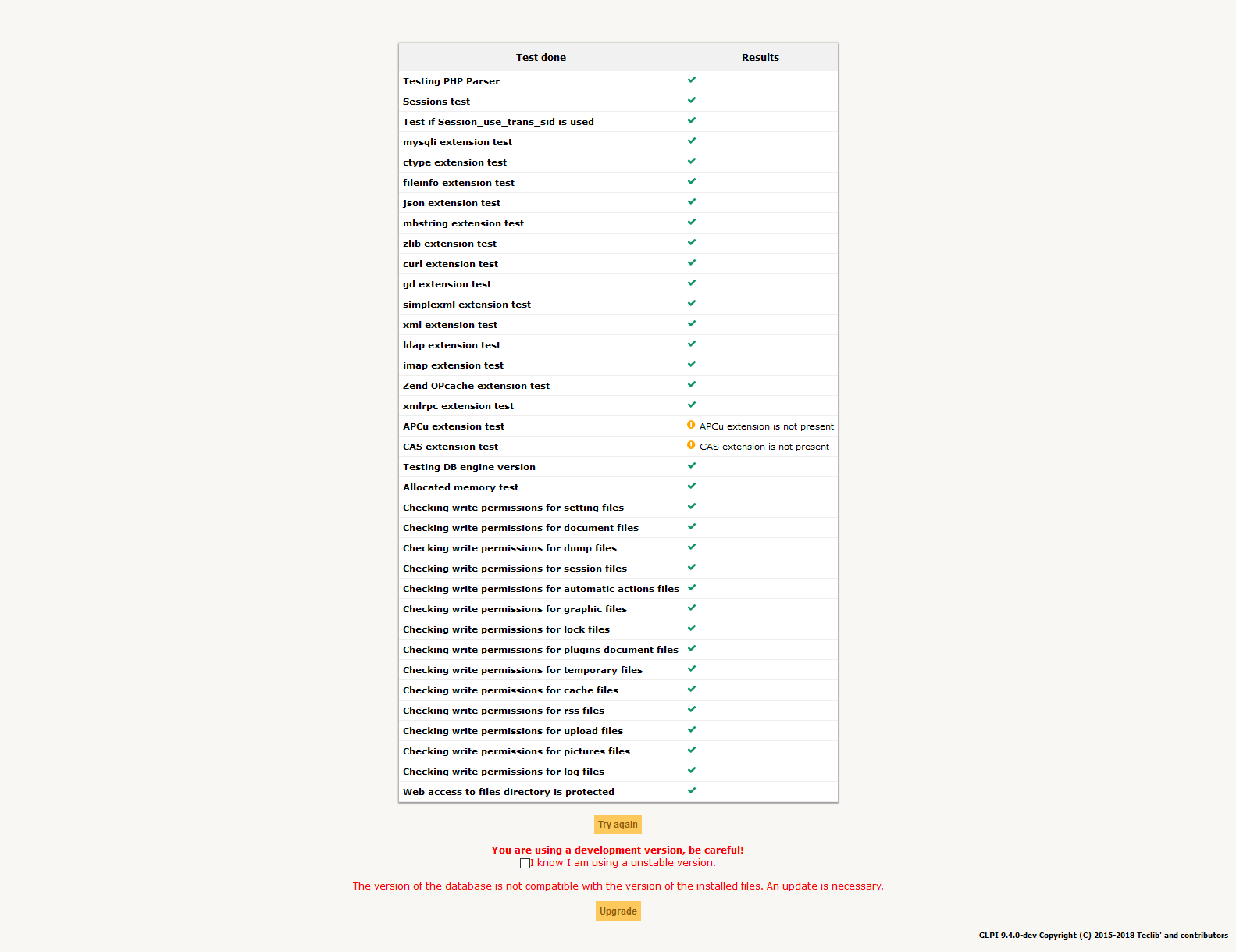
And if I accept it:

- Your GLPI setup (you can find it in Setup > General menu, System tab) :
GLPI master branch on a WAMP 3.1.3 installed by default:

 DIOHz0r
All 18 comments
New update for you, the cliinstall.php script works without problems but it took around 2 minutes to create the database
DIOHz0r
on 23 Jun 2018
DB schema is almost the same between 9.3 and master. If something wxent wrong on the first install; there is something in the logs (glpi, system, ...).
Of coruse, trying to do anything on a non installed instance won't work.
 trasher
on 25 Jun 2018
trasher
on 25 Jun 2018
Also, do not have windows, can't test.
trasher
on 25 Jun 2018
Aren't there known issues using MySQL versions 5.7 and higher? With a default install of WAMPServer 3.1.3 x64 on a new install of Server 2012, I was not able to recreate the issue.
 cconard96
on 27 Jun 2018
cconard96
on 27 Jun 2018
Strange issues has been reported with mysql 5.7 indeed (mysql version has not been specified in the ticket).
trasher
on 27 Jun 2018
Hello, the MySQL version is on the last screenshot (5.7.21)
DIOHz0r
on 27 Jun 2018
GLPI unit tests works well on MySQL 5;7 (see https://circleci.com/gh/trasher/glpi/3155); so this is not the issue.
Sounds like this is a connexion timeout due to its configuration.
trasher
on 18 Jul 2018
With a default install of WAMPServer 3.1.3 x64 on a new install of Server 2012, I was not able to recreate the issue
Same here, no issue at all with fresh install of wamp (3.1.3) and glpi
I tested also with and without dev depencies, no issues
Could you test again with a more recent master @DIOHz0r ?
 orthagh
on 17 Aug 2018
orthagh
on 17 Aug 2018
Same issues with me, I use XAMPP control panel with
PHP Version 7.2.9
MySQL 10.1.53 MariaDB
Stuck on process and nothing happen.
Pls fixed it.
Thanks
 haryadisoepanto
on 5 Sep 2018
haryadisoepanto
on 5 Sep 2018
Sounds like this is due to a default configuration on XAMPP. Use a verbatim mariadb install to know if that works.
trasher
on 5 Sep 2018
Could you test again with a more recent master @DIOHz0r ?
Hello, I have tested again with a clean installation using the last master version (https://github.com/glpi-project/glpi/commit/91ecc044c3c627b8223393058042b107bf671b2c) and the same wamp installation,
the result is still not getting a next button and the same quantity of tables generated in the DB.

DIOHz0r
on 10 Sep 2018
Could you check if you have log for your servers. Both MySQL (this one is very important) and Apache.
I don't know where it's stored in wamp folder btw neither if it's enabled by default but to help you (and other who encounter this issue).
orthagh
on 11 Sep 2018
WAMP logs are stored in the log folder of the installation (normally C:\wamp64\logs). MySQL doesn't have any log registry on install process (I set it to maximun verbosity).
For apache I got this message on error log "[authz_core:error] [pid 8292:tid 1208] [client ::1:53889] AH01630: client denied by server configuration: C:/wamp64/www/glpi/files/_log/php-errors.log" and that file has the following content "glpiphplog.WARNING: Test logger"
DIOHz0r
on 11 Sep 2018
@DIOHz0r You could get a full MySQL activity log using this tip : https://stackoverflow.com/a/304008
Think to remove tje SQL query log after testing… else you will quickly have a log file increasing dramatically ;-)
Regards,
Anael
 AnaelMobilia
on 18 Sep 2018
AnaelMobilia
on 18 Sep 2018
This is the last part of the output in the MySQL log after setted up the log parameter in the my.ini file
DROP TABLE IF EXISTS `glpi_olas`
2018-09-18T17:59:08.127095Z         5 Query     CREATE TABLE `glpi_olas` (
  `id` int(11) NOT NULL AUTO_INCREMENT,
  `name` varchar(255) COLLATE utf8_unicode_ci DEFAULT NULL,
  `entities_id` int(11) NOT NULL DEFAULT '0',
  `is_recursive` tinyint(1) NOT NULL DEFAULT '0',
  `type` int(11) NOT NULL DEFAULT '0',
  `comment` text COLLATE utf8_unicode_ci,
  `number_time` int(11) NOT NULL,
  `calendars_id` int(11) NOT NULL DEFAULT '0',
  `date_mod` datetime DEFAULT NULL,
  `definition_time` varchar(255) COLLATE utf8_unicode_ci DEFAULT NULL,
  `end_of_working_day` tinyint(1) NOT NULL DEFAULT '0',
  `date_creation` datetime DEFAULT NULL,
  `slms_id` int(11) NOT NULL DEFAULT '0',
  PRIMARY KEY (`id`),
  KEY `name` (`name`),
  KEY `date_mod` (`date_mod`),
  KEY `date_creation` (`date_creation`),
  KEY `calendars_id` (`calendars_id`),
  KEY `slms_id` (`slms_id`)
) ENGINE=InnoDB DEFAULT CHARSET=utf8 COLLATE=utf8_unicode_ci
2018-09-18T17:59:08.532708Z         5 Query     ### Dump table glpi_softwarecategories

DROP TABLE IF EXISTS `glpi_softwarecategories`
2018-09-18T17:59:08.533383Z         5 Query     CREATE TABLE `glpi_softwarecategories` (
  `id` int(11) NOT NULL AUTO_INCREMENT,
  `name` varchar(255) COLLATE utf8_unicode_ci DEFAULT NULL,
  `comment` text COLLATE utf8_unicode_ci,
  `softwarecategories_id` int(11) NOT NULL DEFAULT '0',
  `completename` text COLLATE utf8_unicode_ci,
  `level` int(11) NOT NULL DEFAULT '0',
  `ancestors_cache` longtext COLLATE utf8_unicode_ci,
  `sons_cache` longtext COLLATE utf8_unicode_ci,
  PRIMARY KEY (`id`),
  KEY `softwarecategories_id` (`softwarecategories_id`)
) ENGINE=InnoDB  DEFAULT CHARSET=utf8 COLLATE=utf8_unicode_ci
2018-09-18T17:59:08.707614Z         5 Query     INSERT INTO `glpi_softwarecategories` VALUES ('1','FUSION',NULL,'0','FUSION','1',NULL,NULL)
2018-09-18T17:59:08.709583Z         5 Query     ### Dump table glpi_softwarelicenses

DROP TABLE IF EXISTS `glpi_softwarelicenses`
2018-09-18T17:59:08.710599Z         5 Query     CREATE TABLE `glpi_softwarelicenses` (
  `id` int(11) NOT NULL AUTO_INCREMENT,
  `softwares_id` int(11) NOT NULL DEFAULT '0',
  `softwarelicenses_id` int(11) NOT NULL DEFAULT '0',
  `completename` text COLLATE utf8_unicode_ci,
  `level` int(11) NOT NULL DEFAULT '0',
  `entities_id` int(11) NOT NULL DEFAULT '0',
  `is_recursive` tinyint(1) NOT NULL DEFAULT '0',
  `number` int(11) NOT NULL DEFAULT '0',
  `softwarelicensetypes_id` int(11) NOT NULL DEFAULT '0',
  `name` varchar(255) COLLATE utf8_unicode_ci DEFAULT NULL,
  `serial` varchar(255) COLLATE utf8_unicode_ci DEFAULT NULL,
  `otherserial` varchar(255) COLLATE utf8_unicode_ci DEFAULT NULL,
  `softwareversions_id_buy` int(11) NOT NULL DEFAULT '0',
  `softwareversions_id_use` int(11) NOT NULL DEFAULT '0',
  `expire` date DEFAULT NULL,
  `comment` text COLLATE utf8_unicode_ci,
  `date_mod` datetime DEFAULT NULL,
  `is_valid` tinyint(1) NOT NULL DEFAULT '1',
  `date_creation` datetime DEFAULT NULL,
  `is_deleted` tinyint(1) NOT NULL DEFAULT '0',
  `locations_id` int(11) NOT NULL DEFAULT '0',
  `users_id_tech` int(11) NOT NULL DEFAULT '0',
  `users_id` int(11) NOT NULL DEFAULT '0',
  `groups_id_tech` int(11) NOT NULL DEFAULT '0',
  `groups_id` int(11) NOT NULL DEFAULT '0',
  `is_helpdesk_visible` tinyint(1) NOT NULL DEFAULT '0',
  `is_template` tinyint(1) NOT NULL DEFAULT '0',
  `template_name` varchar(255) COLLATE utf8_unicode_ci DEFAULT NULL,
  `states_id` int(11) NOT NULL DEFAULT '0',
  `manufacturers_id` int(11) NOT NULL DEFAULT '0',
  `contact` varchar(255) COLLATE utf8_unicode_ci DEFAULT NULL,
  `contact_num` varchar(255) COLLATE utf8_unicode_ci DEFAULT NULL,
  PRIMARY KEY (`id`),
  KEY `name` (`name`),
  KEY `is_template` (`is_template`),
  KEY `serial` (`serial`),
  KEY `otherserial` (`otherserial`),
  KEY `expire` (`expire`),
  KEY `softwareversions_id_buy` (`softwareversions_id_buy`),
  KEY `entities_id` (`entities_id`),
  KEY `softwarelicensetypes_id` (`softwarelicensetypes_id`),
  KEY `softwareversions_id_use` (`softwareversions_id_use`),
  KEY `date_mod` (`date_mod`),
  KEY `softwares_id_expire` (`softwares_id`,`expire`),
  KEY `locations_id` (`locations_id`),
  KEY `users_id_tech` (`users_id_tech`),
  KEY `users_id` (`users_id`),
  KEY `groups_id_tech` (`groups_id_tech`),
  KEY `groups_id` (`groups_id`),
  KEY `is_helpdesk_visible` (`is_helpdesk_visible`),
  KEY `is_deleted` (`is_deleted`),
  KEY `date_creation` (`date_creation`),
  KEY `manufacturers_id` (`manufacturers_id`),
  KEY `states_id` (`states_id`)
) ENGINE=InnoDB DEFAULT CHARSET=utf8 COLLATE=utf8_unicode_ci
2018-09-18T17:59:09.751136Z         5 Quit
2018-09-18T17:59:09.751284Z         4 Quit
In addition to the referenced issue:
Apache/2.4.37 (Win32) OpenSSL/1.1.1a PHP/7.3.1
Microsoft Windows [Version 10.0.17763.253] x64
MariaDB 10.1.37.0
mysql error.log
2019-02-04 19:40:14 22308 [ERROR] Incorrect definition of table mysql.column_stats: expected column 'min_value' at position 3 to have type varbinary(255), found type varchar(255).
2019-02-04 19:40:14 22308 [ERROR] Incorrect definition of table mysql.column_stats: expected column 'max_value' at position 4 to have type varbinary(255), found type varchar(255).
 Megachip
on 5 Feb 2019
Megachip
on 5 Feb 2019
Short workaround:
increase the max_execution_time= which is by default 30 sec
possible the installation routine should check this value and provide a warning.
Megachip
on 5 Feb 2019
I had the same after creating database on Windows 10 (actually I asked to some friends to do it too, and they had no next button too and the same error)
But I have this message "You are trying to use GLPI with outdated files compared to the version of the database. Please install the correct GLPI files corresponding to the version of your database."
And same log
For apache I got this message on error log "[authz_core:error] [pid 8292:tid 1208] [client ::1:53889] AH01630: client denied by server configuration: C:/wamp64/www/glpi/files/_log/php-errors.log" and that file has the following content "glpiphplog.WARNING: Test logger"
Edit: Fresh Install with WAMP 3.1.7 and GLPI 9.4.2
More confusing : It works on Windows Server 2012 with exact same file...
Edit2: Same error with Xampp which use Mariadb
 Jonathanyyf
on 21 Apr 2019
Jonathanyyf
on 21 Apr 2019
Related issues
trasher
·
5Comments
 mab18
·
5Comments
mab18
·
5Comments
 gfernandez-me
·
5Comments
gfernandez-me
·
5Comments
 ymfinidori
·
5Comments
ymfinidori
·
5Comments
 zoriax
·
4Comments
zoriax
·
4Comments