I was recently reading about GIMP's 25 year anniversary and a lot of the blog comments were about how bad the documentation is and hard the UI is to use.
Since I have some experience in running user documentation sites, I setup a new wiki with a domain name for Glimpse here:
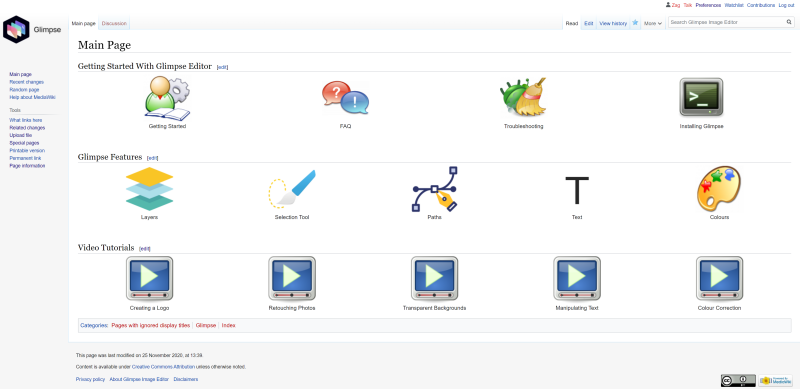
I'd like to propose a new end user Wiki that contains tutorials, feature explanations etc. I can write some of the them but it would be good to get a set of people from the project (both GIMP and Glimpse) to make some tutorials and YouTube Guides.
Let me know if anyone needs a login and is experienced with Media Wiki editing. I like to keep documentation simple and artistic.
I work in education and think this will be useful for our students and the wider community.
Want to help editing this wiki?
Email thedatadb (at) gmail.com and state a username so we can set you up.
 zag2me
All 14 comments
Progress
[x] Installer Page http://glimpse.wiki/index.php?title=Installing_Glimpse
[x] Getting Started
[ ] TroubleShooting
[x] FAQ
[ ] Layers feature page
[ ] Selection tool feature page
[ ] Paths tool feature page
[ ] Text tool feature page
[ ] Colour feature page
[ ] Setup Youtube video tutorial page
zag2me
on 25 Nov 2020
This is really cool! Thank you for starting it 😄
I'm a senior technical writer for my day job, and I have prior credits writing for technology magazines. I can't promise I'll be able to write a huge amount here as I also have to maintain Glimpse Image Editor itself, but I'll do my best.
Hopefully if we can publicise this more we can get the wider community to help contribute too.
 TrechNex
on 25 Nov 2020
TrechNex
on 25 Nov 2020
I'm not personally one experienced in writing "how to" articles, but just want to say that I appreciate this effort :)
 tilda
on 26 Nov 2020
tilda
on 26 Nov 2020
Is the wiki only available via HTTP?
Either way, I'm interested in contributing to the wiki, mainly from design side, though I might write some articles as well.
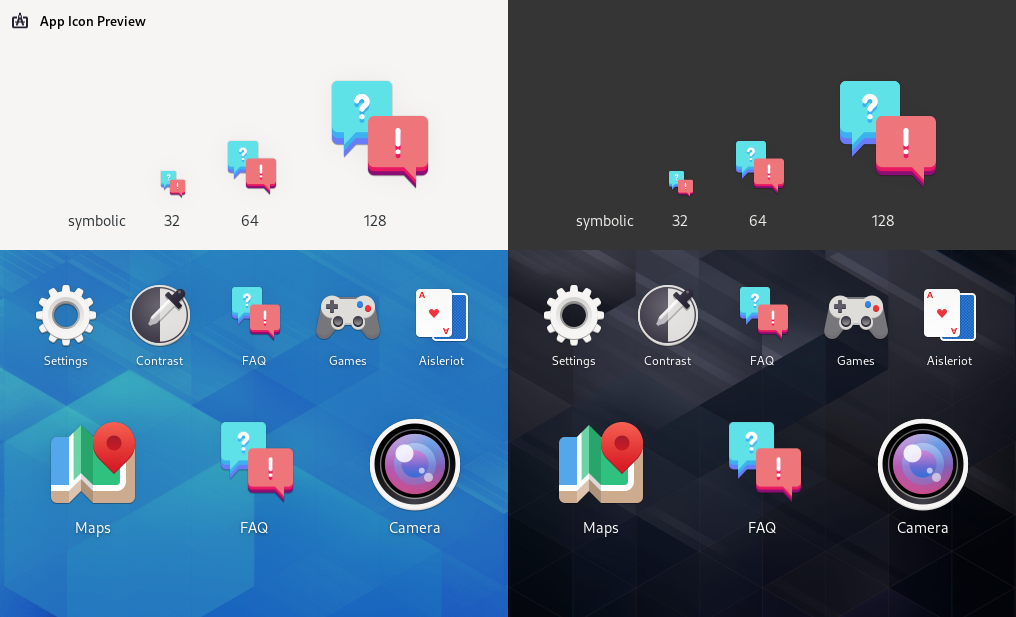
Here's an icon for the FAQ as a glimpse of the direction I want to take. I suppose I'd had to email you to contribute?
 jannuary
on 26 Nov 2020
jannuary
on 26 Nov 2020
Those icons look fantastic, would be great to have a themed set for the wiki.
I've setup HTTPS now on Cloudflare, should be automatic going forward.
Just email me and I will set you up with a username and edit rights on the wiki. I turned off self sign up as they are notorious for spam issues.
zag2me
on 26 Nov 2020
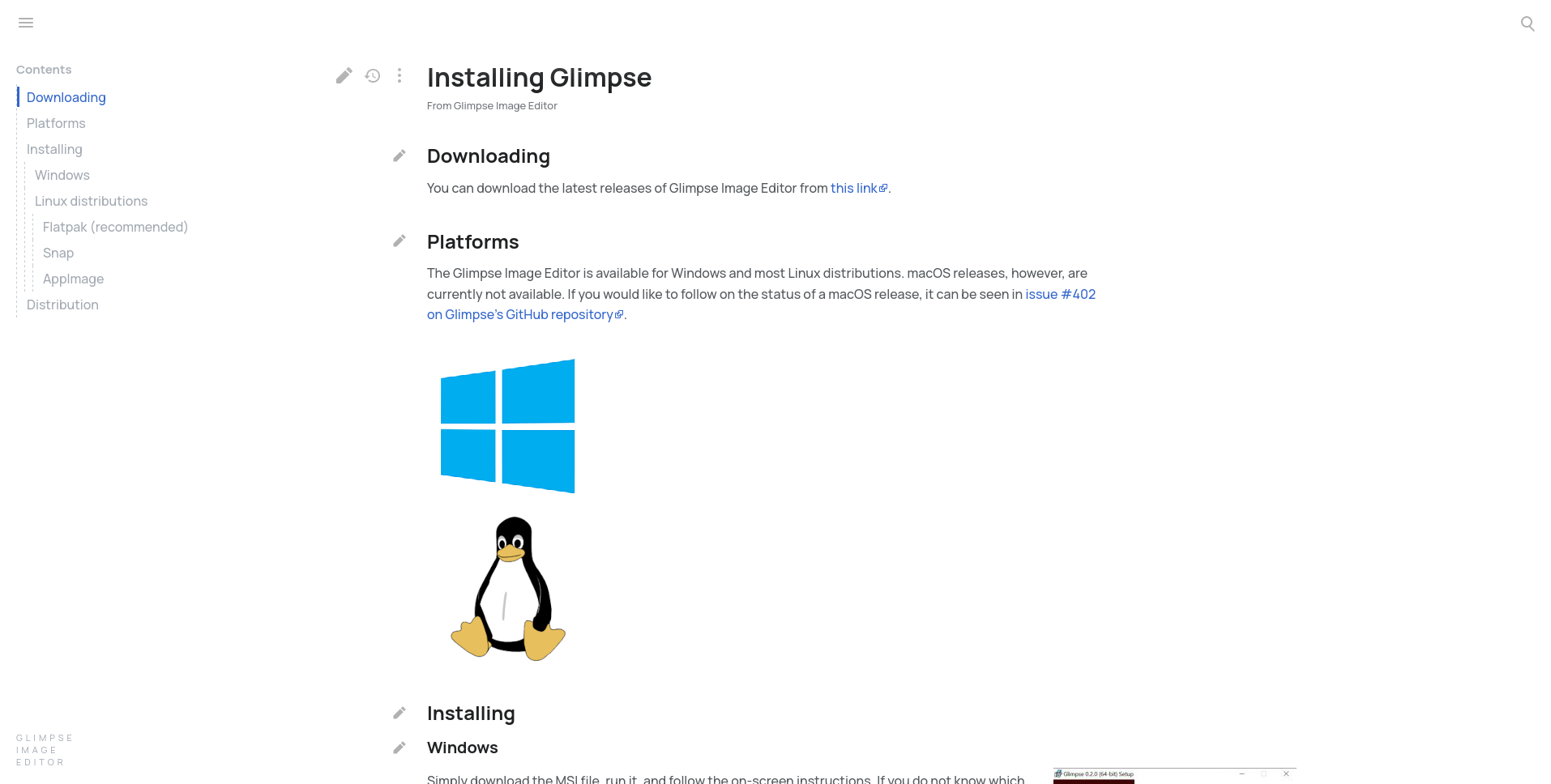
I've always had problems with the default wiki styling and many other projects seem to have had or have the same problem with it.
- The text by default is ridiculously small and not very readable for people with vision issues.
- The styling is old-fashioned and hasn't aged very well
It should be evident that there are other more accessible alternatives for a user-friendly documentation.
I'd like to suggest 2 documentation styles:
- https://docs.blender.org/manual/ (probably the best as other projects use the same styling)
Inkscape, Krita etc. also use this. - https://docs.voidlinux.org/ (very similar but integrated into the website. They switched from wiki)
They both are structured logically and not in an unorderly way as most wiki pages. Wikis are not designed to present information in context but rather in self-contained articles. Example:
It might also be very useful to provide the manual as a pdf, epub or downloadable website (inkscape does that)
just my 2 cents :smile:
 notthewave
on 13 Dec 2020
notthewave
on 13 Dec 2020
@notthewave We we're planning to use a different skin for our wiki, it's up to @zag2me to apply it globally though.
jannuary
on 14 Dec 2020
Thanks, my initial idea was to replicate the Kodi wiki which I helped design here:
https://kodi.wiki/view/Main_Page
But I'm open to any other options, we already installed another theme but it wasn't great for being responsive.
zag2me
on 16 Dec 2020
Blender, Krita and inkscape use:
https://readthedocs.org/
notthewave
on 16 Dec 2020
Do you have links to them @notthewave? This is an end user wiki (not one intended for developers), so it will need to appeal to a non-technical audience that doesn't necessarily know how to ask the right questions.
Big colourful images that direct people to the information they need are a good start imho. 🙂
TrechNex
on 16 Dec 2020
btw for others here adding info to wiki, here are docs that you may find helpful:
Project wiki: https://github.com/glimpse-editor/Glimpse/wiki
Download page with installation instructions: https://glimpse-editor.github.io/downloads/
Contributing links: https://glimpse-editor.github.io/contribute/
Very extensive FAQs page: https://glimpse-editor.github.io/about/
Year in summary and future plans: https://glimpse-editor.github.io/posts/a-year-in-summary/
I'll be updating the website later on this week as we are changing around the way we use Matrix and Discord.
(I recently added a summary of keyboard shortcuts to project wiki, and creating another article on optimizing the UI for a tablet PC is on my TODO list!)
Glimpse Image Editor 0.2.2 is also scheduled for January 2021, and you can see features done & todo here: https://github.com/glimpse-editor/Glimpse/milestone/13
TrechNex
on 16 Dec 2020
Blender:
The general documentation page: https://docs.blender.org/manual/en/latest/
The Manual: https://docs.blender.org/manual/en/latest/
Inkscape:
https://inkscape-manuals.readthedocs.io/en/latest/
notthewave
on 17 Dec 2020
I'm up to make a Spanish translation, but I don't know which site this project is going to use, I'm more inclined for readthedocs.com because it feels modern and easier to navigate.
 stone2forge
on 18 Dec 2020
stone2forge
on 18 Dec 2020
I'm up to make a Spanish translation, but I don't know which site this project is going to use, I'm more inclined for readthedocs.com because it feels more modern and easier to navigate.
The site runs off MediaWiki as of right now.
tilda
on 18 Dec 2020
Related issues
 pipboy96
·
6Comments
pipboy96
·
6Comments
 kofa73
·
6Comments
kofa73
·
6Comments
 TheEvilSkeleton
·
5Comments
TrechNex
·
3Comments
TheEvilSkeleton
·
5Comments
TrechNex
·
3Comments
 jonathancast
·
3Comments
jonathancast
·
3Comments
Most helpful comment
btw for others here adding info to wiki, here are docs that you may find helpful:
Project wiki: https://github.com/glimpse-editor/Glimpse/wiki
Download page with installation instructions: https://glimpse-editor.github.io/downloads/
Contributing links: https://glimpse-editor.github.io/contribute/
Very extensive FAQs page: https://glimpse-editor.github.io/about/
Year in summary and future plans: https://glimpse-editor.github.io/posts/a-year-in-summary/
I'll be updating the website later on this week as we are changing around the way we use Matrix and Discord.
(I recently added a summary of keyboard shortcuts to project wiki, and creating another article on optimizing the UI for a tablet PC is on my TODO list!)
Glimpse Image Editor 0.2.2 is also scheduled for January 2021, and you can see features done & todo here: https://github.com/glimpse-editor/Glimpse/milestone/13