Gliden64: Non-normalized texture coordinates.
TL;DR;
This would be the implementation of texture coordinates in the range (0, texSize) (like the N64 does) rather than transforming them to (0,1) (standard OpenGL range), together withthe use of texelFetch() instead of texture().
LONG VERSION
Texture coordinates are assigned to vertices for processing, and those are rasterized so that texture coordinates are then assigned to fragments (or pixels to put it simply). The N64 uses coordinates in the range (0, texSize) while OpenGL uses coordinates (0,1). In order to use OpenGL's coordinate system, currently GLideN64 divides the value coming from the display lists by texSize to map one interval to the other. This process is called normalization of coordinates.
This may lead to some innacuracies due to the nature of a division in computers. For example, in order to get color at position (1,1) of a texture of size 3x3 the normalized coordinates would be (0.33333333..., 0.33333333....). Because the computer memory can't store these values, they'll be rounded to (0.3333, 0.3333) (shorter than real values for conveniece). When trying to get the color back, it will be multiplied by 3 and color at (0.9999,0.9999) will be retrieved. With point sampling, this may be the color at position (0,0). So as to avoid this, a good practice would be to use coordinates (1.5,1.5) when using normalized coordinates together with point sampling so the error will not be determining the pixel chose, but not all N64 games do this.
The solution to this would be using non-normalized texture coordinates together with texelFetch() function that uses those coordinates. This requieres two things.
TASK 1.
Modify the way texture coordinates are handled for the different primitives and make sure the correct values reach the fragment shader. Probably the most difficult part.
TASK 2.
Handle the texture coordinates. This means,
- Emulate tile attributes in shaders because
texelFetch()doesnt support mirroring, clamping and wrapping. I've done this before in this branch. The good thing is that mirror, clamp and wrap would be accurate to N64.
It would be a function recieving input integer texture coordinates and returning clamped, mirrored and wrapped texture coordinates, based on tile attributes. An example of the goal is listed at the bottom of this page.
2. Reimplement point sample and 3-point filtering (and 4-point if wanted) to adjust to texelFetch() and the coordinates got from above. Not a big deal.
Now, for now I can ignore the first task and use current texture coordinates multiplied by texture size, which is "more or less" correct. Using this texture coordinates I can work on the implementation of the second task. I would like some advice on the design of the code. While working on new texrect coordinate implementation, I have already written most of the code for the task so I'll upload as soon as I can and see if it can be supervised.
As for the first task it will be a hard task so I will need help. The good thing is that they are independent and if I can't accomplish the first task the second one will still be useful and functional.
@gonetz I'd like to hear your input on this and correct me if I said something wrong in the thread.
 standard-two-simplex
All 63 comments
At first glance everything is correct. Don't forget that you need to modify mip-mapping shader as well.
 gonetz
on 28 Sep 2017
gonetz
on 28 Sep 2017
I leave this link here for future reference. Interesting read on how to triangle.
http://www.vg-network.com/2008/04/09/mess-news-n64-emulation/
standard-two-simplex
on 28 Sep 2017
I leave this link here for future reference. Interesting read on how to triangle. http://www.vg-network.com/2008/04/09/mess-news-n64-emulation/
The screenshots are all missing from the blog post, but I assume the issue being referred to is this?
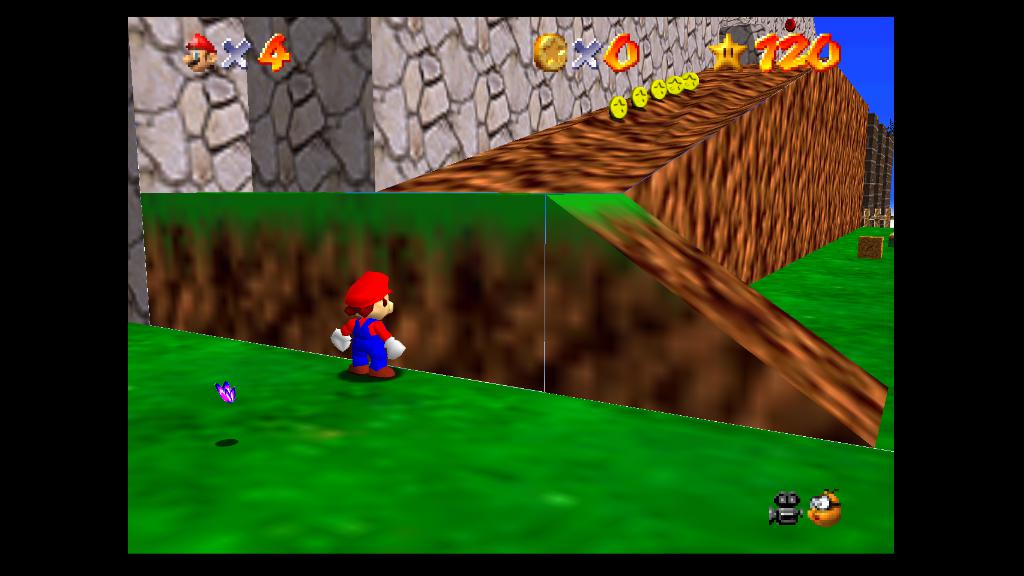
I don't imagine fixing this in GLideN64 would be in any way easy because it's, yet again, a pixel coverage problem. One that is incredibly widespread but rather subtle outside of really problematic games like Mario 64 and Perfect Dark. Years ago I used to wonder why the walls had seams showing skybox behind them on emulators, but not on real hardware.
edit: Found a thread where another coder argues that mooglyguy's drawing sequence in the link above was slightly inaccurate.
http://www.emutalk.net/archive/index.php/t-53938.html
 AmbientMalice
on 28 Sep 2017
AmbientMalice
on 28 Sep 2017
RDP triangle and the edge story is the root cause of the issue with the sky in GE and PD. If there is anything to be fixed to have a good emulation in HLE, this LLE issue should be solved (because sky is drawn directly by LLE command)
 olivieryuyu
on 28 Sep 2017
olivieryuyu
on 28 Sep 2017
Why not rewrite the LLE triangle function to do this all properly?
 ghost
on 28 Sep 2017
ghost
on 28 Sep 2017
I guess because nobody want to do it.
gonetz
on 29 Sep 2017
Makes sense. The documentation is out there to do it right.
This was from CEN64. Someone (krom) was working on a LLE RDP OpenGL based renderer for it. These are what was done so far publically available. It was intended to be based on current angrylion (not Ville Linde's MESS RDP code like z64 was).
Also, krom did some hardware RDP test roms too, with complete documentation on the edge/slope formats.
https://github.com/PeterLemon/N64
ghost
on 29 Sep 2017
Interesting, thanks!
gonetz
on 29 Sep 2017
Why not rewrite the LLE triangle function to do this all properly?
In software or with OpenGL? If it's the second one, is accurate texture colors fetching guaranteed?
That's OpenGL rendered, RDP right?
standard-two-simplex
on 29 Sep 2017
@standard-two-simplex
thats opengl. rdp.
In software or with OpenGL? If it's the second one, is accurate texture colors fetching guaranteed?
Not sure re: acc texture fetching, haven't seen that code in action, just some work in progress shots when krom was working on it, just thought it might be useful as a guide for the LLE triangle rasterization.
ghost
on 29 Sep 2017
some work in progress shots when krom was working on it,
So, it is unfinished, right? And probably not functional.
Could anyone test it?
gonetz
on 29 Sep 2017
Well from what I seen, it was somewhat functional, but yeah, major things like combiners and framebuffer are completely undone, but tile decoding and edge/slope > triangle conversion is done
ghost
on 29 Sep 2017
I wrote a first implementation for the aforementioned second part. It gives mostly same picture as master, except clamp is sometimes wrong for the case when the mask is 0. (See Excitebike intro, Rayman intro, or Zelda pause menus). Disabling clamp for mask = 0 makes those effect render well but breaks others that require it. The load commands have to be checked to see what the expected behaviour is.
I uploaded the code into this branch for those who want to test it. The commented isMask0 = ivec4(0); disables clamp.
standard-two-simplex
on 13 Oct 2017
interesting
can i have a binary please? :)
olivieryuyu
on 13 Oct 2017
Here's a 32bit mupen64plus version. http://s000.tinyupload.com/?file_id=51309173002174387788
AmbientMalice
on 13 Oct 2017
hmm i tried but there is nearly no graphic in any game...
olivieryuyu
on 13 Oct 2017
You may need to disable or clear the shader storage cache since this modifies the shaders
 loganmc10
on 13 Oct 2017
loganmc10
on 13 Oct 2017
nope it is the same white colors and nearly not gfx
olivieryuyu
on 13 Oct 2017
I'm getting wrong graphics too. I might have made an error while refactoring to upload.
What I don't understand is why I got correct graphics when I tested just before uploading.
Edit. Found out why. I didn't implement it wholly so you need to enable 3point filtering, where I made the modifications.
standard-two-simplex
on 13 Oct 2017
@standard-two-simplex could you explain me your math? I see the comment, but details are unclear to me.
ivec4 icoord = ivec4(coord.xxyy) + ivec4(0,1,0,1);
coord is original texture coortinates of the fragment, s, t. icoord is vev4= {s, s+1, t, t+1}. Why?
Then you calculate clamp, wrap mirror flags for all coordinates. Ok.
clamped = min(max(icoord, ivec4(0)), sth.xxyy - stl.xxyy);
Why icoord can't be nagative? Why icoord can't be larger that sth-stl?
Also, are you planing to use dsdx and dtdy parameters?
gonetz
on 16 Oct 2017
ivec4 icoord = ivec4(coord.xxyy) + ivec4(0,1,0,1);
In order to apply a texture filter, I need to know the color of all the texels around coord. Note that, when casting to ivec4 the fractional part is discarded, so I have (floor(s), ceil(s), floor(t), ceil(t)). Because of mirroring, the +1 must be applied before applying mirror, as it could be the texel on the left or on the right. I use an ivec4 in order to do all computations with just one vector.
clamped = min(max(icoord, ivec4(0)), sth.xxyy - stl.xxyy)
Technically, the texture coordinates should be between stl and sth based on whether it's a part of a greater texture, and should be clamped between those values (that's what the N64 programming manual hints at least). However, I think that in current code, coord is between 0 and texture size, which I assumed it has been calculated as sth-stl (can't remember well but I think that I had previously seen that).
I also tried
clamped = min(max(icoord, stl.xxyy), sth.xxyy)
and
clamped = min(max(icoord, ivec4(0)), textureSize(tex, coord,0))
Some effects were better, most worse.
Anyway, clamp is working incorrectly in some cases so I'm open to suggestions.
standard-two-simplex
on 16 Oct 2017
Also, are you planing to use dsdx and dtdy parameters?
It could be done as temporal workaround if it is giving nice image. However, a proper solution would be making coord have the correct value somehow. Either rewriting drawTexrect() and drawTriangle() or computing it in software as mudlord suggested might work, but it is probably quite some work.
standard-two-simplex
on 16 Oct 2017
a proper solution would be making coord have the correct value somehow.
What is correct coord value? If you need original S and T, provided during vertex load, vertex shader passes them in vLodTexCoord variable. It is for standard polygons only, not for rects.
gonetz
on 17 Oct 2017
What is correct coord value? If you need original S and T, provided during vertex load, vertex shader passes them in vLodTexCoord variable. It is for standard polygons only, not for rects.
I would need the interpolation of vertex S,T values based on the relative position of the sample point of the current fragment inside of the primitive.
In current code, this values are normalized and on top of that they have a bias (for texrects it was 0.5*delta, I didn't analyze triangles but there are some visual glitches).
This is generaly done in the rasterization/edgewalking stage, which I believe is non programmable in OpenGL.
standard-two-simplex
on 17 Oct 2017
@standard-two-simplex I added your commits to issue-1603 branch. Your code works when 3-point filtering enabled. It is enough for experiments.
It is not hard to pass original, untouched vertex texture coordinates from vertex shader to fragment as varying variables and do all calculations on them in filter_new. The question: will it increase fetching precision? I'm not sure about it yet.
gonetz
on 17 Oct 2017
I would need the interpolation of vertex S,T values based on the relative position of the sample point of the current fragment inside of the primitive.
I don't understand. Each fragment has texture coordinates, which are interpolation of vertex texture coordinates. Normalization of vertex texture coordinates can be removed.
gonetz
on 17 Oct 2017
I don't understand. Each fragment has texture coordinates, which are interpolation of vertex texture coordinates. Normalization of vertex texture coordinates can be removed.
Yes, but fragment texture coordinates at the moment are not precise. Hence the visual artifacts. I don't understand how exactly they are calculated atm. I tracked it back to vTexCoord0 = aTexCoord0 for rectangles and vTexCoord0 = calcTexCoord(texCoord,0) for triangles in vertex shader.
It is not hard to pass original, untouched vertex texture coordinates from vertex shader to fragment as varying variables and do all calculations on them in filter_new. The question: will it increase fetching precision? I'm not sure about it yet.
It can be done for sure. It would require more than just vertex texture coordinates though. I would need to know the vertices screen coordinates as well.
Again, I don't know if the fragment stage is the right place for the job though. Computing texture coordinates of adjacent fragments should require only 1 sum during rasterization, rather than a whole interpolation.
standard-two-simplex
on 17 Oct 2017
I can't find, why your code does not work with texrects?
gonetz
on 17 Oct 2017
@standard-two-simplex I did not find how to fix your code for texrects. I hacked it:
vec4 filter_new(in sampler2D tex, in mediump vec2 texCoord, int t){ n"
"lowp vec2 coords = texCoord - 0.5; n"
texelFetch(tex,ivec2(coords),0); }"
I needed it to check, can int tex coords help with Ogre Battle and WCW Nitro.
No luck with Ogre Battle. WCW Nitro kinda fixed:
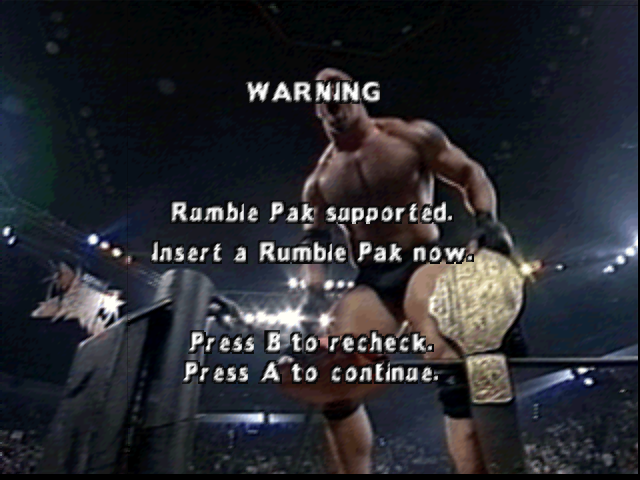
We already discussed problem with Ogre Battle: #1047
"for example for ti_address==0x002f94e8, it is left part of the rectangle with text." This is rectangle with dsdx = 1.1416015625; width=8; uls = 0, lrs=1.1416015625*8=9.1328125
Last pixel of rectangle mapped to texel 9, which is black. I don't understand how render should work to get correct result.
gonetz
on 17 Oct 2017
I think that the problem is that OpenGL takes samples in the middle of the fragment while N64 at the top-left.
For example, texrect with position ulx = 10 gets fragment coordinates (10.5 - 10)*dsdx = 0.5 * dsdx for the 10th screen pixel, when it should take (10 - 10)*dsdx. Hence, there is a bias of 0.5*dsdx. In WCW that texrect had dsdx = 1 so your hack of subtracting 0.5 works.
I can try to use the approach that I did before (probably not best for performance) and if I get it working then think of a better way of getting it done.
standard-two-simplex
on 17 Oct 2017
I think that if you subtract 0.5 in master (you can use TEX_OFFSET macro in 3point) to point sampled textures you shall get the same result. The 3 point filter already subtracts it and I think from tests in the past that OpenGL standard bilinear filtering does something of the style.
standard-two-simplex
on 17 Oct 2017
@gonetz By the way, I want to detect a certain LoadTile() command and debug values. How do I set breakpoints? Is it possible to debug the values in mupen64plus?
standard-two-simplex
on 17 Oct 2017
Of course, it is possible. Open solution in VS, select debug_mupenplus configuration, open project properties, Debugging. Select m64py.exe or other frontend as Command, select path to m64py.exe as Working Directory. Press F5 to run m64py, select GLideN64 as graphics plugin, run some rom and debug. You may set breakpoints in any place of code, in gDPLoadTile for example. I usually first set breakpoint in gDPSetTextureImage with condition gDP.textureImage.address == 0x........ When necessary texture loaded I can debug next commands : set tile, set tile size, load, draw.
gonetz
on 18 Oct 2017
I think that the problem is that OpenGL takes samples in the middle of the fragment while N64 at the top-left.
No, I guess, there is some part of code, which works incorrect on my AMD card. Image in texrects (and probably not only texrects but other polygons with 2D elements) is heavily distorted. I can't show a screen shot right now. NVidia works ok.
gonetz
on 18 Oct 2017
I usually first set breakpoint in gDPSetTextureImage with condition gDP.textureImage.address == 0x........
Ok, thanks. But is there any way I can know the address easily? Can I get that info from a texture dump or something?
standard-two-simplex
on 18 Oct 2017
Original Glide64 (Final one built by me) has internal graphics debugger. Select fullscreen resoltion 1024x768, switch to fullscreen, press ScrollLock and you will get into debug mode. Press Insert at any moment, emulation will paused and you will get detailed info about current frame. Coordinates of each polygon, texture tiles it uses, combiner mode, blender mode, othermodes, detailed info about textures and so on. You may select by mouse any polygon, press space to find texture it uses, press 0 to get info about that texture: RDRAM address, format, size, coordinates, load method and so on. Debugger enabled in release build too.
I implemeted similar tool in GLideN64, but it is buggy atm. It should look like this:
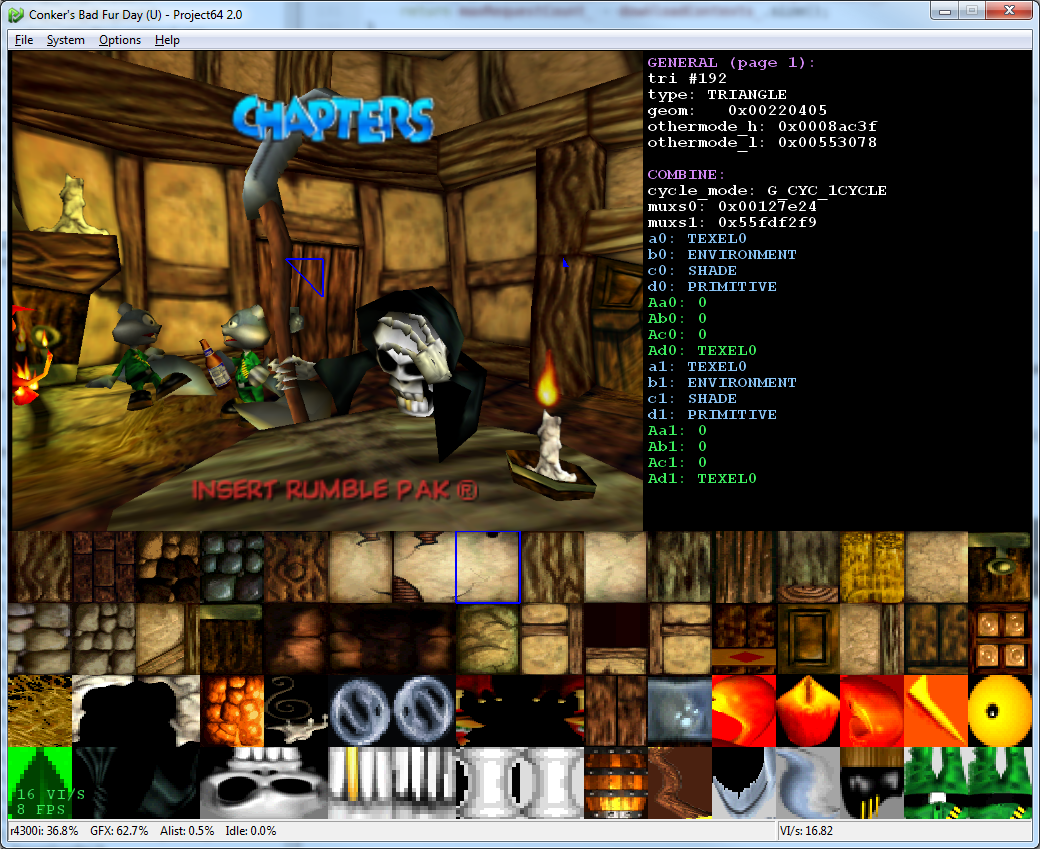
but often fails.
You also may use debug log dump. You need debug build of Glide64 to get debug its debug log.
You may use GLideN64 debug log. You also need to build debug version, and set DebugDumpMode option to 3 (normal) or 7 (detailed). Then during emulation press 'g' to start logging and press 'g' again to stop it.
gonetz
on 18 Oct 2017
I removed texture coordinates normalization: bd6e4ed5af28f686
I don't know, what else can be done with it.
The code works like this on my AMD:
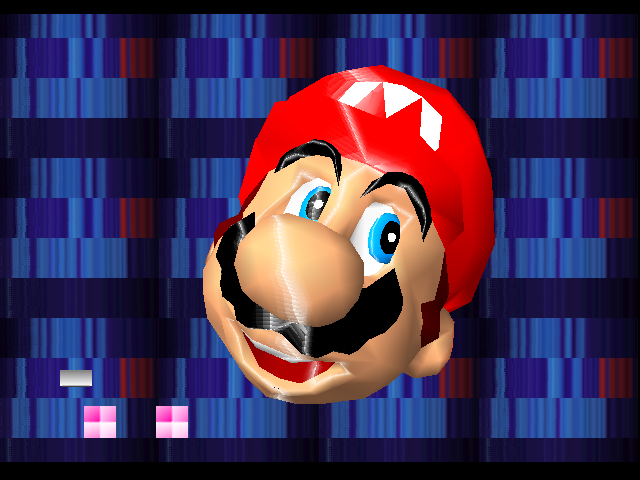
I guess, bitwise operations work incorrect.
gonetz
on 18 Oct 2017
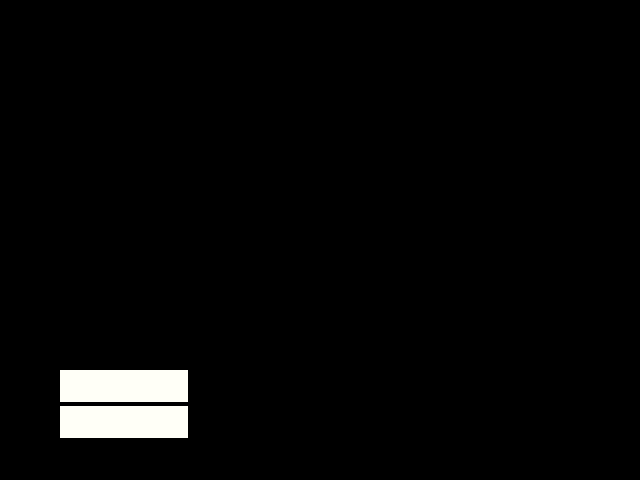
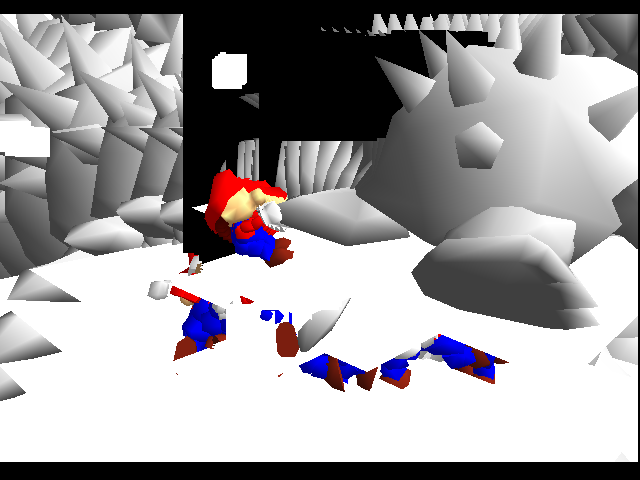
The https://github.com/gonetz/GLideN64/commit/bd6e4ed5af28f686b3513f30c7cf0fa3b2d839f6 build works like this on Intel:
Press Start to Play:
First demo:
 Frank-74
on 18 Oct 2017
Frank-74
on 18 Oct 2017
@gonetz Aren't scaleS, scaleT in drawTexturedRect() responsible for normalization? You left multiplication by those uncommented.
@Frank-74 The build after my changes works ok in my Intel Integrated Chip (4 years old laptop) including bitwise operations. I don't see why Gonetz's changes should break it, I'll test it when I get the time.
standard-two-simplex
on 18 Oct 2017
I just tested and I get right graphics in bd6e4ed with four lines more commented in drawTexturedRect(). However, even without commenting those I still have better image than @gonetz in both my Nvidia and Intel cards.
I'll try to look for a replacement method for the bitwise operations and see if it solves the issue.
standard-two-simplex
on 18 Oct 2017
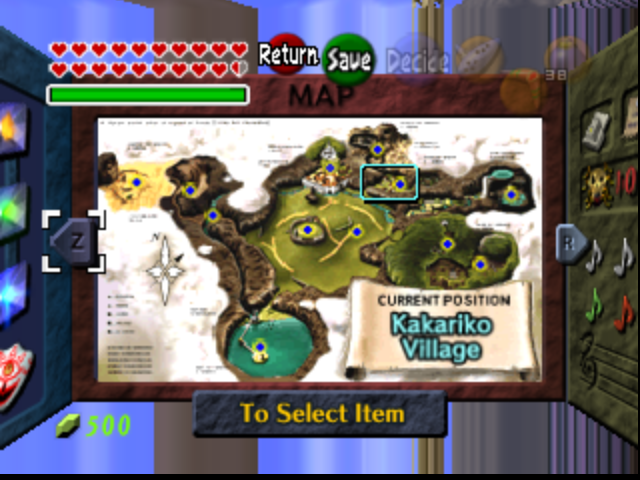
Rects look a little better.
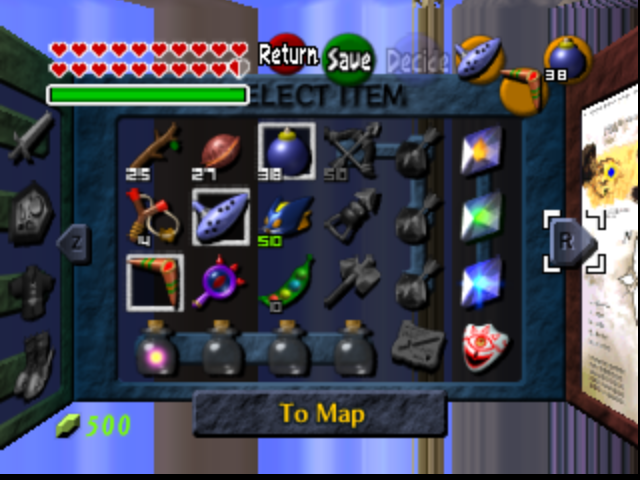
Triangles look a little worse.
standard-two-simplex
on 18 Oct 2017
Aren't scaleS, scaleT indrawTexturedRect() responsible for normalization?
No, they are related to this:
http://n64devkit.square7.ch/pro-man/pro13/13-04.htm#08
Yes, cache.current[t]->scaleS (T) must be commented too, my mistake.
gonetz
on 19 Oct 2017
I'll try to look for a replacement method for the bitwise operations and see if it solves the issue.
It does not sound as a right idea to me. AMD supports bitwise operations. Your code touched some limitation/bug in its implementation. It is better to find a workaround. May be bitwise operations need highp ints. I'll try to adopt your code to AMD if it will prove its usefulness, that is will get more correct result than the current code.
gonetz
on 19 Oct 2017
I think it will be usefull to describe the path, which fragment gets texture coordinate.
Original texture coordinate loaded with vertex from RDRAM. Texture coordinate has s10.5 format, that is it is short integer with 5 bits for fraction part. Vertex loading function converts it to float. For example, original 296 will be converted to 9.25
Texture coordinate in float format passed to vertex shader as vertex attribute. Vertex shader process it:
- scale coordinate by texture sacle value from gSPTexture command. In case of LLE, scaling is done on RSP level and this scale is always 1.
- Devide coordinate by 2 if texture perspective correction is disabled. It is related to N64 internal mechanism of perspective correction.
- Multiply coordinate by ShiftScale, see http://n64devkit.square7.ch/pro-man/pro13/13-04.htm#08
- Subtract tile offset (offset from tile origin to texture origin)
- Add coordinates offset, which is 0.5. OpenGL takes samples in the middle of the fragment while N64 at the top-left. This shift coordinate to middle of the fragment.
- Divide coordinate by texture size to normalize it.
After these manipulations texture coordinate passed to fragment via varying variable.
I removed coordinates offset and normalization in vertex shader. Now fragment gets texture coordinate with only minimal necessary modifications. The question: is it possible to get more correct result with this coordinate and its manual wrapping/clamping/mirroring.
gonetz
on 19 Oct 2017
It is good to know the vertex pipeline I didn't fully understand it from code.
scale coordinate by texture sacle value from gSPTexture command. In case of LLE, scaling is done on RSP level and this scale is always 1.
I assume this is in order to make the texture bigger/smaller than the tiles just put together. In an N64, do you know if this texture is loaded to TMEM or something already resized?
Devide coordinate by 2 if texture perspective correction is disabled. It is related to N64 internal mechanism of perspective correction.
Do you mind pointing to the code where this happens so I can understand better?
Multiply coordinate by ShiftScale
I was thinking of implementing this shift in fragement shader depending on the LOD used, as it will be only a bitwise shift. Now that I think of it, how is it possible that it is applied to the vertex coordinate? Won't you need 2 different vertex coordinates for different LODs?
Add coordinates offset, which is 0.5. OpenGL takes samples in the middle of the fragment while N64 at the top-left. This shift coordinate to middle of the fragment.
I was not aware that this was happening. Was it in vertex code? It might have been the source of some problems, as the bias was that exactly. Your reasoning seems right, but maybe we are assuming something wrong. Solving this mistery should correct major alignment issues even with normalized coordinates.
Is it possible to get more correct result with this coordinate and its manual wrapping/clamping/mirroring
I've found an interesting gist and I'm inclined to think that this alone won't accomplish too much. OpenGL ses barycentric coordinates for interpolation, while N64 a scanline rasterization. Not to mention some parameters (slopes for triangles and delta for rectangles) are passed to the rasterizer for faster rasterization in the N64. Unless the rasterizer is emulated the results won't be 100% accurate.
This is the gist I read. It is written by themaister, who I believe works in parallel-n64 for retroarch. He explains possible approachs for implementing the rasterizer in the GPU.
https://gist.github.com/Themaister/8b314d8cc1bd3728bd562faf58fec84e
standard-two-simplex
on 19 Oct 2017
In an N64, do you know if this texture is loaded to TMEM or something already resized?
I don't understand the question. Texture loaded to TMEM according to tile parameters. I don't know, why texture coordinates scaling is necessary, why not just use scale 1.
Do you mind pointing to the code where this happens so I can understand better?
Vertex shader:
(uTexturePersp == 0 && aModify[2] == 0.0) texCoord *= 0.5;
how is it possible that it is applied to the vertex coordinate? Won't you need 2 different vertex coordinates for different LODs?
ShiftScale is passed to vertex shader in two vec2 uniforms : uCacheShiftScale
Texture coordinates are calculated for each tile:
mediump vec2 calcTexCoord(in vec2 texCoord, in int idx)
{
    vec2 texCoordOut = texCoord*uCacheShiftScale[idx];
....
}
....
  vTexCoord0 = calcTexCoord(texCoord, 0);
  vTexCoord1 = calcTexCoord(texCoord, 1);
I was not aware that this was happening. Was it in vertex code?
Yes:
mediump vec2 calcTexCoord(in vec2 texCoord, in int idx)
{
...
    return (uCacheOffset[idx] + texCoordOut)* uCacheScale[idx];
}
uCacheOffset is uniform
uniform mediump vec2 uCacheOffset[2];
It held tile->offsetS and tile->offsetT, which set in TextureCache::update
    pCurrent->offsetS = 0.5f;
    pCurrent->offsetT = 0.5f;
Unless the rasterizer is emulated the results won't be 100% accurate.
Hardware emulation of N64 rasterizer is interesting programming task, but it is out of this project scope.
Besides, visual difference will not be drastic. GLideN64 in native res mode already is close to angrylion's software plugin. Most of rendering glitches caused by increased resolution. Bilinear filtering gives very different result in native res and in high res. Slits between 2D polygons are because of wrong rounding, which takes effect only in high res, and so on.
gonetz
on 19 Oct 2017
I found out that half of the times where clamp misbehaves is in the intros. (Excitebike, Rayman 2 and Donkey Kong for example). They are mostly nintendo logos. It happens that if I try to open the debugger from Glide64 final in these sections, the emulator crashes. Any ideas why? Could it be CPU rendered or something?
A small note, in Rayman 2, the section of the crash is longer, it even reaches a press start section.
standard-two-simplex
on 19 Oct 2017
About the debugger in Glide64, where do I see info about the tile? And about the primitives? Any way to see the upcoming display lists in the debugger?
I have managed to see the same as in your screenshot, but not more. Are there more pages?
standard-two-simplex
on 19 Oct 2017
2D in Rayman intro is CPU rendered.
Debugger: 0-9 pages, 0 is texture page
A, S D texture display modes (color, alpha, both),
Q,W switch between t0 and t1 texture cache.
Space - find texture for current polygon.
Left-Right circle through polygons
Up- Down scroll texture cache.
gonetz
on 20 Oct 2017
2D in Rayman intro is CPU rendered.
So which function in GlideN64 draws that into its colorbuffer?
Edit: More precisely, I need to make sure that the clamp width and height values are correct for CPU rendered rectangles.
standard-two-simplex
on 20 Oct 2017
So which function in GlideN64 draws that into its colorbuffer?
Sorry for late answer. It is
RDRAMtoColorBuffer::copyFromRDRAM
gonetz
on 22 Oct 2017
RDRAMtoColorBuffer::copyFromRDRAM
So I managed to load the uniforms with right info and now intros work. Only Zelda pause screen left to investigate.
I'll upload code tomorrow (it was just adding info to tile0 which was initialized to 0).
standard-two-simplex
on 22 Oct 2017
So, it is up.
https://github.com/standard-two-simplex/GLideN64/commit/985734ee1f2d377a28ea281e03bf3d266323e1ad
standard-two-simplex
on 23 Oct 2017
I build it.
Good news: it works. You need to set 3-point filtering first, otherwise shaders will not compile.
The question: which problems are solved with new texture fetching? I don't see any improvements, only regressions.
gonetz
on 24 Oct 2017
The intros work. The non normalization steps created an issue. It has to be seen wether all the steos taken are correct. It seems that the offset removal in calctexcoors is hurting
standard-two-simplex
on 24 Oct 2017
Hi, I've been reading the existent code and I have most alignment issues figured out, but still some remain. Some doubts:
In UTextureParams::update() you're setting fuls = float(gSP.textureTile[t]->uls % (1 << gSP.textureTile[t]->masks)); which is then passed to uTexOffset in the shader. That is the wrapped value of the integral part of the offset but the offset is supposed to have a fractional part. Is there any reason to ignore it?
The aforementioned offset uTexOffset is subtracted in calcTexCoords() in vertex shader so that the texture coordinate is relative to the tile. However, in the case of textured rectangles this offset is also subtracted in GraphicsDrawer::drawTexturedRect() by texST[t].s0 = _params.uls * shiftScaleS - gSP.textureTile[t]->fuls;. Is there any reason to subtract twice?
standard-two-simplex
on 26 Oct 2017
Regarding fuls : this code used only for frame buffer textures. Yes, we can use fuls and fmod here, it should not hurt.
Regarding uTexOffset. Only VertexShaderTexturedTriangle has calcTexCoord. VertexShaderTexturedRect uses provided texture coordinates as is.
gonetz
on 26 Oct 2017
Regarding uTexOffset. Only VertexShaderTexturedTriangle has calcTexCoord. VertexShaderTexturedRect uses provided texture coordinates as is.
Thanks, I had overlooked that fact.
The main issue lies in the rasterization process. This is when OpenGL-s sampling and N64-s doesn't coincide. In order to solve that I shifted the scene by 0.5 instead of the texture coordinates. I also eliminated the remaining texture coordinate offsets, which I assume where there trying to accomplish this.
I did it for texture rectangles and they look OK. Only those with negative delta are giving me headaches. I need to shift triangles too. What is the best way to accomplish this? Shift position in GraphicsDrawer::addTriangle() or some vertex load function?
standard-two-simplex
on 26 Oct 2017
In order to solve that I shifted the scene by 0.5 instead of the texture coordinates.
How you did it?
I need to shift triangles too. What is the best way to accomplish this?
I need to understand, what are you trying to do. Rectangles coordinates are in screen space.
Triangles coordinates in HLE mode are not in screen space. How you going to shift them?
BTW, in your old branch "new_texrect_coords", in commit 745bbcb863c2f851 you do "Set origin in the upper left and pixel center on integers for gl_FragCoord"
Why not use that trick instead of scene shift?
gonetz
on 26 Oct 2017
How you did it?
Sorry I didn't express myself very well. I only shifted the rectangles in the scene. I want to shift the whole scene. I did that by changing ulx, uly calculation in GraphicsDrawer::drawTexturedRect(). Apply shift by 0.49 for better results.
I need to understand, what are you trying to do.
I need to move vertex position to the right by 0.5 pixels. For normalized coordinates that should be something like 0.5*2/buffersize. I'm not sure it's neccessary for triangles but I wanted to test it.
standard-two-simplex
on 26 Oct 2017
I don't know how to do it with HLE. LLE triangle has screen space coordinates, so you may change vertex position as you like in drawScreenSpaceTriangle.
gonetz
on 26 Oct 2017
Why not use that trick instead of scene shift?
That doesn't change anything, only the reading value of gl_FragCoord. OpenGL will still sample in the same place, only this place will have different screen coordinates.
What I was doing in Ogre Battle 64 branch was rasterizing the texture coordinates in fragment shader based on texrect parameters. Doing so with triangles is more difficult, but possible as well. I would need all triangle parameters on fragment shader. I might test it and see what's needed.
standard-two-simplex
on 26 Oct 2017
TL;DR;
This would be the implementation of texture coordinates in the range (0, texSize) (like the N64 does) rather than transforming them to (0,1) (standard OpenGL range), together withthe use of texelFetch() instead of texture().
https://github.com/standard-two-simplex/GLideN64/tree/texcoord_refactor
I have started refactoring the earliest stage of the fragment shader in order to make the code more modular and expose suspicious texture coordinate paddings. Now each module does its job.
- Texture engine: Takes texture coordinates and generates an address within the texture (two integer coordinates indicating position) for each neighbouring pixel.
- Texture filter: Performs the texel fetches and mixes them.
The aim of the branch is to reproduce the math the master branch does, but by making the code clearer. So the changes should not fix nor introduce bugs. The only change I introduced was to clamp, wrap and mirror as specified here https://github.com/gonetz/GLideN64/issues/2155, which seems to fix the issues.
All the texture coordinate transformations are performed earlier (either in the vertex shader or graphicsdrawer if I'm not mistaken. This way it will be easier to tackle this sort of issues (https://github.com/gonetz/GLideN64/issues/2097, https://github.com/gonetz/GLideN64/issues/1047,https://github.com/gonetz/GLideN64/issues/1332 etc.).
I believe I supported everything except MSAA so far. I would appreciate it if whoever has the time and will to test this did it. It is based on the master branch from december, so it doesn't have the newest features, bear that in mind.
I post WIP and BASE builds. Please, post any issues present in WIP but not in BASE.
build.zip
Edit: multisampling supported now in the branches newest commit.
standard-two-simplex
on 6 Apr 2020
Related issues
gonetz
·
14Comments
 andrea-petrucci-1975
·
8Comments
olivieryuyu
·
12Comments
gonetz
·
10Comments
andrea-petrucci-1975
·
8Comments
olivieryuyu
·
12Comments
gonetz
·
10Comments
 Nerrel
·
8Comments
Nerrel
·
8Comments
Most helpful comment
Makes sense. The documentation is out there to do it right.
https://pastebin.com/Z5gnFbLJ
This was from CEN64. Someone (krom) was working on a LLE RDP OpenGL based renderer for it. These are what was done so far publically available. It was intended to be based on current angrylion (not Ville Linde's MESS RDP code like z64 was).
Also, krom did some hardware RDP test roms too, with complete documentation on the edge/slope formats.
https://github.com/PeterLemon/N64