Gliden64: List of hotkeys to implement.
There are several feature requests to add a hotkey for some action/setting: #659, #1390, #1496, may be others. I created this ticket to get the full list of necessary hotkeys.
 gonetz
All 24 comments
IMO, hotkeys were an absolute pain in Glide64 because people kept accidentally pressing them. it would be ideal for them to be disabled by default.
 AmbientMalice
on 29 May 2017
AmbientMalice
on 29 May 2017
Sure, hot keys should be customizable. Enable, disable, set key etc.
gonetz
on 29 May 2017
I agree. I would like to help with a UI.
 Aquatakat
on 30 May 2017
Aquatakat
on 30 May 2017
Thanks in advance :)
gonetz
on 30 May 2017
I'm waiting for suggestions, which hotkeys can be useful.
gonetz
on 30 May 2017
Personally I'd like hotkeys for the three OSD displays.
Aquatakat
on 31 May 2017
I think a hotkey to disable/enable custom textures would also help a lot. I spend a lot of time comparing my new textures to the originals for accuracy and as far as I'm aware going in and out of the menu is the only way to switch them on and off.
 Nerrel
on 2 Jun 2017
Nerrel
on 2 Jun 2017
Sorry to bump this issue, but now that most features are already implemented, this one should be in a good position to be worked on =)
 DonelBueno
on 29 Jun 2018
DonelBueno
on 29 Jun 2018
There is a Russian saying "обещанного три года ждут". It can be translated as
"He who expects from a promise a lot must wait for three years or maybe not".
Three years passed since I opened this task and finally I started to work on it.
Current results are in "hotkeys" branch: https://github.com/gonetz/GLideN64/tree/hotkeys
Details:
- While virtually any setting may be hot-keyed I implemented only those hotkeys which users asked me to add plus some from myself. That is, the list of hotkeys can be extended.
- Only a single key can be assigned to the hotkey, that is without alt, ctrl and shift modifiers. Modifiers are hard to support on plugin's level because plugin is not a dialog.
- Key is stored in config file as USB HID code. Explanation is here: https://stackoverflow.com/questions/8737566/rolling-ones-own-keyboard-input-system-in-c-c
- It probably would be more right to use SDL 2.0 to handle keypress, but I don't want to add SDL dependency, at least on Windows. So, hotkeys currently supported only on Windows with use of Windows API.
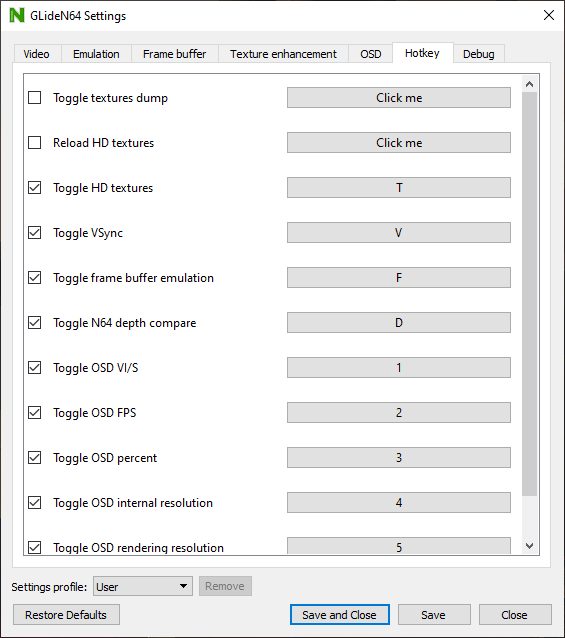
- Zilmar-spec GUI: I added new tab to the Config Dialog: "Hotkey". It contains one widget - list of available hotkeys.
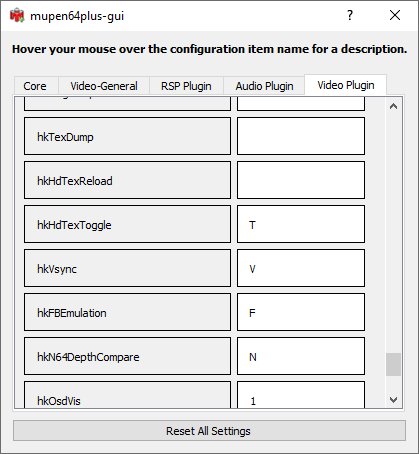
Each list item has a checkbox on the left and a button on the right. To set a hotkey you need to enable its checkbox and press its "Click me" button. The key you press after that will be assigned to that hotkey. Why do you need to check the hotkey, and not just assign a key for it? You may need to disable some hotkey in a future. Uncheck the hotkey to disable it. If you see a better solution, please tell me. - I can't do anything fancy for mupen64plus. Hotkey setting here has string type. User type an ASCII character, which should be used as the hotkey. "0" - "9" and "A" - "Z" characters are supported. It can be extended latter with more advanced processing of hotkey value. Empty value means that hotkey is disabled.
Feedback is welcome.
gonetz
on 9 Nov 2020
Test builds, all but WTL:
https://drive.google.com/file/d/1IDONpg0JSn40a1S2maYaat2Qt5LbE_yd/view?usp=sharing
Thanks Jj0YzL5nvJ for the build script!
gonetz
on 10 Nov 2020
@oddMLan Is it possible to support hotkeys in WTL version of GUI?
gonetz
on 10 Nov 2020
@oddMLan Is it possible to support hotkeys in WTL version of GUI?
Sure, I'll look into it later tonight.
EDIT: Woah, change is pretty big. I willl need more time to work out how it works and to re-implement the equivalent functions to wtl where required. Need to read on the QtKeyEvent class. I know it's possible since the Project64 Input plugin uses WTL and reads keypresses to set the controller bindings. Also I'm a bit busy with school and work.
 oddMLan
on 10 Nov 2020
oddMLan
on 10 Nov 2020
@gonetz wow, finally. I've been waiting for this for so long xD
I've downloaded and tested the build and it's working fine here (Qt Project64). When toggling vsync, the shaders are recompiled, is that right?
DonelBueno
on 11 Nov 2020
When toggling vsync, the shaders are recompiled, is that right?
I'm not sure how to toggle vsync on the fly with mupen64plus. I can use wglSwapIntervalEXT with zilmar-spec, but I don't know how to tell mupen64plus to change vsync for the current graphics context. So, I re-create the context with vsync on/off. If shader storage is off, shaders will be recompiled.
gonetz
on 12 Nov 2020
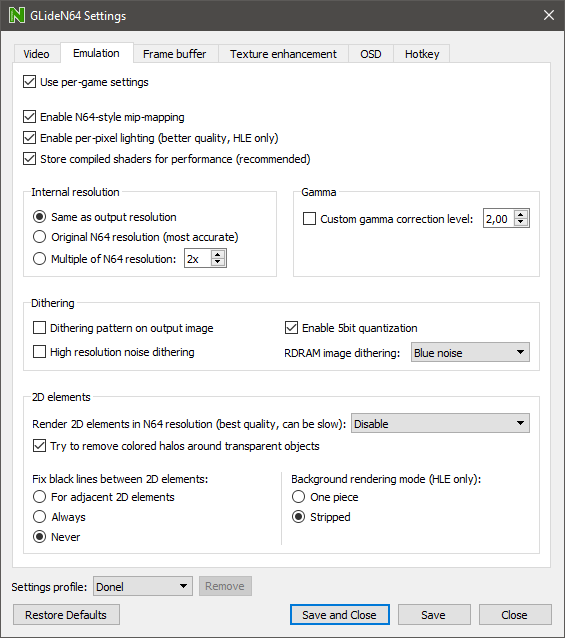
Shader storage is turned on here.
DonelBueno
on 12 Nov 2020
Shader storage is turned on here.
How did you notice that shaders files are recompiled on vsync toggle? I see only message "Loading combiner shaders". GLideN64.xxxxxxxx.OpenGL.shaders file updated only if some new shader was compiled between the moments when vsync was toggled.
gonetz
on 14 Nov 2020
@oddMLan I not only added a new hotkeys controls but also removed the old ones for textures dump and reload.
That broke compilation of GLideNUI-WTL. I fixed it and uploaded the new version of hotkeys branch.
Could you estimate how long it will take to implement hotkeys in GLideNUI-WTL?
If it needs more than two weeks I will merge that branch to master as it is now. Hotkeys is not a so vital feature.
gonetz
on 16 Nov 2020
@gonetz sorry, it was a mistake on my end, ignore the report.
DonelBueno
on 16 Nov 2020
@oddMLan I not only added a new hotkeys controls but also removed the old ones for textures dump and reload.
That broke compilation of GLideNUI-WTL. I fixed it and uploaded the new version of hotkeys branch.
Could you estimate how long it will take to implement hotkeys in GLideNUI-WTL?
If it needs more than two weeks I will merge that branch to master as it is now. Hotkeys is not a so vital feature.
I don't think it'll take longer than a couple days to implement it, but I'll be busy this week with school, so I'll give it shot during the weekend.
oddMLan
on 16 Nov 2020
I'll give it shot during the weekend.
Ok, thanks.
gonetz
on 16 Nov 2020
it was a mistake on my end, ignore the report.
ok
gonetz
on 16 Nov 2020
@gonetz Sorry, I won't be able to do the WTL code by this week, end of semester is putting a lot of pressure on me :(. I think it's best you merge the code as-is to master and I'll prepare the code for WTL when I have more time.
oddMLan
on 25 Nov 2020
thank you so much
 Nes-player4Life
on 26 Nov 2020
Nes-player4Life
on 26 Nov 2020
I think it's best you merge the code as-is to master and I'll prepare the code for WTL when I have more time.
Done.
thank you so much
:)
gonetz
on 2 Dec 2020
Related issues
gonetz
·
10Comments
 NurioHin
·
10Comments
NurioHin
·
10Comments
 olivieryuyu
·
20Comments
olivieryuyu
·
20Comments
 schubertguilherme
·
19Comments
schubertguilherme
·
19Comments
 IceLancerSR
·
15Comments
IceLancerSR
·
15Comments