Glide: Pixelated picture when setting ratio to ImageView on RecyclerView
Glide Version: 4.6.1
Integration libraries:
api 'com.github.bumptech.glide:okhttp3-integration:1.4.0@aar'
api 'com.android.support.constraint:constraint-layout:1.0.2'
api 'com.android.support:cardview-v7:27.0.2'
Device/Android Version: Nexus 5X API 24
Issue details / Repro steps / Use case background:
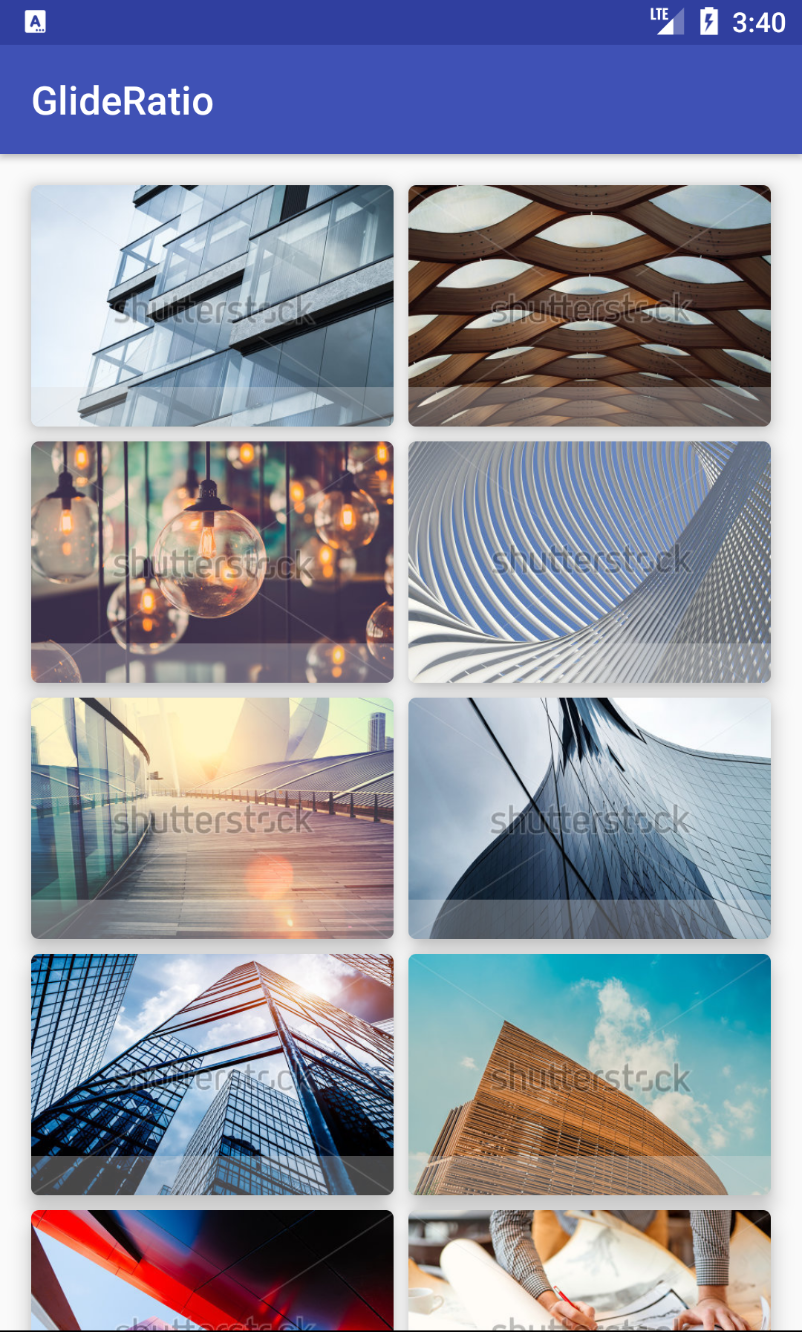
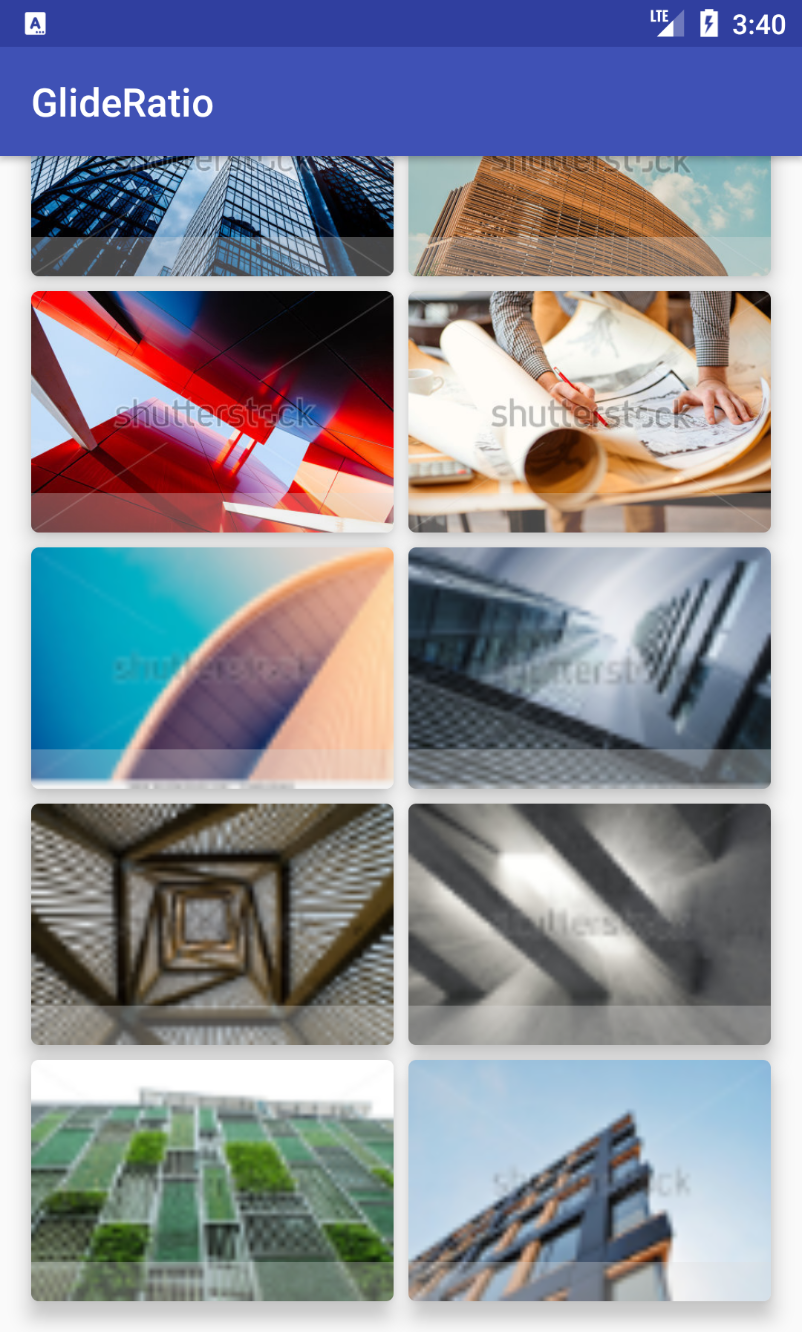
I'm trying to display a list of pictures with a RecyclerView. First items are looking ok, but when scrolling down, the following items (that were previously invisible to user) appear pixelated.
My items are CardViews, containing ConstraintLayout in which I have an ImageView and a simple View with colored background (see XML and screenshots below for more detail). With the help of ConstraintLayout, ImageView is forced to a ratio of 3:2.
When setting a fixed height to the ImageView, it works fine. When removing colored View, it works fine too.
A workaround is to set the View (the one with colored background) visibility to GONE and make it visible only when Glide finished loading:
Glide.with(context)
                .load(resourceId)
                .listener(object : RequestListener<Drawable> {
                    override fun onLoadFailed(e: GlideException?,
                                              model: Any?,
                                              target: Target<Drawable>?,
                                              isFirstResource: Boolean): Boolean = false

                    override fun onResourceReady(resource: Drawable?,
                                                 model: Any?,
                                                 target: Target<Drawable>?,
                                                 dataSource: DataSource?,
                                                 isFirstResource: Boolean): Boolean {
                        tileView.visibility = View.VISIBLE
                        return false
                    }
                })
                .into(tilePicture)
Glide load line / GlideModule (if any) / list Adapter code (if any):
class TileView : CardView {

    constructor(context: Context) : this(context, null)
    constructor(context: Context, attrs: AttributeSet?) : this(context, attrs, 0)
    constructor(context: Context, attrs: AttributeSet?, defStyleAttr: Int) : super(context, attrs, defStyleAttr) {
        init()
    }

    private fun init() {
        val root = LayoutInflater.from(context).inflate(R.layout.item_tile, this, true)

        (root as CardView).radius = context.resources.getDimension(R.dimen.radius_tile_cardview)
        ViewCompat.setElevation(this, context.resources.getDimension(R.dimen.elevation_tile_cardview))
    }

    override fun onAttachedToWindow() {
        super.onAttachedToWindow()

        val margin = context.resources.getDimensionPixelOffset(R.dimen.margin_tile_cardview)
        val marginLayoutParams = this.layoutParams as ViewGroup.MarginLayoutParams?
        marginLayoutParams?.setMargins(margin, margin, margin, margin)
                ?.let { layoutParams = marginLayoutParams }
    }

    fun bindTile(resourceId: Int) {
        Glide.with(context)
                .load(resourceId)
                .into(tilePicture)
    }
}
class TileAdapter(private val context: Context,
                  private val tiles: List<Int> = listOf())
    : RecyclerView.Adapter<TileAdapter.GameViewHolder>() {


    override fun onCreateViewHolder(parent: ViewGroup?, viewType: Int): GameViewHolder = GameViewHolder(TileView(context))

    override fun getItemCount() = tiles.size

    override fun onBindViewHolder(holder: GameViewHolder, position: Int) {
        (holder.itemView as TileView).bindTile(tiles[position])
    }

    class GameViewHolder(itemView: TileView) : RecyclerView.ViewHolder(itemView)
}
Layout XML:
<merge xmlns:android="http://schemas.android.com/apk/res/android"
    xmlns:app="http://schemas.android.com/apk/res-auto"
    xmlns:tools="http://schemas.android.com/tools"
    android:layout_width="match_parent"
    android:layout_height="wrap_content"
    tools:parentTag="android.support.v7.widget.CardView">

    <android.support.constraint.ConstraintLayout
        android:layout_width="match_parent"
        android:layout_height="wrap_content">

        <ImageView
            android:id="@+id/tilePicture"
            android:layout_width="0dp"
            android:layout_height="0dp"
            android:scaleType="centerCrop"
            android:transitionName="thumbnail"
            app:layout_constraintBottom_toBottomOf="parent"
            app:layout_constraintDimensionRatio="w,3:2"
            app:layout_constraintEnd_toEndOf="parent"
            app:layout_constraintStart_toStartOf="parent"
            app:layout_constraintTop_toTopOf="parent" />

        <View
            android:id="@+id/tileView"
            android:layout_width="0dp"
            android:layout_height="20dp"
            android:background="#51DDDDDD"
            app:layout_constraintBottom_toBottomOf="parent"
            app:layout_constraintEnd_toEndOf="parent"
            app:layout_constraintStart_toStartOf="parent"/>

    </android.support.constraint.ConstraintLayout>

</merge>
Stack trace / LogCat:
None
Sample project to reproduce the issue: https://github.com/NFesquet/GlideRatio
 NFesquet
All 7 comments
Does using waitForLayout fix the issue?
Glide.with(context)
  .load(url)
  .into(imageView)
  .waitForLayout();
 sjudd
on 1 Mar 2018
sjudd
on 1 Mar 2018
Unfortunately no, it does not work.
NFesquet
on 1 Mar 2018
.waitForLayout();
It worked fine to me bro #2922
But it take a little bit time to display the picture, So I think that If you loaded the big size picture, It would be spend to much time. I
 thanhthein
on 1 Mar 2018
thanhthein
on 1 Mar 2018
Oh I think I understand.
Your ImageView's dimensions are set based on it's parent. The parent's height is based on it's children (wrap_content). The only child with a defined height before any content is in the ImageView is the colored view, which has a height of 20dp. As a result the parent ends up with a height of 20dp and therefore so does the ImageView. When Glide goes to load the image, it sees the relatively small size of the ImageView and uses that when loading the image.
You're probably better off using override() here to specify the size image you want. If you just want the original unmodified image and you know that the image size will always be less than a certain dimension, you can use Target.SIZE_ORIGINAL. Otherwise you'll want to pick a specific size.
sjudd
on 2 Mar 2018
This is what I thought was happening. The override solution with Target.SIZE_ORIGINAL works fine but I am not sure what the possible side effects are. For your information, my images will always be 450x300px. They will be cached with their original sizes too? If I need to reuse them in another view with different ImageView size, I guess that setting the same override configuration will use the cached images?
NFesquet
on 2 Mar 2018
They will be cached in their original sizes with .override(Target.SIZE_ORIGINAL). If you need to re-use them in another view and apply .override(Target.SIZE_ORIGINAL) the cached image should be used. For more information about caching, see http://bumptech.github.io/glide/doc/caching.html.
The side affects of using Target.SIZE_ORIGINAL are that Glide performs no downsampling or resizing. If you load images that aren't from a source you control, you will OOM if the user tries to view a super large image. If you load images that are substantially larger than the View you're loading them into, you'll waste some amount of memory holding the decoded image in memory and it will also take longer than necessary to load the image (decode times are a function of the image size on disk, which is usually a function of the number of pixels).
sjudd
on 2 Mar 2018
This issue has been automatically marked as stale because it has not had activity in the last seven days. It will be closed if no further activity occurs within the next seven days. Thank you for your contributions.
![stale[bot] picture](https://avatars3.githubusercontent.com/in/1724?v=4&s=40) stale[bot]
on 9 Mar 2018
stale[bot]
on 9 Mar 2018
Related issues
 r4m1n
·
3Comments
r4m1n
·
3Comments
 kooeasy
·
3Comments
kooeasy
·
3Comments
 StefMa
·
3Comments
StefMa
·
3Comments
 billy2271
·
3Comments
billy2271
·
3Comments
 kenneth2008
·
3Comments
kenneth2008
·
3Comments