Glide: ImageView does not load new resoure if I use byte array
Glide Version:
compile 'com.github.bumptech.glide:glide:4.3.1'
annotationProcessor 'com.github.bumptech.glide:compiler:4.3.1'
Issue details / Repro steps / Use case background:
I use byte[] data to display image of a radio station as a image resource. Each time I click "Next" button, the current station is changed, and the ImageView should have displayed the corresponding image. However, it draw the image that was load for the first time, even when I open application again.
On the other hand, everything works if I load image from other source such as url or drawable folder.
How can i solve this problem?
Glide load line / GlideModule (if any) / list Adapter code (if any):
GlideApp.with(mContext)
                .load(Base64.decode(currentStation.getBase64Image(), Base64.DEFAULT))
                .into(ivStation);
 haihack
All 11 comments
I've added a test for this that seems to pass. Each subsequent load of a byte array seems to produce a separate image: https://github.com/sjudd/glide/commit/f1758e5b8667a1c612db86cb075a5e86b7d05c92
I also used this issue as an example in an article describing how to writing failing test cases for issues: http://bumptech.github.io/glide/tut/failing-test-cases.html
Do you think you could follow that guide or update the case case I pushed and see if you can find a way to make it fail or an alternative that demonstrates the failure you're reporting here?
 sjudd
on 25 Nov 2017
sjudd
on 25 Nov 2017
Thank you for instructing me carefully, even taking me as the example in your tutorial.
I tried doing some modifications on your test, they all pass as you think. However, I don't believe in the result cause I've never experienced writing unit test and I couldn't see how the bitmap was displayed.
So I decided to reproduce my issue and push to github. The demo is simple as below:
final String image1 = "Abc2....";
final String image2 = "Abc1....";

        final ImageView ivBackground = findViewById(R.id.backGround);
        Button btn1 = findViewById(R.id.btn1);
        btn1.setOnClickListener(new View.OnClickListener() {
            @Override
            public void onClick(View view) {
                GlideApp.with(MainActivity.this).load(Base64.decode(image1, Base64.DEFAULT)).into(ivBackground);
            }
        });
        Button btn2 = findViewById(R.id.btn2);
        btn2.setOnClickListener(new View.OnClickListener() {
            @Override
            public void onClick(View view) {
                GlideApp.with(MainActivity.this).load(Base64.decode(image2, Base64.DEFAULT)).into(ivBackground);
            }
        });
I converted from base64 encoded image to byte array and loaded to ImageView by using 2 buttons.
Could you take a look on that.
https://github.com/haihack/Issue2638
haihack
on 25 Nov 2017
I have the same issue. I don't have my computer with me. But I can try to help for reproduce this 👍
 Kevinrob
on 25 Nov 2017
Kevinrob
on 25 Nov 2017
Thanks for the sample app! I'm able to reproduce this now and I have a test case.
The issue is that the second request is actually completing from the disk cached result of the first request. Because it's loaded from the disk cache with JPEG compression, the Bitmaps before disk caching and after disk caching aren't exactly identical, even though the image they contain is the same.
You can work around this in 4.3.1 by using:
Glide.with(context)
  .asDrawable()
  .load(bytes)
  .into(imageView)
That method will add a unique key and disabling caching as we expect.
It's worth noting however that you're better off not loading from byte[]s. We can't generate effective cache keys for them, and running Base64.decode on the main thread is probably going to introduce some jank. You could add a custom ModelLoader that does the Base64 decoding from the base64 encoded String or a wrapping POJO that implements equals/hashcode in a sane way.
sjudd
on 25 Nov 2017
The second request is actually completing from the disk cached result of the first request
I'm not clear about this, could you explain in more detail.
I would appreciate if you could give me a example of using ModelLoader that can be used in the context as you said.
haihack
on 26 Nov 2017
The disk cache Key in Glide 4.3.1 is always EmptySignature.get(), so it's constant for all loads with byte[]. We work around this in RequestBuilder when load(byte[]) is called. There's a bug where RequestManager#load(byte[]) calls RequestBuilder#load(Object), which means that the work around logic in RequestBuilder#load(byte[]) is never called. If that makes any more sense.
I would appreciate if you could give me a example of using ModelLoader that I can be used in the context as you said.
How are you obtaining the byte[]? Can you provide the code you're using to acquire them?
sjudd
on 27 Nov 2017
The bug I mentioned is fixed here: 861329226e3dffa0e096c3200fb6b96a1613ba83
sjudd
on 27 Nov 2017
I'm going to close this because the underlying issue is fixed, but feel free to follow up with any questions here anyway.
sjudd
on 27 Nov 2017
How are you obtaining the byte[]? Can you provide the code you're using to acquire them?
I use executeQuery from sqlite database to get Blob type, then convert in to byte array
Blob blob = rs.getBlob("database_field");
int blobLength = (int) blob.length();
byte[] blobAsBytes = blob.getBytes(1, blobLength);
So you're better off moving the SQLite query into a ModelLoader and DataFetcher. That way you don't make the sqlite query when you're loading images that are already in Glide's disk or memory cache.
sjudd
on 30 Nov 2017
@sjudd Hi, I have almost the same problem as @haihack but only if I have added cache strategy. The source code is the same as here https://github.com/haihack/Issue2638 I only changed glide version to 4.9.0 and add cache strategy .apply(RequestOptions.diskCacheStrategyOf(DiskCacheStrategy.ALL))
This bug reproduces not every time but sometimes loaded image isn't the one I expected. I have attached a video to help you understand the problem. 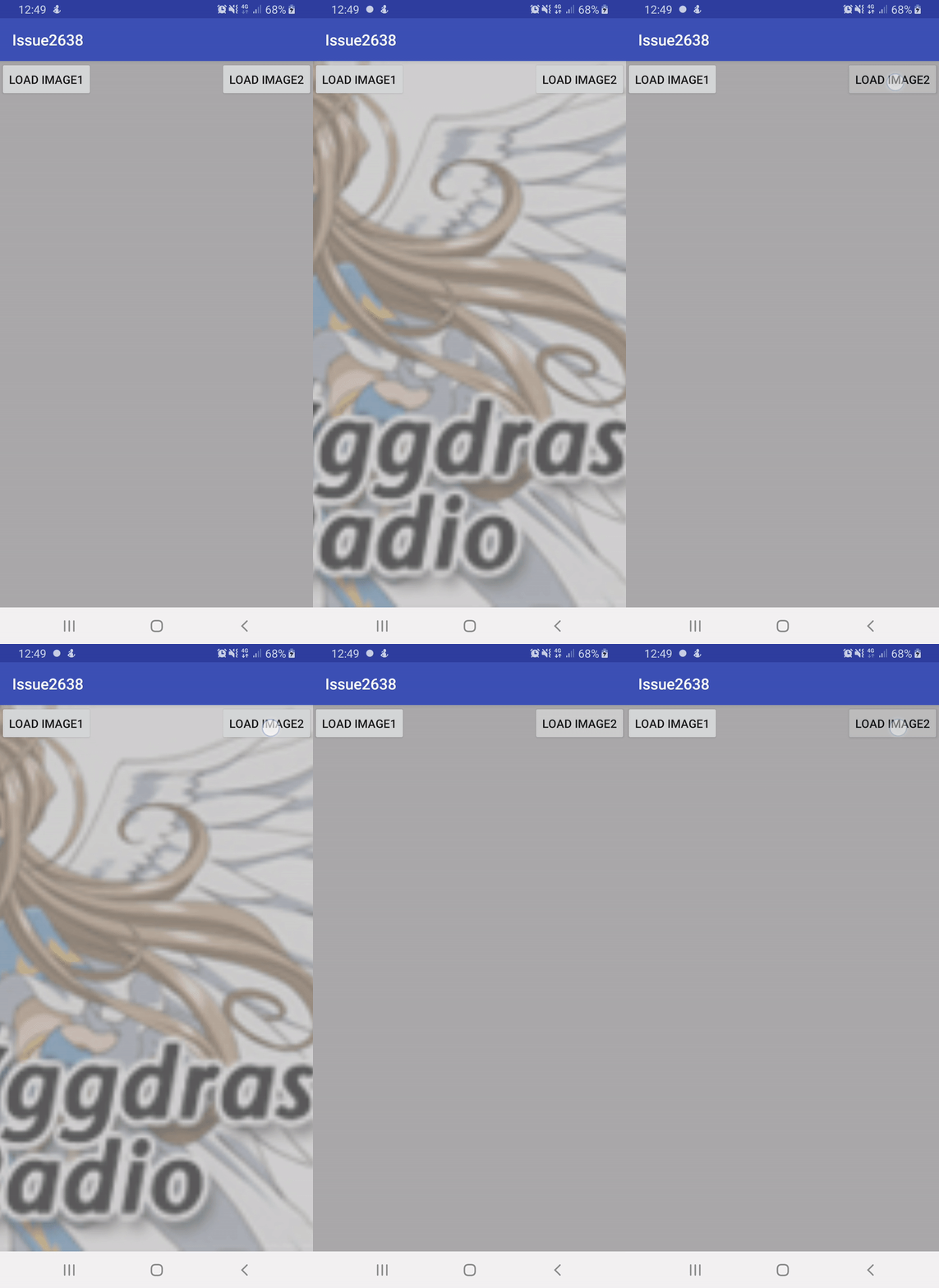
 zino-android
on 20 Mar 2019
zino-android
on 20 Mar 2019
Related issues
 Ncit
·
3Comments
Ncit
·
3Comments
 sant527
·
3Comments
sant527
·
3Comments
 FooBarBacon
·
3Comments
FooBarBacon
·
3Comments
 kooeasy
·
3Comments
kooeasy
·
3Comments
 r4m1n
·
3Comments
r4m1n
·
3Comments