Glide: Using a placeholder causes pictures to be cropped
Glide Version: 4.1.1
Device/Android Version: S8 7.0, Emulator 8.0
Issue details / Repro steps / Use case background:
Using a placeholder causes pictures to be cut off.
When I load pictures without a placeholder, everything is fine. If I load the placeholder drawable (same size as real pictures) instead of the pictures, it also works perfectly, in the right size. As soon as I use the placeholder image with .placeholder(R.drawable.my_placeholder), the placeholder is cut off at the top and bottom. Then the images load in the right size for one time, on subsequent loads after switching fragments the real images are also cut off at the top and bottom.
Glide load line / GlideModule (if any) / list Adapter code (if any):
GlideApp.with(context)
                .load(item.imageURL)
                .placeholder(R.drawable.my_placeholder)
                .into(holder.itemView.my_image_view)
Layout XML:
<ImageView
            android:id="@+id/my_image_view"
            android:layout_width="0dp"
            android:layout_height="wrap_content"
            android:scaleType="centerCrop"
            app:layout_constraintEnd_toEndOf="parent"
            app:layout_constraintStart_toStartOf="parent"
            app:layout_constraintTop_toTopOf="parent"/>
Screenshot: On the left, you see the image when using the placeholder, on the right you can see the image loaded without a placeholder and the placeholder loaded as image without a placeholder.
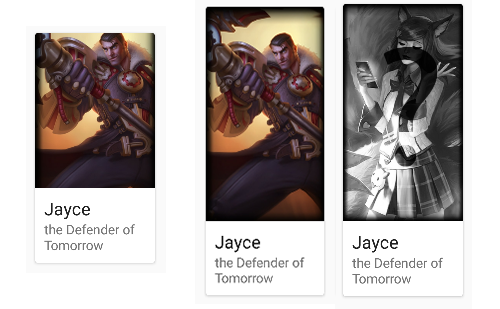
In other words, centerCrop() does not work when there is a placeholder.
 ferbeb
All 6 comments
This probably happens because Glide isn't sure what size image you want.
If the placeholder is set, the View size Glide gets will be the placeholder size since you're using wrap_content. If your placeholder matches the image size exactly, Glide loads the image size. If your placeholder is smaller than either dimension, centerCrop will cause Glide to crop the image to match your placeholder.
You can be specific about what size you want by using override() in Glide, or you can try to layout your View without using wrap_content.
 sjudd
on 17 Nov 2017
sjudd
on 17 Nov 2017
The behavior I see with centerCrop() when not using a placeholder is exactly like I intend: scale up the image to card width- the image itself is smaller than the cards that are managed by GridLayoutManager - and then, instead of cropping, the wrapContent-ImageView automatically chooses height to preserve the aspect ratio.
This breaks as soon as I use a placeholder of the exact same size as the images. As you can see in the screenshot, the placeholder is just one of the images in greyscale. I don't understand what causes the difference in behavior (cropping vs just expanding the wrapContent ImageView) when a placeholder with same size is used.
ferbeb
on 17 Nov 2017
I figured out a solution: addandroid:adjustViewBounds="true" to the ImageView.
No other scaling options are needed on the ImageView or with Glide.
It still seems weird to me that this was apparently the default behavior with centerCrop() unless a placeholder is used, which disables it.
ferbeb
on 17 Nov 2017
This issue has been automatically marked as stale because it has not had activity in the last seven days. It will be closed if no further activity occurs within the next seven days. Thank you for your contributions.
![stale[bot] picture](https://avatars3.githubusercontent.com/in/1724?v=4&s=40) stale[bot]
on 24 Nov 2017
stale[bot]
on 24 Nov 2017
@ferbeb This was the perfect solution for it. Thanks, man! I had used it before, however, as I am shifting from Picasso to Glide, got confused. Thanks for the answer. Appreciate it!
 karannaik
on 14 Sep 2018
karannaik
on 14 Sep 2018
Glide.with(mActivity)
.load(imageUrl)
.apply(new RequestOptions().dontTransform().placeholder(placeholder))
.into(imageView);
 dishantkawatra
on 7 Feb 2019
dishantkawatra
on 7 Feb 2019
Related issues
 Tryking
·
3Comments
Tryking
·
3Comments
 Ncit
·
3Comments
Ncit
·
3Comments
 sergeyfitis
·
3Comments
sergeyfitis
·
3Comments
 mttmllns
·
3Comments
mttmllns
·
3Comments
 PatrickMA
·
3Comments
PatrickMA
·
3Comments
Most helpful comment
I figured out a solution: add
android:adjustViewBounds="true"to the ImageView.No other scaling options are needed on the ImageView or with Glide.
It still seems weird to me that this was apparently the default behavior with
centerCrop()unless a placeholder is used, which disables it.