Please compare the below screenshots.
Screenshots are taken in almost identical conditions.
The app was launched on Samsung galaxy s7.
Glide v3.8.0

Glide v4.0.0 - v4.1.1

Picasso
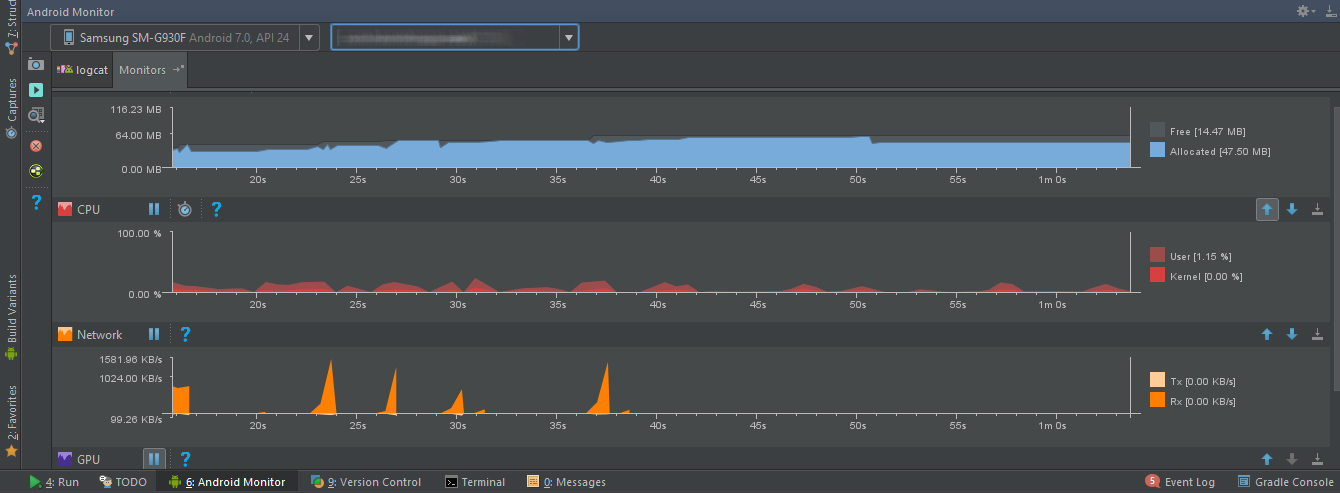
I think that the memory occupied by the library is much larger than before.
 SIARAY
All 15 comments
Memory usage has to be looked at over a long period of time. Glide keeps some Bitmaps in memory anticipating further usage of those, which means that a future load will have no allocation.
What's your code and use case that produced these graphs?
 TWiStErRob
on 10 Sep 2017
TWiStErRob
on 10 Sep 2017
For testing mem I suggest to set the memory cache to MemoryCacheAdapter to disable it and see what the actual resources are using.
TWiStErRob
on 10 Sep 2017
I load image in RecyclerView
    rv = (RecyclerView) view.findViewById(R.id.recyclerView);
    adapter = new MyAdapter(getActivity(), getList());
    rv.setAdapter(adapter);
    final GridLayoutManager gridLayoutManager = new GridLayoutManager(this.getActivity(), 2);
    rv.setLayoutManager(gridLayoutManager);
My loading image code.
loadImage(final Context context, String imageLink, final ImageView imageView, boolean hasAnim) {
    RequestOptions options = new RequestOptions();
    options.diskCacheStrategy(GLIDE_DISK_CACHE_STRATEGY);
    if (!hasAnim) {
        options.dontAnimate();
    }
    RequestBuilder glide = Glide.with(context)
            .load(imageLink)
            .apply(options);
    glide.into(imageView);
}
How to set memory cache to MemoryCacheAdapter and test it?
Also, I had OOM error in my app.
SIARAY
on 10 Sep 2017
One significant change is that Glide v4 uses ARGB_8888 by default instead of RGB_565 (used in v3) .
v3: https://github.com/bumptech/glide/blob/211c4dbd79d92dcc56f186d0dd8b50849f9236ff/library/src/main/java/com/bumptech/glide/load/DecodeFormat.java#L48
v4: https://github.com/bumptech/glide/blob/a4af922db56c928a56bcb8bfc7651e32fe10fd10/library/src/main/java/com/bumptech/glide/load/DecodeFormat.java#L54.
It's also probable that the default memory cache and bitmap pool sizes have changed. You can customize those if you'd like: http://bumptech.github.io/glide/doc/configuration.html#application-options
If you're seeing OOMs though, that implies either your Target/View sizes are too large, or that you have a memory leak in your application: http://bumptech.github.io/glide/doc/debugging.html#out-of-memory-errors.
You could try comparing heap dumps if you want to more definitively determine where the memory usage comes from in the various cases.
 sjudd
on 10 Sep 2017
sjudd
on 10 Sep 2017
I did more testing.
The problem seems to be the size of the images and their centercrop mode. Although they used less memory in the previous version.
How to fix this problem?
The size of the images is not the same. Also, I do not want the quality of images to be reduced.
SIARAY
on 10 Sep 2017
Are you saying that the View size is the same, but the width and height of the Bitmaps Glide loads is different in v3 vs v4?
Or are you saying that View size and the Bitmap size is the same, but the memory size of the Bitmaps Glide loads is different in v3 vs v4?
sjudd
on 10 Sep 2017
No,
I mean, loading similar images in version 4 occupies more memory than version 3.
But I think my problem at the moment is a lot of memory occupation. This may cause the application to oom error.
If the problem is due to the size of the images and centercrop mode, what is your suggestion for solving the problem?
Does Glide have the ability to minimize images by keeping it ratio?
SIARAY
on 10 Sep 2017
If the Bitmap and View dimensions are the same in v3 and v4, you can just use DecodeFormat.RGB_565 to get the same memory usage in v4. See http://bumptech.github.io/glide/javadocs/410/com/bumptech/glide/request/RequestOptions.html#format-com.bumptech.glide.load.DecodeFormat-.
If you're not happy with the quality or you want to reduce memory usage further, then you can:
- Reduce the size of your Views
- Use
override(int, int)to force Glide to load an image that's smaller than your view using the given dimensions. - Use
sizeMultiplier(float)to scale down the image based on yourViewsize.
sjudd
on 11 Sep 2017
Thank you, @sjudd, I will try.
SIARAY
on 11 Sep 2017
This issue has been automatically marked as stale because it has not had activity in the last seven days. It will be closed if no further activity occurs within the next seven days. Thank you for your contributions.
![stale[bot] picture](https://avatars3.githubusercontent.com/in/1724?v=4&s=40) stale[bot]
on 12 Nov 2017
stale[bot]
on 12 Nov 2017
I faced with the same problem. We migrated from version 3.8.0 to 4.6.1 and memory consumption extremely increased. This causes OOM exception.
Screenshots below show memory usage, the same app screen was opened. I tried change DecodeFormat to RGB_565, but it didn't improve a lot. May be something else changed in configuration?
Glide 3.8.0

Glide 4.6.1

 svshishkina
on 9 Apr 2018
svshishkina
on 9 Apr 2018
Use following code for change DecodeFormat:
RequestOptions options = new RequestOptions();
options.format(DecodeFormat.PREFER_RGB_565);
glide.apply(options);
@SIARAY I've already done this. Screenshot for Glide 4.6.1 was done with decode format RGB_565
svshishkina
on 10 Apr 2018
For memory issues, you'll need to look at a heap dump, see http://bumptech.github.io/glide/doc/debugging.html#memory-leaks which has a few pointers.
sjudd
on 10 Apr 2018
**be careful**
Glide.with(this)
     .load("")
     .into(new SimpleTarget<GlideDrawable>(12000, 12000) {
          @Override
           public void onResourceReady(GlideDrawable resource, GlideAnimation<? super GlideDrawable> glideAnimation) {
                int h = resource.getIntrinsicHeight();
                int w = resource.getIntrinsicHeight();
                //4.x  h =12000 && w = 12000  ,so memory usage may be increased
                //3.x  h <=12000 && w<= 12000
             }
         });
@TWiStErRob
 easternHong
on 11 May 2018
easternHong
on 11 May 2018
Related issues
 ghost
·
3Comments
ghost
·
3Comments
 Morteza-Rastgoo
·
3Comments
Morteza-Rastgoo
·
3Comments
 billy2271
·
3Comments
billy2271
·
3Comments
 PatrickMA
·
3Comments
PatrickMA
·
3Comments
 piedpiperlol
·
3Comments
piedpiperlol
·
3Comments
Most helpful comment
If the Bitmap and View dimensions are the same in v3 and v4, you can just use
DecodeFormat.RGB_565to get the same memory usage in v4. See http://bumptech.github.io/glide/javadocs/410/com/bumptech/glide/request/RequestOptions.html#format-com.bumptech.glide.load.DecodeFormat-.If you're not happy with the quality or you want to reduce memory usage further, then you can:
override(int, int)to force Glide to load an image that's smaller than your view using the given dimensions.sizeMultiplier(float)to scale down the image based on yourViewsize.