Glide: Update paddings (and other options) on glider refresh
Would be cool if on glide_api.refresh() you could update certain options, for example paddings
This would enable things like better transitions to mobile layouts, for instance:
- for desktop I use
paddings: '25%'to enable 2 slides up at once - for mobile/small screen, I use
paddings: '0%'to enable 1 slide up at this size (otherwise 2 up at once makes slides appear very skinny)
When resizing the window I would like to be able to change paddings if the window size changes from big to small and vice versa
A workaround i'm using at the moment is to destroy and recreate a new glider with the different paddings option, hax
The .refresh() method seems like a good place to be able to do this as setup is called within. But even any way of being able to update paddings after init of glider would be 👌
Thoughts?
 sehsarah
All 5 comments
.refresh() method already rebuilds all slider dimensions (including paddings). There is no need to destroy and reinit slider. We need a way to change slider options and then refresh slider itself.
The pseudo code could look like this:
glideApi.options({
    paddings: '25%'
});

glideApi.refresh();
Now, glide lacks of functionality for changing options via api. Adding to the milestone :)
Thanks 👍
 jedrzejchalubek
on 18 Oct 2016
jedrzejchalubek
on 18 Oct 2016
glideApi.options({
    paddings: '25%'
});

glideApi.refresh();
Dont work, in milestone 2.1.0
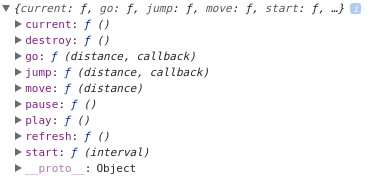
.options() method not exists

 marcaum54
on 8 Feb 2018
marcaum54
on 8 Feb 2018
@marcaum54 From my previous message:
Now, glide lacks of functionality for changing options via api. Adding to the milestone :)
This functionality is planned for v3.0.0
jedrzejchalubek
on 8 Feb 2018
Thanks heaps @jedrzejchalubek can't wait to optimise me codes
sehsarah
on 8 Feb 2018
Introduced with v3.0.0 release :)
Use breakpoints option when initializing glide. Example:
new Glide('.glide', {
  peek: 100,
  breakpoints: {
    800: { peek: 50 },
    480: { peek: 25 },
  }
}).mount();
You can also programmatically update instance settings with .update() API method:
var glide = new Glide('.glide', {
  peek: 100
}).mount();

glide.update({
  peek: 200
});
Related issues
 sadeghbarati
·
5Comments
sadeghbarati
·
5Comments
 rkanson
·
5Comments
rkanson
·
5Comments
 philmarc
·
3Comments
philmarc
·
3Comments
 thasmo
·
4Comments
thasmo
·
4Comments
 garygreen
·
3Comments
garygreen
·
3Comments