Glide: Placeholder is displayed in RecyclerView, but after refresh the image is shown
I use the RecyclerView and Glide(thanks u very much :) ) in my app , but i find a problem that RecyclerView's item sometimes display the placeholder image res first time , but when i refresh again , it can display the right image from url . The code like this :
 Glide.with(BaseApplication.getInstance()).load(imageUrl)
                .centerCrop()
                                .placeholder(R.drawable.XXX)
                .crossFade()
                .into(imageView);
when i remove the placeholder method, it can display the image well .
Bye the way, i use the https://github.com/StanKocken/EfficientAdapter to use the ViewHolder of RecyclerView
i cannot find any way to resolve this problem, can you help me ?
 qinjuning
All 7 comments
I don't see what the problem is, please try to rephrase it. (Did you miss a "not" somewhere?)
What you describe seems like the default behaviour: at first the image loading takes time (downloading and/or decoding from disk cache), next time it may be in memory cache which means there'll be now I/O in this case it's pointless to delay showing what we already have by displaying a placeholder again.
 TWiStErRob
on 19 Nov 2015
TWiStErRob
on 19 Nov 2015
Thanks for you answer . I am sorry because of my English is poor.
I mean the ImageView always display the placeholder until i manually scroll or refresh the RecyclerView again. I seems it cannot load the real image when its done . It spent enough time to observer this phenomenon.
Maybe the follows image can tell me what i said:
- The i mageView always show the placeholder at first time
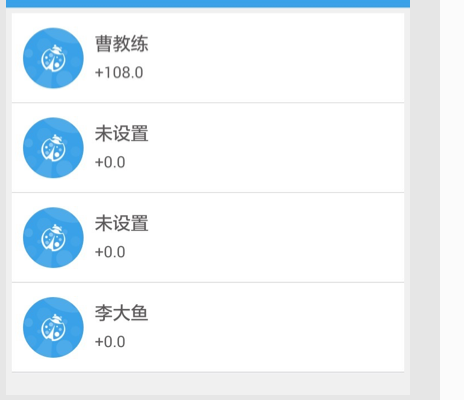
2 .After 10 minutes, i refresh the RecyclerView again, it can display the real image well

qinjuning
on 19 Nov 2015
Showing the placeholder usually means there was an error during loading. Take a look at RequestListener and check what Exception is thrown. I would imagine a timeout maybe.
TWiStErRob
on 19 Nov 2015
I add the RequestListener to observer the callback, it invoke the onResourceReady method. Log is
onResourceReady model
Code is
  Glide.with(BaseApplication.getInstance()).load(imageUrl)
                .placeholder(defaultPlaceHolder)
                .listener(new RequestListener<String, GlideDrawable>() {
                    @Override
                    public boolean onException(Exception e, String model, Target<GlideDrawable> target, boolean isFirstResource) {

                        Logger.d("onException %s  model %s" , e, model );

                        return false;
                    }

                    @Override
                    public boolean onResourceReady(GlideDrawable resource, String model, Target<GlideDrawable> target, boolean isFromMemoryCache, boolean isFirstResource) {
                        Logger.d("onResourceReady  model %s", model );
                        return false;
                    }
                })
                .into(imageView);
So I don't think the cause is that there was an error during loading. Like I said before, "It seems it cannot load the real image when its done at first time".
Then I use the Picasso to do the same thing , it works well .
 Picasso.with(BaseApplication.getInstance())
                .load(imageUrl)
                .placeholder(defaultPlaceHolder)
                .into(imageView);
Finally , I find out that the problem is occurred when I used CircleImageView .
At first, we set the placeholder to ImageView, then we set the “real image” but the placeholder had the same size with the real image , so the ImageView don't auto invalidate().
The difference is
 GlideDrawable extends Drawable

 PicassoDrawable  extends BitmapDrawable
But CircleImageView only support BitmapDrawable and ColorDrawable ,its not well .
private Bitmap getBitmapFromDrawable(Drawable drawable) {
        if(drawable == null) {
            return null;
        } else if(drawable instanceof BitmapDrawable) {
            return ((BitmapDrawable)drawable).getBitmap();
        } else {
            try {
                Bitmap e;
                if(drawable instanceof ColorDrawable) {
                    e = Bitmap.createBitmap(2, 2, BITMAP_CONFIG);
                } else {
                    e = Bitmap.createBitmap(drawable.getIntrinsicWidth(), drawable.getIntrinsicHeight(), BITMAP_CONFIG);
                }

                Canvas canvas = new Canvas(e);
                drawable.setBounds(0, 0, canvas.getWidth(), canvas.getHeight());
                drawable.draw(canvas);
                return e;
            } catch (OutOfMemoryError var4) {
                return null;
            }
        }
    }
The simple way to fix is add the asBitmap() or other way to modify the CircleImageView or GlidDrawable
Thank u very much.
qinjuning
on 20 Nov 2015
Ah, the magic "Circle view" :) Sorry for not noticing earlier. Here's a nice list. We dug deep and found the core of the problem: https://github.com/bumptech/glide/issues/482#issuecomment-107977982 (_scroll down a little, the images may make the URL anchor displaced, it's the last long comment by me_)
You have two options:
- use CircleTransform instead of custom ImageView
- add
.dontAnimate()
While disabling the animation seems easier, you may have more luck with the transformation in the long run.
TWiStErRob
on 20 Nov 2015
THX U very much!
 Bertkiing
on 17 Nov 2016
Bertkiing
on 17 Nov 2016
Related issues
 technoir42
·
3Comments
technoir42
·
3Comments
 kooeasy
·
3Comments
kooeasy
·
3Comments
 billy2271
·
3Comments
billy2271
·
3Comments
 PatrickMA
·
3Comments
PatrickMA
·
3Comments
 sergeyfitis
·
3Comments
sergeyfitis
·
3Comments
Most helpful comment
Ah, the magic "Circle view" :) Sorry for not noticing earlier. Here's a nice list. We dug deep and found the core of the problem: https://github.com/bumptech/glide/issues/482#issuecomment-107977982 (_scroll down a little, the images may make the URL anchor displaced, it's the last long comment by me_)
You have two options:
.dontAnimate()While disabling the animation seems easier, you may have more luck with the transformation in the long run.