Givewp: Donation Goal amount is reduced when thousands separator is set to a period
Issue Overview
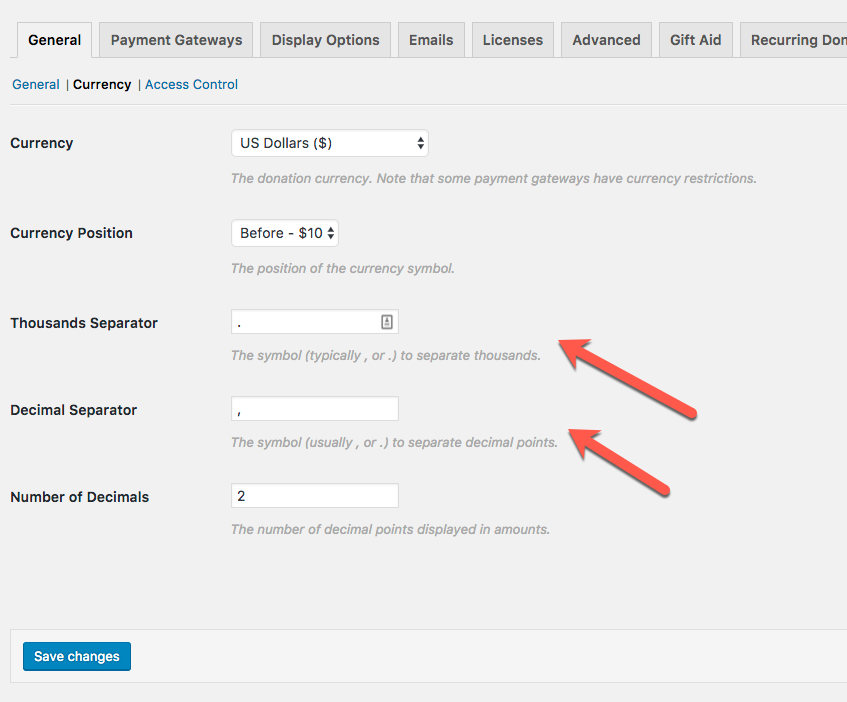
Setting the thousands separator to a period still seems to be problematic for our users in various ways. IN this case, when the thousands separator is a period and the decimal separator is a comma, the goal doesn't save correctly.
Expected Behavior
The amount should never change upon save.
Current Behavior
The goal amount changes after saving the form when the thousands separator is set to a period.
Steps to Reproduce (for bugs)
- Set the thousands separator to a period. Optionally also set the decimal separator to a comma.
- Create a form with a goal that is 1,000 then save the form
- Upon refresh, check the goal and it will now be 1.
Also, when XDebug is on, you should see this PHP warning as well:
Notice: A non well formed numeric value encountered in ...\wp-content\plugins\give\includes\formatting.php on line 113
Related Issues and/or PRs
https://github.com/WordImpress/Give/issues/1981
Todos
- [ ] Confirm this fix for the goal amount.
- [ ] Confirm on #1981 as well (the multi-level amounts)
- [ ] Confirm the fix works for the "Set Donation Amount" field
- [ ] Confirm the fix works for the "Minimum Amount" field
 mathetos
All 6 comments
Reopening since @mehul0810 found a bug:

This happens when currency is setup like so:
 DevinWalker
on 7 Sep 2017
DevinWalker
on 7 Sep 2017
@DevinWalker
Found Another bug
please see the video http://screencast-o-matic.com/watch/cbQirwIQHv
 raftaar1191
on 7 Sep 2017
raftaar1191
on 7 Sep 2017
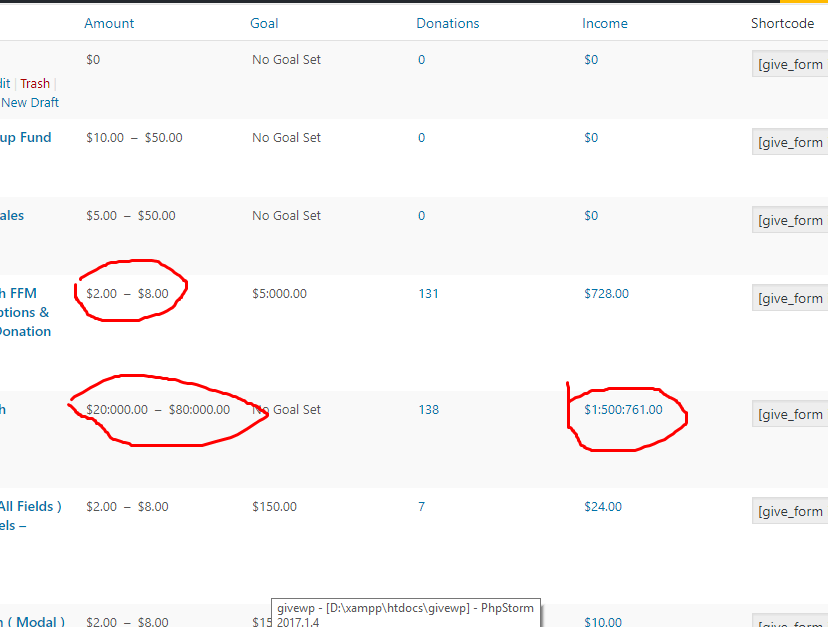
Another Bug in the dashboard page of All Forms
Step to reproduce the issues
Step 1-> Add Some form and donation to it
Step 2 -> Change thousand separate to anything you like
Step 3 -> Now view the All form page
Places where you will find the same
1> All Forms
2> Form single page
raftaar1191
on 7 Sep 2017
@DevinWalker
When setting Thousands Separator as empty it adding a space with the Amount
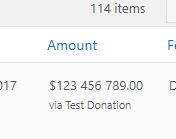
Is this an issue?
raftaar1191
on 8 Sep 2017
Another Bug in the dashboard page of All Forms
-> Working Fine ( No need to do anything to it )
When setting Thousands Separator as empty it adding a space with the Amount
->we support space as thousand separator as some number system have that
raftaar1191
on 18 Sep 2017
Just tested this, looks really solid guys. Great work!
mathetos
on 13 Oct 2017
Related issues
 ravinderk
·
4Comments
ravinderk
·
4Comments
 Benunc
·
3Comments
Benunc
·
3Comments
 gingerling
·
4Comments
gingerling
·
4Comments
 marutim
·
4Comments
ravinderk
·
4Comments
marutim
·
4Comments
ravinderk
·
4Comments
Most helpful comment
Just tested this, looks really solid guys. Great work!