- Can anyone help with the following tasks:
- [x] We need to get
cakebuild script to build thegem packageas it isn't built at present. - [x] We need to get
cakebuild script to build thetfs taskas it isn't build at present.
- We need to get all of the build assets being pushed automatically to their respective deployment channels, on every commit push. Can we agree on the following strategy:
- In order to issue a "stable" release, we will tag a commit on master with a stable number.
- Every other commit not tagged with a stable number, and irrespective of branch, will produce an "Unstable" release.
If so we need to:
- [ ] Configure gitversion to produce stable / unstable version numbers as per the above.
- [x] Amend the build so that stable assets (i.e of the back of a stable build) are pushed to their stable deployment channels (i.e nuget.org etc)
- [x] Ament the build so that "unstable" assets (everything that isn't a stable build are pushed to their unstable / pre-release deployment channels (i.e appveyor ci nuget feed etc)
Note: There appears to be a cake script for deployments` that does a lot of what we need already, but it's not clear to me when this runs or if someone executes it manually or something. Perhaps someone could clarify whether its still used and how.
We have PR's waiting in the wings, and issues because people can't find the latest packages where they are expecting, and this is because we haven't been able to get a handle on the release process or are too reliant on manual intervention.
See several of the bottom comments here for background.
The assets we need to be pushing (Please amend appropriately) are as seen here:
- [x] NuGetCommandLineBuild --> NuGet.org
- [x] NuGetRefBuild --> NuGet.org
- [x] NuGetExeDotNetCoreBuild --> NuGet.org
- [x] NuGetTaskBuild --> NuGet.org
- [x] NuGetExeBuild --> Chocolatey.org
- [x] GemBuild --> ?
- [x] GitVersionTfsTaskBuild--> ?
- [x] zip --> Docker Hub
- [x] zip-dotnetcore --> Docker Hub
 dazinator
All 129 comments
@jakeginnivan @asbjornu @gep13 @pascalberger please feel free to chime in
dazinator
on 23 Jul 2018
Not in a position to help directly, but I can review/answer questions if there are any.
There are addin's Cake.Gem and Cake.Tfx that might be able to help with the work that needs to be done.
 gep13
on 24 Jul 2018
gep13
on 24 Jul 2018
I think #1338 might have some information on how the current release process works. Missing from the release list is Homebrew, but since that requires a pull request, I'm not sure we can fully automate that? Or can we?
 asbjornu
on 24 Jul 2018
asbjornu
on 24 Jul 2018
Or can we?
Automatically creating a PR is something that certainly "can" be done. We have thought about doing this for Cake, as that is also pushed to homebrew, but for now, we do this as a manual step.
gep13
on 24 Jul 2018
@gep13
There are addin's Cake.Gem and Cake.Tfx that might be able to help with the work that needs to be done.
That sounds like an excellent place to start, thanks
dazinator
on 24 Jul 2018
The support for netstandard has been underway for about 8 months and we are at the point of evaluating whether GitVersion(Task) is a viable solution for use in a new project. Is there any expectation of when a release may come or any advice that can be offered by the maintainers of this project? I realize and appreciate that there is a lot of pre-work required for this support - I'm just trying to evaluate whether it makes sense to use this tool right now.
 jnevins-gcm
on 9 Aug 2018
jnevins-gcm
on 9 Aug 2018
@jnevins-gcm afaik there is no reason why you cant consume the gitversiontask nuget package from the netstandard PR. You just need to add the appveyor nuget feed because its not released to nuget.org yet. Instructions should be at the top of the netstandard PR. If you hit problems let us know.
dazinator
on 9 Aug 2018
That's what we're doing (with mostly success). The problem is redistributing the custom NuGet.config to all of our repos and build agents. Also, there is an issue with that PR that generates TONS of warnings in our builds and slow down build times by 4x (presumably due to the NuGet package restores that occur on every single project that gets versioned due to the newly introduced use of the MSBuild helper library for resolving dependent packages instead of including dependent dlls directly). Our build output looks like this:
    10>GetVersion:
         INFO [08/10/18 9:37:22:56] IsDynamicGitRepository: False
         INFO [08/10/18 9:37:22:56] Returning Project Root from DotGitDirectory: D:\gitrepo\.git - D:\gitrepo
         INFO [08/10/18 9:37:22:56] Project root is: D:\gitrepo
         INFO [08/10/18 9:37:22:56] DotGit directory is: D:\gitrepo\.git
         INFO [08/10/18 9:37:22:56] IsDynamicGitRepository: False
         INFO [08/10/18 9:37:22:56] Returning Project Root from DotGitDirectory: D:\gitrepo\.git - D:\gitrepo
    13>WriteVersionInfoToBuildLog:
         INFO [08/10/18 9:37:22:57] IsDynamicGitRepository: False
         INFO [08/10/18 9:37:22:58] Returning Project Root from DotGitDirectory: D:\gitrepo\.git - D:\gitrepo
         INFO [08/10/18 9:37:22:58] Project root is: D:\gitrepo
         INFO [08/10/18 9:37:22:58] DotGit directory is: D:\gitrepo\.git
         INFO [08/10/18 9:37:22:58] IsDynamicGitRepository: False
         INFO [08/10/18 9:37:22:58] Returning Project Root from DotGitDirectory: D:\gitrepo\.git - D:\gitrepo
    10>GetVersion:
         INFO [08/10/18 9:37:22:60] Begin: Loading version variables from disk cache
           INFO [08/10/18 9:37:22:60] Begin: Deserializing version variables from cache file D:\gitrepo\.git\gitversion_cache\DB52FF94A455E845DE32CE7BD871A0ABE8FC594C.yml
    13>WriteVersionInfoToBuildLog:
         INFO [08/10/18 9:37:22:62] Begin: Loading version variables from disk cache
           INFO [08/10/18 9:37:22:62] Begin: Deserializing version variables from cache file D:\gitrepo\.git\gitversion_cache\DB52FF94A455E845DE32CE7BD871A0ABE8FC594C.yml
    10>GetVersion:
           INFO [08/10/18 9:37:22:68] End: Deserializing version variables from cache file D:\gitrepo\.git\gitversion_cache\DB52FF94A455E845DE32CE7BD871A0ABE8FC594C.yml (Took: 77.13ms)
         INFO [08/10/18 9:37:22:68] End: Loading version variables from disk cache (Took: 77.93ms)
with tons of these
10>MSBUILD : Task factory warning NMSBT010: There is a mismatch between SDK NuGet version (4.7.0) and the NuGet version the task factory was compiled against (4.6.0). There might occur some exotic errors. [D:\gitrepo\src\Web\Web.csproj]
Also, our builds sporadically fail due to concurrency issues (which we having seen previously with other builds of GitVersionTask). MSBuild is building in parallel and it seems there are locking issues:
WARN [08/10/18 7:40:00:51] Could not determine assembly version: LibGit2Sharp.LockedFileException: failed to lock file 'D:/gitrepo/.git/config.lock' for writing:
jnevins-gcm
on 10 Aug 2018
@jnevins-gcm
Could the parrallel build / locking issue you are seeing be anything related to: https://github.com/GitTools/GitVersion/issues/1381
In terms of the additional restores slowing builds down, thats certainly something we could investigate, feel free to open a more specific issue, with more details about the csproj etc or a repro or link to a build etc. I would expect nuget packages to hit the cache when restored for the first time, so wouldn't expect too much of a slow down in this area.
With respect to the MSBUILD : Task factory warnings - what version of the dotnet sdk are you building with and what gitversiontask nuget package are you referencing?
Lastly, I tend not to use gitversiontask much these days. I usually just execute gitversion at the start of my build either the .exe directly, or if on a dotnet core platform, you can now also run it via the dotnet command, or if you have access to a docker host, you can invoke it via a docker image. This will give you the version number back, and I usually pass that in to msbuild via /p:PackageVersion. Not sure if this kind of approach would work better for you than the GitVersionTask so just mentioning it just in case.
dazinator
on 10 Aug 2018
This is great help - thanks!
We will switch to the CLI for GitVersion. How is this runnable via the dotnet command?
Also, any reason you are passing in /p:PackageVersion vs. /p:Version?
Are there any other pieces of functionality that would be missing? (aside from appveyor/build server support which could be implemented pretty easily using the command line for their build worker api)?
jnevins-gcm
on 10 Aug 2018
RE the cli, there are instructions at the top of here: https://github.com/GitTools/GitVersion/pull/1269
And Nope package version was sufficient for my case. Let me know how /p:Version works out though.
dazinator
on 10 Aug 2018
Thanks.
And how do you distribute the command line version with your builds since the PackageReference isn't the one installing GitVersion anymore?
Also - tried the command line - blows up here:
https://github.com/GitTools/GitVersion/blob/master/src/GitVersionCore/OutputVariables/VersionVariables.cs
due to
#if NETDESKTOP
                return typeof(VersionVariables).GetProperty(variable).GetValue(this, null) as string;
#else
                throw new NotImplementedException();
                //  return typeof(VersionVariables).GetTypeInfo().GetProperty(variable).GetValue(this, null) as string;
#endif
RE distribution: You could add the cli package to a tools folder in your repo. Or you could have a build step to nuget install the tools to a directory?
Re: command line exception: what command are you executing? Probably worth raising an issue for that. When running under a build server such as teamcity, appveyor etc etc gitversion should be setting the build number for the build without you having to index into any json variables or anything.
dazinator
on 11 Aug 2018
gitversion /listvariable semver
Without listvariable it works fine printing the whole json. Seems like it’s just not implemented for netstandard?
jnevins-gcm
on 11 Aug 2018
Yeah probably the usage of reflection made that code path an endeavour and it wasn't implemented, or just forgotten about :-/
dazinator
on 11 Aug 2018
Ok, so https://github.com/GitTools/GitVersion/releases/tag/untagged-e9734003373a071c8f29 is a draft release of the v4.0.0-beta.14 binaries.
Can people please test in their environments, it has been ages since a release so I want to ensure everything is good to go.
I am going to start working through this. There may be a few failed deployments and issues as we go, but I think we are going to have to endure it to move forward. Any issues with me pushing beta.14 and then fixing the errors (if any)?
 JakeGinnivan
on 15 Aug 2018
JakeGinnivan
on 15 Aug 2018
@JakeGinnivan: Awesome! Given the time since last release, I think it’s totally fine that there’s a bit of stumbling before we have a ship-shape CD pipeline.
My vote is for automated pre-releases for every (merge) commit to master and as automated as possible stable releases for tagged commits on master.
asbjornu
on 15 Aug 2018
Ok, so deploy fails with a Cake error. Does someone know how to sort this out:
https://ci.appveyor.com/project/GitTools/gitversion-jdi4p
Have moved back to a draft release at https://github.com/GitTools/GitVersion/releases/tag/untagged-7b1747225ba6f2c21c05 until we sort the deploy script out
JakeGinnivan
on 16 Aug 2018
@JakeGinnivan Cake.Json doesn't seem to be particularly active, and there's an issue currently for new Cake version support:
https://github.com/cake-contrib/Cake.Json/issues/35
YMMV, but to get over the hump I've just been using Newtonsoft.Json, with a quick wrapper doing pretty much same thing.
#addin "nuget:https://www.nuget.org/api/v2?package=Newtonsoft.Json"
using Newtonsoft.Json;
 gjonespf
on 16 Aug 2018
gjonespf
on 16 Aug 2018
New issues:
https://ci.appveyor.com/project/GitTools/gitversion-jdi4p/build/1.0.29
Will work through them
JakeGinnivan
on 21 Aug 2018
beta-14 is out. The NuGet package is still missing, working on sorting that out.
https://github.com/GitTools/GitVersion/releases/tag/v4.0.0-beta.14
JakeGinnivan
on 21 Aug 2018
So the problem is https://www.nuget.org/packages/GitVersion/4.0.0-beta0012
Which I am unsure is being built anymore? It's now GitVersionCore. Do we actually need the library version of GitVersion, or just stick to CommandLine and Task?
JakeGinnivan
on 21 Aug 2018
Chocolatey is failing with:
Response status code does not indicate success: 409 (This package had an issue pushing: An error occurred while executing the command definition. See the inner exception for details.).
VSIX blows up the rest. I am going to disable (comment out) the NuGet package, Chocolatey, VSIX until we can resolve their deployments.
JakeGinnivan
on 21 Aug 2018
@JakeGinnivan: The library has 37,190 total downloads, so I don't know. Why is it difficult to publish a new version of it?
asbjornu
on 21 Aug 2018
I think we should interpret those download stats with a skeptical eye given Nuget's statistics are notoriously inflated. I'm willing to make a small wager that no one uses this dependency but thats purely a gut feeling :-).
dazinator
on 21 Aug 2018
@JakeGinnivan not sure if you sorted the Nuget/Chocolatey thing. If not, that error (409) is often either:
- Trying to push the same version of a nupkg as one that already exists (some servers don't allow this, but usually give you the fact in the error message)
- Trying to push a problematic nupkg file (often with e.g. two copies of same file in same location from experience) - as the server reads in and validates the manifest and package when you push it
For 2, you could try loading the nupkg in a tool like:
https://github.com/NuGetPackageExplorer/NuGetPackageExplorer
Often with these problematic files loading it in a tool like this will fail, giving you a hint that's the cause of the issue. Easy to end up with a broken nupkg this way by e.g. having a files . include in the nuspec, then including same file again with the same destination location later on. Nuget will let you pack this, then tools will fail to load it. The other thing to check (esp if it's a new nuspec) is that the manifest has all the required bits (id/version/desc/authors).
https://docs.microsoft.com/en-us/nuget/reference/nuspec
gjonespf
on 21 Aug 2018
@JakeGinnivan chocolatey.org had some issues today. You might want to try again.
 pascalberger
on 21 Aug 2018
pascalberger
on 21 Aug 2018
@asbjornu it's not a problem to fix the problem and push it, I am just not sure of the value going forward of even building / having that out there. I vote for commenting out the release and hiding that from NuGet results.
@gjonespf @pascalberger nice, I will have a look at restoring chocolatey in beta 15, hopefully they were just down but the tips are welcome if that isn't the case :)
JakeGinnivan
on 22 Aug 2018
@jakeginnivan: Yeah. I’m not against that. Go for it.
asbjornu
on 22 Aug 2018
@JakeGinnivan if you need to hear from people who want a library, here's me ;) I am using it for an AWS lambda function which generates a version based on link/sha/branch name.
So if it's not hard for you, I would be very happy to see the package on nuget.org.
Because currently I ended up building a custom version and publishing it to our internal nuget repo.
 derwasp
on 24 Aug 2018
derwasp
on 24 Aug 2018
I'm willing to make a small wager that no one uses this dependency but thats purely a gut feeling
I'm glad no one took me up on this wager! @derwasp
dazinator
on 24 Aug 2018
@derwasp thanks for that! I hadn't yet made any changes. Will keep it going then :)
JakeGinnivan
on 26 Aug 2018
@derwasp the package looks like it is going to have to change to GitVersionCore unless anyone knows how to fix https://ci.appveyor.com/project/GitTools/gitversion/build/0.0.1645#L63 to allow us to keep using GitVersion as the package id?
JakeGinnivan
on 26 Aug 2018
If the rename to GitVersionCore sounds ok, I will document it in the release notes, update the description for the GitVersion package and publish a new release. Don't mind which way we go
JakeGinnivan
on 26 Aug 2018
@JakeGinnivan the name I am using is already GitVersionCore, because I took it from the latest branch. So, renaming is fine by me.
derwasp
on 26 Aug 2018
@dazinator, I have been having the same issues that @jnevins-gcm reported concerning the use of GitVersionTask and the build warnings. When we build we get a bunch of the following warnings:
MSBUILD : Task factory warning NMSBT010: There is a mismatch between SDK NuGet version (4.8.0) and the NuGet version the task factory was compiled against (4.6.0). There might occur some exotic errors.
I looked into replacing our use of GitVersionTask with CLI as you previously mentioned. The issue for me is the DevOps team I work with uses the GitVersionInformation that is generated by GitVersionTask for tracking and verification. Is there a way I am missing to generate that file from the CLI and have it included automatically?
DotNet SDK Version = 2.1.401
GitVersionTask Version = 4.0.0-beta0014
 acgritt
on 27 Aug 2018
acgritt
on 27 Aug 2018
I resolved this warning and some of the speed issues with the help of the UtilPack team:
https://github.com/CometaSolutions/UtilPack/issues/28#issuecomment-412306109
Then I gave up on GitVersionTask because of all the hassle and has concurrency issues using parallel msbuilds.
jnevins-gcm
on 27 Aug 2018
@jnevins-gcm thanks for sharing. We should update the version of utilpack that we use that helps resolve those problems. Have merged a PR to update utilpack so that should help fix those problems. Also I have re-opened #1381 which I think describes the locking issue gitversion throws when building projects in parallel. It's worth noting that all indiciation is this locking issue has always been a problem with gitversiontask, prior to anything done with .netstandard, its just you will see it more with dotnet build because by default it seems to do parallel build / restore operations, where as in the past, when building via msbuild for .net framework, enabling parallel builds was something you had to opt in to.
@acgritt in order to replace gitversiontask with the cli, you would need to figure out equivalent msbuild properties that you could set via the variables that are output through calling the gitversion cli. I'm afraid I've not done this, as I tend to stick with GitVersionTask if I need assembly version stamping.
@jnevins-gcm
Then I gave up on GitVersionTask because of all the hassle and has concurrency issues using parallel msbuilds.
Did you switch to the gitversion cli, or something else completely?
dazinator
on 27 Aug 2018
To add to the build warnings that @acgritt mentioned about GitVersionTask, I have also ran into it with beta0014, but only when building using the dotnet build CLI. When I build using msbuild directly, I don't see the warnings. The solution that I'm building only has 2 projects: 1 netstandard2.0 and 1 netcoreapp2.0 (mstest unit tests)
dotnet - 2.1.400
msbuild - 15.8.166
What led me to trying to build with the CLIs was Visual Studio would not build at all, nor would it give me any messages in the build output or error logs. The best it would do is point me to a possible error log in my temp directory. I was able to find the error log based on the file name hint the message gave (MSBUILD_*.failure.txt) and the timestamp of the file.
Here are the contents of the log file:
UNHANDLED EXCEPTIONS FROM PROCESS 12252:
=====================
8/28/2018 10:54:56 AM
System.ArgumentNullException: Value cannot be null.
Parameter name: value
   at System.IO.BinaryWriter.Write(String value)
   at Microsoft.Build.Framework.LazyFormattedBuildEventArgs.WriteToStream(BinaryWriter writer)
   at Microsoft.Build.Framework.BuildMessageEventArgs.WriteToStream(BinaryWriter writer)
   at Microsoft.Build.Shared.LogMessagePacketBase.WriteToStream(INodePacketTranslator translator)
   at Microsoft.Build.Shared.LogMessagePacketBase.Translate(INodePacketTranslator translator)
   at Microsoft.Build.BackEnd.NodeEndpointOutOfProcBase.RunReadLoop(Stream localReadPipe, Stream localWritePipe, ConcurrentQueue`1 localPacketQueue, AutoResetEvent localPacketAvailable, AutoResetEvent localTerminatePacketPump)
===================
Once I switch the PackageReference back to either beta0012 or beta0013, I was able to build in VS again.
VS 2017 Enterprise (v15.8.1)
 bobted
on 28 Aug 2018
bobted
on 28 Aug 2018
@bobted - There is a beta 15 build (the latest build of master) which I updated utilpack to the latest version. If you are able to try that one out, I am hoping it will solve the build warning issue.
dazinator
on 28 Aug 2018
@dazinator - is there a nuget package for beta 15 published somewhere or do i need to pull it from the repo?
bobted
on 28 Aug 2018
@bobted if you have access to this appveyor screen you can download it from the assets tab: https://ci.appveyor.com/project/GitTools/gitversion/branch/master/artifacts
Or.. you should be able to add our appveyor nuget feed to your nuget.config and then pull it from ther. Feed url is: https://ci.appveyor.com/nuget/gitversion-8nigugxjftrw
dazinator
on 28 Aug 2018
Thanks for the links, @dazinator. I added the feed to my local machine configuration so I could run a quick test of all three build paths. Unfortunately all three give me the same build output:
msbuild - passes
dotnet build - give the same build warning as before except it shows
MSBUILD : Task factory warning NMSBT010: There is a mismatch between SDK NuGet version (4.8.0) and the NuGet version the task factory was compiled against (4.7.0).
VS - gives the same build exception and null reference in the log file
After adding the source to my nuget configuration, I made sure the restore reported beta0015 as the dependency in solution explorer.
bobted
on 28 Aug 2018
@bobted could you try killing all dotnet.exe processes before building again. Just in case they are caching the old dll in the build process.
dazinator
on 28 Aug 2018
@bobted re the build warning ive added comment here: https://github.com/CometaSolutions/UtilPack/issues/28#issuecomment-412306109
As you are continuing to hit problems if you are able to create a seperate issue as we have probably hijacked this one enough :-) if you have a simple repro project that would also help and I'll investigate further.
dazinator
on 28 Aug 2018
@bobted also keep in mind you cant build with 2.1.0 sdk at the moment, you need global.json to lock it to 2.0.0. There is an open pr to be merged that will lift this restriction. Perhaps its this you are hitting.
dazinator
on 28 Aug 2018
Is there a possibility that somebody provides more information on the precise requirements of this all. Would really like to contribute and I have a feeling this issue is a complete blocker.
 sarvasana
on 5 Sep 2018
sarvasana
on 5 Sep 2018
I've noticed that the last few PR's that were merged to master, the build has produced 4.0.0-beta.15 nuget packages. Obvioulsy this is problematic as the semantic version hasn't really incremented.
dazinator
on 6 Sep 2018
Any chance a beta 15 could be pushed? PR #1470 being available would be nice :)
 jrlilly
on 12 Sep 2018
jrlilly
on 12 Sep 2018
@youfoundkris I think the requirements are all listed at the top of this issue - @JakeGinnivan was working on this for a while, but I am not sure how far he has got with it. Jake - if you do get a moment, perhaps you could clarify what's remaining and others could maybe pick up?
dazinator
on 12 Sep 2018
I am happy to take this task. If you want please assign to me and I will get started. I have worked with Cake and contributed to it and created many extensions.
 phillipsj
on 21 Sep 2018
phillipsj
on 21 Sep 2018
@phillipsj feel free to get stuck in, I can be on hand to answer any questions that might come up.
gep13
on 21 Sep 2018
I think I got it. I have created all of the package types before.
phillipsj
on 22 Sep 2018
I will be around this weekend, it's a long weekend here. Ping me on gitter with any questions, I was planning to push out a release this weekend and update the state of play.
JakeGinnivan
on 22 Sep 2018
So here is one of the issues that I discovered. The target frameworks between on the different projects are all over the place: net40, net461, netstandard1.3,netstandard1.5, netcoreapp2.0. I am straightening them out, hope that is okay unless there is a need to have them like they are.
phillipsj
on 22 Sep 2018
Okay, everything is good and I have the build rocking and rolling. It is all pretty close to being finished.
phillipsj
on 22 Sep 2018
@phillipsj I think there was some agreement that net40 could be dropped, in favour of net461. There is work done in PR #1422 to move netstandard baseline up to netstandard20. I had hoped we could get a build / release out targeting the current / lower baselines first before we incremented them with merge of #1422 - however this is a nit-pick really if you have to modify them to solve build problems then so be it :-) (and thanks for picking this up by the way)
dazinator
on 22 Sep 2018
I have it all working on the current so that should be good. I don't see a
gemspec file in to repo. Also what version of Ruby and RubyGems do I need.
On Fri, Sep 21, 2018, 10:03 PM Darrell notifications@github.com wrote:
@phillipsj https://github.com/phillipsj I think there was some
agreement that net40 could be dropped, in favour of net461. There is work
done in PR #1422 https://github.com/GitTools/GitVersion/pull/1422 to
move netstandard baseline up to netstandard20. However my hope was before
merging that PR we could get a build / release out targeting the current /
lower netstandard baselines. However if you have to upgrade the netstandard
tf baselines to get this ci / cd stuff working then so be it :-)—
You are receiving this because you were mentioned.
Reply to this email directly, view it on GitHub
https://github.com/GitTools/GitVersion/issues/1445#issuecomment-423709266,
or mute the thread
https://github.com/notifications/unsubscribe-auth/ABfthVwtrtHl1feCmGYSwf0i_-3qXDjmks5udZpogaJpZM4Vbtg5
.
phillipsj
on 22 Sep 2018
NVM, I found it.
On Fri, Sep 21, 2018, 11:34 PM Jamie Phillips cphill11@gmail.com wrote:
I have it all working on the current so that should be good. I don't see
a gemspec file in to repo. Also what version of Ruby and RubyGems do I
need.On Fri, Sep 21, 2018, 10:03 PM Darrell notifications@github.com wrote:
@phillipsj https://github.com/phillipsj I think there was some
agreement that net40 could be dropped, in favour of net461. There is work
done in PR #1422 https://github.com/GitTools/GitVersion/pull/1422 to
move netstandard baseline up to netstandard20. However my hope was before
merging that PR we could get a build / release out targeting the current /
lower netstandard baselines. However if you have to upgrade the netstandard
tf baselines to get this ci / cd stuff working then so be it :-)—
You are receiving this because you were mentioned.
Reply to this email directly, view it on GitHub
https://github.com/GitTools/GitVersion/issues/1445#issuecomment-423709266,
or mute the thread
https://github.com/notifications/unsubscribe-auth/ABfthVwtrtHl1feCmGYSwf0i_-3qXDjmks5udZpogaJpZM4Vbtg5
.
phillipsj
on 22 Sep 2018
With the free Azure DevOps pipelines for OSS projects, anyone think it would be better to convert to that to make it easier to release and do our cross plat builds?
JakeGinnivan
on 23 Sep 2018
With the free Azure DevOps pipelines for OSS projects, anyone think it would be better to convert to that to make it easier to release and do our cross plat builds?
I have it already working with a branch of mine see
https://dev.azure.com/arturcic/OSS/_build/results?buildId=44&view=logs
 arturcic
on 23 Sep 2018
arturcic
on 23 Sep 2018
Actually I was thinking to have a pull request for building with Azure pipelines, and it also uses a powershell core based boostrap script for cross plat builds. Do you think I should send 2 separate PRs, one with the bootstrap script and another with the azure pipeline support?
arturcic
on 23 Sep 2018
@JakeGinnivan Can we get a call organised, so that we can sit down and decide what we want to do with GitVersion in terms of responsibilities, and getting things released? Would be great to get everyone interested on the call, but understood that this could be difficult based on Time Zones, etc. /cc @asbjornu @dazinator
gep13
on 23 Sep 2018
@phillipsj where is the work that you are doing? Have you opened a PR for this?
gep13
on 23 Sep 2018
I would be up for a call. @gep13 I habent opened one yet. I have a few
small changes, but not enough to have it opened. I plan to do some more
tonight and get a PR out there.
On Sun, Sep 23, 2018, 3:54 AM Gary Ewan Park notifications@github.com
wrote:
@phillipsj https://github.com/phillipsj where is the work that you are
doing? Have you opened a PR for this?—
You are receiving this because you were mentioned.
Reply to this email directly, view it on GitHub
https://github.com/GitTools/GitVersion/issues/1445#issuecomment-423798704,
or mute the thread
https://github.com/notifications/unsubscribe-auth/ABfthajSbhcWCS0hVrQtKNxBM9kB0zPIks5udz4egaJpZM4Vbtg5
.
phillipsj
on 23 Sep 2018
@phillipsj perfect. Not in a position to have a call tonight, but lets get something in the calendar so that we can get this out the door.
gep13
on 23 Sep 2018
Agree, I am +8, so probably the most out of the way. I can do early morning, or later in the evening. When works for everyone else?
JakeGinnivan
on 24 Sep 2018
I'm +1, i'm probably not essential to this meeting, would like to join if I'm available though (outside 9-5 mon - fri)
dazinator
on 25 Sep 2018
I can make most times work. 9am EST isn't good for me. So anytime before
or anytime after 9:30am EST.
On Tue, Sep 25, 2018, 1:45 PM Darrell notifications@github.com wrote:
I'm +1, i'm probably not essential to this meeting, would like to join if
I'm available though—
You are receiving this because you were mentioned.
Reply to this email directly, view it on GitHub
https://github.com/GitTools/GitVersion/issues/1445#issuecomment-424437233,
or mute the thread
https://github.com/notifications/unsubscribe-auth/ABfthZD3Uk-wKBW3vsopmKhCCp4bCiaJks5uemu6gaJpZM4Vbtg5
.
phillipsj
on 25 Sep 2018
So I have been working through all of this and I get this error when executing the TFX creation.
C:UserscphilcodeGitVersionsrcGitVersionTfsTask [master ≡]> .Create-Vsix.ps1
TFS Cross Platform Command Line Interface v0.6.1
Copyright Microsoft Corporation
error: Error: ENOENT: no such file or directory, lstat 'C:UserscphilcodeGitVersionsrcGitVersionTfsTaskGitVersionTask'
There isn't a directory named GitVersionTask which is listed in the manifest.json.
phillipsj
on 4 Oct 2018
Ah didn't see the other PR. The other PR is really nice work.
phillipsj
on 4 Oct 2018
@phillipsj sorry, I should have mentioned that @arturcic has been working on a PR for fixing this. Apologies.
gep13
on 4 Oct 2018
I have noticed the current build errors at docker step, but appveyor reports success: https://ci.appveyor.com/project/GitTools/gitversion/builds/19415100
Perhaps @arturic 's changes will make the docker publish a little more robust (haven't checked)
dazinator
on 10 Oct 2018
1485 is merged, so that should at least give us a better basis for further improvements.
asbjornu
on 10 Oct 2018
Excellent stuff.
I just wanted to check, now that @arturcic has completed the build script changes to publish all the things everywhere :-) - one other thing was that GitVersion be configured to produce our build numbers correctly - i.e I think the idea was that all commits produce an unstable version number (increasing in sem ver with each commit as we deploy assets to CI feeds) until we tag with a stable number, and then the cycle starts again.. If this is now the behaviour then I think this issue can be closed!
dazinator
on 10 Oct 2018
I haven't verified whether this is the behaviour we now have after merging #1485, but I'll have a look when time allows.
asbjornu
on 10 Oct 2018
@dazinator at the moment we have this https://github.com/GitTools/GitVersion/blob/master/run.cake#L471 for each Publish tasks.
This is the way the scripts knows it's a stable or pre-release https://github.com/GitTools/GitVersion/blob/master/build/parameters.cake#L41
That was based on this feedback https://github.com/GitTools/GitVersion/pull/1485#issuecomment-425861255.
So basically the Publish task runs for stable and pre-release versions.
To AppVeyor CI it is publishing every time it builds.
Currently as part of tests I ran for the scripts on this feeds it's possible to publish pre-releases:
- nuget
- chocolatey
- rubygem
- dockerhub (using tags)
Visual Studio Marketplace does not support pre-release versions. It accepts version having the format :
_major version.minor version.build number.revision_
Based on this and your feedback I guess we should adjust the scripts and put the correct criteria for publishing
arturcic
on 11 Oct 2018
I have noticed the current build errors at docker step, but appveyor reports success: https://ci.appveyor.com/project/GitTools/gitversion/builds/19415100
Perhaps @arturic 's changes will make the docker publish a little more robust (haven't checked)
It failed because building docker images for windows takes time and sometimes and appveyor fails. I'll need to investigate if possible to use the cached base images from AppVeyor itself.
Re:
but appveyor reports success:
I noticed that as well. Seems like the AppVeyor is not correctly handling the exit code from powershell, I'll have a look at that as well.
arturcic
on 11 Oct 2018
I had a quick look at NuGet and the latest version there is still 4 beta 12 from 2017, so something is still not working quite as intended.
asbjornu
on 11 Oct 2018
I have disabled the publishing to nuget and chocolatey till we figure out when to publish there. So we should agree on criterias for publishing based on this:
public bool IsStableRelease() => !IsLocalBuild && IsMainRepo && IsMainBranch && !IsPullRequest && IsTagged;
public bool IsPreRelease() => !IsLocalBuild && IsMainRepo && IsMainBranch && !IsPullRequest && !IsTagged;
For stable release we publish to all supported feeds
What about pre-release versions?
arturcic
on 11 Oct 2018
@arturcic: Aha, I see. I would prefer if pre-release packages were instantly published to all platforms that support it.
asbjornu
on 11 Oct 2018
@arturcic: Aha, I see. I would prefer if pre-release packages were instantly published to all platforms that support it.
@dazinator what do you think about that?
arturcic
on 11 Oct 2018
I agree on pushing pre-release packages automatically - as long as they are not PR packages and by the looks of that criteria you posted above it wont push PR packages to any official feeds (except appveyor) which I think is desirable since PR code is essentially untrusted.
dazinator
on 11 Oct 2018
ok then, I'll keep the current criteria, except I'll remove the parameters.EnabledPullRequestPublish as I used that while testing the PR
arturcic
on 11 Oct 2018
I have fixed the versioning for the build artifacts and now they are published to
- nuget.org - some of them already indexed
The only feed not supported for now is TFS - as there is no valid PAT (personal access token) at the moment
arturcic
on 11 Oct 2018
@arturcic: Sorry, but I should probably have discovered this earlier; I now see that some of the new packages have been suffixed with Core. Is this due to the new version not being backwards compatible? Can't that just be indicated with a new major version number instead? Or is there other reasons why the package name needs to change?
asbjornu
on 11 Oct 2018
That were the names before I started building the new scripts, so I guess @dazinator has more details on that.
arturcic
on 11 Oct 2018
Not aware of any package names being changed.. just new / additional packages for .net
core being added (like additional nuget packages and docker images) and so any suffix
of "core" would just be to dustinguish those new packages from the
pre-existing non .net core counterparts..
If this is not what you see, please mention specific packages and can look closer!
On Thu, 11 Oct 2018, 22:45 Artur, notifications@github.com wrote:
That was the names before I started building the new scripts, so I guess
@dazinator https://github.com/dazinator has more details on that.—
You are receiving this because you were mentioned.
Reply to this email directly, view it on GitHub
https://github.com/GitTools/GitVersion/issues/1445#issuecomment-429129644,
or mute the thread
https://github.com/notifications/unsubscribe-auth/ADB4uE6vC3YO1FDiThK1hkWgnjTzzxP3ks5uj7vbgaJpZM4Vbtg5
.
dazinator
on 11 Oct 2018
I see. That makes sense. I just checked the GitVersion package on NuGet and it's still stuck on v4b12, so I thought it was abandoned by these changes. However, v4b12 is from May 17th 2017, so its abandonment is due to something else, probably. I can't remember what.
asbjornu
on 11 Oct 2018
The version number of the new packages is 4.0.0-beta0015-1644. Is 1644 the build metadata? Shouldn't that be suffixed with a +?
asbjornu
on 11 Oct 2018
@arturcic that's awesome!
Does this include the final piece of ensuring GitVersion produces unstable versions for all non tagged commits? (It looks like that is now the behaviour looking at the published packages..)
If so I think that was everything this issue was tracking (aside from the vsts token you mentioned - which we could plug in at a later date whenever we get it)
dazinator
on 12 Oct 2018
@asbjornu
However, v4b12 is from May 17th 2017, so its abandonment is due to something else, probably. I can't remember what.
I witnessed something about changing gitversion package name for the library to be gitversioncore - so thats probs why, that one has indeed changed it now is here: https://www.nuget.org/packages/GitVersionCore/4.0.0-beta0015-1644
I dont recall who did it, think the reasoning was to have the name Gitversion relate to the .exe and GitVersionCore makes it a little more obvious its the core library not an exe. Something like that in nature.. think Jake may have had some input.
dazinator
on 12 Oct 2018
@dazinator, that sounds reasonable. I might even have been involved in the decision, for all I know. My memory is not my strongest asset. 😅
asbjornu
on 12 Oct 2018
So am I right in thinking we should now do following:
- Tag and build to push stable packages (to everyehere except vsts)
- Close this issue (assuming above was succesful), open another for vsts token?
How does that sound?
That will mean we have pushed support to stable channels for older dotnetcore sdk versions.
(Then we should nect look at merging the open PR which removes support for the older dotnet core sdk versions but adds support for 2.1 sdk as a follow up release)
dazinator
on 12 Oct 2018
Using these changes pulled into my feature/netstandard2 build results in the following failure.
========================================
Pack-Chocolatey
========================================
Executing task: Pack-Chocolatey
Chocolatey v0.10.11
Attempting to build package from 'GitVersion.Portable.temp.nuspec'.
The special version part cannot exceed 20 characters.
An error occurred when executing task 'Pack-Chocolatey'.
Just an FYI since I assume it will only come into play on long feature branch type names that I assume won't get pushed to chocolatey anyway. It makes it annoying to try to verify everything builds correctly when working in feature branches though. :)
 kll
on 12 Oct 2018
kll
on 12 Oct 2018
So am I right in thinking we should now do following:
- Tag and build to push stable packages (to everyehere except vsts)
- Close this issue (assuming above was succesful), open another for vsts token?
How does that sound?
That will mean we have pushed support to stable channels for older dotnetcore sdk versions.
(Then we should nect look at merging the open PR which removes support for the older dotnet core sdk versions but adds support for 2.1 sdk as a follow up release)
@dazinator I agree. We can move the vsts to a different issue.
Have a question now, how should the stable version number look like?
Is it going to be 4.0.0? Or it is stil a beta?
arturcic
on 12 Oct 2018
The version number of the new packages is
4.0.0-beta0015-1644. Is1644the build metadata? Shouldn't that be suffixed with a+?
https://github.com/GitTools/GitVersion/blob/master/build/version.cake#L17 this is where the version is set, it uses CommitsSinceVersionSource. I guess I could change that to +, just need that added to the version number so that we can have pre-releases on every commit to master (and they should be different)
arturcic
on 12 Oct 2018
@arturcic: I see. Yes, that would be good. As per SemVer:
Build metadata MAY be denoted by appending a plus sign and a series of dot separated identifiers immediately following the patch or pre-release version. Identifiers MUST comprise only ASCII alphanumerics and hyphen [0-9A-Za-z-]. Identifiers MUST NOT be empty. Build metadata SHOULD be ignored when determining version precedence. Thus two versions that differ only in the build metadata, have the same precedence. Examples: 1.0.0-alpha+001, 1.0.0+20130313144700, 1.0.0-beta+exp.sha.5114f85.
asbjornu
on 12 Oct 2018
@asbjornu, Thanks for the link, I'll update the scripts.
arturcic
on 12 Oct 2018
@dazinator, @asbjornu, @JakeGinnivan , @gep13 need your feedback on this:
How should the stable version number look like?
Is it going to be 4.0.0? Or it is still a beta?
arturcic
on 12 Oct 2018
I reckon we should release 4.0.0, followed by a 4.1.0 shortly after for that netstandard baseline increment. The last stable release was major version 3, so this is already going to be a major version bump. We can then fix any critical issues of 4.1.0 as patches i.e 4.1.1, 4.1.2 etc if necessary.
dazinator
on 12 Oct 2018
That was also my assumption, I'll have to check how the scripts generate version for this, for all artifacts
arturcic
on 12 Oct 2018
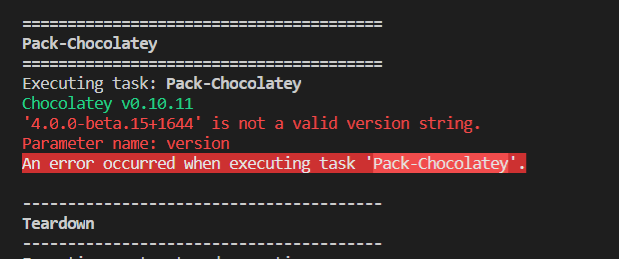
@asbjornu this is the reason I changed + with .
arturcic
on 12 Oct 2018
@ajbjornu , I kept the format for pre-release version like this as 4.0.0-beta0015-1644 as chocolatey and rubygem does not support the + and nuget is showing warnings.
arturcic
on 12 Oct 2018
@dazinator @gep13 @asbjornu @JakeGinnivan . I have updated the scripts to support the stable release as well as pre-release (there were some issues with the versioning format). I guess we should close this issue as @dazinator suggested and open a new issue for the VSTS publishing.
As for this issue, we should just tag the master branch with 4.0.0 and run a new build. Any other suggestions?
arturcic
on 12 Oct 2018
@arturcic agreed. Let's tag first, and check the stable channels. I'll leave this issue open until we have verified everything goes to stable channels as 4.0.0!
dazinator
on 12 Oct 2018
Actually.. just looking at releases:
https://github.com/GitTools/GitVersion/releases
It seems historically, releases have been created in Github as "draft" status first - I believe this creates a tag no?
Against the draft release is the opportunity to put release notes etc.
Do we want the ability to create a draft release first, do the release notes, but then only push the actual assets to the stable channels when the draft release on GitHub is "released" ?
dazinator
on 12 Oct 2018
Does this mean it's a 2-step release process? Does this mean when you we "release" from GitHub we should somehow trigger a publish to all channels? I guess that was the way it worked before. That's why we had a build.cake and a deploy.cake scripts.
I think when we have a stable release we should create a Github release as well, as part of the build, similar with what I saw in the https://github.com/cake-build/cake/blob/develop/build.cake#L594
This way we can still do stable releases in one step and have a Github release as well.
arturcic
on 12 Oct 2018
I reckon we should release 4.0.0, followed by a 4.1.0 shortly after for that netstandard baseline increment.
Yep! 👍
I think when we have a stable release we should create a Github release as well, as part of the build
That's what I would like. A git tag should be enough to get 99% there. It's more important to get new releases out the door easily than them being with perfect release documentation.
If we can get the GitHub release draft to include automatically created release documentation with GitReleaseManager, GitReleaseNotes or similar, that would be supreme.
asbjornu
on 12 Oct 2018
I concur. We can always add the auto creation of a github release (in draft status, with generated release notes) at a later stage too, rather than conflate this any further, We can create a seperate issue for that addition.
Ok then so for now, let's just tag, check the stable build and deployment channels work, then we can manually create a github release for now. I don't envy the person who has to create the github release notes for v4.0.0 :-)
dazinator
on 12 Oct 2018
So I suggest we open an issue related to GitHub release/release notes, so that we are able to release this version and unblock the release process. Creating a Github release from script will be next step to improve the build pipeline. As for now, for stable releases the build script creates the release notes and upload to AppVeyor, so we could manually create the release notes on Github till we have it automatically created.
arturcic
on 12 Oct 2018
Release created: https://github.com/GitTools/GitVersion/releases/tag/v4.0.0
I was curious to know if the act of publishing a tag would automatically trigger a build. Checked AppVeyor and it currently shows a build pending form 2 hours ago: https://ci.appveyor.com/project/GitTools/gitversion/history
Makes me think something maybe broken on AppVeyor as surely builds shouldn't queue for that long?
dazinator
on 12 Oct 2018
Actually it was 2 hours ago when I pushed the latest changes. The build is working fine now
arturcic
on 12 Oct 2018
@arturcic watching it in anticipation! :-)
dazinator
on 12 Oct 2018
I have added some general stuff to the 4.0.0 release notes on github, anyone please feel free to amend or completely change as necessary, it'ls just a bit better to have something over nothing :-)
dazinator
on 12 Oct 2018
Looks like all supported channels have been updated.
For chocolatey we'll have to fix the requirements for approval https://chocolatey.org/packages/GitVersion.Portable/4.0.0
arturcic
on 12 Oct 2018
I kept the format for pre-release version like this as 4.0.0-beta0015-1644 as chocolatey and rubygem does not support the
+and nuget is showing warnings.
Ok, so neither Chocolatey nor RubyGems supports SemVer 2.0, then. That's a shame.
asbjornu
on 12 Oct 2018
Ok, so neither Chocolatey nor RubyGems supports SemVer 2.0, then. That's a shame.
and nuget clients < 4.3 I think
arturcic
on 12 Oct 2018
OK.
For chocolatey we'll have to fix the requirements for approval
How do we fix this? I've got the Chocolatey credentials, but I can't find anywhere to adjust this in ther interface. If I try to "Edit Package", I'm only presented with this error message:
To edit the metadata for a package, please upload an updated version of the package.
NuGet currently does not allow updating package metadata on the website. This helps ensure that the package itself (and the source used to build the package) remains the one true source of package metadata.
This does require that you increment the package version.
asbjornu
on 12 Oct 2018
I could run manually the pack for chocolatey and push it from local as I have the API key.
arturcic
on 12 Oct 2018
I could run manually the pack for chocolatey and push it from local as I have the API key.
So you can fix the approval requirements locally and push them somehow? Or did you have something else in mind?
asbjornu
on 12 Oct 2018
That's exactly what I mean
arturcic
on 12 Oct 2018

asbjornu
on 12 Oct 2018
I have pushed the nuget package with the missing files - VERIFICATION.txt and LICENSE.txt. Waiting for moderation
arturcic
on 12 Oct 2018
Looks like the chocolatey was approved.
Hooray!! We have version 4.0.0 published to all supported channels, except Vsts. We can close this issue
arturcic
on 12 Oct 2018
What would need to happen in order to push this to VSTS?
Op vr 12 okt. 2018 17:17 schreef Artur notifications@github.com:
Looks like the chocolatey was approved.
Hooray!! We have version 4.0.0 published to all supported channels, except
Vsts—
You are receiving this because you are subscribed to this thread.
Reply to this email directly, view it on GitHub
https://github.com/GitTools/GitVersion/issues/1445#issuecomment-429361502,
or mute the thread
https://github.com/notifications/unsubscribe-auth/ABKzEShE-2d9jd5uhpfPFxMJD-YNPPu_ks5ukLKIgaJpZM4Vbtg5
.
 jmezach
on 12 Oct 2018
jmezach
on 12 Oct 2018
Actually we can manually update to latest as we already have an issue registered for build script vsts publish
arturcic
on 12 Oct 2018
@arturcic excellent news. I'll close this, and we can track VSTS under the issue you created :-)
Thank you!
dazinator
on 12 Oct 2018
@jmezach I haved updated to latest version on VSTS
arturcic
on 12 Oct 2018
Related issues
 cnickel
·
4Comments
cnickel
·
4Comments
 makuepfer
·
4Comments
makuepfer
·
4Comments
 cryptomatt
·
4Comments
cryptomatt
·
4Comments
 afcruzs
·
4Comments
afcruzs
·
4Comments
 willhughes-au
·
4Comments
willhughes-au
·
4Comments
Most helpful comment
Ok, so https://github.com/GitTools/GitVersion/releases/tag/untagged-e9734003373a071c8f29 is a draft release of the v4.0.0-beta.14 binaries.
Can people please test in their environments, it has been ages since a release so I want to ensure everything is good to go.
I am going to start working through this. There may be a few failed deployments and issues as we go, but I think we are going to have to endure it to move forward. Any issues with me pushing beta.14 and then fixing the errors (if any)?