Gitversion: VSTS GitVersion variables are not resolved when tagging sources
Using the GitVersion task from VSTS Marketplace, it's working fine updating assembly info and nuget version, but when I want to use any GitVersion variable to tag or label my sources, the variable is not expanded.
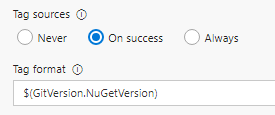
and so here is the result in the log file
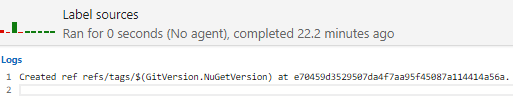
If I use a user-defined variable in the build process, i.e. $(tagVersion) and assigning a value (1.2.3.4) then the tag is correctly labeled with the variable's value.
 BiribiriJaNai
All 5 comments
I think this is not GitVersion issue, but TFS not making variables created by task running on the build agent available on the server where the tag in the source control is created. Such variables are only available for other tasks in the same build (but not even for the very task that is creating the variable)
User-defined variable is created on the server and passed in the context to the build on the agent; this is not the same scenario that GitVersion is in.
I hope this will be fixed eventually.
I cannot test it now, but I think as a workaround you could set the build number format to the NugetVersion variable (GitVersion should update build number) and then use $(Build.BuildNumber) in the tag format.
 dpurge
on 1 Aug 2017
dpurge
on 1 Aug 2017
@dpurge thanks for the workaround!
Indeed, GitVersion already updates the $(Build.BuildNumber) variable, and using it, as is, for tagging works like a charm.
Now I just have to set this variable to the Nuget version.
BiribiriJaNai
on 5 Aug 2017
I have a similar problem. I want to use the $(GitVersion_FullSemVer) for the Build number format but also want to pass the $(GitVersion_AssemblySemVer) to another VSTS Task (see the screenshot).
The BuildNumber will be correctly replaced, but all variables with $(GitVersion are not working and will be displayed as "$(GitVersion_AssemblySemVer)" instead of i.e. "1.0.0.0".
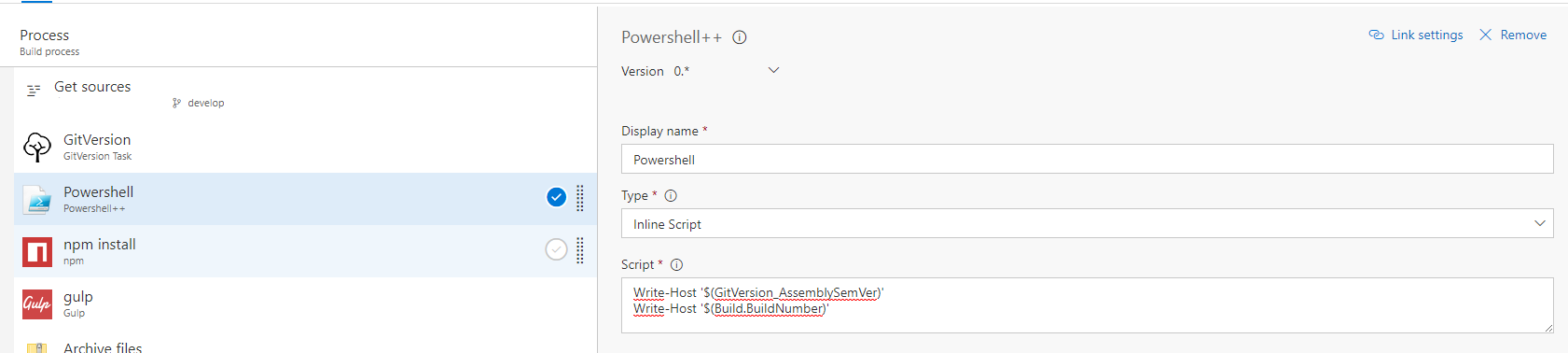
Do you have any idea?
Thanks!
ps: Great VSTS Task! Thanks!
 bastianjohn
on 9 Aug 2017
bastianjohn
on 9 Aug 2017
@bastianjohn VSTS variables created by GitVersion are in the form GitVersion.* not GitVersion_*. See documentation.
 pascalberger
on 10 Aug 2017
pascalberger
on 10 Aug 2017
As @dpurge mentioned this is not an issue with GitVersion but with how variables are scoped on VSTS. Setting of build number is handled specially by GitVersion by using the appropriate service message.
Closing this since I don't see anything which we can do here from GitVersion side.
pascalberger
on 10 Aug 2017
Related issues
 shaneholder
·
4Comments
shaneholder
·
4Comments
 cryptomatt
·
4Comments
cryptomatt
·
4Comments
 Scharpp
·
3Comments
Scharpp
·
3Comments
 Caleb9
·
3Comments
Caleb9
·
3Comments
 tcs-devel
·
4Comments
tcs-devel
·
4Comments
Most helpful comment
@bastianjohn VSTS variables created by GitVersion are in the form
GitVersion.*notGitVersion_*. See documentation.