Gitpod: Git push on github doesn't work
Describe the bug
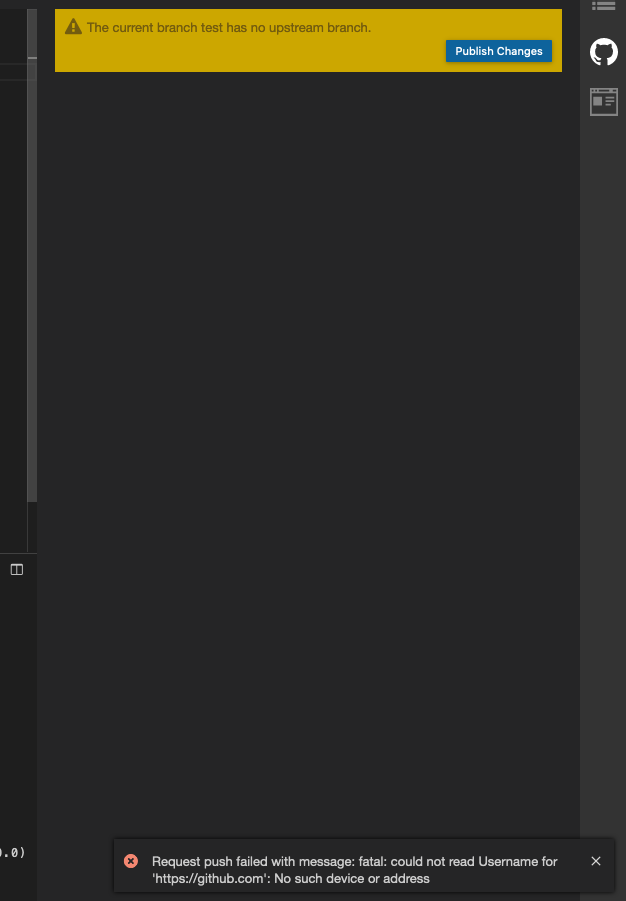
I can't push my branch created in gitpod to github.
Steps to reproduce
I created a new test branch with git pod working on my blog (see https://github.com/katmatt/katmatt-blogs) and I then tried to push my changes to github. Then I get the following error:
Expected behavior
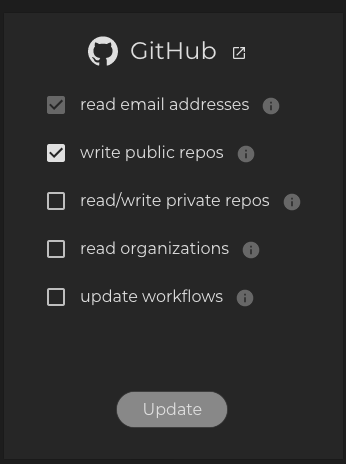
Since I authorized gitpod to write to my public github repositories, I would expect that pushing my changes to github should work without further configuration changes.
Additional information
My github account has:
- two emails associated with it, one for my private email and one for my business email.
- has access to multiple organizations with public and private repositories
- uses 2FA via SMS
My gitpod account settings can be seen here:
Example repository
 katmatt
All 12 comments
cc @AlexTugarev maybe you have an idea what is going wrong.
 akosyakov
on 30 Oct 2020
akosyakov
on 30 Oct 2020
Sounds like a (temporary?) network issue. Can you reproduce it, @katmatt?
 corneliusludmann
on 30 Oct 2020
corneliusludmann
on 30 Oct 2020
I stumbled over this issue already last weekend and I tried to push my changes to github multiple times. I even tried git push ... from the integrated terminal. And tried to open a fresh gitpod workspace. And I always got the same error.
And I was able to reproduce it yesterday too. I can give it another try, but from my users perspective it doesn't look like a network issue.
katmatt
on 30 Oct 2020
Thanks, @katmatt. You're right.
corneliusludmann
on 30 Oct 2020
By the way: What is the output of git push ... on the terminal?
corneliusludmann
on 30 Oct 2020
On the integrated terminal it looks like this:
hugo:/workspace/katmatt-blogs$ git push --set-upstream origin test
Username for 'https://github.com':
And I didn't remember that it was asking for my user name 😞
katmatt
on 30 Oct 2020
Hi @katmatt! I'm trying to understand the underlying issue.
First of all, git will punish you with asking for Username for 'https://github.com' whenever a push operation fails several times for any reason, i.e. even a misconfigured remote branch could cause it if repeated several times, because git will assume that the credential helper in place is not working any more, thus falls back to read credentials from command line. Unfortunately, we've no recover strategy in place, yet.
Now, I just tried to fork your repo and reproduce. First thing I see, there are some git hooks enabled, e.g. a simple commit fails with
Request commit failed with message: *** Please tell me who you are. Run git config --global user.email "[email protected]" git config --global user.name "Your Name" to set your account's default identity. Omit --global to set the identity only in this repository. fatal: unable to auto-detect email address (got 'gitpod@ws-1834bab1.(none)')
Okay, I had a closer look on the project setup. The docker image of your project is pre-configured to be used by root. As long as Gitpod has no root support yet, you would need to make some adjustments. You would need to create a dockerfile and reference it from .gitpod.yml
FROM klakegg/hugo:0.68.3-ext-alpine

ENV HOME="/home/gitpod"

# `gitpod` user will be activated in the gitpod layer on top
Otherwise $HOME is pointing to /src, which the gitpod user has no permissions for, thus getting:
hugo:/home/gitpod$ source .bashrc
touch: /src/.gitconfigured: Permission denied
error: could not lock config file /src/.gitconfig: Permission denied
Once the Gitpod Layer can be applied the git integration should work as expected.
 AlexTugarev
on 2 Nov 2020
AlexTugarev
on 2 Nov 2020
Hi @AlexTugarev ,
Thanks a lot for taking a closer look and your answer is very helpful. But changing my docker file to not run as root unfortunately didn't help, you can see my docker file here: https://github.com/katmatt/katmatt-blogs/blob/master/.gitpod.Dockerfile
This non root docker file didn't change any of the symptoms. But my repo uses git modules and my account is set up with ssh keys. I will try to reproduce this issue with a simpler repo and keep you posted about my findings.
katmatt
on 3 Nov 2020
@katmatt : Please make sure that the HOME variable is set to the home of the Gitpod user:
ENV HOME="/home/gitpod"
It's now set to /src:
hugo:/workspace/katmatt-blogs$ echo $HOME
/src
@corneliusludmann Thanks a lot for pointing out that I have to set the HOME env var, looks like I missed it in @AlexTugarev answer. But adding this line to my docker file doesn't change anything.
I'm also wondering how gitpod supports images from different linux distributions. And I wasn't even aware that the commands between different distros/ userlands can differ: alpine uses addgroup and adduser, where debian uses useradd and groupadd.
You can see my updated docker file here: https://github.com/katmatt/katmatt-blogs/blob/master/.gitpod.Dockerfile
katmatt
on 3 Nov 2020
You can see what happens with your image when Gitpod uses it here: https://github.com/gitpod-io/gitpod/tree/1cf441ab78ef5d9d23eb5ef31ffaaf5f330da1e5/components/image-builder/workspace-image-layer/gitpod-layer
The safest way is to create a Docker image for your workspace is to create an image that is based on gitpod/workspace-full and installs everything you need on top of this. Using an existing image and make it running for Gitpod needs usually more try-and-error.
corneliusludmann
on 3 Nov 2020
Just a heads up: I followed your advice @corneliusludmann and built my own docker image based on gitpod/workspace-full. Looks like that docker image is really big, it at least took a while to download when I tried to build my docker image locally. But fortunately gitpod already has it cached :smile:
And with this docker image (see https://github.com/katmatt/katmatt-blogs/blob/master/.gitpod.Dockerfile) everything works fine and I would suggest to close this issue.
Thanks a lot for your help!
katmatt
on 4 Nov 2020
Related issues
 Kreyren
·
3Comments
Kreyren
·
3Comments
 LinqLover
·
3Comments
Kreyren
·
3Comments
LinqLover
·
3Comments
Kreyren
·
3Comments
 ColbyWTaylor
·
3Comments
akosyakov
·
3Comments
ColbyWTaylor
·
3Comments
akosyakov
·
3Comments
Most helpful comment
You can see what happens with your image when Gitpod uses it here: https://github.com/gitpod-io/gitpod/tree/1cf441ab78ef5d9d23eb5ef31ffaaf5f330da1e5/components/image-builder/workspace-image-layer/gitpod-layer
The safest way is to create a Docker image for your workspace is to create an image that is based on
gitpod/workspace-fulland installs everything you need on top of this. Using an existing image and make it running for Gitpod needs usually more try-and-error.