Describe the bug
Getting this error when attempting to install clang (this worked in the past):
building base image

initializing base image context
UGit operations complete                       location=/workspace/init
running base image build
Step 1/4 : FROM gitpod/workspace-full-vnc
latest: Pulling from gitpod/workspace-full-vnc
Digest: sha256:73408fe1417c5b54129bf97e29ebb72ef3d8622a38ae02724674b2070412bbd2
Status: Image is up to date for gitpod/workspace-full-vnc:latest
 ---> b325d8070820
Step 2/4 : USER gitpod
 ---> Running in b4ecccf3dc0e
 ---> f09a98558aba
Step 3/4 : RUN sudo apt-get -q update &&     sudo apt-get install -yq libsdl2-dev libsdl2-image-dev libsdl2-mixer-dev libsdl2-ttf-dev clang clang-format clangd gcc make cloc
 ---> Running in efe30660f4e1
sudo: setrlimit(RLIMIT_CORE): Operation not permitted
Get:1 https://apt.llvm.org/focal llvm-toolchain-focal InRelease [4,231 B]
Get:2 http://ppa.launchpad.net/git-core/ppa/ubuntu focal InRelease [23.8 kB]
Get:3 http://security.ubuntu.com/ubuntu focal-security InRelease [107 kB]
Get:4 http://archive.ubuntu.com/ubuntu focal InRelease [265 kB]
Get:5 https://apt.llvm.org/focal llvm-toolchain-focal/main amd64 Packages [10.6 kB]
Get:6 http://security.ubuntu.com/ubuntu focal-security/universe amd64 Packages [62.6 kB]
Get:7 http://ppa.launchpad.net/git-core/ppa/ubuntu focal/main amd64 Packages [4,699 B]
Get:8 http://security.ubuntu.com/ubuntu focal-security/main amd64 Packages [199 kB]
Get:9 http://security.ubuntu.com/ubuntu focal-security/restricted amd64 Packages [39.1 kB]
Get:10 http://security.ubuntu.com/ubuntu focal-security/multiverse amd64 Packages [1,078 B]
Get:11 http://archive.ubuntu.com/ubuntu focal-updates InRelease [111 kB]
Get:12 http://archive.ubuntu.com/ubuntu focal-backports InRelease [98.3 kB]
Get:13 http://archive.ubuntu.com/ubuntu focal/restricted amd64 Packages [33.4 kB]
Get:14 http://archive.ubuntu.com/ubuntu focal/main amd64 Packages [1,275 kB]
Get:15 http://archive.ubuntu.com/ubuntu focal/multiverse amd64 Packages [177 kB]
Get:16 http://archive.ubuntu.com/ubuntu focal/universe amd64 Packages [11.3 MB]
Get:17 http://archive.ubuntu.com/ubuntu focal-updates/main amd64 Packages [411 kB]
Get:18 http://archive.ubuntu.com/ubuntu focal-updates/universe amd64 Packages [187 kB]
Get:19 http://archive.ubuntu.com/ubuntu focal-updates/restricted amd64 Packages [39.1 kB]
Get:20 http://archive.ubuntu.com/ubuntu focal-updates/multiverse amd64 Packages [17.3 kB]
Get:21 http://archive.ubuntu.com/ubuntu focal-backports/universe amd64 Packages [3,209 B]
Fetched 14.4 MB in 3s (4,396 kB/s)
Reading package lists...
sudo: setrlimit(RLIMIT_CORE): Operation not permitted
Reading package lists...
Building dependency tree...
Reading state information...
gcc is already the newest version (4:9.3.0-1ubuntu2).
make is already the newest version (4.2.1-1.2).
Some packages could not be installed. This may mean that you have
requested an impossible situation or if you are using the unstable
distribution that some required packages have not yet been created
or been moved out of Incoming.
The following information may help to resolve the situation:

The following packages have unmet dependencies:
 clang : Depends: clang-11 (>= 11~) but it is not installable
 clang-format : Depends: clang-format-11 (>= 11~) but it is not installable
 clangd : Depends: clangd-11 (>= 11~) but it is not installable
E: Unable to correct problems, you have held broken packages.


build failed: cannot build base image: The command '/bin/sh -c sudo apt-get -q update &&     sudo apt-get install -yq libsdl2-dev libsdl2-image-dev libsdl2-mixer-dev libsdl2-ttf-dev clang clang-format clangd gcc make cloc' returned a non-zero code: 100

Error: build failed: cannot build base image: The command '/bin/sh -c sudo apt-get -q update &&     sudo apt-get install -yq libsdl2-dev libsdl2-image-dev libsdl2-mixer-dev libsdl2-ttf-dev clang clang-format clangd gcc make cloc' returned a non-zero code: 100
Steps to reproduce
https://gitpod.io/#https://github.com/ryanpcmcquen/basque
Expected behavior
clang would be installable.
Example repository
 ryanpcmcquen
All 18 comments
Last run a few seconds ago: Error: build failed: cannot build base image: The command '/bin/sh -c sudo apt-get -q update && sudo apt-get install -yq libsdl2-dev libsdl2-image-dev libsdl2-mixer-dev libsdl2-ttf-dev clang clang-format gcc make cloc' returned a non-zero code: 100
It will repro even with image section in YAML file.
So even images under the gitpod namespace are affected.
By the way, how did you copy this build output from gitpod?
Can't fill the issue template. But better than not reporting.
Major decline in responsiveness using the Gitpod terminal. Enter a character, say " wait for terminal to update, show it on screen. Same for other characters.
Workaround is to just use a script to enter commands, as much as possible. 😀
Even start and stop workspace suffers.
https://gitpod.io/start/#bdf9b7fb-cc9a-4969-bd33-b31ecf896c64
It is about 1.6 GB to download. Nope 3.1 now.
It is not a permanent degradation, but not shortlived. Maybe it is the size of the workspace, but don't quote me on that.
Nothing on the status page or in the recent issues about this slow-down.
thanks. have a nice day. keep up the great work. 👏
 ret394
on 8 Aug 2020
ret394
on 8 Aug 2020
Hi! Thank you for reporting this issue.
Firstly, please note that clang is already installed in every Gitpod workspace. Here are the used installation instructions from Gitpod's default base image:
However, maybe it is still version 10 and not 11. Also, maybe there is a temporary bug with apt.llvm.org with the newer version.
I think we should try to update our clang installing lines, so that our Dazzle Docker cache gets invalidated for that layer. This may reveal the same bug in our default image.
 jankeromnes
on 8 Aug 2020
jankeromnes
on 8 Aug 2020
@jankeromnes, are there any other redundant packages I have in my Dockerfile?
ryanpcmcquen
on 8 Aug 2020
@ret394, the output is available in the loading window when the container is built.
ryanpcmcquen
on 8 Aug 2020
From the top of my head, at least these are redundant:
clang clang-format clangd gcc make
Our base image buildpack-deps already has most common build tools, and then our Dockerfile has many more tools (ideally every common tool you'd expect in the latest stable version).
jankeromnes
on 8 Aug 2020
@jankeromnes, thanks!
ryanpcmcquen
on 8 Aug 2020
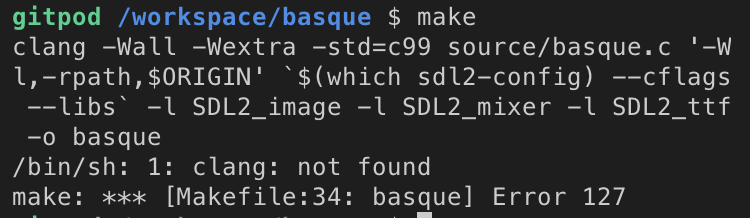
@jankeromnes, I removed clang and now it says clang isn't found:
ryanpcmcquen
on 8 Aug 2020
It can't be copied from the window. Ideally, it would surface a button to copy it or something.
By the way, nice choice for Github bio. More people should do that - hosting on two sites and a useful bio.
@jankeromnes, I removed clang and now it says clang isn't found:
And that's why you don't remove the redundant packages. I had a hunch it would go wrong.
thanks. have a nice day. keep up the great work. 👏
ret394
on 9 Aug 2020
Sorry, about that. It seems that because clang is not explicitly installed there is no alias for clang on the PATH.
Only clang-11 as it was pulled as an upstream dependency. @jankeromnes is that on purpose?
 svenefftinge
on 10 Aug 2020
svenefftinge
on 10 Aug 2020
Hm, thay may be a bug with apt.llvm.org (I believe it's supposed to add a clang --> clang-11 alias automatically.)
Will investigate.
jankeromnes
on 10 Aug 2020
@jankeromnes, any news?
ryanpcmcquen
on 20 Aug 2020
@ryanpcmcquen I think it has been solved here: https://github.com/gitpod-io/workspace-images/pull/275#issuecomment-677375553 (but not merged yet)
 geropl
on 21 Aug 2020
geropl
on 21 Aug 2020
@ryanpcmcquen The Docker builds on that PR were successfully deployed. Would you be interested in testing the result by temporarily pointing your project to the following Docker image / tag?
Dockerfile:
FROM gitpod/workspace-full:branch-jx-explicitly-install-clang
Or, .gitpod.yml:
image: gitpod/workspace-full:branch-jx-explicitly-install-clang
Hopefully this will fix the clang installation. If you're not able to or interested in testing it, I'll test it next week and merge the PR then.
Thanks again for reporting this problem. 👍
jankeromnes
on 21 Aug 2020
Of course, I would be honored to test it, I'll report back as soon as I do.
ryanpcmcquen
on 21 Aug 2020
@jankeromnes, it works!!!! Woo.
ryanpcmcquen
on 21 Aug 2020
@jankeromnes, will this change also populate to workspace-full-vnc?
ryanpcmcquen
on 21 Aug 2020
This is fixed!
https://github.com/ryanpcmcquen/basque/commit/60daeae673d4f6f57b15c6bd5edbce028ef00a5e
ryanpcmcquen
on 31 Aug 2020
it works!!!! Woo.
That's awesome, many thanks for confirming!
will this change also populate to
workspace-full-vnc?
Yes, should already have, as full-vnc is based on full.
jankeromnes
on 31 Aug 2020
Related issues
 LinqLover
·
3Comments
LinqLover
·
3Comments
 kuniss
·
3Comments
kuniss
·
3Comments
 Kreyren
·
3Comments
Kreyren
·
3Comments
 ColbyWTaylor
·
3Comments
ColbyWTaylor
·
3Comments
 kittaakos
·
3Comments
kittaakos
·
3Comments
Most helpful comment
@ryanpcmcquen I think it has been solved here: https://github.com/gitpod-io/workspace-images/pull/275#issuecomment-677375553 (but not merged yet)