Gitpod: Workspace creation fails - sudo: setrlimit(RLIMIT_CORE): Operation not permitted
Describe the bug
Can't create workspace: fails trying to run a local script
Steps to reproduce
https://gitpod.io/#https://github.com/pwsafe/pwsafe/tree/gitpod3
Expected behavior
Workspace should be created successfully.
Additional information
Trying to eliminate some duplicates: Both the gitpod Dockerfile and an existing utility script run apt-get install for the project's dependencies. However, replacing 'sudo apt-get install ..." with an invocation of the script 'sudo sh ./Misc/setup-deb-dev-env.sh" causes the workspace build to fail with:
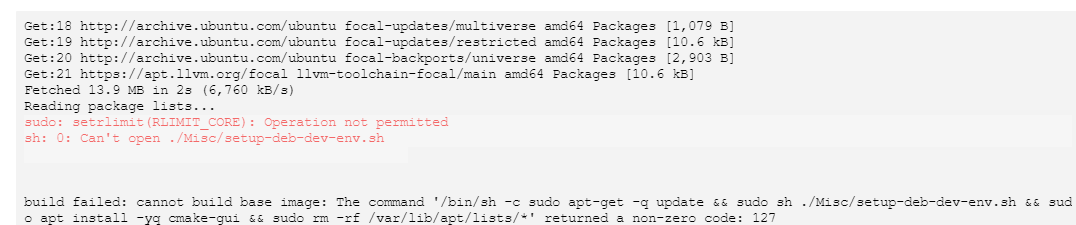
Example repository
 ronys
ronys
All 11 comments
Assigned @jankeromnes for reasons in https://github.com/gitpod-io/website/pull/668#issuecomment-635886244
 Kreyren
on 29 May 2020
Kreyren
on 29 May 2020
Hi @ronys,
At the time you're running:
RUN sudo apt-get -q update && sudo sh ./Misc/setup-deb-dev-env.sh && #...
I think there is no such thing as a ./Misc/setup-deb-dev-env.sh in your Docker image.
Here is a Dockerfile that I think should work better:
FROM gitpod/workspace-full-vnc

# Set debconf to noninteractive mode.
RUN echo 'debconf debconf/frontend select Noninteractive' | sudo debconf-set-selections

# Install dependencies.
COPY ./Misc/setup-deb-dev-env.sh /tmp/setup-deb-dev-env.sh
RUN sudo apt-get -q update && \
    sudo sh /tmp/setup-deb-dev-env.sh && \
    sudo apt install -yq cmake-gui && \
    sudo rm -rf /var/lib/apt/lists/* /tmp/setup-deb-dev-env.sh

# Set debconf back to normal.
RUN echo 'debconf debconf/frontend select Dialog' | sudo debconf-set-selections
 jankeromnes
on 29 May 2020
jankeromnes
on 29 May 2020
@jankeromnes - the COPY command you suggest makes sense, but it doesn't work:
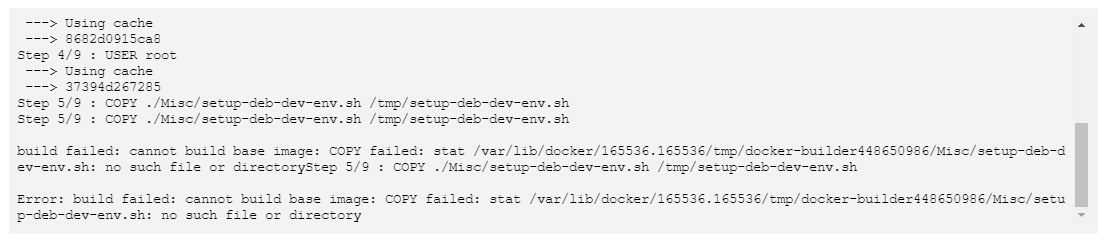
.gitpod.Dockerfile is in https://github.com/pwsafe/pwsafe/blob/gitpod3/.gitpod.Dockerfile
Suggestions?
ronys
on 29 May 2020
@ronys
--- COPY ./Misc/setup-deb-dev-env.sh /tmp/setup-deb-dev-env.sh
+++ COPY Misc/setup-deb-dev-env.sh /tmp/setup-deb-dev-env.sh
Thanks @Kreyren - that was the missing part!
Where can I see the workspace creation log? I still see some red text, but it's scrolling by way too fast for me to investigate while the workspace is being built.
ronys
on 29 May 2020
Where can I see the workspace creation log? I still see some red text, but it's scrolling by way too fast for me to investigate while the workspace is being built.
afaik it's only in the provided window and in browser's console
@jankeromnes may clarify
Kreyren
on 30 May 2020
Where can I see the workspace creation log? I still see some red text, but it's scrolling by way too fast for me to investigate while the workspace is being built.
You can scroll up in the build output view, or Select All + Copy + Paste somewhere else if you prefer that.
jankeromnes
on 30 May 2020
FWIW i usually do this or something alike to get logs https://github.com/Kreyren/forkless-pwsafe/blob/01237b1154e3af37e77c9d3a91ed5dd34254c2a9/Makefile#L7
Which provides the required logs on paste service for me to view easily~
Kreyren
on 30 May 2020
Just for the record: The warning
sudo: setrlimit(RLIMIT_CORE): Operation not permitted
has nothing to do with the failure of the workspace creation. This warning is from sudo and can be safely ignored (see https://github.com/sudo-project/sudo/issues/42).
@ronys: Fell free to close this issue when it is solved for you.
 corneliusludmann
on 1 Jun 2020
corneliusludmann
on 1 Jun 2020
My fault then! >.<
Kreyren
on 1 Jun 2020
This issue has been automatically marked as stale because it has not had recent activity. It will be closed if no further activity occurs. Thank you for your contributions.
![stale[bot] picture](https://avatars3.githubusercontent.com/in/1724?v=4&s=40) stale[bot]
on 4 Oct 2020
stale[bot]
on 4 Oct 2020
Related issues
 bytekast
·
3Comments
bytekast
·
3Comments
 kittaakos
·
3Comments
kittaakos
·
3Comments
 akosyakov
·
3Comments
akosyakov
·
3Comments
 LezaiNiubi
·
3Comments
LezaiNiubi
·
3Comments
 PatMyron
·
3Comments
PatMyron
·
3Comments