Gitpod: C/C++ Language Server doesn't work well for a C project
A user reported this on Twitter:
I am trying to make my simple C library use intellisense in gitpod properly but have not been successful. If you have time, could you take a look too? I'd really appreciate it. Here is a link to the github: https://github.com/sirspot/ACR
I did a lot more reading about how gitpod works and I wonder if this is actually a limitation of their vscode extension support. The actual editor seems to find the files and can switch between source and headers just fine. Only the intellisense ext seems to have a problem.
Good news, it works perfectly if I open the command list and turn OFF the language server 😂 I even got a build task and debug to work 👍
This is going to be fun!
I find it a bit worrying that you have to turn off the Language Server in order to get a good C development experience. I'm opening this issue so that we can further investigate these issues.
 jankeromnes
All 14 comments
To reproduce:
- Start with language server on

Turn off language server

Enjoy the ide's ability to lookup enum values and other names across files

 sirspot
on 19 May 2020
sirspot
on 19 May 2020
I notice that the project is installing the ms-vscode.cpptools VS Code extension:
https://github.com/sirspot/ACR/blob/bfed48fbc85215babb76efdad3ae0e83e4a98875/.gitpod.yml#L6-L8
However, Gitpod (and Theia) already come with a C/C++ language server extension: https://github.com/eclipse-theia/theia-cpp-extensions
So, either one of these two language servers doesn't work well, or they're conflicting somehow. I wonder which one "C/C++: Stop Language Server" turns off.
jankeromnes
on 20 May 2020
FWIW it works on my end even with the extension installed
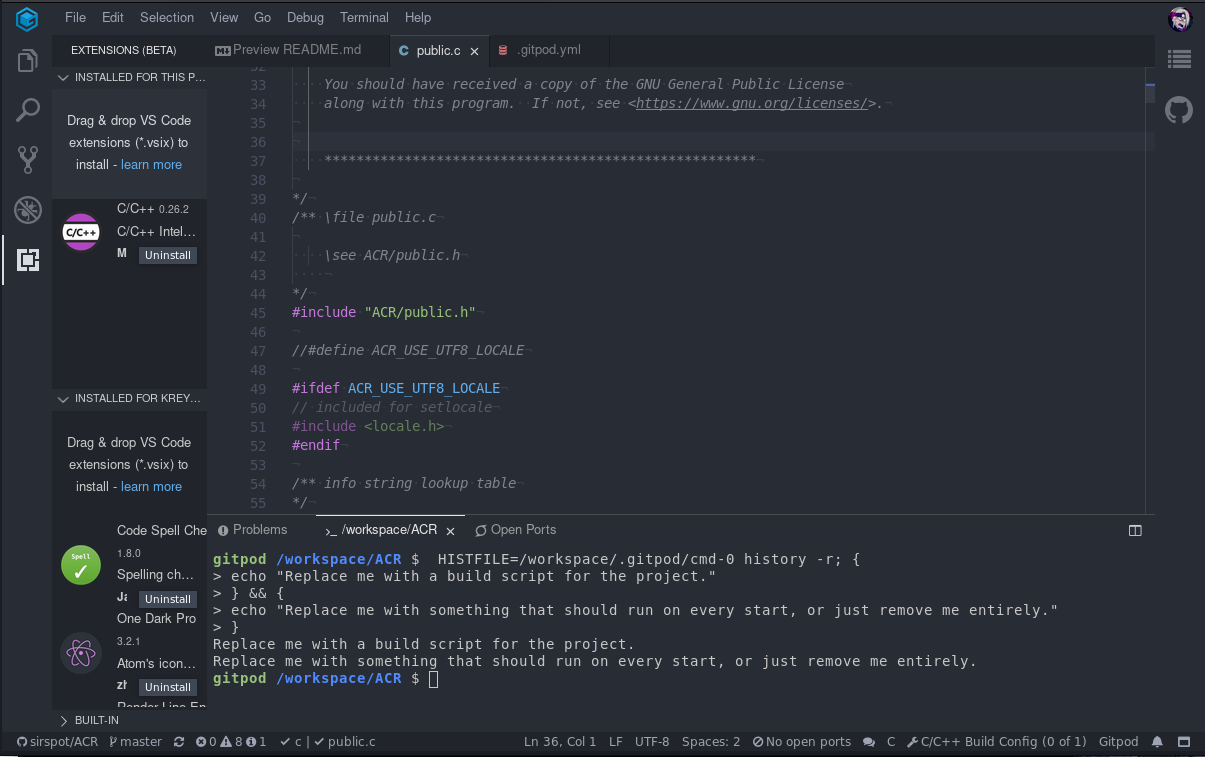
Maybe this is a somehow related to this thing? (wasn't required to make the reported working i suspect this is caused by emacs extension or theme)
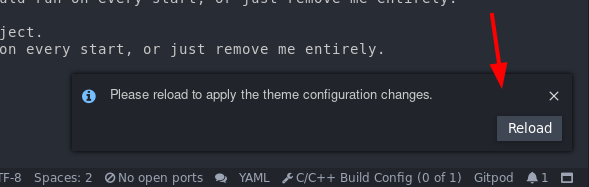
 Kreyren
on 20 May 2020
Kreyren
on 20 May 2020
FWIW it works on my end even with the extension installed
@Kreyren To clarify, by "it works on my end", do you mean that in public.c you can hover over the ACR_INFO_COUNT symbol, and the popover shows the correct type (as defined in public.h)?
jankeromnes
on 20 May 2020
@jankeromnes Nope i am getting following:
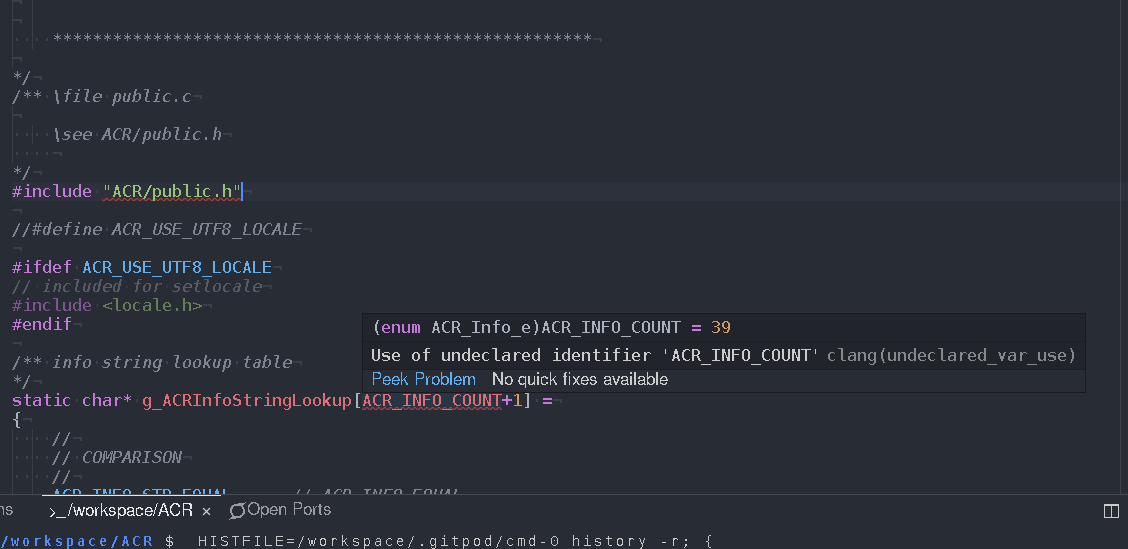
I don't see it being defined in the code itself on this snapshot: https://gitpod.io#snapshot/f950a200-b31d-49b2-9ec6-c020a3a57dd2
Defining it (lazy proof of concept because i didn't read the code) seems to result in expected behavior:
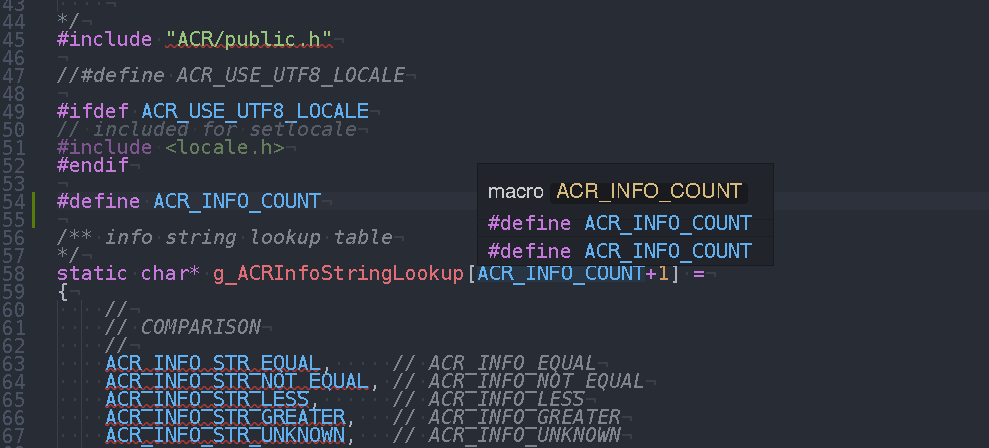
Kreyren
on 20 May 2020
I can clarify a bit. When the ms-vscode.cpptools VS Code extension is NOT installed and the ACR/public.c file is open, it cannot find ACR/public.h and places a red line under it. When I turn off the language server in that case the red line goes away but hovering over ACR_INFO_COUNT has no effect.
Then, when I install the ms-vscode.cpptools VS Code extension and the language server is on, I still get the red line under ACR/public.h but when I turn off the language server it goes away. AND now that the extension is installed I can hover over ACR_INFO_COUNT to see the value is defined as expected (it is defined in an enum in ACR/public.h)
sirspot
on 21 May 2020
The default gitpod environment seems to be able to find it if specified as full path:

@sirspot Can you verify this on your environment? https://gitpod.io/#https://github.com/Kreyren/ACR/blob/699b96b8abe35ba8b7f1db2701dac697d14318a4/src/ACR/public.c
So far looks to me as configuration issue.
Kreyren
on 21 May 2020
@sirspot If the behavior is different on your environment then elaborate on what browser were you using at the time (i.e issue related to Microsoft Edge
Kreyren
on 21 May 2020
also if the changes works on your environment then adding .theia/settings.json with content
{
    "cpp.clangdArgs": "-I/workspace/ACR/include"
}
Seems to resolve the issue.
EDIT: It doesn't
EDIT2: Outputs that clangd is not present, but it should be installed https://github.com/gitpod-io/workspace-images/blob/master/full/Dockerfile#L62
EDIT3: According to apt list --installed clangd is not installed on workspace-full -> Seems as deployment issue
EDIT4: Installing dependencies doesn't seem to affect the issue, seems to be done by design.
Kreyren
on 21 May 2020
@Kreyren That was a great hint! I found that the clang flags can be stored in a file called compile_flags.txt and I think it works! I am going to test a few things and commit to git but this may be the missing piece of the puzzle :)
EDIT: Confirmed! It now works straight out of the box. The compile_flags.txt file is just briefly mentioned at the bottom of this page https://clang.llvm.org/docs/JSONCompilationDatabase.html for future reference
sirspot
on 21 May 2020
Glad it worked ^-^
@sirspot Can you confirm that without the compiler_flags.txt it works locally?
If it works without that locally then i think that using compile_flags.txt is kinda janky on gitpod -> Should be store this somewhere else?
Few options:
- Extension configuration
- In
.gitpod.yml - In code? (probably a bad idea assuming it could be considered as bloat)
Kreyren
on 21 May 2020
Also assuming gitpod not expecting end-users to install ms-vscode cpp extension then we should probably put it in some kind of blacklist with a helpful message specifying why..
Kreyren
on 21 May 2020
I think the ms-vscode cpp ext is required for debugging c/c++ in gitpod. I don’t remember it working until I got that ext to install.
sirspot
on 21 May 2020
@sirspot It should work out of the box without ms-vscode cpp ext (at least on my end it does and the info above was provided on repository without the extension O.o).
Kreyren
on 21 May 2020
Related issues
 Sandared
·
25Comments
Sandared
·
25Comments
 benjamink85
·
25Comments
benjamink85
·
25Comments
 BSFishy
·
42Comments
jankeromnes
·
25Comments
BSFishy
·
42Comments
jankeromnes
·
25Comments
 svenefftinge
·
26Comments
svenefftinge
·
26Comments