Gitpod: Gitpod should't ask for admin preveliges as they are not required.
Describe the bug
A user has reported in https://github.com/iterative/dvc.org/issues/1253#issuecomment-624825259 that:
Unfortunately Gitpod wants access to manage repo settings and development keys so I don't feel comfortable giving it those permissions from my account, since I have admin access to the repo. Maybe for a developer in an org this would be OK but they will probably have a local dev env anyway.
The screenshot that he shared shows that Gitpod is asking for "deploy keys", "webhooks and services" and "settings"

@jankeromnes told me this in https://github.com/TypeFox/gitpodify/issues/410#issuecomment-624862954
Gitpod only requires a valid email address (to prevent abuse). That's it. It will totally work if you grant nothing else.
Then, later, you can decide whether you want to also grant it push access to public repositories, or to private repositories, etc. But this is entirely optional.
Furthermore, it should never ask for admin privileges. If you see it requesting anything like repo settings, or key-related permissions, please let us know -- that would be a serious bug and we'd fix it ASAP.
Steps to reproduce
Expected behavior
Additional information
Example repository
 nisarhassan12
All 9 comments
FWIW i also don't see a reason for gitpod to manage wikis.
 Kreyren
on 6 May 2020
Kreyren
on 6 May 2020
Thanks @nisarhassan12 and @jorgeorpinel for surfacing this worrying problem!
Let's review the OAuth scopes that Gitpod may potentially request, and under which circumstances it requests them. We want Gitpod to request as few permissions as possible (i.e. just the precise thing that you want to achieve, nothing more).
All GitHub's OAuth scopes are described here: https://developer.github.com/apps/building-oauth-apps/understanding-scopes-for-oauth-apps/#available-scopes
- From what I can see, Gitpod.io login should only ever request one scope by default,
user:email:
user:email: Grants read access to a user's email addresses.
A valid email address is necessary to prevent abuse. But that's it. Gitpod shouldn't request anything more to allow basic functionality (i.e. creating a workspace by cloning a public repository).
Next, once logged in, a user may visit https://gitpod.io/access-control/ to audit previously granted access, and decide to retract scopes, or to grant additional scopes to unlock further Gitpod use cases:
- Enabling
write public reposgrants Gitpod thepublic_reposcope:
public_repo: Limits access to public repositories. That includes read/write access to code, commit statuses, repository projects, collaborators, and deployment statuses for public repositories and organizations. Also required for starring public repositories.
Here it's unfortunate that GitHub's scope definition is so broad. Gitpod only needs (and uses) push rights so that you can push commits from Gitpod to GitHub. It doesn't need access to commit statuses, repository projects, collaborators, deployment statuses, or starring repositories. For what it's worth, it also doesn't use any of these extra features as far as I can tell, but we're limited by GitHub's OAuth scope granularity here (i.e. if there was a write:public_repo, we'd request only that instead).
- Enabling
read/write private reposgrants Gitpod thereposcope:
repo: Grants full access to private and public repositories. That includes read/write access to code, commit statuses, repository and organization projects, invitations, collaborators, adding team memberships, deployment statuses, and repository webhooks for public and private repositories and organizations. Also grants ability to manage user projects.
Same story here. Gitpod only wants to let you push commits to your private repository, and it doesn't need/use all the rest. Finer granularity would be great here, because Gitpod only needs something like write:repo.
- Enabling
read organizationsgrants Gitpod theread:orgscope:
read:org: Read-only access to organization membership, organization projects, and team membership.
Now this sounds more reasonable. I think this is only required when you fork from inside Gitpod, to show you a list of places that you can fork to, be it under an org or under your personal GitHub account. You can also decide to fork manually outside of Gitpod and never grant this scope.
- Enabling
update workflowsis new, and grants Gitpod theworkflowscope:
workflow: Grants the ability to add and update GitHub Actions workflow files. Workflow files can be committed without this scope if the same file (with both the same path and contents) exists on another branch in the same repository.
This is only required if you have a .github/workflows/ directory in your project (the special workflow scope is required for any attempted modification of files in there, even if you're just rebasing a branch to a new state and didn't do any changes in there yourself -- even if the docs says otherwise, I've already gotten bitten by this). If you don't have such a directory, you probably don't need to grant this scope. But if you do need it, it also doesn't seem to grant any unrelated extra nonsense, which is great.
Now, we've covered all the scopes that can potentially be granted to Gitpod if desired by the user. However, we still don't have any explanation for the extra items that GitHub is showing in what seems like the public_repo confirmation prompt:
- Issues: I guess this comes bundled with code access?
- Pull Requests: Ok, this probably actually makes sense for Gitpod, since it allows creating Pull Requests
- Wikis: ?? probably also bundled with code access like Issues?
- Settings: ?? Gitpod doesn't need or want to have anything to do with repository settings. Why is this bundled with
public_repo? This sounds a bit dangerous. - Webhooks and services: Webhooks don't sound so bad, but what are "services" here? (If it's just other types of hooks, I guess it's okay)
- Deploy keys: ??? Ok now this is going too far. What does this even mean? Like, does
public_repogive apps the right to read a user's deploy keys? That sounds like a terrible idea. Or maybe it just allows apps to add new deploy keys? (Still not great though.)
I guess the "Learn more" link has more info. It would be great to reproduce this confirmation prompt, and click on "Learn more", to understand what all these extra things mean. I can totally understand why a user would feel surprised and anxious about granting them, and they're not even mentioned in GitHub's official OAuth scopes docs.
 jankeromnes
on 12 May 2020
jankeromnes
on 12 May 2020
Unfortunately Gitpod wants access to manage repo settings and development keys so I don't feel comfortable giving it those permissions from my account, since I have admin access to the repo.
That's totally understandable, and it would be good to understand what GitHub means by "Settings" here exactly!
However, the prompt says "Deploy keys", not "development keys", so I think this has nothing to do with SSH keys (which would require a scope like admin/read/write:public_key) nor with GPG keys (which would require admin/read/write:gpg_key). I have no idea what exactly "Deploy keys" are in the context or a public repo, but maybe they have something to do with publishing "Releases"? (In any case, that's not needed or used by Gitpod, and we don't want access to that.)
jankeromnes
on 12 May 2020
Ok, I was able to reproduce the confirmation screen by:
- going to https://gitpod.io/access-control/
- clicking on the GitHub audit link
- revoking app access entirely
- unchecking all boxes, and clicking "Update" (re-authorized the app with just
user:email) - checking
write public repo, and clicking "Update" again:
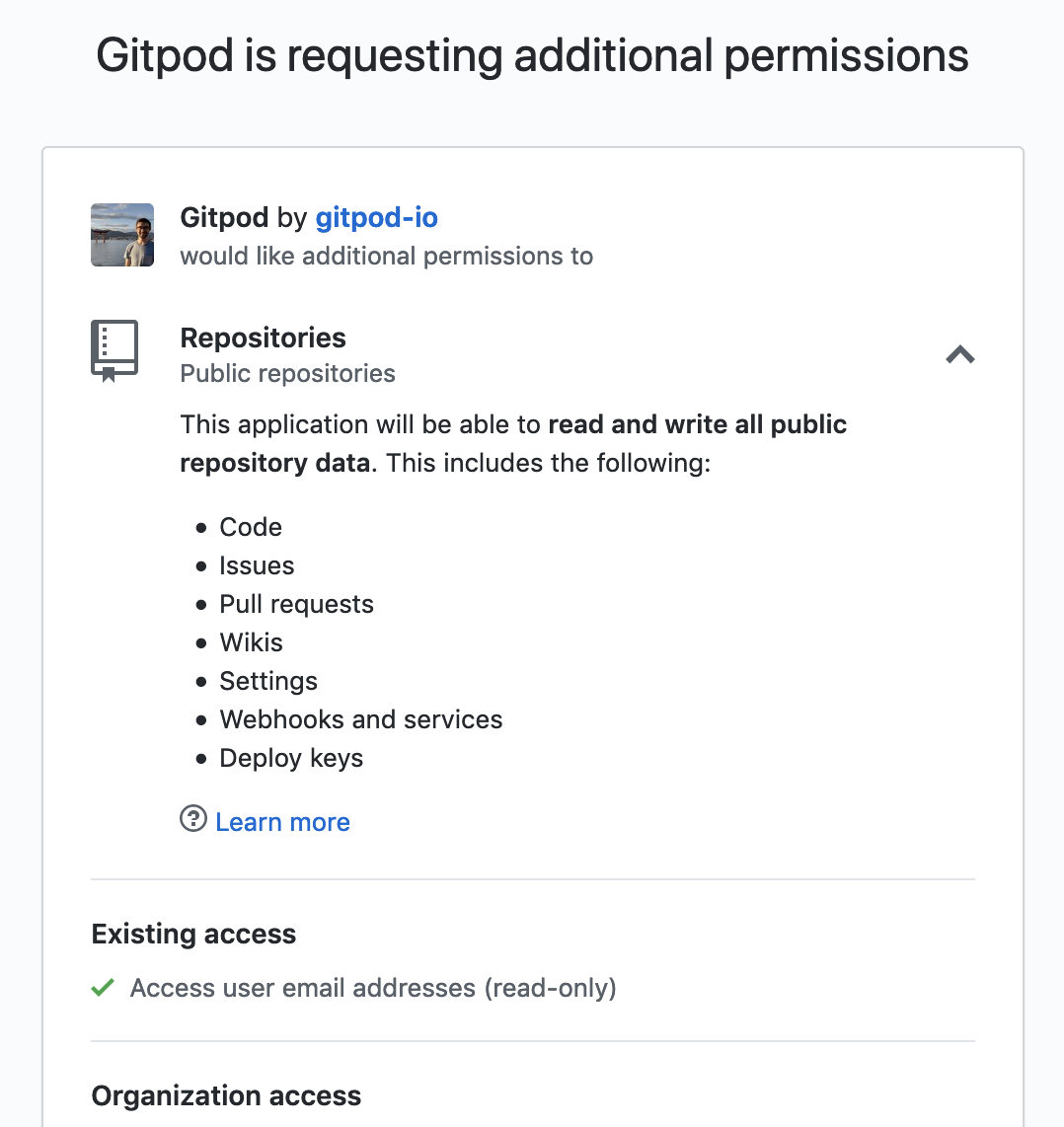
However, "Learn more" is just a generic link to: https://help.github.com/en/github/authenticating-to-github/authorizing-oauth-apps
The page unfortunately doesn't seem to have any information about what "Settings" and "Deploy keys" mean here.
I guess the way forward is to ask GitHub Support what these mean?
EDIT: I've opened a GitHub Support request to ask about this. Will relay any answers I get here.
jankeromnes
on 12 May 2020
However, the prompt says "Deploy keys", not "development keys"
Correct, mistyping on my part. I guess those are read-only anyway but still if they're not needed, why get them? 🙂
Thank you all for looking into this!
 jorgeorpinel
on 12 May 2020
jorgeorpinel
on 12 May 2020
relevant: Staging gitpod also requires insane permissions.
Kreyren
on 13 May 2020
GitHub support replied to my question:
Thanks for writing in!
If the user is the owner of, or has admin permissions for, a public repository, the
public_reposcope will allow the application to make changes to the repository's settings via this endpoint:https://developer.github.com/v3/repos/#update-a-repository
And modify deploy keys using this endpoint:
https://developer.github.com/v3/repos/keys/
I hope this helps clear things up. I'm also going to make a note for our documentation team to see if we can make this clearer.
Please let me know if you have any questions about this or anything else!
So, these extra permissions that Gitpod doesn't need or use are indeed bundled with the public_repo scope, due to lack of OAuth scope granularity.
The public keys don't seem too worrying to me:
- Everyone's public keys are already 100% public via the
GET /users/:username/keysendpoint, without any sort of authentication required, e.g. https://api.github.com/users/jankeromnes/keys (well I don't have any keys there, but if I did, you would see them in plain text -- that's kind of the point of public/private keypairs) - Adding authorized public keys is considered sensitive by GitHub, and GitHub is very loud about it (e.g. you get an alert email on all your registered addresses if some key is being added, with direct links to audit / revoke them if something looks off)
However, the settings permissions granted by the public_repo scope is something to be aware of:
- It's not currently needed or used by Gitpod, so it's kind of unnecessary (but
public_repohaving no sub-scopes, we have to live with it for now) - It could potentially allow implementing additional repository features into Gitpod without requesting more permissions, which is nice (I'm not sure if this could be something sensible / useful / desirable in any way, but at least we know it's possible)
jankeromnes
on 18 May 2020
See also
https://github.com/prometheus/prometheus/pull/7749#issuecomment-670470177
 svenefftinge
on 7 Aug 2020
svenefftinge
on 7 Aug 2020
I'd like to go away from the GitHub app approach and use a webhook instead (we do that for GitLab and Bitbucket and it makes it easier for us to install this). Gitpod would then use the scopes granted by the user that installed the webhooks.
svenefftinge
on 7 Aug 2020
Related issues
 akosyakov
·
3Comments
akosyakov
·
3Comments
 iksaif
·
3Comments
iksaif
·
3Comments
 alesanchezr
·
3Comments
alesanchezr
·
3Comments
 hidehiro98
·
3Comments
hidehiro98
·
3Comments
 kuniss
·
3Comments
kuniss
·
3Comments
Most helpful comment
Correct, mistyping on my part. I guess those are read-only anyway but still if they're not needed, why get them? 🙂
Thank you all for looking into this!