Describe the bug
So I have a private repository that I'm opening in Gitpod, and my configuration looks like:
ports:
- port: 5000

tasks:
  - before: python3 -m pip install --upgrade -r requirements.txt
(and yes, I've tried with both init and before)
the issue is that I can now open the code, only to see:
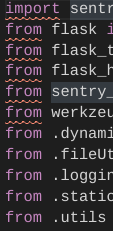
all my external dependencies seemingly missing!
To Reproduce
Private so I can't sorry
Expected behavior
My dependencies should be in site packages
Additional Information
This only happens for external dependencies, like sentry_sdk, but not with builtins like os and package-private classes (in the project's package, meaning they are in the same folder).
Please help, this is a bit urgent as it is slowing down my workflow!
 RDIL
RDIL
All 14 comments
Hi @RDIL! I’m sorry to hear that. Do you see the packages being installed?
Does it help to reopen the Python file after the installation is finished?
Please verify that you have set python.jediEnabled setting to false.
 AlexTugarev
on 15 Nov 2019
AlexTugarev
on 15 Nov 2019
Hey @AlexTugarev
- Yes, I can see the logs
- No - the installation will have already completed by the time it actually opens the editor instead of the animated logo
- Why and how
RDIL
on 15 Nov 2019
I could reproduce it. ‘Working on a fix, and will come back soon with a temporary workaround for you.
AlexTugarev
on 15 Nov 2019
@AlexTugarev just out of interest, what is the actual issue?
RDIL
on 15 Nov 2019
The Python LS doesn’t consider the user site for its search path.
AlexTugarev
on 15 Nov 2019
Also worth noting: pylint notes "errors" all over the place that can be fixed by simply modifying and saving the file which is getting really annoying
RDIL
on 15 Nov 2019
Also, why the hell are we using pyenv?
RDIL
on 15 Nov 2019
How about have a minimal base image for gitpod and allow users to customize their own images for workspaces?
 dclong
on 15 Nov 2019
dclong
on 15 Nov 2019
@RDIL I prepared a fix for the issue the Python LS, but will need to wait to our team with the deployment.
In the meantime to work around this, please navigate to https://gitpod.io/environment-variables/ and add the following Env Var:
key | value | scope
------------ | ------------- | -------------
PYTHONUSERBASE | /workspace/.pip-modules | */*

AlexTugarev
on 15 Nov 2019
Also, why the hell are we using pyenv?
Feel free to suggest improvements on https://github.com/gitpod-io/workspace-images 🙌
AlexTugarev
on 15 Nov 2019
@AlexTugarev it works like a charm. Any idea when the deployment will happen?
RDIL
on 17 Nov 2019
AlexTugarev not sure why but python syntax highlighting just broke - its all white
RDIL
on 19 Nov 2019
never mind
RDIL
on 19 Nov 2019
thanks for verifying.
 svenefftinge
on 20 Nov 2019
svenefftinge
on 20 Nov 2019
Related issues
 ColbyWTaylor
·
3Comments
ColbyWTaylor
·
3Comments
ColbyWTaylor
·
3Comments
ColbyWTaylor
·
3Comments
 mouse484
·
3Comments
mouse484
·
3Comments
 akosyakov
·
3Comments
akosyakov
·
3Comments
 kittaakos
·
3Comments
kittaakos
·
3Comments
Most helpful comment
@RDIL I prepared a fix for the issue the Python LS, but will need to wait to our team with the deployment.
In the meantime to work around this, please navigate to https://gitpod.io/environment-variables/ and add the following Env Var:
key | value | scope
------------ | ------------- | -------------
PYTHONUSERBASE|/workspace/.pip-modules|*/*