Gitlab-plugin: Web hook fails when Jenkins Anonymous user does not have job/build permission
Issue
Context
- Gitlab plugin version: 1.2.5
- Gitlab version: Community Edition 8.5.4
- Jenkins version: 1.654
Logs & Traces
When testing the web hook on gitlab side, I get this exception :
Hook execution failed: java.lang.Exception: anonymous is missing the Job/Build permission at org.kohsuke.stapler.HttpResponses.error(HttpResponses.java:83) at (...)
Problem description
Indeed, if on the Jenkins side, I allow the job/build permission for Anonymous, everything works fine. But I certainly don't want to allow anybody to launch builds. Is that a gitlab-plugin issue ? Or am I missing something on the Jenkins side ?
Thanks for all your work
 emarin
All 8 comments
You can either add a special user in Jenkins for this and configure the Webhook in GitLab accordingly or you can uncheck the checkbox "Enable authentication for '/project' end-point" in the GitLab section of the global Jenkins configuration. But this should be unchecked by default.
 coder-hugo
on 6 Jul 2016
coder-hugo
on 6 Jul 2016
Unchecking the box works indeed ... thanks !
I am curious on how to 'configure the webhook in Gitlab accordingly' though, right now the documentation only refers to :
http://JENKINS_URL/project/PROJECT_NAME
Is there a way to configure that link with other options ?
Thanks again
emarin
on 6 Jul 2016
If you are using GitLab EE you can use the Jenkins CI service where you can enter a username and password. For webhooks you can add the username and password directly to the URL like this:
https://username:password@JENKINS_URL/project/PROJECT_NAME
Not that nice as the password is visible for everybody how as access to the webhook page but it should work.
coder-hugo
on 6 Jul 2016
You can set Secret Token as well and I think this method is better than two other options since no credential exposed or no too open policy.
Create Jenkins Secret Token

Use the Secret Token at Gitlab

 legshort
on 20 Apr 2017
legshort
on 20 Apr 2017
You can set Secret Token as well and I think this method is better than two other options since no credential exposed or no too open policy.
Create Jenkins Secret Token
Use the Secret Token at Gitlab
This should be the accepted answer to this issue.
 BilelYahia
on 7 Jun 2019
BilelYahia
on 7 Jun 2019
I have to put the gitlab url and secret token from Jenkins server. like below 👍
http://yourpublicip:8080/project/test
secret token from Jenkins:- e5a68a6f4a2a76a243380c75af21a206
Uncheck the SSL as I dont have ssl on Jenkins.


Click on the Advance section to Generate secret token
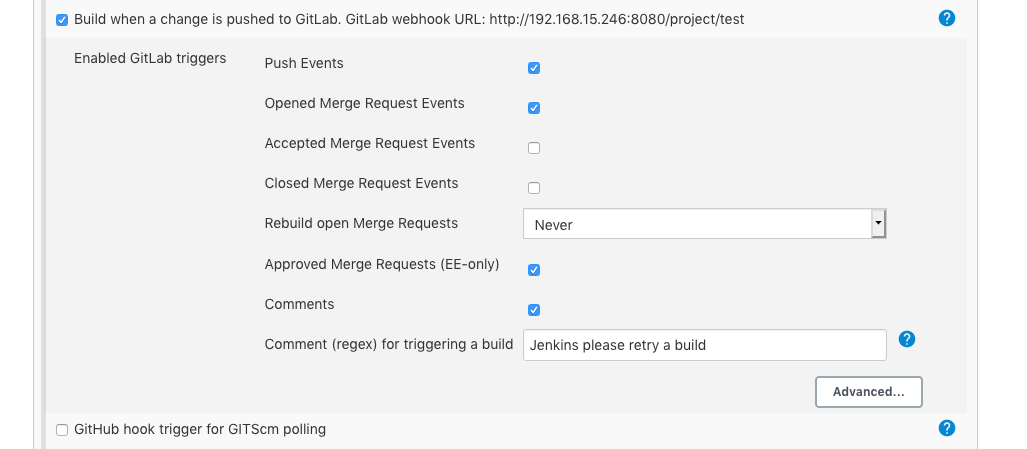
Its working Thanks
 techs2resolve
on 18 Aug 2020
techs2resolve
on 18 Aug 2020
Sorry to bump this, but do you get proper feedback on the pipeline status from jenkins in the MR page when using secret token-based auth? My MR still says Checking pipeline status. indefinitely. Thanks!
 marc0s
on 8 Jan 2021
marc0s
on 8 Jan 2021
@marc0s I have the same issue, did you find a fix? I can create a GitLab comment just fine.
My pipeline is very simple:
pipeline {
    agent any

    stages {
       stage('gitlab') {
          steps {
             echo 'Notify GitLab'
             updateGitlabCommitStatus name: 'build', state: 'pending'
             updateGitlabCommitStatus name: 'build', state: 'success'
             addGitLabMRComment comment: "#${env.BUILD_ID} ${JOB_BASE_NAME} triggered"
          }
       }
    }
 }
 Roming22
on 4 Mar 2021
Roming22
on 4 Mar 2021
Related issues
 dcuenot
·
5Comments
dcuenot
·
5Comments
 amarruedo
·
5Comments
amarruedo
·
5Comments
 ffrddrll
·
6Comments
ffrddrll
·
6Comments
 omehegan
·
3Comments
omehegan
·
3Comments
 Kiran-B
·
6Comments
Kiran-B
·
6Comments
Most helpful comment
You can set Secret Token as well and I think this method is better than two other options since no credential exposed or no too open policy.
Create Jenkins Secret Token
Use the Secret Token at Gitlab