Github: Github tab is blank. Git tab is not working as expected.
Prerequisites
- Have you tried to reproduce the problem in Safe Mode?
- Have you followed all applicable steps in the debugging guide?
- Have you checked the FAQs on the message board for common solutions?
- Have you checked that your issue isn't already filed?
Description
Hi. I've been using Atom for a few months for most my projects, and I want to use GitHub more. It's always been a big headache, but hey, the cool kids use it. I'm trying to place some of my local stuff in GitHub. I tried following the documentation but I can't even get to the first step.
Issue 1: Github tab is blank. There's nothing there. I can't log in, enter a token, nothing. With or without opening a project folder, files, or local git repository.
Attempting with Github clone gives an error "Unable to clone:..."
Issue 2: Git tab only says "create new repository". When I try to create one in the folder I'm in, error "This directory already contains a git repository". But how do I open it? I was able to create a repository yesterday and commit some things, but now it's gone and I can't find it. Where is it and how do I open it??
I can't find any information on this in the documentation or in any past issues. I'm not even sure it is an error or bug because I can't find anything about it. How does this work? Why isn't there more beginner-friendly information anywhere? Please help. I've been trying to get this to work for a week but it's just not doing anything. Deactivating packages, reactivating, quitting, restarting, everything.
Steps to Reproduce
- Open Github tab
- There's nothing there
- Open Git tab
- Local repository isn't there
- Can't create new repository
- Can't do anything
- Please help
Expected behavior:
I expect the github tab to at least say "login". Or something. Anything
Or my repository created yesterday to be available in the git tab.
Actual behavior:
There is nothing in the github tab. It's blank.
Can't open repository in the git tab.
Reproduces how often:
Every time
Versions
Atom : 1.34.0
Electron: 2.0.16
Chrome : 61.0.3163.100
Node : 8.9.3
apm 2.1.3
npm 6.2.0
node 8.9.3 x64
atom 1.34.0
python 2.7.10
git 2.18.0
MacOS Mojave 10.14.3
Additional Information

 Cecile-Lebleu
All 23 comments
This is also an issue for me. I have read the previous related GitHub issues, and none aside form this one seem to relate.
Below are my current specs - running macOS 10.14.3, but have had this issue for several months:
  atom -v
    Atom    : 1.34.0
    Electron: 2.0.16
    Chrome  : 61.0.3163.100
    Node    : 8.9.3
  apm -v
    apm  2.1.3
    npm  6.2.0
    node 8.9.3 x64
    atom 1.34.0
    python 2.7.10
    git 2.17.2
 cheney-enterprises
on 17 Feb 2019
cheney-enterprises
on 17 Feb 2019
@Cecile-Lebleu hello and thanks for reporting this issue 👋
So the Git and GitHub tabs expects the root directory that you open in the editor to be a git repository. From your screenshot, it looks like you are opening atom with a project called "Programming." I am guessing "Programming" contains multiple directories that contain git repositories, and is not itself a git repository.
If that is the case, can you try opening a folder that is a Git repository and seeing if the git and github tabs within Atom work?
 annthurium
on 20 Feb 2019
annthurium
on 20 Feb 2019
I created an empty test folder and created the repository from the Git tab.
This is right after creating the repository:

This is the Github tab after creating the repository (This repository does not have any remotes hosted at GitHub.com)

Logically, here is where I should be able to log in, right?
So I made a file to commit, to see if that would help.
This is after making the first commit:

And the Github tab after the first commit:
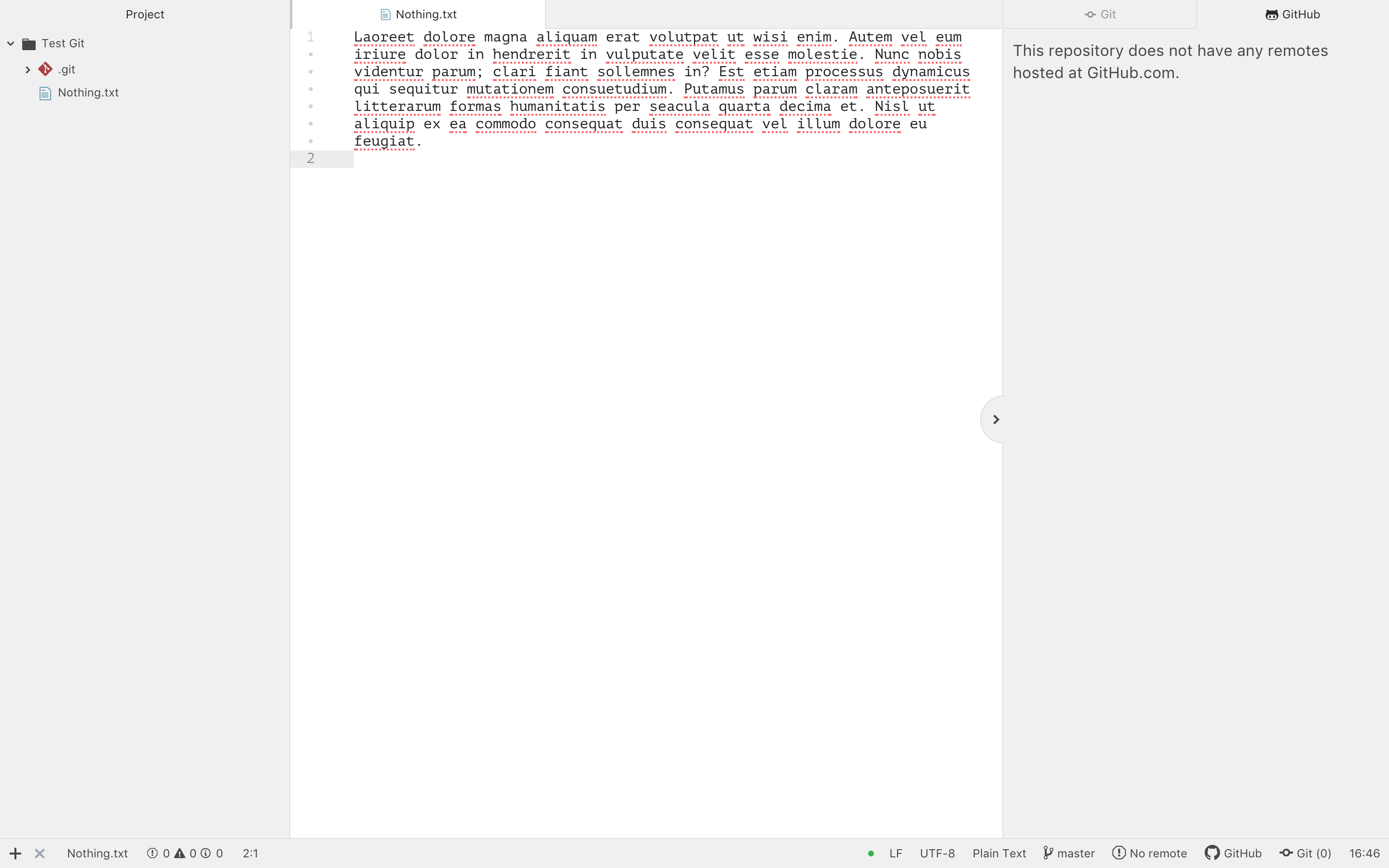
- Where do I log in to GitHub in Atom? I don't remember ever logging into GitHub from Atom. I'm pretty sure I never did, but I could be wrong. Where can I see that?
- How can I get a repository created in Github.com to be in Atom too? (that's not setting it up using the command line and then opening the folder in Atom.) There should be a direct way of doing this from the Github tab, without having to go to the command line, Github.com, folders, Atom... or at least it seems logical to me
- And conversely, how to make a local folder into a repository and commit to Github?
Thank you!
Cecile-Lebleu
on 21 Feb 2019
If you pull up the command palette (command shift p in any text buffer, although the keyboard shortcut might be different depending on your operating system) and start typing "github" it should pull up the list of commands, including log in (if you're not logged in already) or log out (if you are logged in.)

It looks like you created a local repository on your machine. In order for that repository to show up on GitHub (and on the GitHub tab within Atom), you need to add a remote. Atom does not support managing remotes, so you'd need to do that on the command line. There are instructions for how to do so here: https://help.github.com/en/articles/adding-a-remote
Alternately iIf you created a repository on GitHub.com, then you'd need to clone the repository locally for it to show up on Atom. There's a command palette command for doing this:

Hope this helps -- let me know if you have additional questions. 😄
annthurium
on 21 Feb 2019
I see "No changes" git tab from time to time when it worked 1 minute ago and suddenly shows empty tab. With the status bar number still shows correctly:

 xgdgsc
on 28 Feb 2019
xgdgsc
on 28 Feb 2019
@annthurium
If that is the case, can you try opening a folder that is a Git repository and seeing if the git and github tabs within Atom work?
This worked for me.
Once I cloned a Github repo and opened the directory in Atom, the Github tab was asking me to log in as expected.
 d00vy
on 7 Mar 2019
d00vy
on 7 Mar 2019
The very first time when I'd installed Atom, I was facing the same issue too. Here are the steps I'd followed to fix this GitHub blank tab issue on my Atom.
- Copied the URL of an existing GitHub repository that I should clone.
- Cloned the repository in the Atom Editor, by pressing the key combination
Cmd + Shift + Pto invoke the Command Palette and type the command git clone (or) github clone
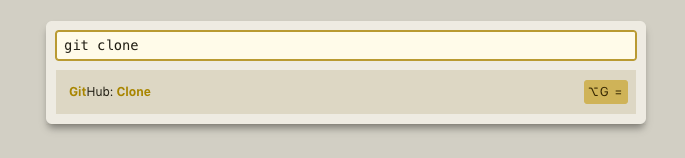
- Prompted a window to enter the URL of the repository that I wanted to clone and then the local path where the repository has to be cloned.

- Click
Clonebutton to clone the repository to your local machine. - Once this is done, the GitHub tab and the Git tab will not be empty anymore. In the GitHub you will be asked to Login to your account by clicking on a link to Authorize Atom editor and paste a token generated by GitHub for this Atom editor.
Hope this helps!
 nijanthanvijayakumar
on 28 Apr 2019
nijanthanvijayakumar
on 28 Apr 2019
Atom version 1.38.1 has the same problem and the above solution fixed it.
 TiredMir
on 16 Jun 2019
TiredMir
on 16 Jun 2019
What you did prolly worked for you, but it just says unable to clone
 YashKarthik
on 1 Jul 2019
YashKarthik
on 1 Jul 2019
Once I created a repo using Git, the GitHub panel became active.
 jakes2255
on 4 Jul 2019
jakes2255
on 4 Jul 2019
Hey Jakes,
Thank you for your help, though I actually figured that out with a bit of
experimenting.
On Thu, 4 Jul 2019 at 16:42, jakes2255 notifications@github.com wrote:
Once I created a repo using Git, the GitHub panel became active.
—
You are receiving this because you commented.
Reply to this email directly, view it on GitHub
https://github.com/atom/github/issues/1962?email_source=notifications&email_token=AMPRTVCYPVG5Y327UA3EZV3P5XLLXA5CNFSM4GX4V52KYY3PNVWWK3TUL52HS4DFVREXG43VMVBW63LNMVXHJKTDN5WW2ZLOORPWSZGODZHD7ZQ#issuecomment-508444646,
or mute the thread
https://github.com/notifications/unsubscribe-auth/AMPRTVGUJ23NJITWIOQHU3LP5XLLXANCNFSM4GX4V52A
.
YashKarthik
on 4 Jul 2019
I experienced blank GitHub tabs when opening repositories using 'Add Project Folder'. The GitHub tab is not blank if I use 'Open Folder'.
 JeffreyUrban
on 26 Sep 2019
JeffreyUrban
on 26 Sep 2019
I had the same problem on Windows. The reason was that .git was a hidden folder. Selecting properties and unselecting hidden folder solved the issue.
 iserp
on 8 Nov 2019
iserp
on 8 Nov 2019
didn't work for me too
What you did prolly worked for you, but it just says unable to clone
yes mine didn't work too(same error). I use atom portable on Ubuntu 19.04

 tutut500
on 11 Dec 2019
tutut500
on 11 Dec 2019
I had the same problem (running on Mac OS) for a project, while at the same time works fine in another project. I'm not sure why. Fixed by moving the Atom.app on "Applications" folder (previously running from Downloads folder).
It looks like it has something to do with user permissions.
 Vagelis90
on 12 Dec 2019
Vagelis90
on 12 Dec 2019
- If you pull up the command palette (command shift p in any text buffer, although the keyboard shortcut might be different depending on your operating system) and start typing "github" it should pull up the list of commands, including log in (if you're not logged in already) or log out (if you are logged in.)
- It looks like you created a local repository on your machine. In order for that repository to show up on GitHub (and on the GitHub tab within Atom), you need to add a remote. Atom does not support managing remotes, so you'd need to do that on the command line. There are instructions for how to do so here: https://help.github.com/en/articles/adding-a-remote
Alternately iIf you created a repository on GitHub.com, then you'd need to clone the repository locally for it to show up on Atom. There's a command palette command for doing this:
Hope this helps -- let me know if you have additional questions. 😄
Thanks, this comment helped to solve my problem.
I needed to add a remote host using the command line, as instructed on https://help.github.com/en/articles/adding-a-remote.
Basically:
1- Open a terminal
2- cd to your directory or open terminal at your project folder
3- $ git remote add origin https://github.com/user/repo.git (Copy paste https address from your Github)
4- Login and paste your Atom key on the GitHub tab.
 KGSTC
on 13 Dec 2019
KGSTC
on 13 Dec 2019
I experienced blank GitHub tabs when opening repositories using 'Add Project Folder'. The GitHub tab is not blank if I use 'Open Folder'.
This worked for me! Thanks!
 nickhallph
on 29 Jan 2020
nickhallph
on 29 Jan 2020
After disabling project manager plugin issue disappeared
 andriilive
on 2 Mar 2020
andriilive
on 2 Mar 2020
Making any (first) change in any file and save this, populates git and github tab for me
 c-hartmann
on 9 Mar 2020
c-hartmann
on 9 Mar 2020
Couldn't authorize either. This good man solved my problem: https://www.youtube.com/watch?reload=9&v=6HsZMl-qV5k
 Tritaya
on 14 Mar 2020
Tritaya
on 14 Mar 2020
For me, sometimes github tab works, sometimes git tab, sometimes neither, sometimes both! I haven't found any specific pattern 🤷♂
 HunderlineK
on 23 Mar 2020
HunderlineK
on 23 Mar 2020
Couldn't authorize either. This good man solved my problem: https://www.youtube.com/watch?reload=9&v=6HsZMl-qV5k
I agree, this solved to me too.
 gstorelli
on 27 Mar 2020
gstorelli
on 27 Mar 2020
Is there a way to change default location for git cloning from : /home/%u/github to something else instead? if so where is the setting located???
 beydouin
on 23 Jun 2020
beydouin
on 23 Jun 2020
Related issues
 simurai
·
3Comments
simurai
·
3Comments
 rsese
·
4Comments
rsese
·
4Comments
 joshaber
·
4Comments
joshaber
·
4Comments
 ccavolt
·
3Comments
ccavolt
·
3Comments
 jingr1
·
4Comments
jingr1
·
4Comments
Most helpful comment
I experienced blank GitHub tabs when opening repositories using 'Add Project Folder'. The GitHub tab is not blank if I use 'Open Folder'.