Github: Improve changed files list and diff view UX
In an effort to address #606, #645, #854 and related UX issues around staging/unstaging/discarding, I'd like to start a quick UX discussion first to guide development.
As part of this, the plan is to keep the file diff view open rather than closing it abruptly as is currently the case. Here are the UX interactions I’ve thought through and I’d be curious to hear what others think 💭, especially @simurai. It’s quite likely that I’ve missed something that’s worth considering
Changed list view UX
- after hitting enter to stage file, select next file
- if diff view is open, display next selected file
- if diff view is closed, display no file diff
- when there is no other file in list, go to next list and display diff
- Note: this automatic shift from one type of changes (staged vs unstaged) to another might be unexpected to users, or confusing if they don’t notice that there has been a switch of change type
- might be able to address this by styling the diff view headers to make the change type more obvious
Diff view UX
- after staging all hunks
- keep empty diff view open, offer buttons and keyboard shortcuts to
- go to the next diff in the list of changed files
- go to staged/unstaged version
Questions
- _when git panel is closed, should we close file diff?_ I think not. because it could be that the user just wants more screen space to view the diff so they close the panel
 kuychaco
All 12 comments
This sounds like a great plan. Then as soon as you start using the arrow keys, the diff view stays until closed.
might be able to address this by styling the diff view headers to make the change type more obvious
Yeah, that's a good idea. Currently the diff view takes some effort to know in which list you're in. When reading the title or button labels, I always have to think for a bit what it means. A simple ✅ checkmark in front of "Staged Changes" might already help orient better? I'll try out some options.
_when git panel is closed, should we close file diff?_ I think not. because it could be that the user just wants more screen space to view the diff so they close the panel
Hmmm... first thought was yes, but you found the only edge case. 😜 Actually, I can think of one more. You could keep the diff view open in a split pane and watch the diff change while coding. To have a handy reference what changed. Kinda like the split-diff package.
Ohh.. and you could move the diff-view into the same dock as the Git panel, split to the left. Then you can show/hide them together:

Maybe we can think of something useful to show when the diff view is empty. Some Git tips. Or keybinding cheat-sheet of this package.
 simurai
on 24 May 2017
simurai
on 24 May 2017
Maybe we can think of something useful to show when the diff view is empty. Some Git tips. Or keybinding cheat-sheet of this package.
Oooh I like those ideas!
And good call on sticking the diff view in the dock in order to hide it with the git panel. If you think it's something that people may want to do, maybe we could include it as one of those tips in the empty diff view.
kuychaco
on 24 May 2017
Okay came across a kink when discarding/staging/unstaging ALL hunks in a diff view. If we keep an empty file diff view open, then there is no associated item in the Staged/Unstaged Changes list.
One approach is to make it such that there are no items selected in the Staged/Unstaged Changes list. And in the empty diff view have a button that would select the next logical file in the list (specifying the name of the next file since it won't be clear from looking at the list view once the associated file is gone from the list).
And if the user switches focus to the Staged/Unstaged Changes list, then we simply select the first item in the lists and the file diff view will update to display the associated diff, or we can store off the next item in the list and select that when focus is restored to the list view. Would it be weird/jarring for the file diff to change by focusing the list?
/cc @simurai @BinaryMuse for 💭
kuychaco
on 24 May 2017
One approach is to make it such that there are no items selected in the Staged/Unstaged Changes list. And in the empty diff view have a button that would select the next logical file in the list (specifying the name of the next file since it won't be clear from looking at the list view once the associated file is gone from the list).
Is the reason to keep the diff empty and not select the next file so that you can undo the discard of all hunks? Hmmm.. maybe there is a way to do both: Show the next diff AND have a button to undo a discard from the previous file. In Gmail for example, if you delete an email, a bar at the bottom appears with an undo button.

simurai
on 25 May 2017
Oh yeah, I like the bar at the bottom. And I like that it gives extra information like the file path. What if we do something similar for the changed file lists? It's harder to accidentally click the undo button if it's down below. Which is something I've done several times while aiming for the first file in the "Unstaged Changes" list. Especially when I've just done a discard and the Undo button appears right underneath my cursor as I'm clicking where the first file was before it was displaced by the button

/cc @simurai
kuychaco
on 1 Jun 2017
What if we do something similar for the changed file lists?
👍 Yes, good idea.
simurai
on 2 Jun 2017
When typing in my commit message, I find myself wishing that the diff view was showing all of my staged changes. This would help me review the diff as a whole and craft the corresponding commit message.
As part of the UX updates being discussed in this issue, would you consider updating the diff view to show all staged changes when the commit message text box gains focus?
 jasonrudolph
on 9 Jun 2017
jasonrudolph
on 9 Jun 2017
@jasonrudolph That's a great point. I like the idea, assuming we could do it in a performant manner and without it being jarring, e.g. if I have a file or a diff view open and click on the commit box, I may not want what I'm looking at to change. But perhaps the other files in the diff could be shown below the current diff so that things don't shift around.
 BinaryMuse
on 9 Jun 2017
BinaryMuse
on 9 Jun 2017
@BinaryMuse: If it ends up being too jarring to display the complete staged diff by default, perhaps we could update the diff view based on the files that the user has selected. For example, in the demo below, selecting a single file will show the staged diff for that file, but selecting multiple files has no effect:
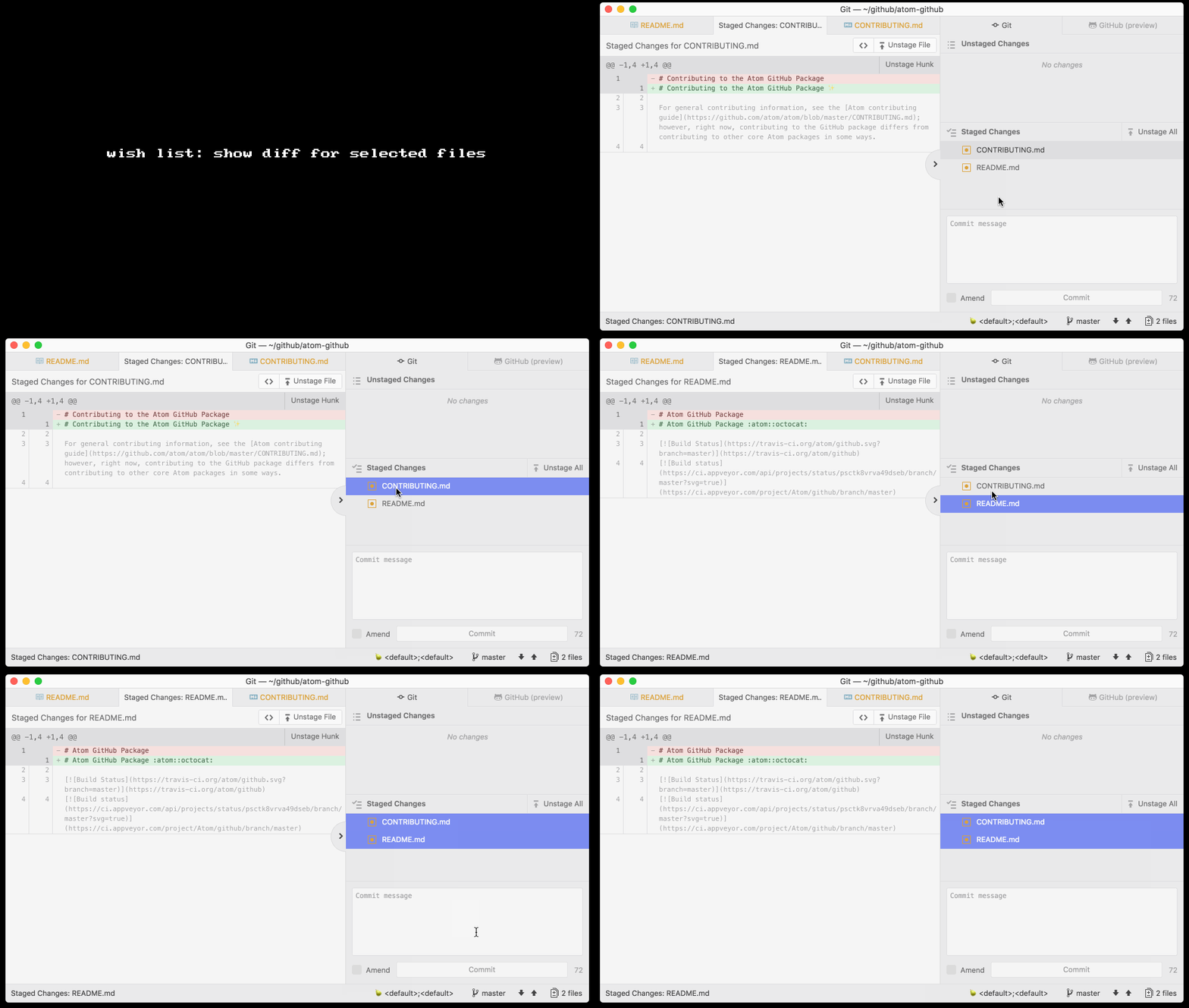
I think it would be awesome if the diff view showed the staged diff for all of the selected files.
jasonrudolph
on 9 Jun 2017
would you consider updating the diff view to show all staged changes when the commit message text box gains focus?
At some point we probably need a diff view that shows multiple files anyways. For example when clicking on a commit in the recent commit log. Or a diff of a PR.
I like the idea, assuming we could do it in a performant manner and without it being jarring
If a commit adds a large file, we could do it similar to .com, where you have to click first to load the diff. And if a commit has many files, all files would initially be collapsed and only show the file name. Clicking on a file would uncollapse and load the diff.
simurai
on 29 Jun 2017
It is frustrating to manually close the empty diff view each time after we commit all the changes.
 ibnesayeed
on 24 Apr 2018
ibnesayeed
on 24 Apr 2018
I believe the commit preview feature addresses any remaining action items here, so I'm going to close this issue out. Feel free to reopen if you have any concerns.
 annthurium
on 5 Jan 2019
annthurium
on 5 Jan 2019
Related issues
simurai
·
3Comments
 sebastianroming
·
4Comments
sebastianroming
·
4Comments
 benogle
·
4Comments
benogle
·
4Comments
 UziTech
·
4Comments
UziTech
·
4Comments
 joshaber
·
4Comments
joshaber
·
4Comments
Most helpful comment
When typing in my commit message, I find myself wishing that the diff view was showing all of my staged changes. This would help me review the diff as a whole and craft the corresponding commit message.
As part of the UX updates being discussed in this issue, would you consider updating the diff view to show all staged changes when the commit message text box gains focus?