Github: Uncaught Error: Cannot find pane for item in `PaneItem#activate`
From @rsese:
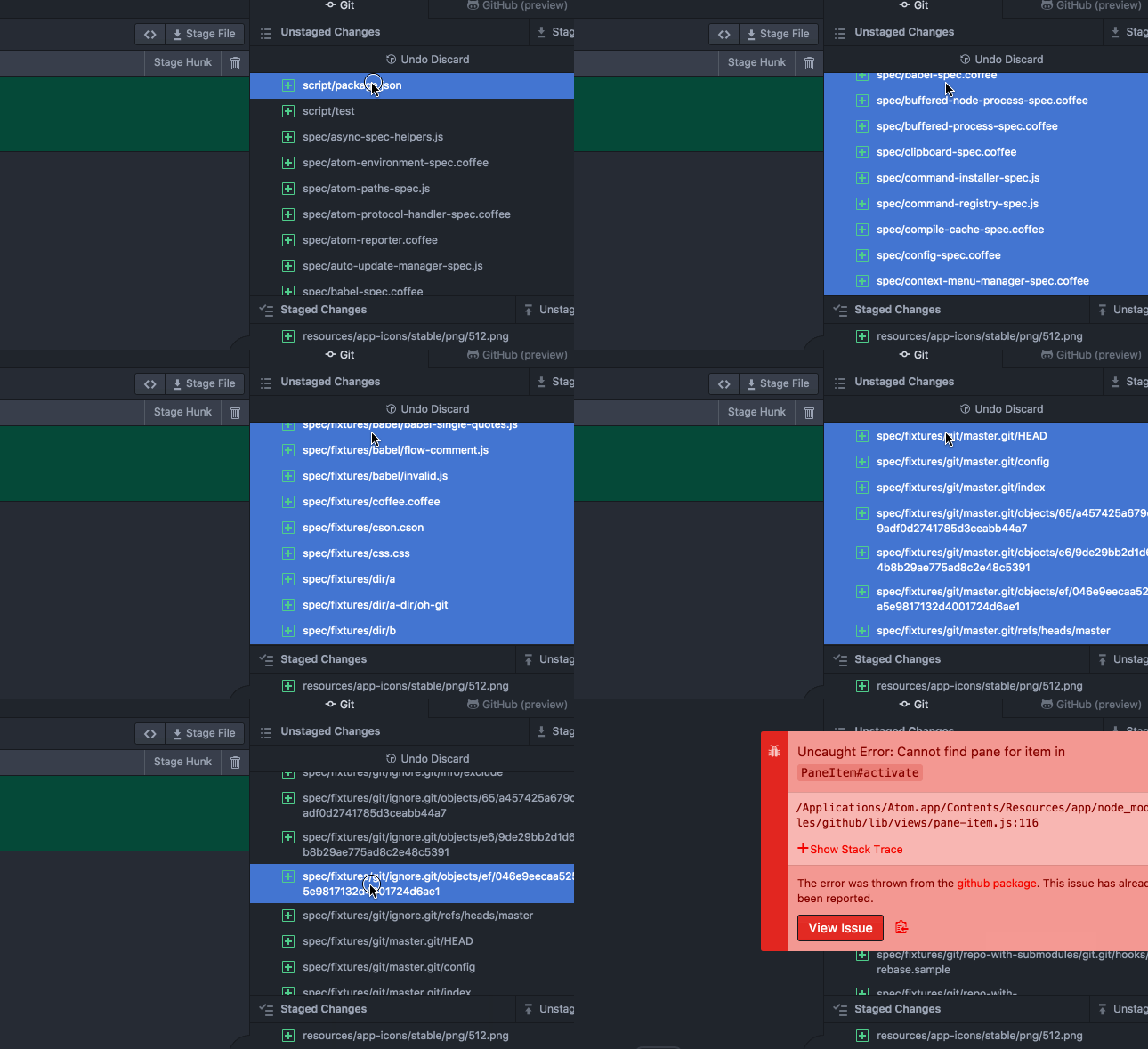
It's not 100% for me but it does seem like one way of generating the error is related to discarding a lot of changes (I can reproduce when selecting ~40 files to discard changes) and while that's going on, I double click through the list of selected files to stage the files. I can reproduce the error in this case maybe 3 out of 10 times? Might depend on the files I'm selecting too, some have more changes than others:
git clone https://github.com/atom/atom atom-tmpcd atom-tmpmv .git .git-backgit initatom --safe .- Enable the
Gitpanel - Select ~40 of the unstaged changes
- Right click and
Discard changes - Double click through the list of selected files
GIF of steps 7 through 9:
Some interesting comments in the thread:
my files were from an sshfs drive with pretty terrible performance (https://github.com/atom/github/issues/849#issuecomment-321888481)
Reproducible by quickly staging or unstaging a couple of files using double clicks (5 to 15 changed files should be enough to get this exception) (https://github.com/atom/github/issues/849#issuecomment-314133101).
I see a similar problem sporadically when staging/unstaging a file with a large number of diffs, along with a significant UI lockup (presumably due to the diff display). (https://github.com/atom/github/issues/849#issuecomment-322003194)
Happened to me once again on 1.19.3 on macOS while right-clicking on "Discarding changes" on a bunch of "Unstaged changes".
I possibly discarded some multiple times as they get discarded with a delay of multiple seconds. Still, the error only appeared once (https://github.com/atom/github/issues/849#issuecomment-324433963).
[Enter steps to reproduce:]
- ...
- ...
Atom: 1.18.0-beta0 x64
Electron: 1.3.15
OS: Mac OS X 10.12.6
Thrown From: github package 0.0.9
Stack Trace
Uncaught Error: Cannot find pane for item in PaneItem#activate
At /Applications/Atom Beta.app/Contents/Resources/app/node_modules/github/lib/views/pane-item.js:114

Error: Cannot find pane for item in `PaneItem#activate`
    at setTimeout (/Applications/Atom Beta.app/Contents/Resources/app/node_modules/github/lib/views/pane-item.js:114:1)
Commands
     -2:30.4.0 core:copy (input.hidden-input)
     -2:29.5.0 core:paste (input.hidden-input)
     -2:26.7.0 core:copy (input.hidden-input)
     -2:25.7.0 core:paste (input.hidden-input)
     -2:24.2.0 core:backspace (input.hidden-input)
     -2:22.9.0 core:save (input.hidden-input)
  4x -2:19.8.0 core:backspace (input.hidden-input)
     -2:14.1.0 core:save (input.hidden-input)
     -2:10.6.0 core:backspace (input.hidden-input)
     -2:09.7.0 core:save (input.hidden-input)
  4x -0:49.9.0 core:confirm (span.github-FilePatchListView-path)
     -0:10 github:discard-changes-in-selected-files (span.github-FilePatchListView-path)
Non-Core Packages
busy-signal 1.4.1
intentions 1.1.2
linter 2.1.4
linter-eslint 8.1.7
linter-ui-default 1.5.4
node-debugger 1.10.1
text-manipulation 0.6.0
text-pastry 0.6.1
 cruzlauroiii
All 14 comments
Thanks for the report! Can you confirm a few things for us?
- what were you doing at the time of the error?
- is the error is reproducible?
- if reproducible, do you see the error in safe mode (atom --safe)?
 rsese
on 19 May 2017
rsese
on 19 May 2017
I just had this happen to me twice, using the Linux beta.
Both times, intermittently, yet doing the same task, I had saved a JavaScript file I was working on and double-clicked it's name in "unstaged" to place it in "staged". That's all I was doing, and while this did not occur every time, it has occurred a second time just now. I then have to clear the error box and finish the commit.
Copying the error report to the clipboard feature is unresponsive for me and this was the only output from the error box:
/usr/share/atom-beta/resources/app/node_modules/github/lib/views/pane-item.js:116
Error: Cannot find pane for item in PaneItem#activate
at setTimeout (/usr/share/atom-beta/resources/app/node_modules/github/lib/views/pane-item.js:116:21)
 dcneuts
on 26 Jun 2017
dcneuts
on 26 Jun 2017
@rsese Same error, I'm on:
- Atom v 1.19.0-beta0
- macOS Sierra.
Installed packages:
➜ ge-ui git:(Develop) ✗ apm list -p -i
Dev Packages (1) /Users/casraf/.atom/dev/packages
└── [email protected]
Community Packages (45) /Users/casraf/.atom/packages
├── [email protected]
├── [email protected]
├── [email protected]
├── [email protected]
├── [email protected]
├── [email protected]
├── [email protected]
├── [email protected]
├── [email protected]
├── [email protected]
├── [email protected]
├── [email protected]
├── [email protected]
├── [email protected]
├── [email protected]
├── [email protected]
├── [email protected]
├── [email protected]
├── [email protected]
├── [email protected]
├── [email protected]
├── [email protected]
├── [email protected]
├── [email protected]
├── [email protected]
├── [email protected]
├── [email protected]
├── [email protected]
├── [email protected]
├── [email protected]
├── [email protected]
├── [email protected]
├── [email protected]
├── [email protected]
├── [email protected]
├── [email protected]
├── [email protected]
├── [email protected]
├── [email protected]
├── [email protected]
├── [email protected]
├── [email protected]
├── [email protected]
├── [email protected]
└── [email protected]
Same stack trace as @dcneuts.
Reproducible whenever I click any unstaged or staged files in the git pane to view the changes.
The diff pane opens up but doesn't get focused, leaving it in the background and requiring a click on the tab to view. It works fine otherwise.
 chenasraf
on 10 Jul 2017
chenasraf
on 10 Jul 2017
This happened to me once in the Linux build 1.18.0 when double clicking on an unstaged file to stage it.
Reproducible by quickly staging or unstaging a couple of files using double clicks (5 to 15 changed files should be enough to get this exception).
 jaller94
on 10 Jul 2017
jaller94
on 10 Jul 2017
Same error.
[Enter steps to reproduce:]
- Double clicked unstaged file to stage it.
Atom: 1.19.0 x64
Electron: 1.6.9
OS: Mac OS X 10.12.6
Thrown From: github package 0.3.4-0
Stack Trace
Uncaught Error: Cannot find pane for item in PaneItem#activate
At /Applications/Atom.app/Contents/Resources/app/node_modules/github/lib/views/pane-item.js:116
Error: Cannot find pane for item in `PaneItem#activate`
    at setTimeout (/Applications/Atom.app/Contents/Resources/app/node_modules/github/lib/views/pane-item.js:116:21)
Commands
Non-Core Packages
atom-beautify 0.29.26
atom-ternjs 0.18.3
busy-signal 1.4.3
docblockr 0.9.1
docblockr 0.9.1
git-plus 7.9.3
highlight-selected 0.13.1
intentions 1.1.2
linter 2.1.4
linter-jshint 3.1.2
linter-ui-default 1.6.0
project-manager 3.3.5
remote-edit 1.9.0
split-diff 1.4.0
 ktravelet
on 10 Aug 2017
ktravelet
on 10 Aug 2017
Thanks for the repro steps all :v: I still wasn't able to reproduce (tried with ~15 unstaged files) but I'll ask someone else on the team to give it a try.
rsese
on 11 Aug 2017
Here is a screenshot of the errors that have popped up from this, I get this error every time I click on an unstaged file.
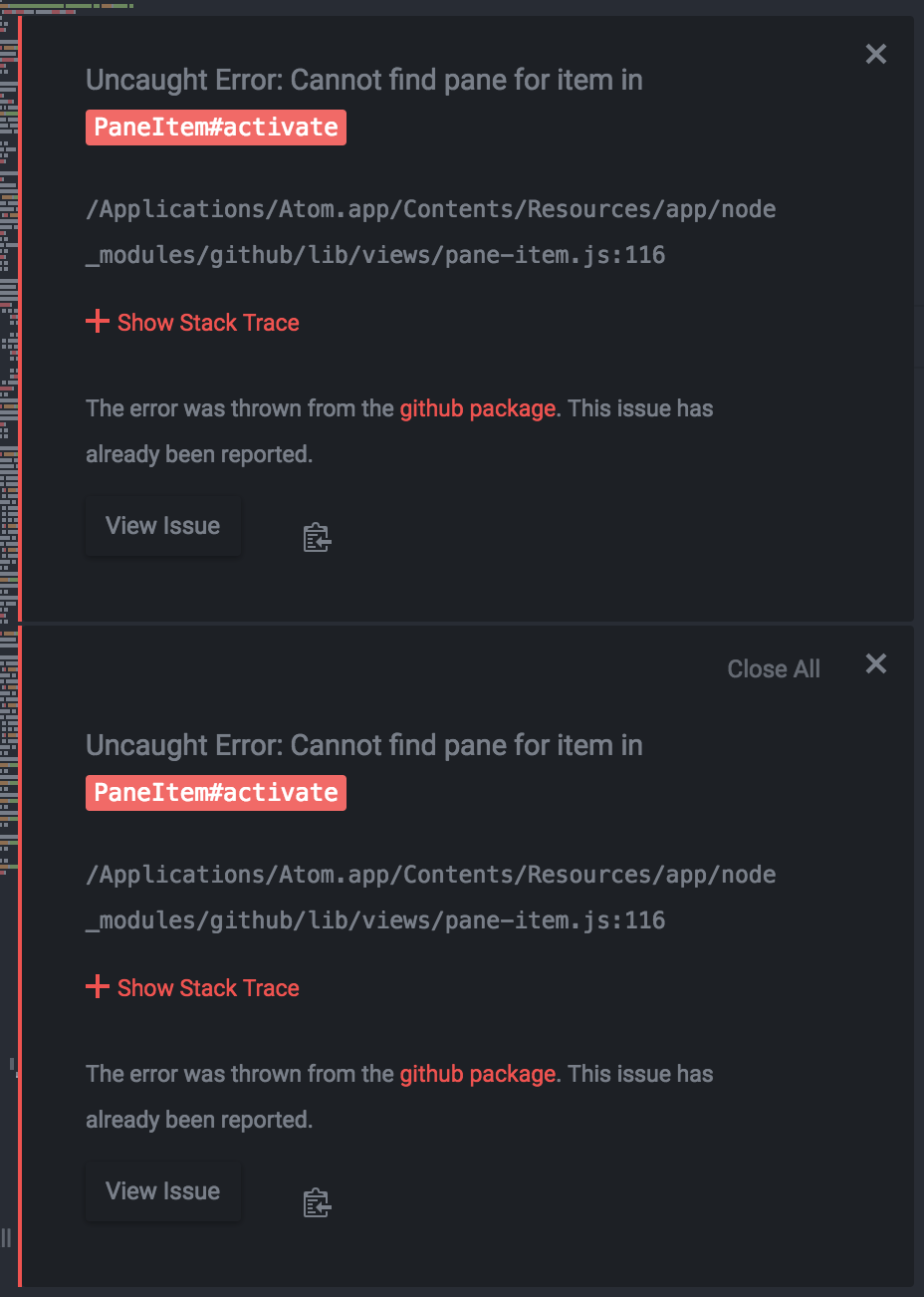
Stack trace is as follows:
Error: Cannot find pane for item in `PaneItem#activate`
at setTimeout (/Applications/Atom.app/Contents/Resources/app/node_modules/github/lib/views/pane-item.js:116:21)
 B1scuit
on 11 Aug 2017
B1scuit
on 11 Aug 2017
Also, not sure this is relative but my files were from an sshfs drive with pretty terrible performance.
ktravelet
on 11 Aug 2017
I see a similar problem sporadically when staging/unstaging a file with a large number of diffs, along with a significant UI lockup (presumably due to the diff display). Running the Linux build 1.19.0.
 sneakypete81
on 12 Aug 2017
sneakypete81
on 12 Aug 2017
Happened to me once again on 1.19.3 on macOS while right-clicking on "Discarding changes" on a bunch of "Unstaged changes".
I possibly discarded some multiple times as they get discarded with a delay of multiple seconds. Still, the error only appeared once.
jaller94
on 23 Aug 2017
MacOS 1.19 atom...
I have a few different project directories open, each different git repositories.
If I have a single file open from directory A (no other tabs), then click a changed file on the tree at the left from directory B, and then click the file in the unstaged changes this error occurs.
However, if I have a file open in directory B (double click the file in the left tree, then click in the file to focus the pane to the editor, then click the unstaged changes, the error does NOT occur.
Also, if I have only a file open from directory A, then DOUBLE CLICK the file from directory B in the left tree pane, then click the unstaged changes this also does NOT occur.
But if I close the file from directory B, click focus on the editor window for file in directory A, then single click the file in the left tree in directory B again, then hit unstaged chagnes, the error once again appears, every time.
Hope this is clear and gives some clue... seems to be related to how some tabs aren't... sticky? like they get replaced as you click on files in the tree, seems like the git diff view is trying to replace the editor window that was ephemeral and it causes the error to appear, but when it's trying to display by opening a new editor pane, it works fine.
 kminkler
on 24 Aug 2017
kminkler
on 24 Aug 2017
Same error. It's really annoying btw.
- opened a project
- Changed the active file
Atom: 1.19.4 x64
Electron: 1.6.9
OS: Mac OS X 10.11.6
Thrown From: github package 0.3.4-1
Stack Trace
Uncaught Error: Cannot find pane for item in PaneItem#activate
At /Applications/Atom.app/Contents/Resources/app/node_modules/github/lib/views/pane-item.js:116

Error: Cannot find pane for item in `PaneItem#activate`
    at setTimeout (/Applications/Atom.app/Contents/Resources/app/node_modules/github/lib/views/pane-item.js:116:21)
Commands
     -0:50.1.0 nuclide-file-tree:reveal-active-file (atom-workspace.workspace.scrollbars-visible-when-scrolling.theme-atom-material-syntax.theme-atom-material-ui)
     -0:44 application:reopen-project (atom-pane.pane.active)
     -0:43.8.0 tree-view:show (atom-workspace.workspace.scrollbars-visible-when-scrolling.theme-atom-material-syntax.theme-atom-material-ui)
Non-Core Packages
apex-syntax 0.2.0
apex-ui 1.0.1
ariake-dark-syntax 0.1.3
atom-beautify 0.30.5
atom-clock 0.1.13
atom-elixir 0.2.3
atom-material-syntax 1.0.6
atom-material-ui 2.0.4
atom-ternjs 0.18.3
atom-typescript 11.0.7
autoclose-html 0.23.0
autocomplete-modules 1.7.0
autocomplete-paths 2.8.1
busy-signal 1.4.3
color-picker 2.2.5
dash 1.7.1
docblockr 0.11.0
editorconfig 2.2.2
emmet 2.4.3
file-icons 2.1.11
git-history 3.3.0
git-plus 7.9.3
git-time-machine 1.5.9
haskell-grammar 0.4.0
highlight-line 0.12.0
highlight-selected 0.13.1
hyperclick 0.1.3
intentions 1.1.5
isotope-ui 2.8.5
language-babel 2.73.0
language-docker 1.1.8
language-elixir 0.20.1
language-gitignore 0.3.0
language-graphql 0.9.0
language-ignore 1.6.0
language-ini 1.19.0
language-lua 0.9.11
language-ocaml 1.9.5
language-rust 0.4.12
language-swift 0.5.0
language-thrift 1.0.2
linter 2.2.0
linter-eslint 8.2.1
linter-ui-default 1.6.8
linter-write-good 0.9.0
MagicPython 1.0.12
merge-conflicts 1.4.5
minimap 4.29.6
minimap-cursorline 0.2.0
minimap-highlight-selected 4.6.1
minimap-pigments 0.2.2
node-debugger 1.10.1
nord-atom-syntax 0.9.1
nord-atom-ui 0.11.0
northem-dark-atom-ui 2.1.0
nucleus-dark-ui 0.12.3
nuclide 0.249.0
nuclide-format-js 0.0.41
pigments 0.40.2
prettier-atom 0.38.0
project-manager 3.3.5
redux-devtools 0.5.1
set-syntax 0.3.2
seti-ui 1.9.0
sort-lines 0.15.0
sync-settings 0.8.3
todo-show 2.0.0
tool-bar 1.1.0
tree-view-git-status 1.4.0
wakatime 7.0.3
 Sly777
on 29 Aug 2017
Sly777
on 29 Aug 2017
Thanks again for all the reports I finally have a reproduction for this based on @jaller94's comment:
Happened to me once again on 1.19.3 on macOS while right-clicking on "Discarding changes" on a bunch of "Unstaged changes".
I possibly discarded some multiple times as they get discarded with a delay of multiple seconds. Still, the error only appeared once.
It's not 100% for me but it does seem like one way of generating the error is related to discarding a lot of changes (I can reproduce when selecting ~40 files to discard changes) and while that's going on, I double click through the list of selected files to stage the files. I can reproduce the error in this case maybe 3 out of 10 times? Might depend on the files I'm selecting too, some have more changes than others:
git clone https://github.com/atom/atom atom-tmpcd atom-tmpmv .git .git-backgit initatom --safe .- Enable the
Gitpanel - Select ~40 of the unstaged changes
- Right click and
Discard changes - Double click through the list of selected files
GIF of steps 7 through 9:
I'll update the issue body and ask the team to take a look.
rsese
on 30 Aug 2017
We no longer manually activate pane items from the PaneItem component, so this should be resolved as of the next stable Atom release (1.20). ✨
 BinaryMuse
on 8 Sep 2017
BinaryMuse
on 8 Sep 2017
Related issues
rsese
·
4Comments
 UziTech
·
4Comments
UziTech
·
4Comments
![move[bot] picture](https://avatars.githubusercontent.com/in/6673?v=4&s=40) move[bot]
·
3Comments
move[bot]
·
3Comments
 sebastianroming
·
4Comments
sebastianroming
·
4Comments
 ccavolt
·
3Comments
ccavolt
·
3Comments
Most helpful comment
Here is a screenshot of the errors that have popped up from this, I get this error every time I click on an unstaged file.
Stack trace is as follows: