Github-readme-stats: App Stats Data Delayed
Describe the bug
As I was observing, the app has the delay to be updated (from GitHub data) for more or less 30 minutes, depending on the type of data to be updated (starred repos, commits, repo counts). I was looking whether it's directly in GitHub or in your app. But, this last observation proved that this was indeed from your app.
Expected behavior
It should be better to find out where is the delay. The screenshots provided were taken at the same time. And, it actually took time because I have been waiting for your app to be updated for more than 30 minutes. This always happens. And I need to reload that everytime. The worst is that the one embedded in my profile is even delayed further but the direct API call is already updated. Take note, even the direct API call, as I was describing, has the delay, in my observation, for more than 30 minutes (it's already more than an hour now). And up to now, the update is not yet complete (from 1.3k to 1.4k) because my contribution is already 1500 according to GitHub. I think the delay is when your app fetches data from GitHub or some bug right there in your app that delays the update. Thanks!
Other badges from other services are actually synchronous with data of GitHub.
Screenshots / Live demo link (paste the github-readme-stats link as markdown image)

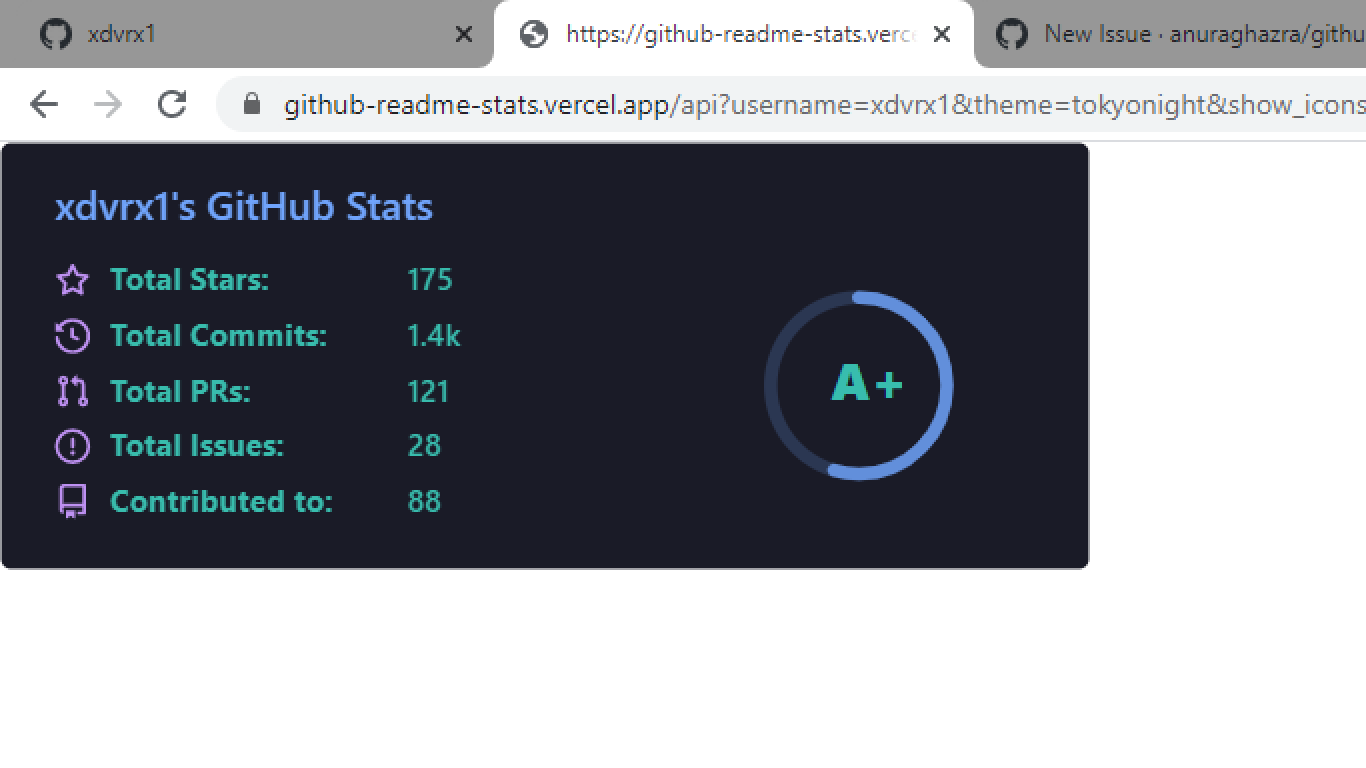
 xdvrx1
All 17 comments
We can't really do anything about this, as far as I know vercel and github both cache it.
 nathanchu
on 10 Nov 2020
nathanchu
on 10 Nov 2020
Thanks for the response, I'll be simply closing it. We all know that's a reality, we can't simply write bug-free code.
xdvrx1
on 10 Nov 2020
This is not a bug, this is totally intentional and we also have the docs in the readme please read that. https://github.com/anuraghazra/github-readme-stats/blob/master/readme.md#common-options
We have minimum of 2 hour cache for all the cards and we have extra dynamic logic based on stats for the Pin cards.
Other badges from other services are actually synchronous with data of GitHub.
If you want absolutely realtime data then fork our repo and make changes to the cache_seconds logic to be zero. github-readme-stats is being used by lot of people so without caching we will again hit the vercel as well as github's limit #325
 anuraghazra
on 10 Nov 2020
anuraghazra
on 10 Nov 2020
NOTE: Also in the above two screenshot you provided, note that github's contribution graph !== total commits
anuraghazra
on 10 Nov 2020
okay sure, but that one issue, the 1.4k was updated after almost 2 days, it's now 1.5k. That's the correct one.
xdvrx1
on 10 Nov 2020
1.5k which is on the contribution graph does not show "commits" it shows "contributions".
contributions !== commits
anuraghazra
on 10 Nov 2020
yup, I know that, it's called contribution there but it's reflecting now in your GitHub data you tag as commits. In my observations, there is always the delay but it was the longest one, this last update. Hence, they do refer to the same thing, if not it will not reflect that 1.5k commits, right?
It was described last 2013 by a GitHub blog and the two words were being used there.
xdvrx1
on 10 Nov 2020
No... you have 1190 commits in 2020 and counting previous years commits you total have 1.5k commits (This is total not this year's) in the screenshot you provided it says "Total commits" not "Total Commits (2020)"

anuraghazra
on 10 Nov 2020
yup, it's the same thing, including my private repos, that's the reason why if my GitHub data is 1.5k contributions, the total contribution (as in total, all my contributions that in your app is Total Commits is 1.5k)
xdvrx1
on 10 Nov 2020
please take note of the blog, it might be helpful for you, a contribution in GitHub is just like raising an issue, creating a pull request (even if not merged), forking a repo or just your commits in your repos, they end as contributions in GitHub, the one displayed in GitHub itself but your app is stating that as Total Commits, take note of that please, my commits there are not just all the commits I had in my repos,
xdvrx1
on 10 Nov 2020
I know and we are considering that..
We are using github's cloak preview api to fetch the total commits since GraphQL API isn't capable of fetching all the commit at once.
And yes, we are counting COMMITS. not CONTRIBUTION. we do not count issues/prs with the commits.
In the screenshot we are showing Total Commits of all time since you joined github. not just this year.
This year's commits 2020 https://github-readme-stats.vercel.app/api/?username=xdvrx1
TOTAL Commits of all time since you joined github (in your case 2020+2019) https://github-readme-stats.vercel.app/api/?username=xdvrx1&include_all_commits=true
TOTAL Commits of all time INCLUDING Private contributions https://github-readme-stats.vercel.app/api/?username=xdvrx1&include_all_commits=true&count_private=true
Please read our customization docs everything is documented there. https://github.com/anuraghazra/github-readme-stats#customization
anuraghazra
on 10 Nov 2020
You are quite confused with Contribution of Github and your Total Commits. I know the previous year and this year. Before your app, I was actually visiting the API of GitHub itself and observed everything. These commits of mine were not all simply commits, they include pull requests, issues, fork repos. Every time I did something I always check that.
Now, going back to your app, you are referring to commits as just the commit you did in your repo, but the PRs there is included, don't you know that? But, it seems your interpretation is just like that, a commit simply by clicking the commit button. So, in your computation (I checked that also), there is another Pull Request component and the Contributed to. It's okay.
But simply consider all these commits not just simply those commits done, it includes issues, pull requests and everything. And I was not mentioning any bug related to this one. What I am pointing out is simply there is always the delay, that's the bug that I am referring to. There is no problem with how you count commits and contributions.
xdvrx1
on 10 Nov 2020
Contributions = Commits + PRs + Issues. (Which github's contribution graph shows)
Commits = Code which is pushed.
And in our card we are showing "Total Commits"
See the code if you don't believe me.
Including all commits
Counting private with restricted commits
We are not counting any issues/PRs with the totalCommits
What I am pointing out is simply there is always the delay, that's the bug that I am referring to. There is no problem with how you count commits and contributions.
Yeah i got that but what happened is that you got totally confused with the count 1.5k being the current year's contribution which github is showing and total commits of our 1.5k count.
anuraghazra
on 10 Nov 2020
And feel free to run and inspect the graphql query here: https://developer.github.com/v4/explorer/
      query userInfo($login: String!) {
        user(login: $login) {
          name
          login
          contributionsCollection {
            totalCommitContributions
            restrictedContributionsCount
          }
          repositoriesContributedTo(first: 1, contributionTypes: [COMMIT, ISSUE, PULL_REQUEST, REPOSITORY]) {
            totalCount
          }
          pullRequests(first: 1) {
            totalCount
          }
          issues(first: 1) {
            totalCount
          }
          followers {
            totalCount
          }
          repositories(first: 100, ownerAffiliations: OWNER, orderBy: {direction: DESC, field: STARGAZERS}) {
            totalCount
            nodes {
              stargazers {
                totalCount
              }
            }
          }
        }
      }
and also check the rest api for getting the total commits
return axios({
     method: "get",
     url: `https://api.github.com/search/commits?q=author:${variables.login}`,
     headers: {
       "Content-Type": "application/json",
       Accept: "application/vnd.github.cloak-preview",
       Authorization: `bearer ${token}`,
     },
   });
Yeah i got that but what happened is that you got totally confused with the count 1.5k being the current year's contribution which github is showing and total commits of our 1.5k count.
nope, I know that from the very beginning, how come I would be confused of that one? And that's not even the issue I raised , the delay, right?
And I did not even mentioned that because I am aware of that, even the private commits inclusion and exclusion I was testing that. I am very specific with everything even before your app, that's the reason why I am testing everything, exclusion, inclusion, total commits, this year's commit, I know all of that even before your app.
xdvrx1
on 10 Nov 2020
Thats good you know all. but there is absolutely no delay I can confirm that.
We have 2 hours of cache and that's it. I can be confused, you can be confused but not the response headers which i've setup in the code. and github also respects the response headers of vercel serverless function.
Still if you think something is wrong feel free to reopen this issue and after proper investigation you can fix any potential bug and raise the PR.
anuraghazra
on 10 Nov 2020
The project is great actually so if I have time I'll investigate that. Thanks.
xdvrx1
on 10 Nov 2020
Related issues
nathanchu
·
5Comments
 kajweb
·
4Comments
kajweb
·
4Comments
 Math-O5
·
5Comments
Math-O5
·
5Comments
 HaaLeo
·
4Comments
HaaLeo
·
4Comments
 pablohs1986
·
5Comments
pablohs1986
·
5Comments