Github-readme-stats: null for name AymanArif
I am using Github Stats in this form:
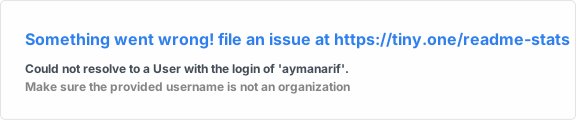
Output:

)
I think it could be because my name is in Camel-Case.
Appreciate any help. :smiley:
 aymanapatel
All 7 comments
Well, i think you don't have a name

Github API is returning null also.

 anuraghazra
on 10 Jul 2020
anuraghazra
on 10 Jul 2020
Hi @anuraghazra.
Is there onboarding to Github's GraphQL API? If so, can you share link to the documentation?
aymanapatel
on 10 Jul 2020
@AymanArif It seems like you only have your username set.
Maybe we could add an option where the user specifies if he wants the username or name to be rendered?
 nombrekeff
on 10 Jul 2020
nombrekeff
on 10 Jul 2020
Hi @anuraghazra.
Is there onboarding to Github's GraphQL API? If so, can you share link to the documentation?
Do you mean any learning resources? well you don't need any documentation links because graphql is self documenting try it out https://developer.github.com/v4/explorer/
anuraghazra
on 10 Jul 2020
@AymanArif It seems like you only have your username set.
Maybe we could add an option where the user specifies if he wants the username or name to be rendered?
Hmm yes that could be an option
anuraghazra
on 10 Jul 2020
Looks like it worked @AymanArif
anuraghazra
on 10 Jul 2020
Silly from my part. There was no username in GitHub settings. 😂
Anyway, thanks for replying swiftly.
aymanapatel
on 10 Jul 2020
Related issues
 stemount
·
4Comments
stemount
·
4Comments
 HaaLeo
·
4Comments
HaaLeo
·
4Comments
 kajweb
·
4Comments
kajweb
·
4Comments
 harshagv
·
5Comments
harshagv
·
5Comments
 nathanchu
·
6Comments
nathanchu
·
6Comments
Most helpful comment
Silly from my part. There was no username in GitHub settings. 😂
Anyway, thanks for replying swiftly.