Githawk: Group inbox by repo and additional interactions when viewing all notifications
I find the current method of having to switch between repos in the inbox quite laborious.
Ideally inbox would be more like the GitHub approach, where I can mark read all notifications from a repo.
Not the best screenshot, as only one repo shown, but all I have at the moment:

Also see:
1281
61
Bug Report Dump (Auto-generated)
Version 1.23.0 (1541192331)
Device: iPhone 6s (iOS 12.1)
TestFlight: false
 gingerbeardman
All 14 comments
I think this has been suggested a bunch before
Sent with GitHawk
 rnystrom
on 8 Nov 2018
rnystrom
on 8 Nov 2018
I found the previous two issues listed, but there could be more
gingerbeardman
on 8 Nov 2018
Browsing the referenced threads it seems the obstacle was pagination. What about keeping the current setup but simply adding two filter columns for unread/all at the top. That way each repo is still separate if you select a specific repo. And you have the ability to view those repos by the two views without the other repos messing with the pagination. Essentially the view all option would move from a filter option to the all tab (this view would not group by repo due to the complexity mentioned). And if you wanted a repo-view, then the other filter options, which are solely repos now, would present two views instead of one.
And perhaps add a badge for open issues per repo on the filter menu when invoking it.
 ijm8710
on 9 Nov 2018
ijm8710
on 9 Nov 2018
That sounds like it would be an improvement in some ways.
But if I'm honest the the core of my request is the grouping so that I can "mark all as read" to dismiss all notifications from a repo whilst I am looking at all notifications.
I do this so often on the GitHub website, or through BitBar (GitHub Notifications Plugin) on macOS. Not being able to do it on iOS is a bit of a pain point.
notifications
- grouped by repo
- filter unread, participating, saved for later, all
- filter by repo
for all
- mark as read
per repo
- mark as read
per thread
- mark as read
- save for later
- unsubscribe
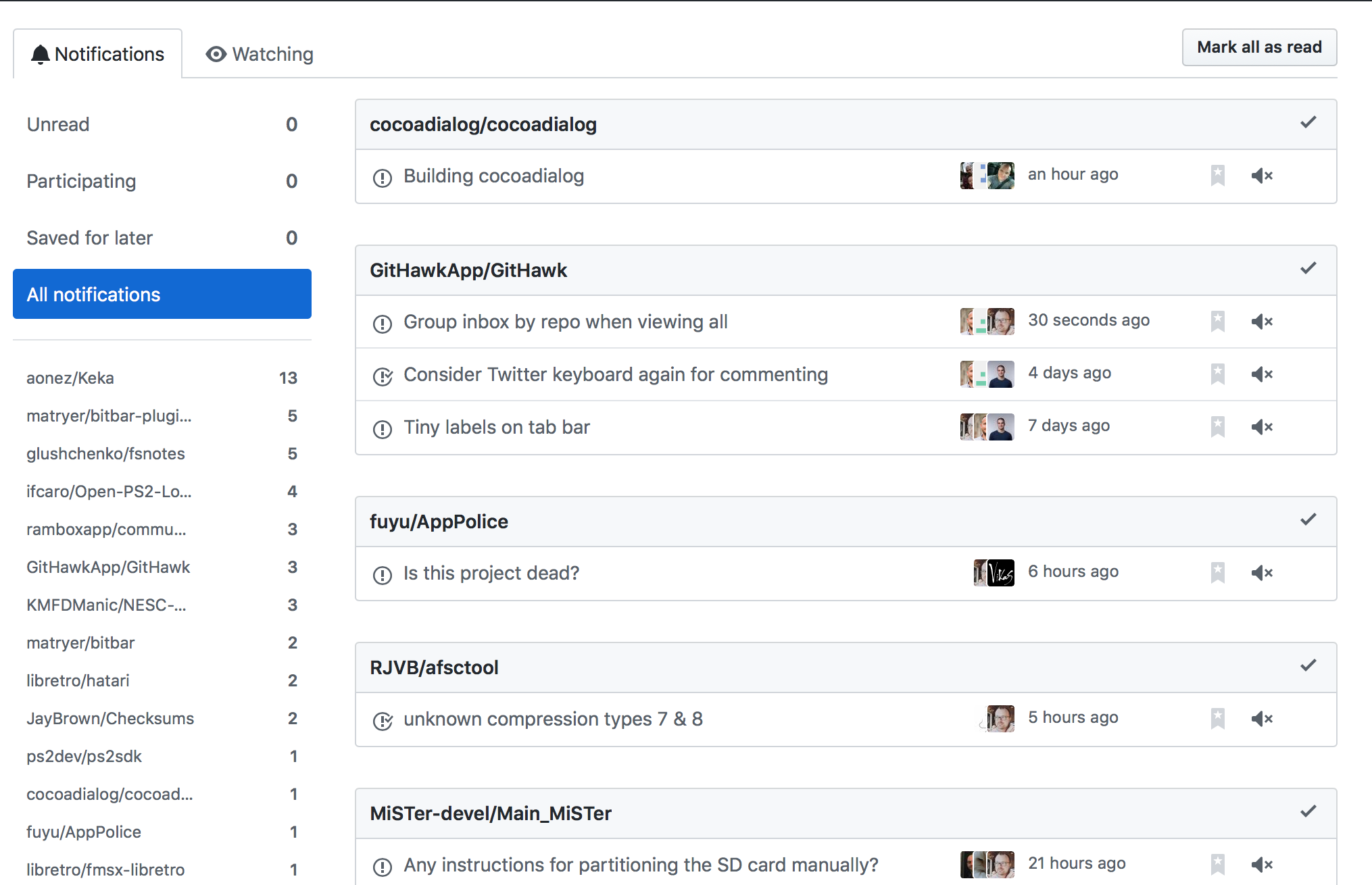
gingerbeardman
on 9 Nov 2018
2413 is sort of related to this?
gingerbeardman
on 9 Nov 2018
Yeah my point was that since Ryan had stated trouble with pagination when having the repos grouped but intertwined on one screen perhaps have the features you ask for but in diff screens per repo based on your filter. You could still mass edit on a repo basis but you would only either see one repo at a time or all the repos at once but the latter would not be grouped. So it’s filter sorted as opposed to just the sorting which inferred difficulty. I would foresee all the options you mention still there
ijm8710
on 9 Nov 2018
I appreciate your summary. That proposition doesn't seem any better to me and would still require laborious switching between repos; the grouping is the key thing here.
gingerbeardman
on 9 Nov 2018
Why not load all the pages of notifications at once?
 j-f1
on 9 Nov 2018
j-f1
on 9 Nov 2018
Indeed. Maybe I don't use git enough, or maybe I never let my notifications build up, as I can't remember seeing the "load more" on the notifications. Just load them all (and cache them for next time)?
gingerbeardman
on 9 Nov 2018
@gingerbeardman FYI you can tap the "..." to view notifications in a repo and the check-mark will then mark all notifs for only that repo read.
rnystrom
on 11 Nov 2018
Understood, it's the tapping of "..." switching between repos that is the friction I'd like to avoid.
Here's how a dozen notifications look using the GitHub Notifications BitBar plugin (basically a shell script that can put some UI in the menu bar)

I can hold down alt to make any interaction "mark as read"

here's github.com with the same list
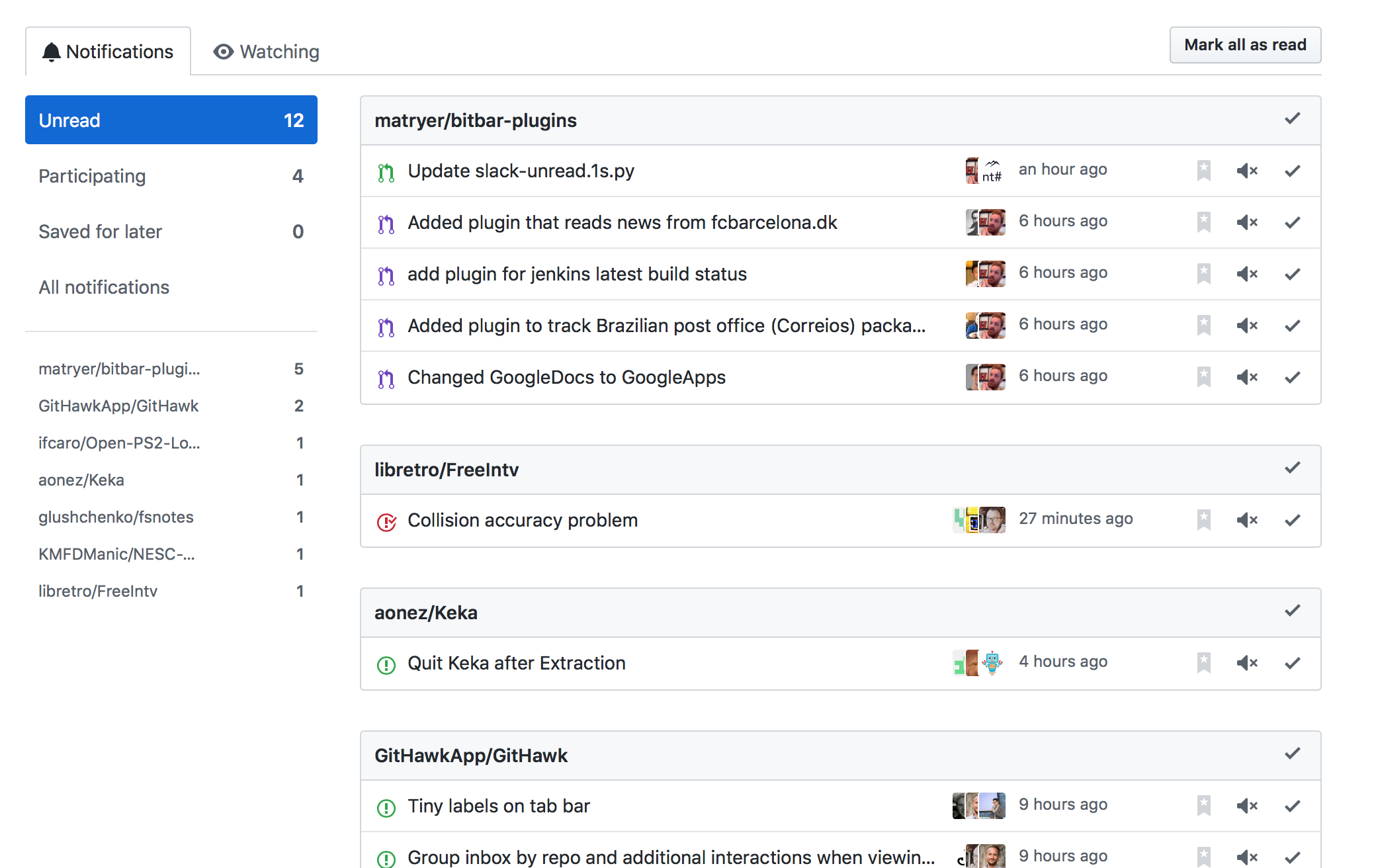
and GitHawk
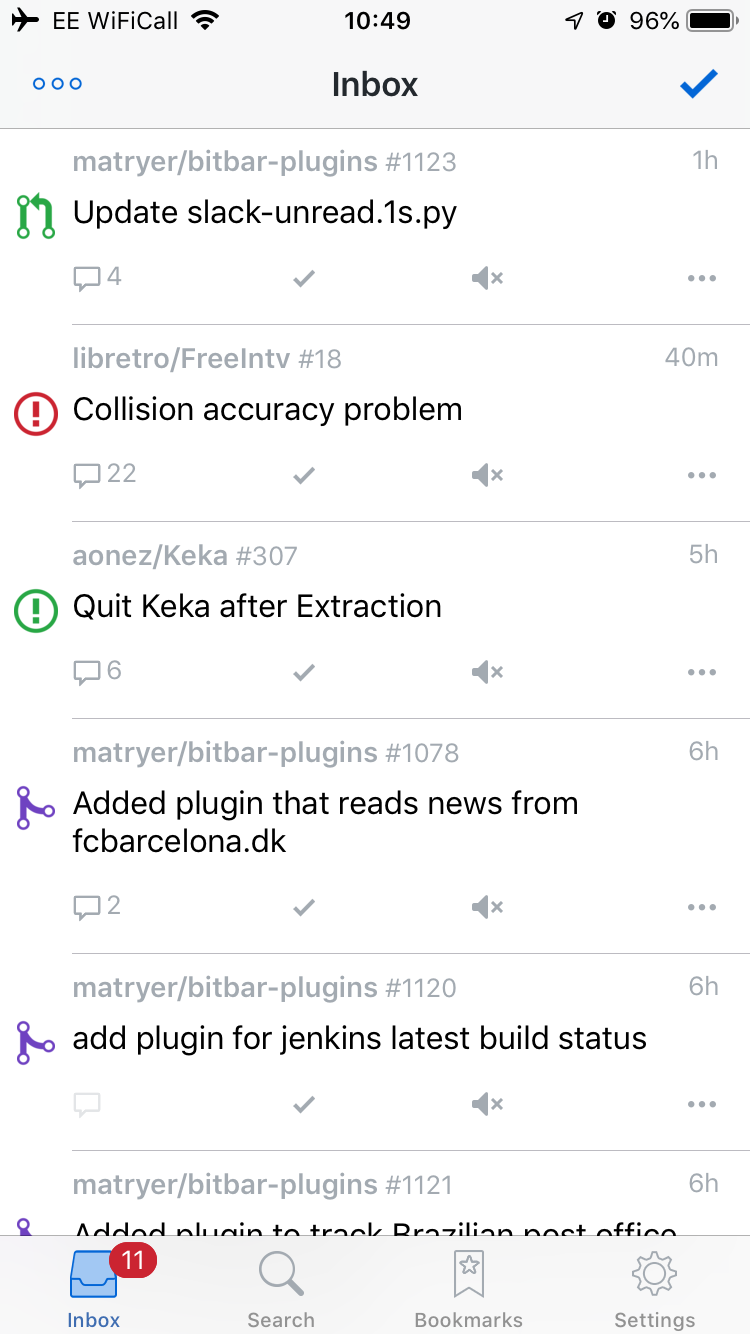
Also notice how few notifications fit on screen in GitHawk! 5.5 items
gingerbeardman
on 11 Nov 2018
If someone wants to champion design and dev of this have at it!
Sent with GitHawk
rnystrom
on 11 Nov 2018
I do think the point about how many inbox items fit on the screen at a time is a valid item to revisit
ijm8710
on 11 Nov 2018
One way to have full control and filter by repo, will be to load all notifications at once, but we’ll need to do multiple reqs to the notification api as the page size is limited to about 100 records per page (if I remember correctly) so in my case that I have 450 notifications, I’ll need 5 reqs to get all of them.
Checking the response sizes from api, in my example 450 notification will be about 2MB
Another way will be to parse the web version html /notifications main list, to just extract the repo names and then using the api, load the paginated results of each repo
 dimirc
on 21 Feb 2019
dimirc
on 21 Feb 2019
Related issues
 BasThomas
·
3Comments
BasThomas
·
3Comments
BasThomas
·
3Comments
BasThomas
·
3Comments
rnystrom
·
3Comments
BasThomas
·
3Comments
BasThomas
·
3Comments
BasThomas
·
3Comments
BasThomas
·
3Comments
rnystrom
·
3Comments
Most helpful comment
If someone wants to champion design and dev of this have at it!
Sent with GitHawk