Git: Chinese display garbled code in "git reset" command above 2.27.0
When I use git-bash.exe(above 2.27.0) to run "git reset --hard origin/master" command , Chinese display garbled code. But running it in 2.26.2(below 2.26.2) is normal.
 Xiphin
All 9 comments
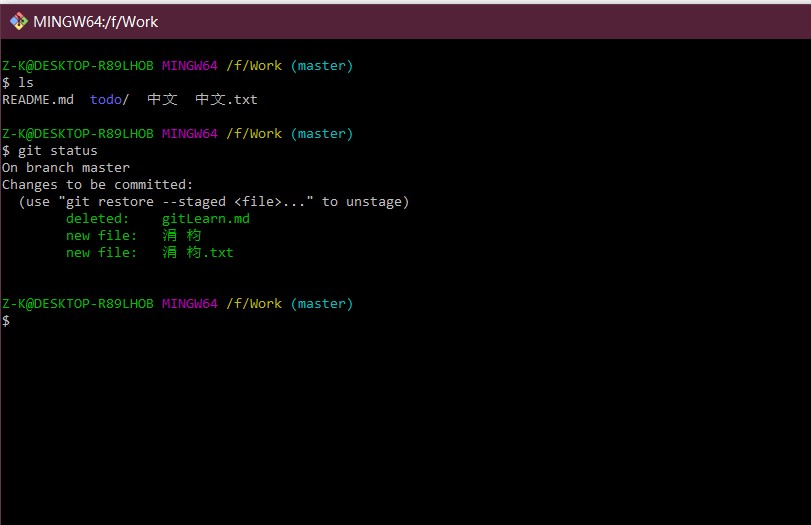
I have a similar problem. In git bash(git version 2.27.0.windows.1 64bit), the 'git status' can't show display Chinese correctly.But in cmd, everything is fine.
I have set the .gitconfig file, but it doesn‘t work. The same goes for relinstalling.
I don’t know if I’m the only one with this problem.
 Taswen
on 25 Jul 2020
Taswen
on 25 Jul 2020
This must be related with issues #2648 and #2734.
 lourdas
on 27 Jul 2020
lourdas
on 27 Jul 2020
Chinese characters are garbled, setting utf-8 is also garbled
Hi,
There are some problems here.
I have configured the character encoding in .gitconfig:
[core]
  quotepath = false
[gui]
  encoding = utf-8
[i18n]
  commitencoding = utf-8
  logoutputencoding = utf-8
and Git Bash configed: Options > Text > Locale: zh_CN, Character set: UTF-8
However, when executing git pull/reset/status, Chinese characters still appeared garbled.
git reset:
Xiang@Xiang MINGW64 /c/me/front-end-note (master)
$ git reset --hard df576e2
HEAD is now at df576e2 doc: 琛ュ厖 ES5 缁ф壙
git pull:
Xiang@Xiang MINGW64 /c/me/front-end-note (master)
$ git pull
Updating df576e2..bd2894b
Fast-forward
AngularJS/assets/AngularJS-Component-LifeCycle.png | Bin 0 -> 154433 bytes
AngularJS/chapter/Components.md | 2 +
AngularJS/chapter/Scopes.md | 18 ++-
ESLint.md | 118 ++++++++++++++
NPM.md | 173 +++++++++++++--------
React/Context.md | 3 +
React/Refs.md | 47 ++++++
React/react-architecture.png | Bin 0 -> 56624 bytes
React/react-lifecycle-methods-diagram.png | Bin 0 -> 41677 bytes
React/鍗忚皟.md | 33 ++++
i18n 瑙e喅鏂规.md | 76 +++++++++
浠g爜鐩綍鏂囦欢缁撴瀯.md | 15 ++
娣卞叆鐞嗚ВES6/9.JavaScript涓殑绫?md | 13 +-
13 files changed, 426 insertions(+), 72 deletions(-)
create mode 100644 AngularJS/assets/AngularJS-Component-LifeCycle.png
create mode 100644 ESLint.md
create mode 100644 React/Context.md
create mode 100644 React/Refs.md
create mode 100644 React/react-architecture.png
create mode 100644 React/react-lifecycle-methods-diagram.png
create mode 100644 React/鍗忚皟.md
create mode 100644 i18n 瑙e喅鏂规.md
create mode 100644 浠g爜鐩綍鏂囦欢缁撴瀯.md
git status:
Xiang@Xiang MINGW64 /c/me/front-end-note (master)
$ git status
On branch master
Your branch is up to date with 'origin/master'.
Changes not staged for commit:
(use "git add <file>..." to update what will be committed)
(use "git restore <file>..." to discard changes in working directory)
modified: 浜夎涓庢帰绱?md
no changes added to commit (use "git add" and/or "git commit -a")
git log command is correct:
Xiang@Xiang MINGW64 /c/me/front-end-note (master)
$ git log --oneline -3
bd2894b (HEAD -> master, origin/master) i18n
73dceea 代码目录文件结构
89121aa 更新 NPM
My environment:
- windows 10 home chinese edition, 2004
- windows 10 pro, 2004
- git version 2.28.0.windows.1
This problem did not appear in the previous version, and we look forward to fixing it.
Thanks.
 xianghongai
on 2 Aug 2020
xianghongai
on 2 Aug 2020
Maybe this has something to do with the console output code page? Can you try running the same command, after running cmd /c chcp 65001?
 dscho
on 1 Sep 2020
dscho
on 1 Sep 2020
Maybe this has something to do with the console output code page? Can you try running the same command, after running
cmd /c chcp 65001?
Tried it, but it doesn't work.
xianghongai
on 3 Sep 2020
I encountered similar problems in 2.28.0
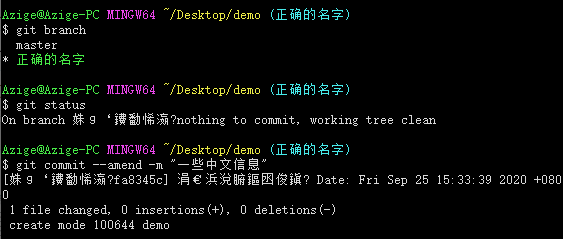
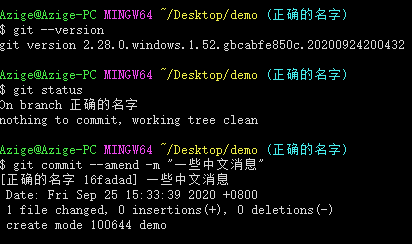
I tried 2.28.0.windows.1.52.gbcabfe850c.20200924200432 later. It seems that it has been fixed.
 azige
on 25 Sep 2020
azige
on 25 Sep 2020
@Xiphin Please test the latest snapshot.
If the problem persists, please publish a repository to demonstrate the issue.
dscho
on 25 Sep 2020
@Xiphin Please test the latest snapshot.
If the problem persists, please publish a repository to demonstrate the issue.
I tried “git version 2.29.1.windows.1”. It has been fixed.
Xiphin
on 30 Oct 2020
I tried “git version 2.29.1.windows.1”. It has been fixed.
Perfect!
dscho
on 30 Oct 2020
Related issues
 rangka-kacang
·
3Comments
rangka-kacang
·
3Comments
 tldzyx
·
3Comments
tldzyx
·
3Comments
 educhana
·
5Comments
educhana
·
5Comments
 Unknow0059
·
3Comments
Unknow0059
·
3Comments
 Snaptags
·
4Comments
Snaptags
·
4Comments
Most helpful comment
Chinese characters are garbled, setting utf-8 is also garbled
Hi,
There are some problems here.
I have configured the character encoding in .gitconfig:
and Git Bash configed:
Options>Text> Locale:zh_CN, Character set:UTF-8However, when executing
git pull/reset/status, Chinese characters still appeared garbled.git reset:git pull:git status:git logcommand is correct:My environment:
This problem did not appear in the previous version, and we look forward to fixing it.
Thanks.