Git: Update available dialog/prompt should have better design
Setup
- Which version of Git for Windows are you using? Is it 32-bit or 64-bit?
$ git --version --build-options

git version 2.24.0.windows.2
cpu: x86_64
built from commit: 02af2cc5bfc37d4500e8a09333269e57f442198a
sizeof-long: 4
sizeof-size_t: 8
- Which version of Windows are you running? Vista, 7, 8, 10? Is it 32-bit or 64-bit?
$ cmd.exe /c ver

Microsoft Windows [Version 10.0.18362.10024]
- What options did you set as part of the installation? Or did you choose the
defaults?
# One of the following:
> type "C:\Program Files\Git\etc\install-options.txt"
> type "C:\Program Files (x86)\Git\etc\install-options.txt"
> type "%USERPROFILE%\AppData\Local\Programs\Git\etc\install-options.txt"
$ cat /etc/install-options.txt

Editor Option: VisualStudioCode
Custom Editor Path:
Path Option: Cmd
SSH Option: OpenSSH
Tortoise Option: false
CURL Option: OpenSSL
CRLF Option: CRLFAlways
Bash Terminal Option: ConHost
Performance Tweaks FSCache: Enabled
Use Credential Manager: Enabled
Enable Symlinks: Enabled
Enable Builtin Interactive Add: Disabled
- Any other interesting things about your environment that might be related
to the issue you're seeing?
N/A
Details
- Which terminal/shell are you running Git from? e.g Bash/CMD/PowerShell/other
N/A
- What commands did you run to trigger this issue? If you can provide a
Minimal, Complete, and Verifiable example
this will help us understand the issue.
Daily update prompt
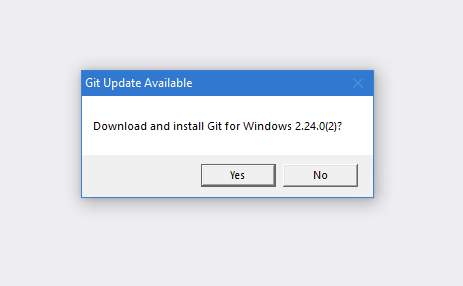
Dialog design/layout is very simple and does not provide any branding. It could be mistaken for a generic prompt or worst a spam/virus/adware dialog.
The dialog also lacks useful information such as the newer version number and existing version number, as well as a link to the release notes to find what has changed.
Clicking "Yes" also hides the dialog and does not provide any information. It feels like nothing happened when in fact it is downloading in the background.
- What did you expect to occur after running these commands?
Wireframe mock up of what it could look like
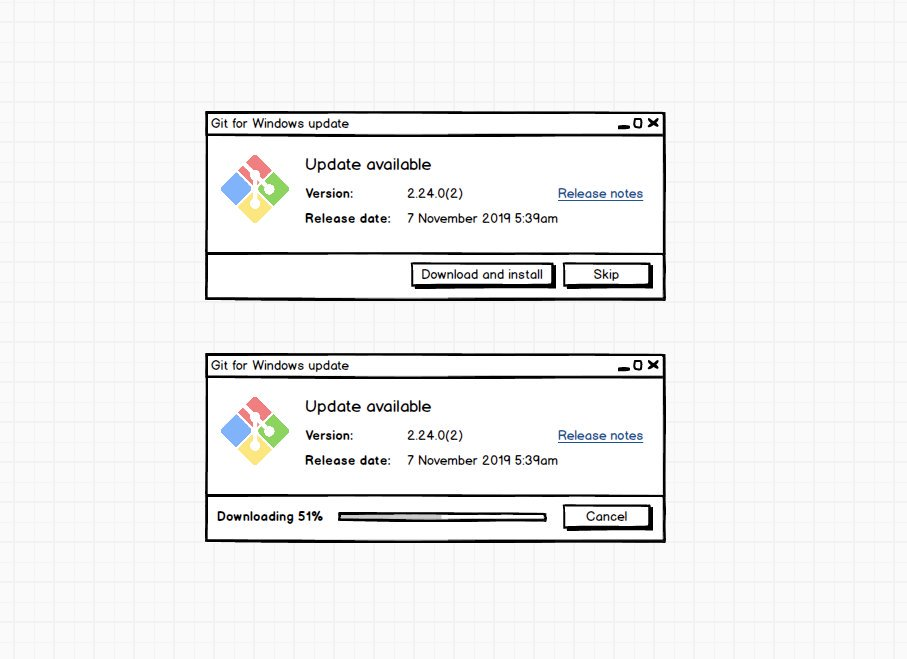
I suggest the dialog should show app logo, newer version number, link to release notes, new version release date, currently installed version number (not in wireframe), a progress bar when downloading and allow download to be cancelled
- What actually happened instead?
N/A
- If the problem was occurring with a specific repository, can you provide the
URL to that repository to help us with testing?
N/A
 longzheng
All 15 comments
Ok. This requires significant changes.
By that I mean changing porting the update script to C and rewriting large parts (Completely new WinAPI GUI, keep existing CLI, download can't be through curl any more, ...) and some change so we can actually retrieve the release notes of the released version without the changes for the next version,...
These changes would probably be up to you. How good is your C?
 rimrul
on 7 Nov 2019
rimrul
on 7 Nov 2019
Maybe less of a big change is using the the task dialog in Windows.
See https://docs.microsoft.com/en-us/windows/win32/controls/task-dialogs-overview
It has a couple of customization capabilities and may provide enough to keep this code change small.
I do not know, maybe Tcl or other scripting languages used by Git may even have an interface for it, if you search.
 mfriedrich74
on 7 Nov 2019
mfriedrich74
on 7 Nov 2019
Tcl probably won't work (we switched to C for git--askyesno because of issues with tcl), shell probably doesn't have an interface for this and perl doesn't have much of an interface either. But this could potentially work.
The taskdialog can contain Hyperlinks (release notes), can show yes/no/cancel buttons, a progress bar, custom icons, so most things we'd need.
rimrul
on 7 Nov 2019
Give me a couple hours to get back from work and I'll whip up a quick prototype.
rimrul
on 7 Nov 2019
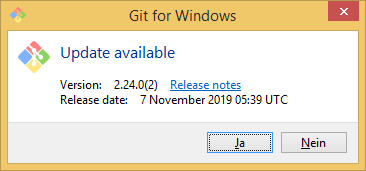
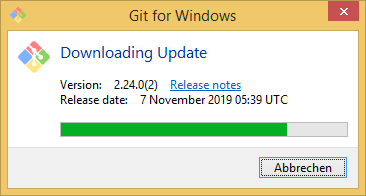
I'm slowly getting somewhere. Please ignore the German buttons, that's just windows chosing the system locale for these.
The text alignment is wonky because that's one long string that needs to be indented with spaces.
rimrul
on 7 Nov 2019
The changes to the current shell script are probably less than I originally thought, too.
rimrul
on 7 Nov 2019
I am pretty sure it supports some type of line breaks, e.g. \n or
.
On Thu, Nov 7, 2019, 3:32 PM Matthias Aßhauer notifications@github.com
wrote:
The changes to the current shell script are probably less than I
originally thought, too.—
You are receiving this because you commented.
Reply to this email directly, view it on GitHub
https://github.com/git-for-windows/git/issues/2395?email_source=notifications&email_token=ABZH5SBVNYVWN7WIZ3WZ2B3QSR3M7A5CNFSM4JKFFY2KYY3PNVWWK3TUL52HS4DFVREXG43VMVBW63LNMVXHJKTDN5WW2ZLOORPWSZGOEDNW2JA#issuecomment-551251236,
or unsubscribe
https://github.com/notifications/unsubscribe-auth/ABZH5SGKP243U2MH4LO4C73QSR3M7ANCNFSM4JKFFY2A
.
mfriedrich74
on 7 Nov 2019
Yeah, \n works great. There's one in the Screenshots above, just after the Hyperlink.
It's the alignment within a line (i.e getting the date and version number lined up) that works on spaces alone.
rimrul
on 8 Nov 2019
TBH I am curious why these dialogs show in the first place. I would have expected a Toast to be shown in the Action Center.
 dscho
on 8 Nov 2019
dscho
on 8 Nov 2019
To answer the question why the toast didn't work, could you @longzheng run
type wintoast.exe
wintoast.exe --appname "Git for Windows" --text "Download and install?" --expirems 15000
echo $?
and post the results?
rimrul
on 8 Nov 2019
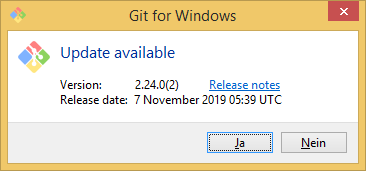
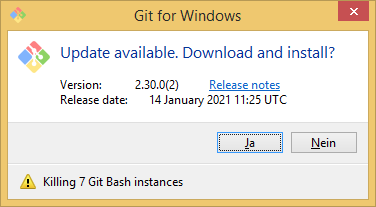
I've got the alignment fixed an the hyperlink is working. The remaining steps before the pr are (in no specific order):
- [x] make sure it compiles outside VS
- [x] fetch version
- [x] fetch metadata
- [x] actually download git
- [x] parse release date
- [x] add flag to skip yes/no dialog (script was passed
--yesor user already clicked yes in toast) - [x] update
MakefileandPKGBUILDforgit-extra - [ ] prepare some stuff for a future update when progress bars get added to wintoast
- [ ] finalize return codes
- [x] code cleanup
- [ ] modify update script
- [x] figure out why libcurl doesn't find the CA certificate bundle when the executable file is located in
/usr/src/build-extra/git-extra
rimrul
on 8 Nov 2019
To answer the question why the toast didn't work
@rimrul to answer this question, I opened https://github.com/git-for-windows/build-extra/pull/268. Could you kindly have a look?
dscho
on 8 Nov 2019
To answer the question why the toast didn't work, could you @longzheng run
type wintoast.exe
wintoast.exe --appname "Git for Windows" --text "Download and install?" --expirems 15000
echo $?
and post the results?
This has been left unanswered for over a year. I vote for closing this ticket as stale. @rimrul are you okay with that?
dscho
on 11 Dec 2020
This has been left unanswered for over a year. I vote for closing this ticket as stale.
That was really only a tangent. You found the root cause and fixed the missing toasts, but the original ticket is about the lack of a progress or activity indicator during download.
From my point of view this is only stale because I'm low on time. The issue still exists and we aren't really waiting for any user feedback.
rimrul
on 11 Dec 2020
Okay, then let's leave it open.
dscho
on 11 Dec 2020
Related issues
 dlk-pavan
·
4Comments
dlk-pavan
·
4Comments
 t-b
·
4Comments
t-b
·
4Comments
 yegorich
·
3Comments
yegorich
·
3Comments
 Snaptags
·
4Comments
Snaptags
·
4Comments
 vocaviking
·
5Comments
vocaviking
·
5Comments