git for windows has issues with international characters in branch names
We have been using umlauts and apostrophes in our branch names, and both are having issues:
apostrophe:
git removes the apostrophes from the branch name when creating/pushing a branch.
In our TFS server repository we're having the same branch name twice: Once with apostrophes,
and once without. And I don't seem to be able to delete the one without apostrophes.umlauts:
The umlauts are not correctly interpreted when SMB is used. "gemäss" becomes "gem<C3><A4>ss".


Setup
Which version of Git for Windows are you using? Is it 32-bit or 64-bit?
$ git --version --build-options

git version 2.21.0.windows.1
cpu: x86_64
built from commit: 2481c4cbe949856f270a3ee80c802f5dd89381aa
sizeof-long: 4
sizeof-size_t: 8
Which version of Windows are you running? Vista, 7, 8, 10? Is it 32-bit or 64-bit?
$ cmd.exe /c ver

Windows 10x64, Microsoft Windows [Version 10.0.14393]
What options did you set as part of the installation? Or did you choose the
defaults?# One of the following: > type "C:\Program Files\Git\etc\install-options.txt" > type "C:\Program Files (x86)\Git\etc\install-options.txt" > type "%USERPROFILE%\AppData\Local\Programs\Git\etc\install-options.txt" $ cat /etc/install-options.txt Editor Option: VisualStudioCode Custom Editor Path: Path Option: Cmd SSH Option: OpenSSH CURL Option: WinSSL CRLF Option: CRLFCommitAsIs Bash Terminal Option: ConHost Performance Tweaks FSCache: Enabled Use Credential Manager: Enabled Enable Symlinks: Disabled
Details
Which terminal/shell are you running Git from? e.g Bash/CMD/PowerShell/other
Visual Studio Code, PowerShell.
What commands did you run to trigger this issue? If you can provide a
Minimal, Complete, and Verifiable example
this will help us understand the issue.See screenshots above.
What did you expect to occur after running these commands?
I expected git for Windows to accept the branche names given.
What actually happened instead?
See description above.
 SetTrend
All 28 comments
The umlaut part is apparently an issue with less and CMD/Powershell. It's a pure display issue (your branch actually contains the umlauts) and can be worked around using --no-pager. See also #1087.
 rimrul
on 6 May 2019
rimrul
on 6 May 2019
I see. Yet, the git fetch error rather is an issue with the branch name itself, I guess?
SetTrend
on 7 May 2019
Here's another example screenshot of this issue:

git branch seems to have issues, while git ls-remote doesn't.
It can easily be seen that the original branch name has been doubled (a second branch with missing apostrophes had been created). And the umlauts are incorrectly displayed by git branch.
SetTrend
on 7 May 2019
Just tried to checkout one of our branches that's containing apostrophes:
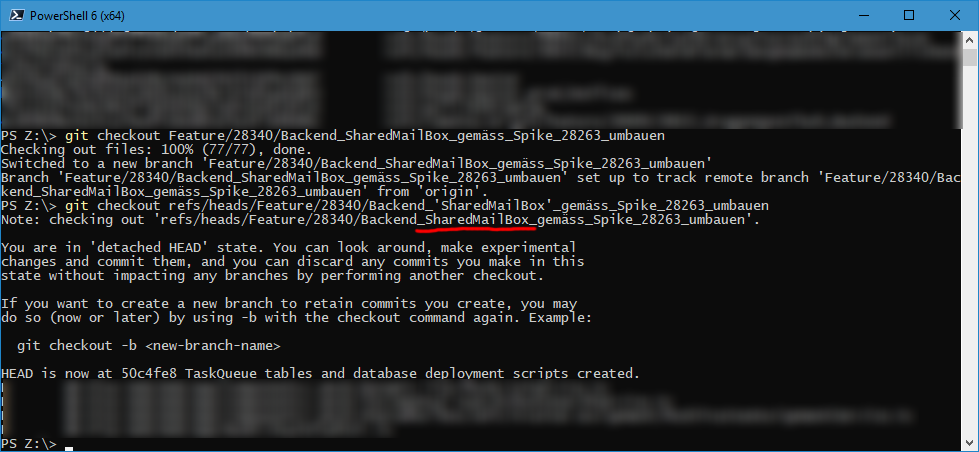
Git for Windows always tries to checkout a branch name _without_ apostrophes when I use that branch name.
There must be something wrong with how Git for Windows interprets apostrophes in branch names.
SetTrend
on 8 May 2019
It looks like Powershell removes the apostrophes:
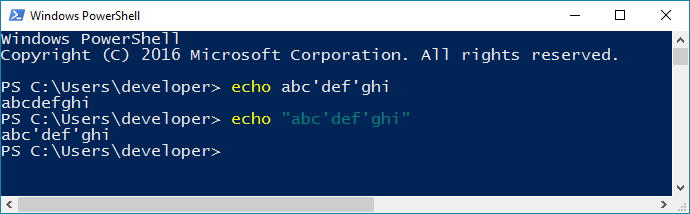
 bbolli
on 9 May 2019
bbolli
on 9 May 2019
Gee ... Marvellous observation!
I didn't think in this direction at all.
You're sooo right. Visual Studio Code utilizes PowerShell, too.
I closed this issue too early. I was so stunned about your observation that I forgot about the umlaut problem.
SetTrend
on 10 May 2019
A solution to the umlaut problem would be configuring core.pager or the GIT_PAGER environment variable to an empty string or "cat". less probably isn't going anywhere anytime soon.
rimrul
on 10 May 2019
I just tried to set
git config --global --add core.pager more
But that doesn't page at all in PowerShell / VS Code, I'm afraid.
SetTrend
on 16 May 2019
Sorry for nagging again, but this issue is a true nuisance.
Whenever I try to git push, git exits with error because the remote branch has umlauts within:
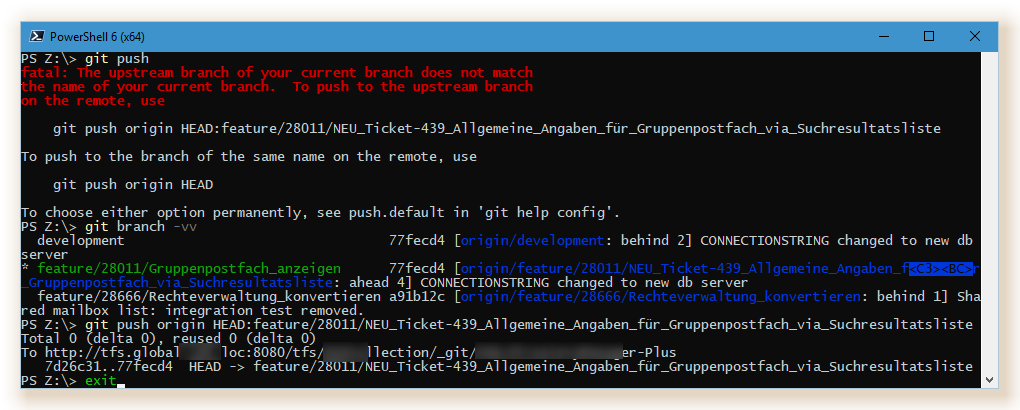
This repository is git for Windows, not git, isn't it? Is it necessary then to rely on less like all the other git version do ... rather than intrinsically utilizing another - more modern - pager, like e.g. more?
SetTrend
on 23 May 2019
more is actually the older less modern pager of the two. But let's talk about how to configure Git for Windows to use more.
On Windows we need to distinguish between more in CMD, more in Powershell and more in Git-Bash.
more in CMD is an executable named MORE.COM. You can set core.pager to more.com and git will use that. It mangles umlauts even worse than less does, though.
Git-Bash does not recognise .com as a valid extension for PE-files and doesn't ship a ported Unix more at the moment, thus doesn't resolve more into a valid command.
more in Powershell is a builtin function. This AFAIK means you'd need a scripted wrapper to call it with parameters.
rimrul
on 23 May 2019
Update:
Both CMD more and powershell more turn
gemäss
into
gemäss
(just rendering \
but somehow git branch -vv seems to behave a little weird when specifiying core.pager with the -c option.
rimrul
on 23 May 2019
What about git -P branch -vv? This suppresses the pager completely and might help if you don't have many branches active.
bbolli
on 23 May 2019
BTW, it seems to me that the problems are not caused by the umlaut at all, but by the fact that
- your local and remote branch names don't match
- your local branch doesn't track the remote branch
This can be fixed by once pushing with the option --set-upstream. This makes your local branch track the remote branch.
bbolli
on 23 May 2019
Thanks for your valuable information.
Wouldn't it be feasible, though, to make this behaviour the default and avoid scrambled names right from the beginning?
- your local and remote branch names don't match
- your local branch doesn't track the remote branch
Just have a look at the blue text in the screenshot:
- It's valid to have the local branch name differ from the remote branch name.
- The local branch is tracking the remote branch.
So, the issue seems to be the name.
SetTrend
on 24 May 2019
As someone else said, the garbled branch name is an artifact of the less output and Powershell's inability to handle UTF-8 characters. You can verify this yourself with git -P branch -vv I gave earlier, which turns off paging (i.e. doesn't pipe through less) and correctly displays the umlaut.
Have you tried setting the config push.default to upstream?
bbolli
on 24 May 2019
Any success, @SetTrend ?
bbolli
on 4 Jun 2019
Well, I can list my branches using the -P parameter. But I still cannot push to the remote without setting the remote name manually in the git push operation.
Regarding your --set-upstream hint: As you can see from the screenshot above, the remote ref _is_ set up correctly. Still git push seems to not be able to compute it correctly by itself. I always need to manually enter the remote ref during a push operation.
I believe the umlaut issue is something that needs to be fixed. It's not reasonable to be required to manually edit remote refs and commands.
SetTrend
on 5 Jun 2019
It looks like the umlaut issue is even larger than expected:
I cannot force-push my branch (which I can do with any other branch in the system):
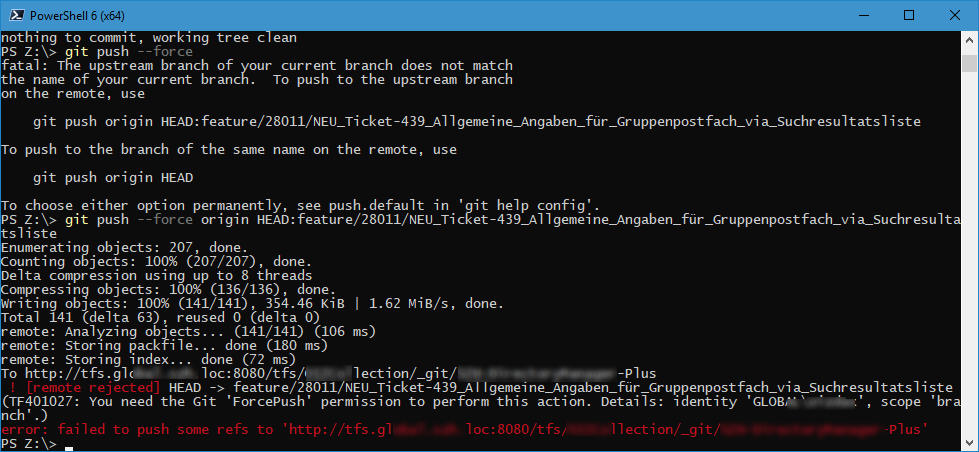
Please, can someone get this fixed?
SetTrend
on 6 Jun 2019
@SetTrend Do we have a simple Minimal, Complete, and Verifiable Example to setup the failing condition yet?
a) how to prepare / set up the remote (does it need to be from the same machine, a different machine, directly on the remote?)
b) what to adjust on the local so that there is something to push
e.g. one branch called master with initial commit and 2nd commit
one branch called umläut [as long as it has the magic character, the ascii user will never know about the spelling 😉 ], branched after the initial commit with one extra commit.
Without an MVCE the support (i.e. debugging) will be minimal. Make it easy for more eyes to look at it.
 PhilipOakley
on 6 Jun 2019
PhilipOakley
on 6 Jun 2019
The force problem is something different. The error message clearly says that you don't have the ForcePush permission.
Please don't mix different issues and try out the suggestion I gave you two weeks ago:
Have you tried setting the config
push.defaulttoupstream?
bbolli
on 7 Jun 2019
This also affect author name in git log: https://github.com/PowerShell/PowerShell/issues/10023.
 zmni
on 2 Jul 2019
zmni
on 2 Jul 2019
This isn't really a powershell, cmd, or windows console host (conhost.exe, the application that hosts all console applications) issue at all. This is a choice made by the default pager that ships with git.
If you set LANG just like you would on a non-windows machine, it works properly:
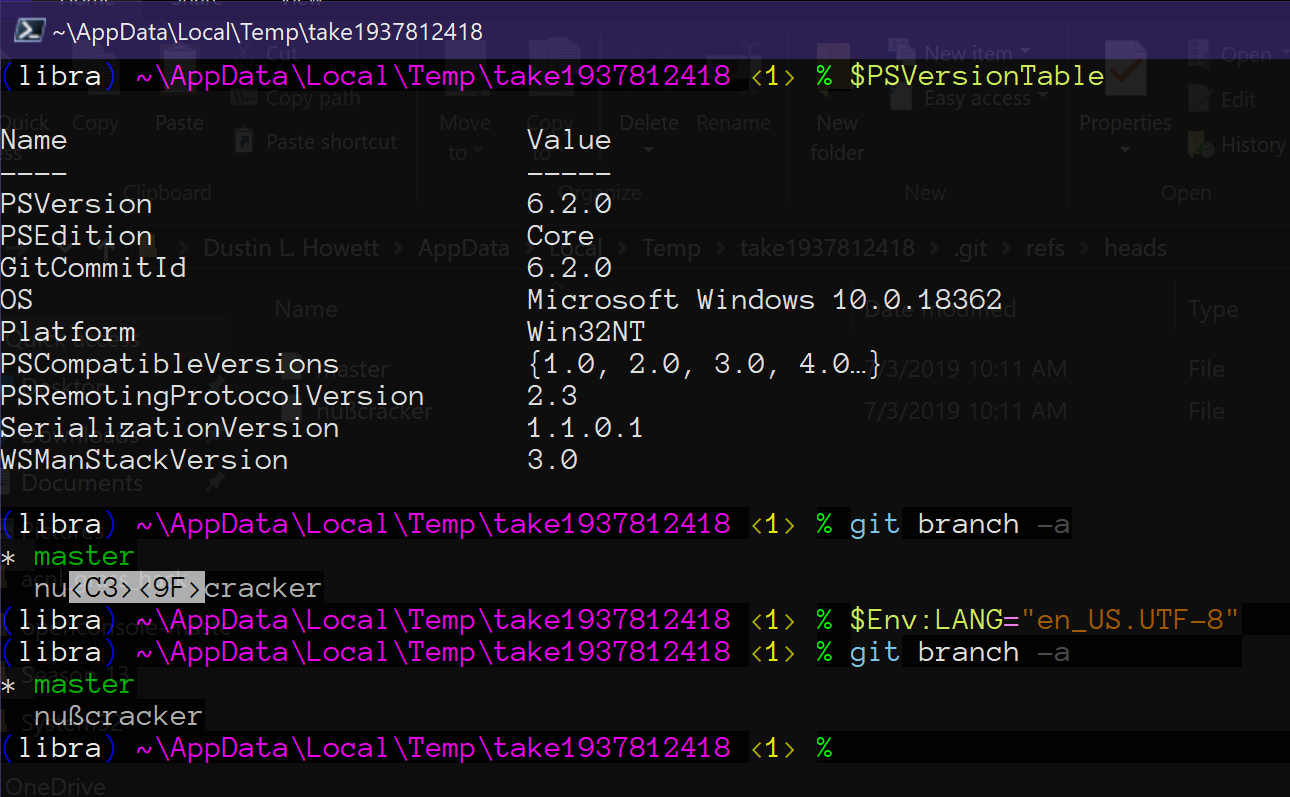
To make it work with your pager configured to be more, you need to set the "output codepage" to "UTF-8":
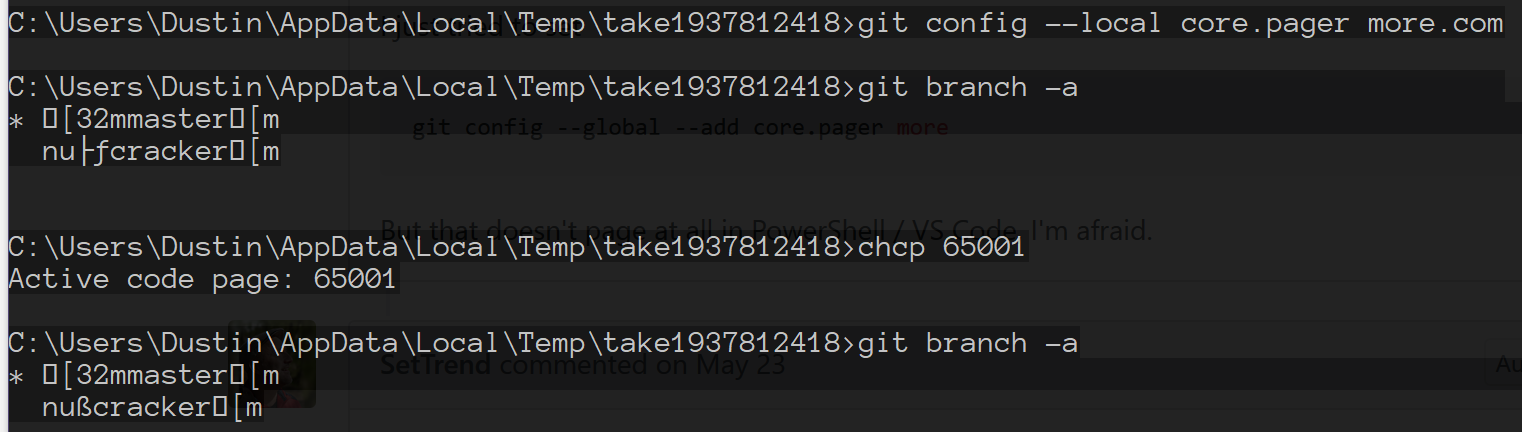
Though, more has some obvious deficiencies in the "printing escape sequences" department.
 DHowett-MSFT
on 3 Jul 2019
DHowett-MSFT
on 3 Jul 2019
I'm deeply sorry for replying so late.
@PhilipOakley : Please find a concise repository here: https://github.com/SetTrend/umlaute
It has a branch called "hätte".
I deeply feel this needs to be fixed. Our branches are hard to read at this time.
SetTrend
on 17 Oct 2019
On 17/10/2019 10:14, Axel D. wrote:
>
I'm deeply sorry for replying so late.
@PhilipOakley https://github.com/PhilipOakley : Please find a
concise repository here: https://github.com/SetTrend/umlauteIt has a branch called "hätte".
in https://github.com/SetTrend/umlaute/blob/master/test.txt are the
first two characters there in any way important?
they show as two 'unknown' characters (black diamond with ?) here on
Firefox - maybe they are Byte Order Marks (BOM)
Philip
PhilipOakley
on 17 Oct 2019
Hi @PhilipOakley, yes, they are UTF-8 BOMs.
Visual Studio Code fails to recognize file encoding flawlessly, so I started saving all my files with a BOM.
SetTrend
on 18 Oct 2019
<C3><A4> This kind of CJK garbled characters can be solved by referring to the following article:
However, there is no solution for the following garbled codes:
HEAD is now at df576e2 doc: 琛ュ厖 ES5 缁ф壙, reset
create mode 100644 浠g爜鐩綍鏂囦欢缁撴瀯.md, pull
modified: 浜夎涓庢帰绱?md, status
 xianghongai
on 2 Aug 2020
xianghongai
on 2 Aug 2020
Maybe the issue can be resolved by setting the code page via cmd /c chcp 65001, or by setting $env:LANG = "en_US.UTF-8"?
 dscho
on 1 Sep 2020
dscho
on 1 Sep 2020
Maybe the issue can be resolved by setting the code page via
cmd /c chcp 65001, or by setting$env:LANG = "en_US.UTF-8"?
Tried it, but it doesn't work.
xianghongai
on 3 Sep 2020
Related issues
 drewnoakes
·
5Comments
drewnoakes
·
5Comments
 daxelrod
·
4Comments
daxelrod
·
4Comments
 tldzyx
·
3Comments
tldzyx
·
3Comments
 Jarmos-san
·
3Comments
Jarmos-san
·
3Comments
 t-b
·
4Comments
t-b
·
4Comments
Most helpful comment
It looks like Powershell removes the apostrophes:
