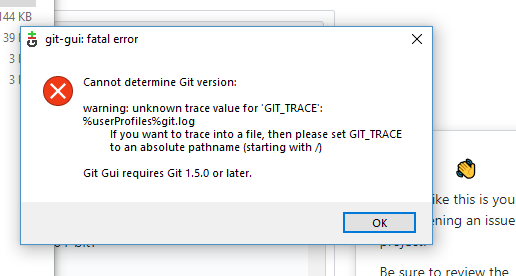
Git: The lastest version cannot work! Always warning: unknown trace value for 'GIT_TRACE'
Setup
Git-2.18.0-64-bit.exe
$ git --version --build-options

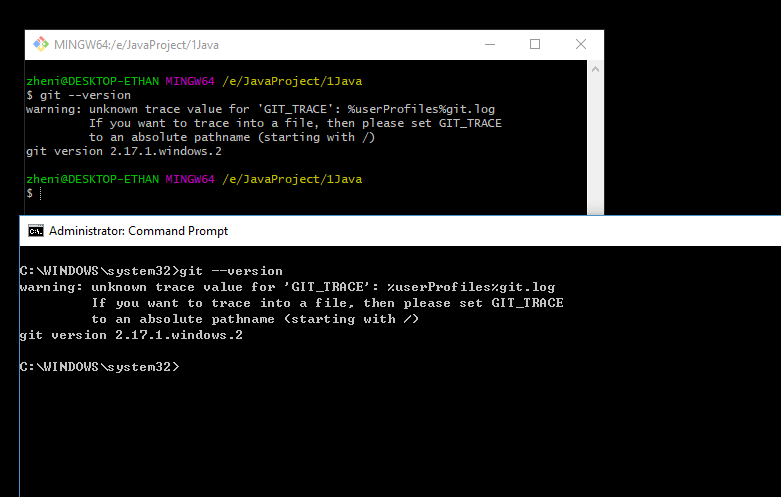
$ git --version
warning: unknown trace value for 'GIT_TRACE': %userProfiles%git.log
         If you want to trace into a file, then please set GIT_TRACE
         to an absolute pathname (starting with /)
git version 2.18.0.windows.1

 - Which version of Windows are you running? Vista, 7, 8, 10? Is it 32-bit or 64-bit?
Microsoft Windows [Version 10.0.17134.165]

$ cmd.exe /c ver

C:\WINDOWS\system32>git --version
warning: unknown trace value for 'GIT_TRACE': %userProfiles%git.log
         If you want to trace into a file, then please set GIT_TRACE
         to an absolute pathname (starting with /)
git version 2.18.0.windows.1

 - What options did you set as part of the installation? Or did you choose the
   defaults?
Yes , I choosed the defaults.

# One of the following:
> type "C:\Program Files\Git\etc\install-options.txt"
> type "C:\Program Files (x86)\Git\etc\install-options.txt"
> type "%USERPROFILE%\AppData\Local\Programs\Git\etc\install-options.txt"
$ cat /etc/install-options.txt

Editor Option: Notepad++
Path Option: Cmd
SSH Option: OpenSSH
CURL Option: OpenSSL
CRLF Option: CRLFAlways
Bash Terminal Option: MinTTY
Performance Tweaks FSCache: Enabled
Use Credential Manager: Enabled
Enable Symlinks: Disabled
- Any other interesting things about your environment that might be related
to the issue you're seeing?
No
Details
- Which terminal/shell are you running Git from? e.g Bash/CMD/PowerShell/other
git bash & cmd & double click the git-gui.exe are the same error.
 os9sur
All 10 comments
'GIT_TRACE': %userProfiles%git.log
Who set that environment variable? Certainly not Git. Somebody set this manually on your setup, and that is your problem right there.
 dscho
on 8 Aug 2018
dscho
on 8 Aug 2018
@White99 could you identify what your %userProfile% value is?
Also, it looks like the Git Gui error message hint isn't quite correct. IIRC the GIT_TRACE value should be set to the (numeric) file descriptor (fd) value that links to the desired log file.
... goes and looks https://git-scm.com/book/en/v2/Git-Internals-Environment-Variables - hmm yes a path starting '/' is valid.
back to %userProfile% value - are we expecting the implicit bash shell to expand that? will it be in Windows format, etc. [cf dscho's comment 'that is your problem right there.']
 PhilipOakley
on 8 Aug 2018
PhilipOakley
on 8 Aug 2018
back to %userProfile% value - are we expecting the implicit bash shell to expand that?
No, the GIT_TRACE variable's value is not supposed to contain variable names that have to be interpolated. It is documented that it can be an absolute path. But not any expression, certainly not a non-shell expression (the % markers are only expanded by cmd, ever).
dscho
on 8 Aug 2018
@dscho Thanks, that confirms my expectation, but I wasn't 100% sure about the potential cmd, bash , Gui distinction issues that have bedevilled some of the Windows Git issues.
As I understand your comment - 'there is no interpolation' - [even on Linux]. The correct full path, with leading slash (of the right type) must already be present in the GIT_TRACE variable, or git will barf!
Hopefully @White99 will now be able to fix his(?) local environment and determine how GIT_TRACE was set to that [incorrect] value.
PhilipOakley
on 8 Aug 2018
@dscho @PhilipOakley I just downloaded the installation package, the first installation, using the default options, and the first run failed, no manual modification , I am a newbie. I am not very clear about how to fix it. Can you tell me more detail about it please? Thanks a lot!
os9sur
on 8 Aug 2018
@White99 You have to check the environment settings in the Control Panel. You might find the variable GIT_TRACE defined there.
 bbolli
on 18 Aug 2018
bbolli
on 18 Aug 2018
@bbolli Thank you so much!
os9sur
on 18 Sep 2018
I still wonder how GIT_TRACE got into the system env settings?!?
bbolli
on 18 Sep 2018
@bbolli I also want to know, I re-checked my other computer, and also have this environment setting, but it always works well. after i deleted it manually and re-install the git, it also works well, and there is no that setting.
There are another setting seems also incorrect : GCM_TRACE C:\Users\DB156892git.log You can find there is one slash missing in the path. DB156892 is my computer id
GCM_TRACE has the same incorrect value as GIT_TRACE
os9sur
on 20 Sep 2018
GCM_TRACE is described here https://github.com/Microsoft/Git-Credential-Manager-for-Windows/blob/master/Docs/Environment.md
Sound like an administrator or other programme/installer set it. Beware (when reading stuff) the cmd vs bash style commands, and which interpolation is happening. (https://github.com/Microsoft/Git-Credential-Manager-for-Windows/issues/333)
PhilipOakley
on 20 Sep 2018
Related issues
dscho
·
3Comments
 jesterKing
·
3Comments
jesterKing
·
3Comments
 educhana
·
5Comments
educhana
·
5Comments
 dlk-pavan
·
4Comments
dlk-pavan
·
4Comments
 JoshSchreuder
·
4Comments
JoshSchreuder
·
4Comments
Most helpful comment
@White99 You have to check the environment settings in the Control Panel. You might find the variable GIT_TRACE defined there.