Git: Git Bash is trying to look for node_modules in its own folder .... (module.js:549 - throw err;)
_Git 2.17.0 _ 64-bit_
$ git --version --build-options

git version 2.17.0.windows.1
cpu: x86_64
built from commit: e7621d891d081acff6acd1f0ba6ae0adce06dd09
sizeof-long: 4
- Which version of Windows are you running? Vista, 7, 8, 10? Is it 32-bit or 64-bit?
Windows 7 x64
$ cmd.exe /c ver

Microsoft Windows [Version 6.1.7601]
- What options did you set as part of the installation? Or did you choose the
defaults?
Defaults.
$ cat /etc/install-options.txt

Editor Option: VisualStudioCode
Path Option: Cmd
SSH Option: OpenSSH
CURL Option: OpenSSL
CRLF Option: CRLFAlways
Bash Terminal Option: MinTTY
Performance Tweaks FSCache: Enabled
Use Credential Manager: Enabled
Enable Symlinks: Disabled
Details
- Which terminal/shell are you running Git from? e.g Bash/CMD/PowerShell/other
Git Bash
_for example_, Angular command: _ng serve_

I've been using this command thousand times, and everything was OK.
And I really don't know what changed and when, but for now Git Bash searches for all commands like this one - in it's own folder (C:/Program Files/Git/...) instead of _AppData/Roaming/..._
When I try to use Windows CMD - everything is OK. ng serve - works.
It's not about "ng serve". It will also result with the same error if I try to launch any "test.html" file using VS Code command "code". So like "_code test.html_". And there will be the same error.
It is ridiculous as hell, but if I enter "npm start" command, which is responsible for "ng serve" - it will work!
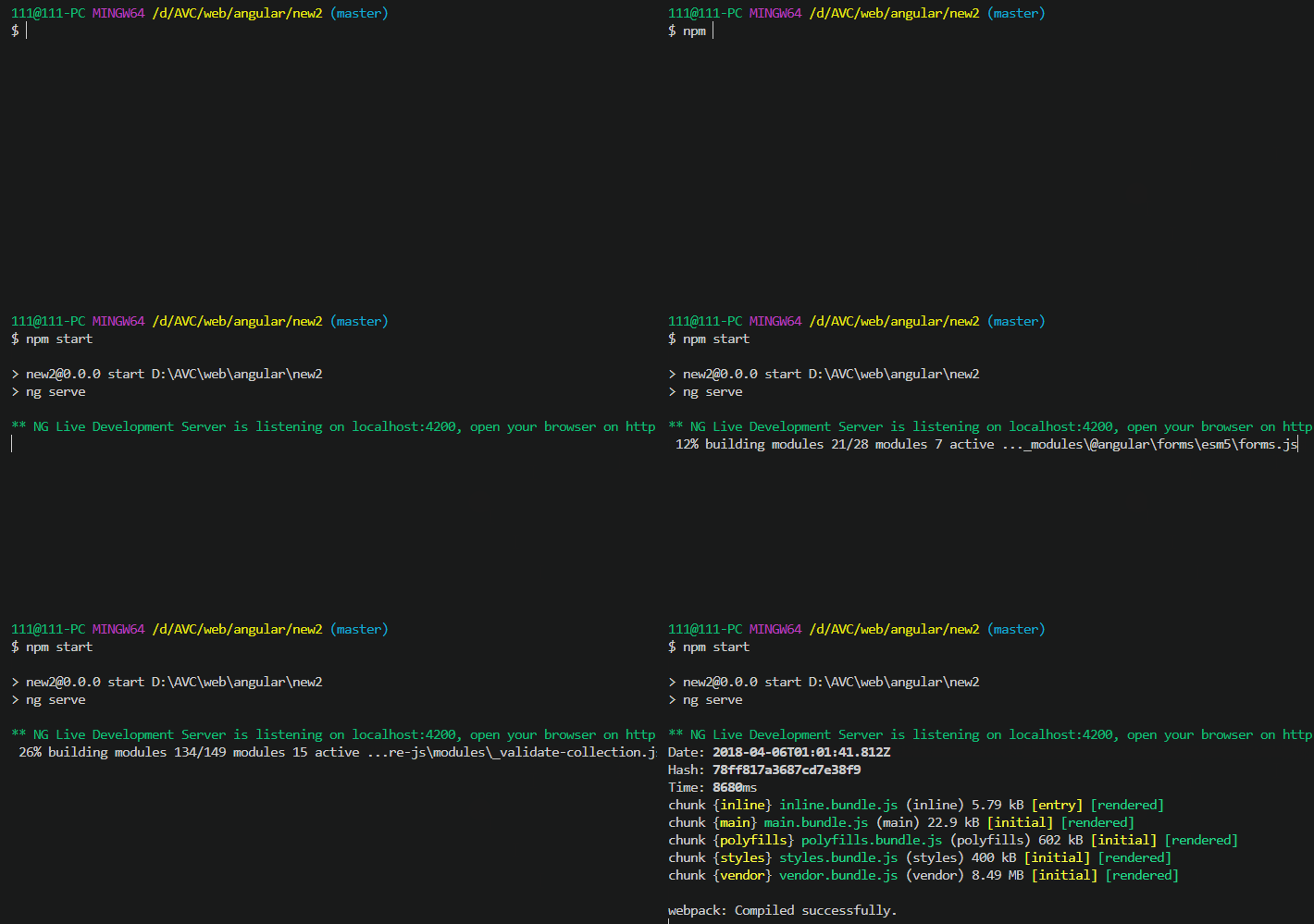
So, what the hell?
I've already tried Git versions 2.16.2, 2.16.3, and now 2.17.0. All three versions act the same.
PS: it seems like (as I remember it) in version 2.16.2 the error was in line 540, so _module.js:540_, and now it is _module.js:549_
 user3323
All 27 comments
A curious problem. Not quite a Git problem, but...
I guess the difference between the two invocations may be that the first uses a Unix shell script called ng and the second might use ng.bat instead.
What does which ng say? If it points to a shell script (i.e. a file starting with a line like #!/bin/sh), you could try to run it with tracing enabled, via sh -x "$(which ng)" and see whether that sheds some light into the problem.
(The fact that C:\Program Files\Git is prefixed to the path, which corresponds to Git Bash's idea of the root directory /, makes me believe that the bug might lie with the Unix shell script assuming to be running in a Unix/Linux environment.)
 dscho
on 6 Apr 2018
dscho
on 6 Apr 2018
@dscho , thanks for your reaction...
here is what "which ng" says:

so, it points to this npm folder:
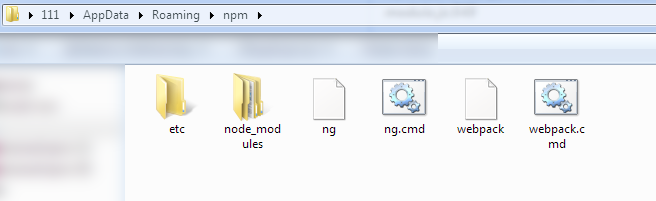
content of the file "_ng_":
#!/bin/sh
basedir=$(dirname "$(echo "$0" | sed -e 's,\\,/,g')")

case `uname` in
    *CYGWIN*) basedir=`cygpath -w "$basedir"`;;
esac

if [ -x "$basedir/node" ]; then
  "$basedir/node"  "$basedir/node_modules/@angular/cli/bin/ng" "$@"
  ret=$?
else
  node  "$basedir/node_modules/@angular/cli/bin/ng" "$@"
  ret=$?
fi
exit $ret
content of the file "_ng.cmd_":
@IF EXIST "%~dp0\node.exe" (
  "%~dp0\node.exe"  "%~dp0\node_modules\@angular\cli\bin\ng" %*
) ELSE (
  @SETLOCAL
  @SET PATHEXT=%PATHEXT:;.JS;=;%
  node  "%~dp0\node_modules\@angular\cli\bin\ng" %*
)
And I'm sorry, but "_code_" command gives a different error...

there is a folder of VS Code:
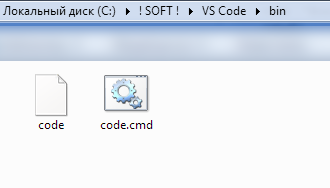
content of the file "_code_":
#!/usr/bin/env bash
#
# Copyright (c) Microsoft Corporation. All rights reserved.
# Licensed under the MIT License. See License.txt in the project root for license information.

NAME="Code"
VSCODE_PATH="$(dirname "$(dirname "$(realpath "$0")")")"
ELECTRON="$VSCODE_PATH/$NAME.exe"
if grep -q Microsoft /proc/version; then
    # If running under WSL don't pass cli.js to Electron as environment vars
    # cannot be transferred from WSL to Windows
    # See: https://github.com/Microsoft/BashOnWindows/issues/1363
    #      https://github.com/Microsoft/BashOnWindows/issues/1494
    "$ELECTRON" "$@"
    exit $?
fi
if [ "$(expr substr $(uname -s) 1 9)" == "CYGWIN_NT" ]; then
    CLI=$(cygpath -m "$VSCODE_PATH/resources/app/out/cli.js")
else
    CLI="$VSCODE_PATH/resources/app/out/cli.js"
fi
ELECTRON_RUN_AS_NODE=1 "$ELECTRON" "$CLI" "$@"
exit $?
content of the file "_code.cmd_":
@echo off
setlocal
set VSCODE_DEV=
set ELECTRON_RUN_AS_NODE=1
call "%~dp0..\Code.exe" "%~dp0..\resources\app\out\cli.js" %*
endlocal
Here is my "System Properties" PATHs:
_C:! SOFT !\VS Code\bin_;C:! SOFT !\VS Code Insiders\bin;_C:\Users\111\AppData\Local\GitHubDesktop\bin_;C:\Users\111\AppData\Roaming\npm
user3323
on 6 Apr 2018
content of the file "ng":
#!/bin/sh
basedir=$(dirname "$(echo "$0" | sed -e 's,\\,/,g')")

case `uname` in
    *CYGWIN*) basedir=`cygpath -w "$basedir"`;;
esac

if [ -x "$basedir/node" ]; then
  "$basedir/node"  "$basedir/node_modules/@angular/cli/bin/ng" "$@"
  ret=$?
else
  node  "$basedir/node_modules/@angular/cli/bin/ng" "$@"
  ret=$?
fi
exit $ret
Could you change the
*CYGWIN*) basedir=`cygpath -w "$basedir"`;;
to
*CYGWIN*|*MINGW*|*MSYS*) basedir=`cygpath -w "$basedir"`;;
and try again?
dscho
on 6 Apr 2018
@dscho
cygpath: can't convert empty path
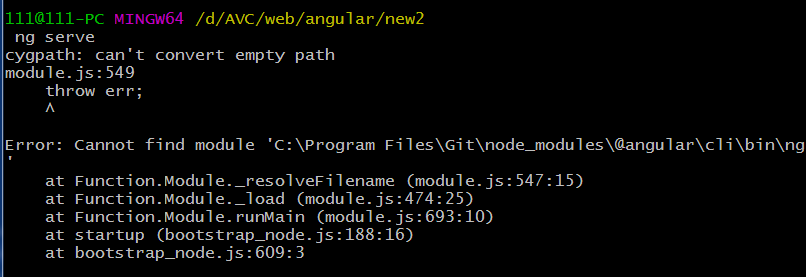
user3323
on 6 Apr 2018
Try
*CYGWIN*|*MINGW*|*MSYS*) basedir=`cygpath -w "${basedir:-.}"`;;
(${basedir:-.} expands to $basedir it non-empty, and to . otherwise)
dscho
on 6 Apr 2018
@dscho , awesome!
*CYGWIN*|*MINGW*|*MSYS*) basedir=cygpath -w "${basedir:-.}";;
this one - worked!
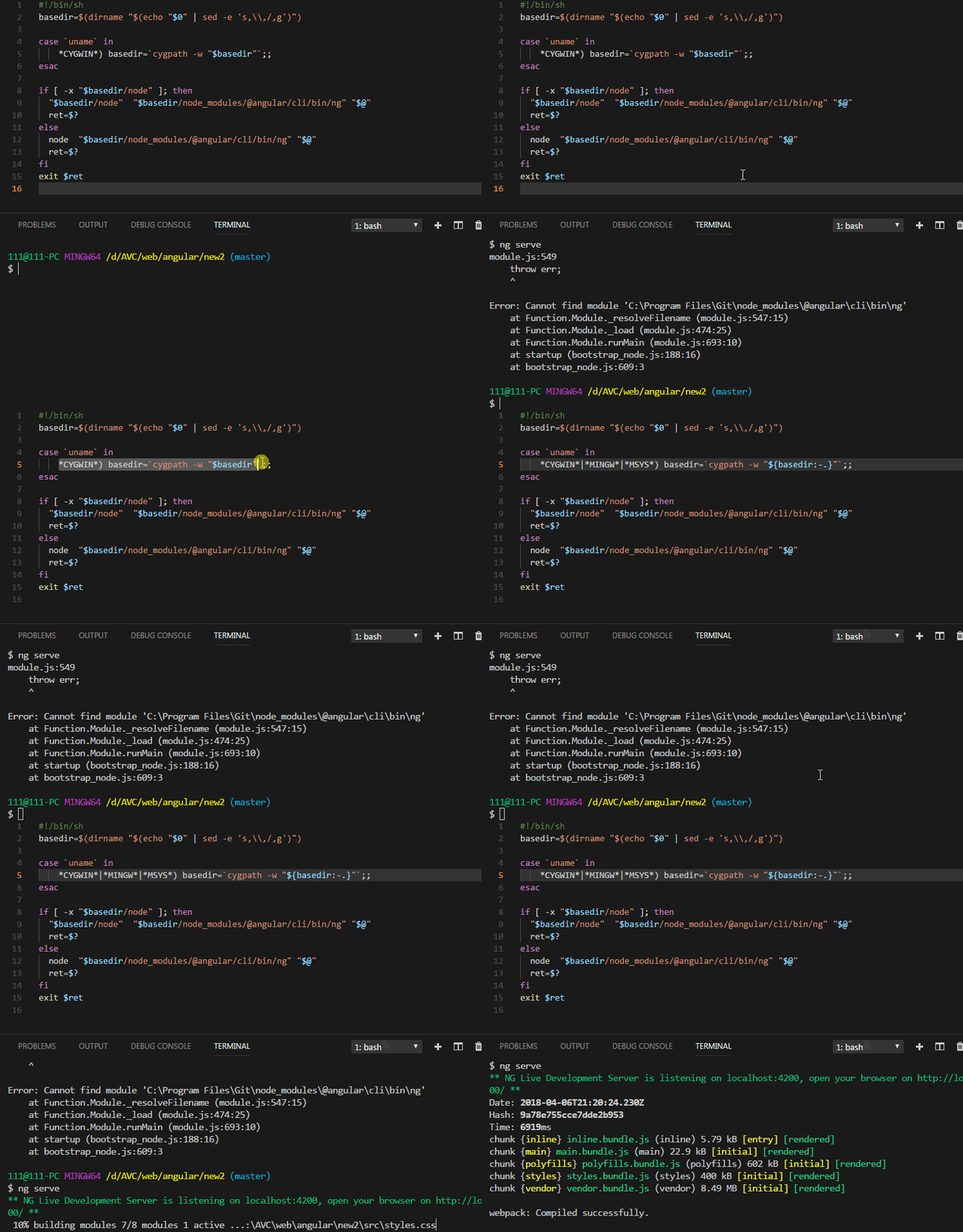
... but, I wonder what is the reason of all this? Why it was working fine, and in one day everything changed? I didn't install (or update) anything, that could change "ng" file. So, I'm really confused.
And why "ng" command (without last editing) works fine in Windows CMD ?
Why "code" command works fine in Windows CMD ? (in Git Bash it still _cannot find such file or directory_)
user3323
on 7 Apr 2018
command "_code_" _(responsible for VS Code launching)_
Windows CMD:

Git Bash:
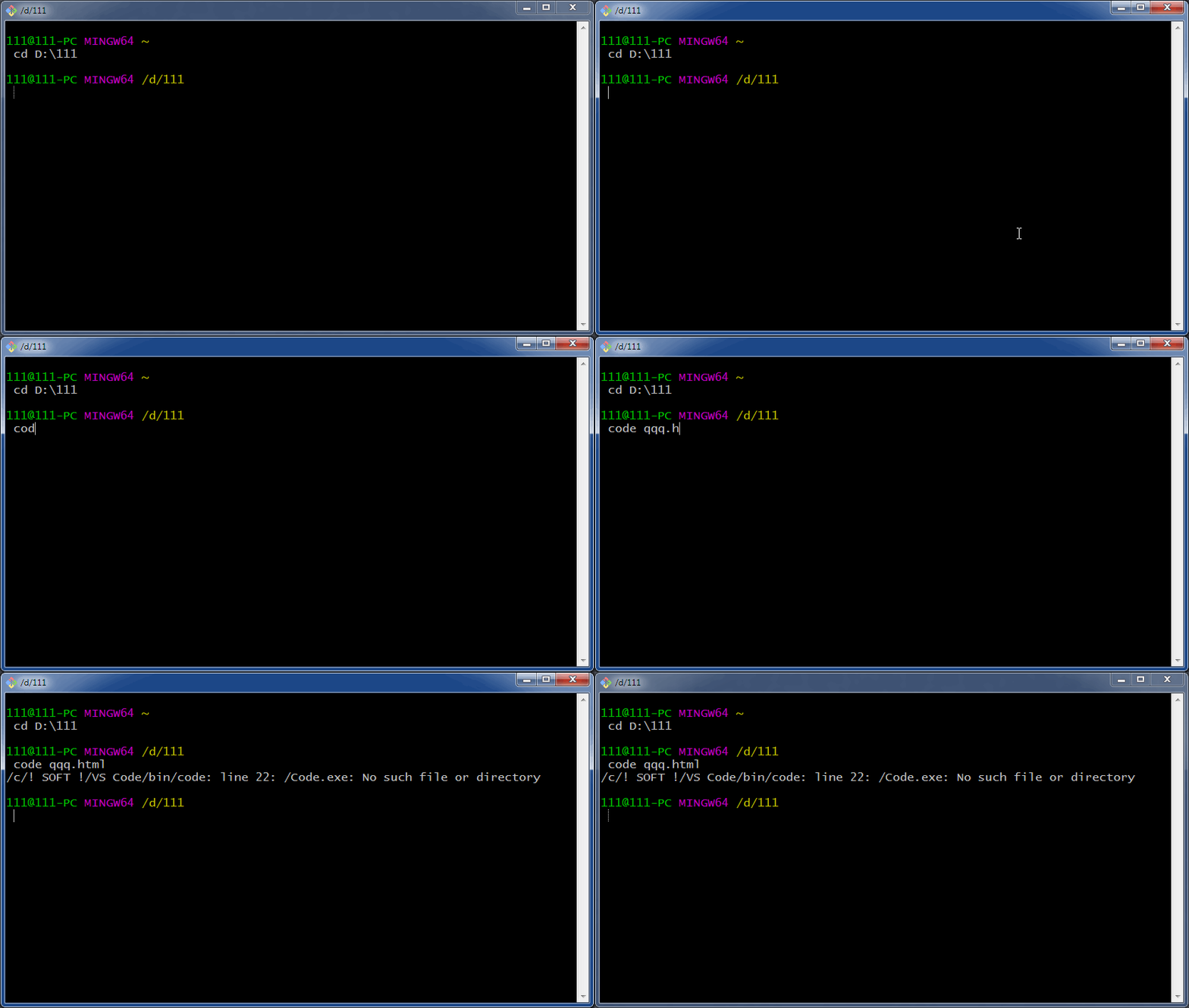
.... so, how come? Any ideas, what is the reason of this mess?
What do you think, can it be somehow because of "cleaning registry" soft?
Are there registry entries, that can be "cleaned" by mistake, causing this problem?
Thanks!
user3323
on 7 Apr 2018
Git Bash:
git bash - code
.... so, how come? Any ideas, what is the reason of this mess?
I think this could be the same thing... Visual Studio Code does have a shell script wrapper to start it up (which is called code and in your PATH), and this Unix shell script may be ill-equipped to handle Git for Windows' idiosyncratic environment.
Although I have to say... it works here ;-)
Can you call bash -x "$(which code)"? The output should give us an idea what is going wrong...
dscho
on 9 Apr 2018
@dscho
$ bash -x "$(which code)"
+ NAME=Code
++++ realpath '/c/! SOFT !/VS Code/bin/code'
+++ dirname '/c/! SOFT !/VS Code/bin/code'
++ dirname '/c/! SOFT !/VS Code/bin'
+ VSCODE_PATH='/c/! SOFT !/VS Code'
+ ELECTRON='/c/! SOFT !/VS Code/Code.exe'
+ grep -q Microsoft /proc/version
+++ uname -s
++ expr substr MINGW64_NT-6.1 1 9
+ '[' MINGW64_N == CYGWIN_NT ']'
+ CLI='/c/! SOFT !/VS Code/resources/app/out/cli.js'
+ ELECTRON_RUN_AS_NODE=1
+ '/c/! SOFT !/VS Code/Code.exe' '/c/! SOFT !/VS Code/resources/app/out/cli.js'
+ exit 0
do you see anything?)
user3323
on 9 Apr 2018
I guess you still want to add the command-line parameter qqq.html: bash -x "$(which code)" qqq.html.
dscho
on 10 Apr 2018
@dscho
bash -x "$(which code)" qqq.html
this one works, opening VS Code...
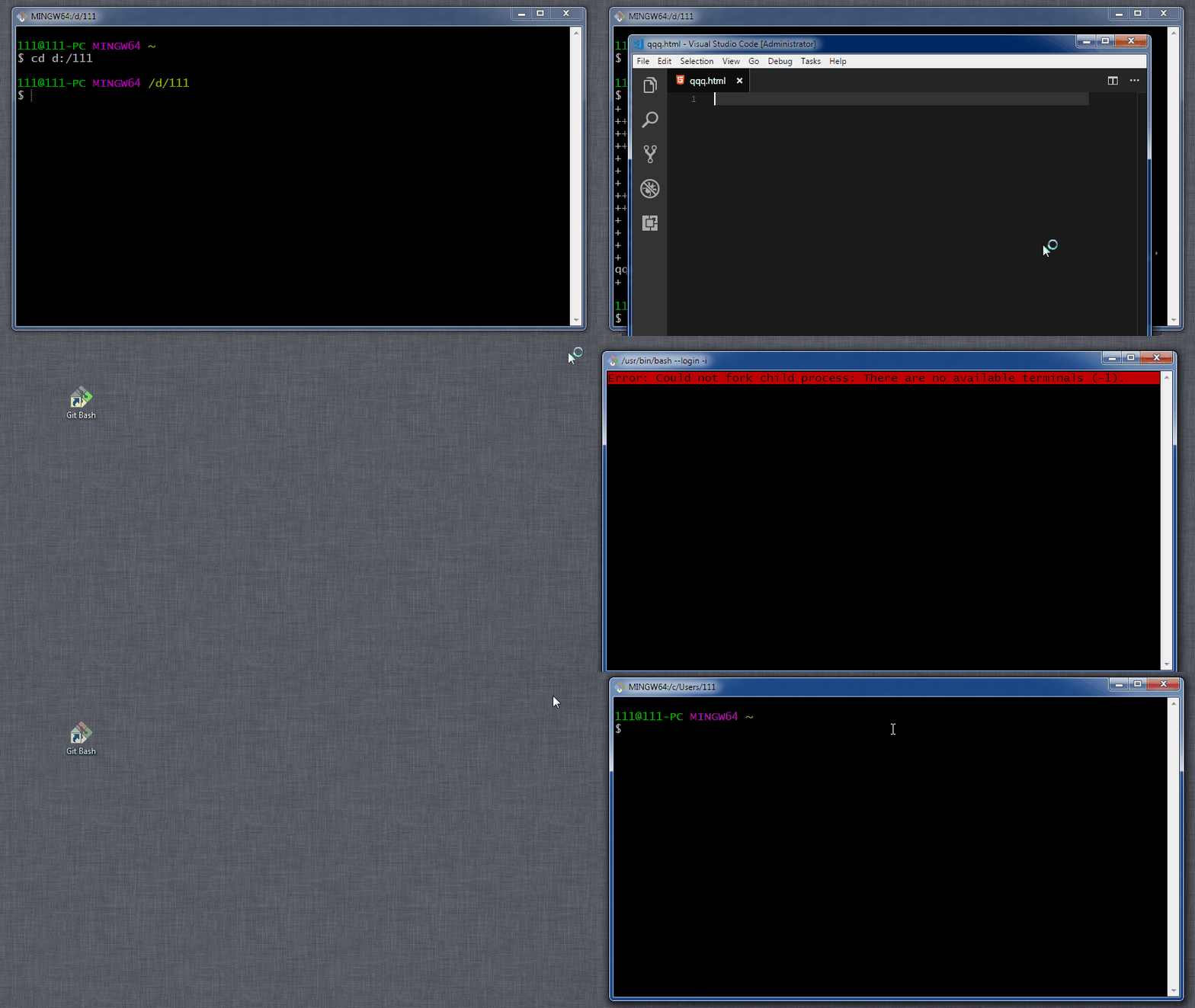
... also, pay attention about:
Error: Could not fork child process: There are no available terminals (-1).
.. as you see, happens when you minimize VS Code, close Git Bash, and launch Git Bash again...
user3323
on 11 Apr 2018
I believe npm package or npm install adds those command wrappers, so I think npm would be the right place to report the issue.
 drizzd
on 30 Apr 2018
drizzd
on 30 Apr 2018
Here is a Stackoverflow question discussing this issue: https://stackoverflow.com/questions/37643385/pipe-is-returning-empty-string-in-bash-in-git-for-windows.
I cannot reproduce the issue, but, for what it's worth, the wrapper is generated here https://github.com/npm/cmd-shim/blob/master/index.js#L138. Here is a minimal example:
myapp/index.js
#!/usr/bin/env node
console.log("Hello world");
myapp/package.json
{
  "name": "myapp",
  "version": "1.0.0",
  "bin": {
    "myapp": "index.js"
  }
}
package.json
{
  "dependencies": {
    "myapp": "file:myapp"
  }
}
Now run:
$ npm install
$ ./node_modules/.bin/myapp
Hello world
For the ng issue, could you please add the following two lines, run again and tell us the output? I think it might give us new insights to know what gets passed as $0 in your case.
--- node_modules/.bin/myapp     2018-05-01 10:42:41.811246200 +0000
+++ myapp.mod   2018-05-01 10:42:35.947695900 +0000
@@ -1,5 +1,7 @@
 #!/bin/sh
+printf "\$0: %s\n" "$0"
 basedir=$(dirname "$(echo "$0" | sed -e 's,\\,/,g')")
+printf "\$basedir: %s\n" "$basedir"

 case `uname` in
     *CYGWIN*) basedir=`cygpath -w "$basedir"`;;
I have a similar problem with yarn in node.js
Here is what I found out...
The yarn script installed by npm install yarn is the following:
```#!/bin/sh
basedir=$(dirname "$(echo "$0" | sed -e 's,\,/,g')")
case uname in
CYGWIN|MINGW) basedir=cygpath -w "$basedir";;
esac
if [ -x "$basedir/node" ]; then
"$basedir/node" "$basedir/node_modules/yarn/bin/yarn.js" "$@"
ret=$?
else
node "$basedir/node_modules/yarn/bin/yarn.js" "$@"
ret=$?
fi
exit $ret
To me, the very first line is causing the issue.
The value of $0 is `C:/Path/To/yarn`

Here is the result of some commands in git bash... (I removed the prompts with my username/machine name and replaced them by   ~>)

```~> t="C:\Path\To\yarn"
~> echo $t
C:\Path\To\yarn
~> echo "$t" | sed -e 's,\\,/,g'
C:/Path/To/yarn
~> dirname $(echo "$t" | sed -e 's,\\,/,g')
C:/Path/To
~> dirname "$(echo "$t" | sed -e 's,\\,/,g')"
.
~> echo "$(echo "$t" | sed -e 's,\\,/,g')"

~>
This is the result of the same commands typed in an actual linux bash shell:
~>t="C:\Path\To\yarn"
~>echo $t
C:\Path\To\yarn
~>echo "$t" | sed -e 's,\\,/,g'
C:/Path/To/yarn
~>dirname $(echo "$t" | sed -e 's,\\,/,g')
C:/Path/To
~>dirname "$(echo "$t" | sed -e 's,\\,/,g')"
C:/Path/To
~>echo "$(echo "$t" | sed -e 's,\\,/,g')"
C:/Path/To/yarn
~>
As can be seen from the two snippets, there is a difference between git bash and and linux bash. This causes scripts using syntax like command "$(another command)" to be equivalent to running command "", i.e., the "$(another command)" part seems to always return an empty string.
 DracoDynasty
on 18 May 2018
DracoDynasty
on 18 May 2018
As can be seen from the two snippets, there is a difference between git bash and and linux bash. This causes scripts using syntax like command "$(another command)" to be equivalent to running command "", i.e., the "$(another command)" part seems to always return an empty string.
I have seen this before. In a couple of tickets, too, seemingly unrelated (one about git stash, one about git rebase, and one about git flow, from the top of my head), so I do not fault you at all for not finding it.
In all of these cases, it turned out to be some overzealous anti-malware, most likely Comodo Internet Security, mistaking the subshell for an attempt to attack your computer, and simply killing the process. Therefore, it cannot produce the expected output, the error checking is as incomplete as is typical for shell scripts, and everything goes to hell.
Maybe you also have Comodo Internet Security running in the background, messing with your scripts?
dscho
on 21 May 2018
Interesting. I just tried again while having both my firewall (which is indeed Comodo) and Anti-virus (360 Internet Security) disabled. The result was the same, sadly.
DracoDynasty
on 21 May 2018
If "$(some command)" returns an empty string despite the command clearly wanting to output something, then I am afraid it must be some other process interfering, most likely some anti-malware.
I did hear reports that sometimes the anti-malware was still active, despite being told to disable itself... Not sure that's the case here, at this point I am just clutching at straws.
dscho
on 21 May 2018
I feel like I either confused myself or didn't explain myself properly.
After looking at my examples again, the $(some command) does output something alone. But placing it inside double-quotes doesn't. echo "$(some command)" displays nothing, even when echo $(some command) does.
Both output the same thing correctly in linux's bash (see the examples with dirname $(some command retuning path) and dirname "$(some command retuning path)")
DracoDynasty
on 21 May 2018
@DracoDynasty yes, you explained that properly. And that is the exact symptom, as funny as it sounds, of an overzealous anti-malware such as Comodo Internet Security. In one case, it lets the command run. In the other, it simply stops it, because to Comodo is somehow looks like some code injection or something (which is not the case, of course). Turning off Comodo Internet Security (CIS) "fixes" this.
The bug really lies with CIS for not analyzing the situation properly.
dscho
on 28 May 2018
I did some investigation on this issue and found an interesting solution.
After npm install -g diff-so-fancy (for example) this startup script is created in %APPDATA%\npm:
%APPDATA%\npm\diff-so-fancy
#!/bin/sh
basedir=$(dirname "$(echo "$0" | sed -e 's,\\,/,g')")

case `uname` in
    *CYGWIN*) basedir=`cygpath -w "$basedir"`;;
esac

if [ -x "$basedir/perl" ]; then
  "$basedir/perl"  "$basedir/node_modules/diff-so-fancy/diff-so-fancy" "$@"
  ret=$?
else
  perl  "$basedir/node_modules/diff-so-fancy/diff-so-fancy" "$@"
  ret=$?
fi
exit $ret
The issue is about the first two lines (which is the same in every npm module startup scripts):
#!/bin/sh
basedir=$(dirname "$(echo "$0" | sed -e 's,\\,/,g')")
basedir is empty because of the shebang line. Tested on Git Bash:
test/tmp.sh
#!/bin/sh
echo "A) $0"
echo "B) $0" | sed -e 's,\\,/,g'
echo "C) $(echo "$0" | sed -e 's,\\,/,g')"
echo "D) $(dirname "$(echo "$0" | sed -e 's,\\,/,g')")"
Output
$ test/tmp.sh
A) test/tmp.sh
B) test/tmp.sh
C)
D)
Changing #!/bin/sh to #!/bin/dash
$ test/tmp.sh
A) test/tmp.sh
B) test/tmp.sh
C) test/tmp.sh
D) test

It seems that Bash fails because of pipes in $(...) expression:
$ echo $(echo $(ls))
bin/ cmd/ dev/ etc/ git-bash.exe git-cmd.exe LICENSE.txt mingw64/ proc/ ReleaseNotes.html tmp/ unins001.dat unins001.exe unins001.msg usr/
$ echo $(echo $(ls) | cat)
# No output
EDIT
Well I'm not sure about the reason, but it's definitely about piping + $(...) expressions in Bash.
$ echo $(ls) | cat
bin/ cmd/ dev/ etc/ git-bash.exe git-cmd.exe LICENSE.txt mingw64/ proc/ ReleaseNotes.html tmp/ unins001.dat unins001.exe unins001.msg usr/
$ echo $(ls | cat)
bin/ cmd/ dev/ etc/ git-bash.exe git-cmd.exe LICENSE.txt mingw64/ proc/ ReleaseNotes.html tmp/ unins001.dat unins001.exe unins001.msg usr/
$ echo $(echo $(ls) | cat)
# No output
GNU bash, version 4.4.19(1)-release (x86_64-pc-msys)
 bimlas
on 2 Jun 2018
bimlas
on 2 Jun 2018
Just tried out after turning off my antivirus (Comodo), the results are the same.
test/tmp.sh
#!/bin/sh
echo "A) $0"
echo "B) $0" | sed -e 's,\\,/,g'
echo "C) $(echo "$0" | sed -e 's,\\,/,g')"
echo "D) $(dirname "$(echo "$0" | sed -e 's,\\,/,g')")"
echo $(ls) | cat
echo $(ls | cat)
echo $(echo $(ls) | cat)
$  test/tmp.sh
A) test/tmp.sh
B) test/tmp.sh
C)
D)
# Files...
# Files...
# No output
OMG... (-_-') Uninstalled antivirus (Comodo), now it works...
EDIT
Just reported to Comodo as false-positive.
bimlas
on 2 Jun 2018
Ended up here with an identical issue, and the machine has Comodo Cloud Antivirus. Will report back if uninstalling _doesn't_ fix it.
Update: confirmed that an uninstall fixes it.
 dahlbyk
on 5 Jun 2018
dahlbyk
on 5 Jun 2018
It is too bad that Comodo causes so many problems here. If only they would work with us to resolve the issue.
dscho
on 21 Jun 2018
Related issues
 jesterKing
·
3Comments
jesterKing
·
3Comments
 vocaviking
·
5Comments
vocaviking
·
5Comments
 JoshSchreuder
·
4Comments
JoshSchreuder
·
4Comments
 yegorich
·
3Comments
yegorich
·
3Comments
 dlk-pavan
·
4Comments
dlk-pavan
·
4Comments
Most helpful comment
@dscho , awesome!
*CYGWIN*|*MINGW*|*MSYS*) basedir=cygpath -w "${basedir:-.}";;this one - worked!
... but, I wonder what is the reason of all this? Why it was working fine, and in one day everything changed? I didn't install (or update) anything, that could change "ng" file. So, I'm really confused.
And why "ng" command (without last editing) works fine in Windows CMD ?
Why "code" command works fine in Windows CMD ? (in Git Bash it still _cannot find such file or directory_)