Git: Installer doesn't detect VSCode Insiders.
Setup
- Which version of Git for Windows are you using? Is it 32-bit or 64-bit?
Git-2.16.2-64-bit.exe
- Which version of Windows are you running? Vista, 7, 8, 10? Is it 32-bit or 64-bit?
cmd.exe /c ver
Microsoft Windows [Version 10.0.16299.125]
- What options did you set as part of the installation? Or did you choose the
defaults?
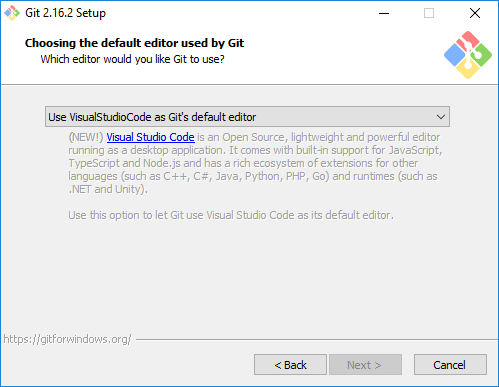
Use VisualStudioCode as Git's default editor.
- Any other interesting things about your environment that might be related
to the issue you're seeing?
Visual Studio Code Insiders is installed.
Details
- Which terminal/shell are you running Git from? e.g Bash/CMD/PowerShell/other
CMD
- What commands did you run to trigger this issue? If you can provide a
Minimal, Complete, and Verifiable example
this will help us understand the issue.
start "Git for Windows" "Git-2.16.2-64-bit.exe"
- What did you expect to occur after running these commands?
The installer should detect that VSCode is installed.
- What actually happened instead?
The installed doesn't allow me to install Git for Windows.
 NatoBoram
All 13 comments
Visual Studio Code Insidersis installed.
I think this is the problem, because Insiders and Stable can be installed alongside eachother they use a different registry key.
From this snippet in the installer: https://github.com/git-for-windows/build-extra/blob/master/installer/install.iss#L1129-L1132
EditorAvailable[GE_VisualStudioCode]:=RegQueryStringValue(HKEY_LOCAL_MACHINE,'SOFTWARE\Classes\Applications\Code.exe\shell\open\command','',VisualStudioCodePath);
The Insiders build of VSCode sets a different registry key (the whitespace is important):
SOFTWARE\Classes\Applications\Code - Insiders.exe\shell\open\command
@dscho put together a guide to show how to create your own installer, after setting up the SDK, if someone wants to have a go at modifying the install script.
 shiftkey
on 23 Feb 2018
shiftkey
on 23 Feb 2018
As you can install VSCode Stable and Insiders side-by-side, this probably means the installer should let you choose between one or the other.
shiftkey
on 23 Feb 2018
As you can install VSCode Stable and Insiders side-by-side, this probably means the installer should let you choose between one or the other.
I agree.
@NatoBoram you can easily get the feature you desire by following the guides @shiftkey mentioned and by editing /usr/src/build-extra/installer/install.iss, imitating what was done for Visual Studio Code (just look for "VisualStudioCode"). If you then open a Pull Request to https://github.com/git-for-windows/build-extra, you will even get this feature in the official installers.
 dscho
on 23 Feb 2018
dscho
on 23 Feb 2018
I'm seeing the same issue, but I don't have the insider build. It doesn't appear to me that I have a shell folder underneath Code.exe in my registry path. Is that perhaps a new entry that's not applied on updates of VSCode?
My version info:
Version 1.20.1
Commit f88bbf9137d24d36d968ea6b2911786bfe103002
Date 2018-02-13T15:33:21.935Z
Shell 1.7.9
Renderer 58.0.3029.110
Node 7.9.0
Architecture ia32
 jwittner
on 27 Feb 2018
jwittner
on 27 Feb 2018
@jwittner the same applies to you as what I told @NatoBoram...
dscho
on 15 Mar 2018
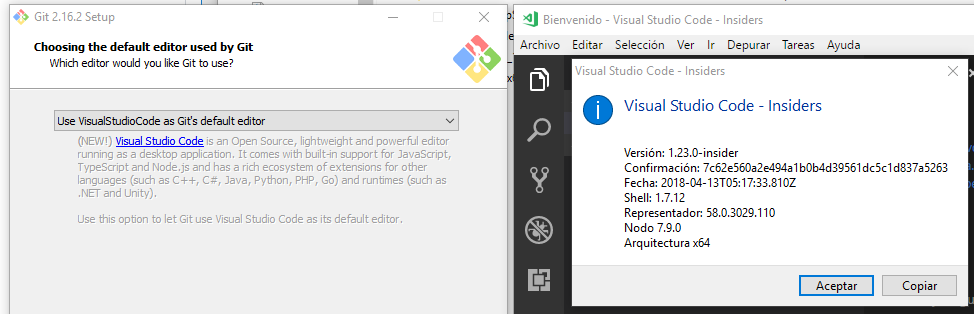
I'm using Windows 10 v1709 c16299.371.
 justalemon
on 16 Apr 2018
justalemon
on 16 Apr 2018
As a side note, this is how GitHub Desktop detects Code and Code Insiders at the same time (more info on desktop/desktop#3011).
justalemon
on 16 Apr 2018
@justalemon so how about giving it a try? https://github.com/git-for-windows/git/wiki/Making-an-installer should help making an installer, and the /usr/src/build-extra/installer/install.iss file is the one needing to be patches.
dscho
on 19 Apr 2018
@dscho Thanks for the idea! I forked build-extra to my account and i'm ready to send the Pull Request.
justalemon
on 19 Apr 2018
I hit this again.
Setting up the following registry key resolved the issue
SOFTWARE\Classes\Applications\Code - Insiders.exeshell\open\command
 schemburkar
on 30 Jun 2018
schemburkar
on 30 Jun 2018
HKEY_LOCAL_MACHINE\SOFTWARE\Classes\Applications\Code - Insiders.exe\shell\open\command will be created during the install of VS Code Insiders if you used Microsoft's installer from here.
If you used the .zip file or it was built by yourself, then the registry key does not exist.
justalemon
on 30 Jun 2018
If you used the .zip file or it was built by yourself, then the registry key does not exist.
Is that what we were missing all along, that people "installed" from .zip? I do not recall reading any hint about this earlier.
dscho
on 30 Jun 2018
@justalemon I actually did install from the site using the installer VSCodeSetup-x64-1.25.0-insider.exe. it did not create the registry keys.
Even the console command 'code' does not work.
schemburkar
on 30 Jun 2018
Related issues
 drewnoakes
·
5Comments
drewnoakes
·
5Comments
 michaelblyons
·
5Comments
michaelblyons
·
5Comments
 dlk-pavan
·
4Comments
dlk-pavan
·
4Comments
 Jarmos-san
·
3Comments
Jarmos-san
·
3Comments
 limasued
·
3Comments
limasued
·
3Comments