Git: Bug: Cannot kill Nodejs process using ctrl + c
Setup
- Which version of Git for Windows are you using? Is it 32-bit or 64-bit?
$ git --version --build-options

git version 2.13.1.windows.2
built from commit: a36e14b3aaa0ddb633c40a9c8483e6fe12d99616
sizeof-long: 4
machine: x86_64
- Which version of Windows are you running? Vista, 7, 8, 10? Is it 32-bit or 64-bit?
Windows 7
$ cmd.exe /c ver

Microsoft Windows [Version 6.1.7601]
- What options did you set as part of the installation? Or did you choose the
defaults?
# One of the following:
> type "C:\Program Files\Git\etc\install-options.txt"
> type "C:\Program Files (x86)\Git\etc\install-options.txt"
> type "%USERPROFILE%\AppData\Local\Programs\Git\etc\install-options.txt"
$ cat /etc/install-options.txt

Path Option: BashOnly
SSH Option: OpenSSH
CURL Option: OpenSSL
CRLF Option: LFOnly
Bash Terminal Option: MinTTY
Performance Tweaks FSCache: Enabled
Use Credential Manager: Enabled
Enable Symlinks: Disabled
Any other interesting things about your environment that might be related
to the issue you're seeing?- Using Nodejs - 8.1.2
Details
- Which terminal/shell are you running Git from? e.g Bash/CMD/PowerShell/other
Bash
- What commands did you run to trigger this issue? If you can provide a
Minimal, Complete, and Verifiable example
this will help us understand the issue.
Steps:
- Create a js file with content
const http = require('http');
const fs = require('fs');
const port = 3000;
const app = http.createServer((req,res) => {
    res.writeHead(200);
    res.end("hi");
});

app.listen(port);
its a simple server running on 3000 port.
- Run command "node ./app.js" inside git bash.
- hit "CTRL + c" (2 times) to kill the process.
If you look at taskmanager, then you will see a node.js process
still running. or if you try to restart the server it will say port
300 already in use.- What did you expect to occur after running these commands?
If you look at taskmanager, then you will see a node.js process still running. or if you try to restart the server it will say port 300 already in use.
- What actually happened instead?
The nodejs process still running.
Notes:
- It was working fine on first release of git 2.13. It broken with releases after that.
git version 2.13.0.windows.1
built from commit: eba7af3dbb4c846c6303c5f64102acee696c9ab0
sizeof-long: 4
machine: x86_64
 gyandeeps
All 50 comments
So this has been reported to the Git mailing list: https://public-inbox.org/git/CAHaNChecHzZqzafe4P85Kz4BtJuisO+krCvm=yPW9wGMXWJK_A@mail.gmail.com/t/#m014eb20edd8dbe7f0bd41527f031c7e578747d9e
And I responded there, too:
On Mon, 26 Jun 2017, Gyandeep Singh wrote:
- hit "CTRL + c" (2 times) to kill the process.
- If you look at taskmanager, then you will see a node.js process
still running. or if you try to restart the server it will say port
300 already in use.
The way Ctrl+C is handled in Git for Windows changed recently, indeed.
Remember: sending signals to processes to ask them to terminate is POSIX
semantics. Not Windows semantics.
On Windows you can terminate a process via the Win32 API. And I really
mean "terminate". There is no chance for that process to, say, remove a
now-stale .git/index.lock.
We have to jump through hoops to accomodate Git's lack of non-POSIX
understandings. In this particular case, we inject a remote thread into
the process, running ExitProcess() so that the atexit() handlers have a
chance to perform the cleanup that Git so cleverly expects to be able to
do when being terminated.
It is probably that thread that is still trying to run when you hit Ctrl+C
the second time, and that second time it terminates just the shadow
process: node.exe is a Console program, and since you run it in Git Bash
(which does not have a Win32 Console, but emulates a Unix terminal
instead) the node shell alias runs node.exe through a helper called
winpty.exe that I suspect gets terminated without taking down its child
processes.
 dscho
on 29 Jun 2017
dscho
on 29 Jun 2017
is the decision that the behavior present in git version 2.13.0.windows.1 was not correct. That incorrect behavior has been fixed now. Sorry I am little confused.
gyandeeps
on 29 Jun 2017
@dscho Just wanted to check-in to understand whether this is something considered a bug and will be fixed in future or this is the expected behavior? thanks
gyandeeps
on 25 Jul 2017
ping...
gyandeeps
on 21 Aug 2017
The previous behavior was to terminate processes instead of killing them, I.e. now processes get a chance to clean up before exiting.This fixed the very real bug that .lock files were left behind, as I explained.
It is not clear from your description what goes wrong, as information such as "bitness" of the node.js let alone instructions how to reproduce this issue easily & quickly is missing.
dscho
on 22 Aug 2017
I am sorry but i think I have given the instruction in the issue (Details -> Steps). What are you looking for other than that?
gyandeeps
on 25 Aug 2017
What are you looking for other than that?
Time.
dscho
on 26 Aug 2017
I am having the same issue.
git --version = git version 2.14.1.windows.1
bash --version = GNU bash, version 4.4.12(1)-release (x86_64-pc-msys)
node --version = 8.4.0
mintty v2.7.7 (x86_64-pc-msys)
Windows 10
if I run either of these scripts in PowerShell, ctrl+c works as expected in that the nodejs process exits and is no longer visible in the task manager.
"scripts": {
    "start": "nodemon --watch views --watch public --watch routes ./bin/www ",
    "test": "karma start karma.conf.js --no-single-run"
The start script is starting up an expressjs web app. When I type ctrl+c one or more times in Git-Bash, I see a line feed for each, but the process does not exit. I can type 'rs' to restart nodemon and it responds. I have to close GitBash manually by clicking the close button or alt+f4 and then kill the nodejs jobs in the task manager.
The test script will respond to a ctrl+c by returning to the prompt. It looks like it exited, but a check of the task manager shows that it is actually still running.
 begin-again
on 30 Aug 2017
begin-again
on 30 Aug 2017
The start script is starting up an expressjs web app.
Is this running as a 32-bit or as a 64-bit process?
dscho
on 15 Sep 2017
Nodejs is 64-bit if that is what you mean.
begin-again
on 15 Sep 2017
Nodejs is 64-bit if that is what you mean.
What I meant is the process (even 64-bit software is know to execute 32-bit code from time to time, e.g. Git for Windows' installer is always 32-bit).
But I guess 64-bit node.js will run 64-bit processes.
Hrm.
Can you kill -9 <pid> (find the pid using ps -W)?
dscho
on 15 Sep 2017
Having the same issue using latest Git for Windows 2.14.1
Using latest Node 64-bit for Windows 8.5.0
Basically any node.js application that I start will keep running after ctrl+C
I can kill the process using Task Manager but that's not really a solution.
Reverting to 2.12.2.2 fixes the problem.
 zaggino
on 19 Sep 2017
zaggino
on 19 Sep 2017
@dscho Attempting to kill the process with or without the 9 seems to crash GitBash as I can see some output just before MinTTY closes. I'll look around for a log file.
begin-again
on 19 Sep 2017
Reverting to 2.12.2.2 fixes the problem.
@zaggino please do not claim that this fixes the problem. It does nothing of the sort, it is just a workaround, nothing more.
I understand that it is much harder to fix this, or even to help fix this, than to revert to a previous version, but it really helps nobody to paper over the issue.
Attempting to kill the process with or without the 9 seems to crash GitBash as I can see some output just before MinTTY closes. I'll look around for a log file.
@begin-again this, in contrast, is helpful. Maybe (hopefully?) if you can call bin\bash.exe in a CMD window, it won't close after crashing Bash?
dscho
on 19 Sep 2017
- In GitBash I ran some unit tests with karma which also launched a phantomjs browser.
- I then typed
ctrl+cto exit that process. - Verified that the processes were still running via the Windows task manager. They were.
- Inside a windows command console I started bash.
$ ps -W | grep node
    11076       0       0      11076  ?              0 14:33:16 C:\Program Files\nodejs\node.exe
    13032       0       0      13032  ?              0 14:33:17 C:\Users\me\Projects\connect-client\node_modules\phantomjs-prebuilt\lib\phan
tom\bin\phantomjs.exe
02:37:34 ~
$ kill 11076
      0 [main] bash 15856 cygwin_exception::open_stackdumpfile: Dumping stack trace to bash.exe.stackdump
The process remained running.
Stack trace
$ cat bash.exe.stackdump
Stack trace:
Frame        Function    Args
000FFFFAF30  0018005D31C (000FFFFE3F4, 56240100000080, C0C0C000F0EDEE, 000FFFFDE50)
000FFFFAFD0  0018005E91B (00000000064, 00000000000, 00000000000, 00000000000)
000FFFFB220  00180121DA0 (00000000000, 0060003A229, 0000000065C, 00000000004)
000FFFFBBC0  0018005D651 (00180040000, F84C005C0000, 000FFFFB5C0, 000FFFFB570)
000FFFFB5C0  7FFC7523AB6D (000FFFFBBC0, 00000000000, 001CD61B6EC, 00174AE0001)
000FFFFB5C0  7FFC751D9933 (000FFFFC4E0, 00000002B44, 001800B3A62, 00000000002)
00000000000  7FFC75239C8A (00000000000, 001005EC610, 001004E6EF1, 0010043CB4E)
00000000000  001800EB190 (001005EC610, 001004E6EF1, 0010043CB4E, 00000000000)
00000000000  0018011E752 (00600199D00, 00000000000, 00000000000, 00000000000)
000FFFFC640  0018011ECB9 (006001D7171, 001005EB004, 00000000003, 00000000009)
000FFFFC640  0018011EE21 (006001CCA60, 0060019A800, 0010040E508, 00600227F30)
000FFFFC640  0018011A58B (006001CCA60, 0060019A800, 0010040E508, 00600227F30)
000FFFFC640  00100427D41 (00000000020, 00000000004, 001005EC5B0, 00000000000)
000FFFFC640  001004607F8 (00100410FBB, 00600043580, 00600199BD0, 00000000000)
00000000000  001004142AA (0060000001F, 001004E494B, 001800BA3D3, 00600000000)
00000000000  00100416707 (001FFFFFFFF, 001FFFFFFFF, 00000000000, 006001D5EF0)
End of stack trace (more stack frames may be present)
Some of my node processes do respond properly to ctrl+c such as gulpjs utilizing gulp-watch watchers.
begin-again
on 19 Sep 2017
- Create a js file with content
const http = require('http');
const fs = require('fs');
const port = 3000;
const app = http.createServer((req,res) => {
    res.writeHead(200);
    res.end("hi");
});

app.listen(port);
its a simple server running on 3000 port.
- Run command "node ./app.js" inside git bash.
- hit "CTRL + c" (2 times) to kill the process.
FWIW I just tried this with my (32-bit) node.js v6.10.2 that I installed ages ago, and hitting Ctrl+C once. It did terminate the process correctly.
dscho
on 25 Sep 2017
I just tried this with my (32-bit) node.js v6.10.2
And now I downloaded the 64-bit .zip from https://nodejs.org/dist/v8.5.0/node-v8.5.0-win-x64.zip and tried again. Same result. A single Ctrl+C terminates the process correctly.
dscho
on 25 Sep 2017
@dscho with Git-2.14.1-64-bit.exe version, running MinTTY:
index.js
const fs = require('fs');
const http = require('http');
const port = 3000;
const app = http.createServer((req,res) => {
  res.writeHead(200);
  res.end(`hi`);
});
app.listen(port);
console.log(`listening at ${port}`);
running node index.js and using ctrl+c indeed works as you said
but add a file package.json
{
  "scripts": {
    "start": "node index.js"
  }
}
run npm start which should do the same thing, using ctrl+c doesn't kill the web server process as it does in old versions
$ git --version
git version 2.14.1.windows.1
$ node --version
v8.4.0
$ npm --version
5.3.0
run npm start which should do the same thing, using ctrl+c doesn't kill the web server process as it does in old versions
Sorry, it does kill things here...
me@work MINGW64 /d/test-git/nodejs-ctrl-c-1219
$ git --version
git version 2.14.1.windows.1

me@work MINGW64 /d/test-git/nodejs-ctrl-c-1219
$ node --version
v8.5.0

me@work MINGW64 /d/test-git/nodejs-ctrl-c-1219
$ npm --version
5.3.0
Actually, and that's funny, a second attempt reproduces the problem:
me@work MINGW64 /d/test-git/nodejs-ctrl-c-1219
$ npm start

> @ start D:\test-git\nodejs-ctrl-c-1219
> node app.js


me@work MINGW64 /d/test-git/nodejs-ctrl-c-1219
$ ps -W | grep node
     7148       0       0       7148  ?              0 13:10:53 D:\test-git\node-v8.5.0-win-x64\node.exe
So I think what is happening is a subtle change in behavior introduced by the change to the MSYS2 runtime that made it into v2.13.1 and was announced thusly;
- When interrupting Git processes in Git Bash by pressing Ctrl+C, Git now removes
.lockfiles as designed (accompanying Git PR; this should also fix issue #338).
The subtle change is that the responsibility to signal child processes was moved from the caller of kill() to the process that should now be terminating. And I fear that I have to change that again, enumerating the child processes, and only use the CreateRemoteThread() version for SIGTERM/SIGINT (and the former TerminateProcess() version for SIGKILL).
dscho
on 26 Sep 2017
I had an issue with this where I thought it was Node: nodejs/node/issues/16103
It has to do with MinTTY (which, as you just mentioned, likely has to do with MSYS2). I reinstalled Git with the following settings and Ctrl+C started to work properly (I switched from MinTTY to CMD):
- Use Git from Git Bash only
- Use the OpenSSL Library
- Checkout Windows-style, commit Unix-style line endings
- Use Default Console Window (CMD)

- Enable file system caching
- Enable Git Credential Manager
- Disable symbolic links
Obviously, switching to CMD doesn't solve the fact that MinTTY is doing this, but for me, it is fine for now. I hope this helps.
 dark-swordsman
on 9 Oct 2017
dark-swordsman
on 9 Oct 2017
- git version 2.14.2.windows.3
- node version v6.11.4
- Windows 10 x64
Hi all, so I experienced the same issue lately and as indicated here zombie processes were present when launching node in the git bash terminal MinTTY - launched from the default Git Bash shortcut and from the context menu on a folder - located in C:Program FilesGit
So I decided to use bash.exe located in C:Program FilesGitbin and voilà- no more zombie processes!
Then I modified the shortcut and the windows shell context menu and no more nuisances.
See the screenshot below:

Hope this helps.
 danikane
on 18 Oct 2017
danikane
on 18 Oct 2017
Having the same issue here.
Switching away from MinTTY let me end processes normally with Ctrl+C
 martinmckenna
on 13 Nov 2017
martinmckenna
on 13 Nov 2017
I don't know if this is relevant, but I noticed a similar issue even with the CMD one I switched to.
This weekend I was at a hackathon making a website with too many APIs. It could be related to the process waiting for the https connections to close (for some reason), but about 60% of the time it would take about 1-2 minutes for it to fully terminate the program, instead of the usual 100-200 ms.
Otherwise, the CMD version is still working well. I may try @danikane 's suggestion, but am in no mood to even look at any code right now. I was staring at my screen for a solid 23 hours this weekend with no sleep. 😅
dark-swordsman
on 13 Nov 2017
@danikane's suggestion worked for me as well. But the console change destroys my lovely prompt colors. 😢
begin-again
on 14 Nov 2017
@dscho I guess you have confirmed the problem and thanks for your patience.
Just update node to v8.9.1 and git to 2.15.1.window.2, since I use node scripts in my project to start a dev server, Ctrl+C cannot kill node.js process is really annoying.
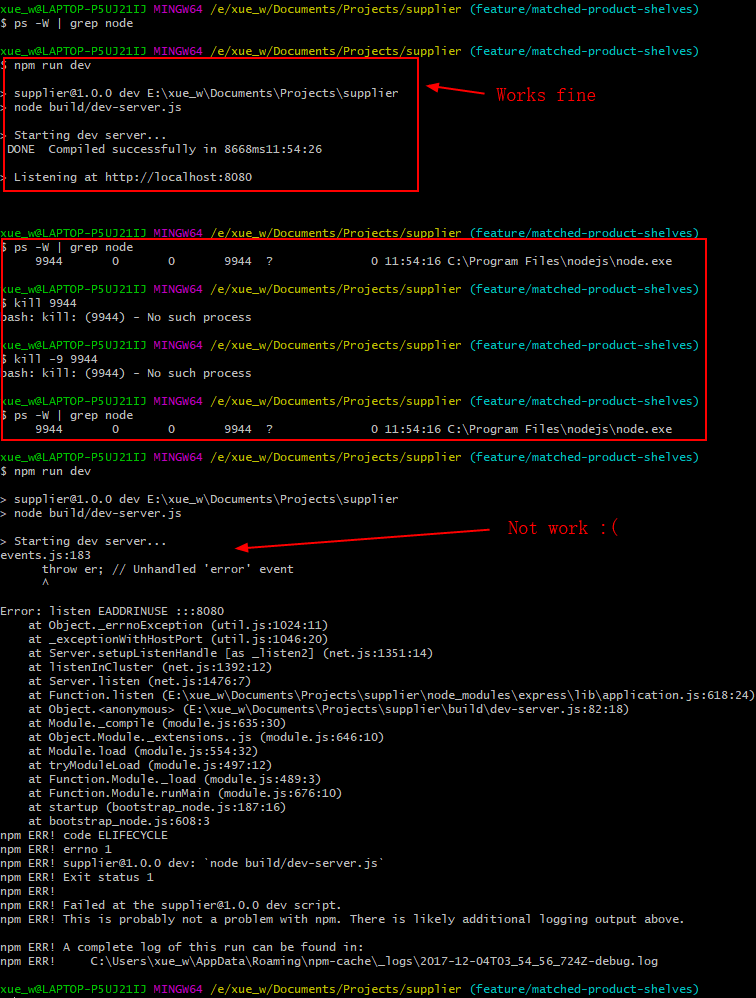
I have to kill the process in Task Manager, because kill <pid> only throw me "no process found" in terminal.
@danikane's suggestion works for me, and merci bp!
Hope this issue will be fixed in future.
 Vivi-wu
on 4 Dec 2017
Vivi-wu
on 4 Dec 2017
I have the same problem.
- git version 2.15.1.windows.2
- node v8.7.0
- Windows 10 x64
 lanxxg
on 7 Dec 2017
lanxxg
on 7 Dec 2017
I have seen this issue discussed in various JS communities. Just wanted to know if this is going to be fixed in the future or not. Just asking so that user can take appropriate action like using the workaround as described above or start using something else, etc.
Thanks
gyandeeps
on 5 Jan 2018
@gyandeeps I have a lot of sympathy for your situation.
But please also see mine: there are tons of open tickets here. Some of them describe really hard-to-solve problems (last time I dove into MSYS2 issues, it took me three days, straight, to just understand the issue, that's how hard MSYS2 things are to debug, and in those three days I could not address any other issues on the bug tracker). Some of them describe really easy-to-solve problems, yet it still is me who ends up having to address them. Y'all are not helping here.
So what I face is simply a question of priorities: can I really afford to spend another three days straight (during which time I cannot take care of other issues, which then weigh on my shoulders) to address a problem that seems to affect only node.js users, not Git users in general?
I hope you see that this is a serious problem. Of course, if you would jump in and help, you would get what you want. Quicker. A lot quicker.
As things stand, I cannot guarantee to even get to this bug this year. I have a long backlog of issues I have to work on, and the Ctrl+C issue is way far down.
dscho
on 5 Jan 2018
Sorry to come off so needy. And I do understand you situation and thanks you for all your efforts.
I just wanted to make sure that this issue does or doesnt fall under "will not be fixed" bucket since some of the discussion (way up top) led me to believe that.
gyandeeps
on 5 Jan 2018
@gyandeeps if you have some rudimentary C skills, you could help me fix it. I know how to fix it, I simply lack the time. Do you have time?
dscho
on 5 Jan 2018
I did little bit C back in 2006 but never done it after that. If you can give me some pointer then I can try.
Might have to get my laptop setup for this...
gyandeeps
on 5 Jan 2018
The MSYS2 runtime (which is responsible for handling Ctrl+C) is actually written in C++...
Have a look here: https://github.com/git-for-windows/msys2-runtime/commit/0b90c6aa0aa205dedc67cd1c796f44c5264059ff
What needs to be changed in this commit is the way exit-process.h works: it traverse the process tree in all cases, not only when falling back to TerminateProcess(). Then, it should go back to signaling pids for which there is a cygpid (using cygwin_winpid_to_pid()) and skip the corresponding arms of the process tree. And I think the best way would be to handle only SIGINT/SIGTERM/SIGKILL, SIGKILL via TerminateProcess(), SIGTERM and SIGINT via CreateRemoteThread(ExitProcess) (as is done right now).
To get started with this, please see https://github.com/git-for-windows/git/wiki/Building-msys2-runtime
It will be a ride, but I can assist.
dscho
on 5 Jan 2018
@dscho I'd be willing to give this a shot. I've been able to successfully rebuild msys-2.0.dll. As for the actual code changes -- I want to make sure I understand the approach you're suggesting.
What needs to be changed in this commit is the way exit-process.h works: it [should] traverse the process tree in all cases, not only when falling back to TerminateProcess().
So I might write a function similar to terminate_process_tree e.g. safe_terminate_process_tree. It appears terminate_process_tree first collects all of the process ids in the tree and then iterates through the processes calling TerminateProcess on each. So instead of immediately calling TerminateProcess I would use the approach below and instead call CreateRemoteThread for SIGINT and SIGTERM?
Then, it should go back to signaling pids for which there is a cygpid (using cygwin_winpid_to_pid()) and skip the corresponding arms of the process tree. And I think the best way would be to handle only SIGINT/SIGTERM/SIGKILL, SIGKILL via TerminateProcess(), SIGTERM and SIGINT via CreateRemoteThread(ExitProcess) (as is done right now).
The main thing I'm not following here is where cygwin_winpid_to_pid comes in and what you mean by "skipping" part of the process tree. Are you saying that TerminateProcess/CreateRemoteThread should only be called if theres a cygpid and the pid should be ignored if not?
Let me know if I'm understanding this correctly if you get a chance. Thanks!
 afsmith92
on 8 Jan 2018
afsmith92
on 8 Jan 2018
I'd be willing to give this a shot.
You have no idea how thankful that makes me. I've been agonizing about this, as I realistically lack the time.
So I might write a function similar to
terminate_process_treee.g.safe_terminate_process_tree. It appearsterminate_process_treefirst collects all of the process ids in the tree and then iterates through the processes callingTerminateProcesson each. So instead of immediately callingTerminateProcessI would use the approach below and instead callCreateRemoteThreadfor SIGINT and SIGTERM?
Oh, there is no need to introduce another function there. Just modify terminate_process() to take a callback function for every process ID in the process tree (if you want, you could rename it to enumerate_process_tree()...).
Then, just pass different callback functions for SIGINT, SIGTERM and SIGKILL.
To be honest, I am not quite sure what to do in the SIGINT case, but I am fairly certain that it should perform that CreateRemoteThread() trick and then call ExitProcess() probably with code 3.
The SIGTERM case definitely should use that CreateRemoteThread() trick so that the killed processes can still run their atexit() handlers to clean up, say, open database connections and to delete temporary files (Git wants to do the latter).
The SIGKILL case should run TerminateProcess() directly, not giving the killed process any chance to do anything, corresponding to the same behavior on Unix/Linux.
The main thing I'm not following here is where
cygwin_winpid_to_pidcomes in and what you mean by "skipping" part of the process tree.
What I mean is that Cygwin/MSYS2 processes do not want to be handled this way. They have their own signal processing (triggered via kill(pid, signal)). So what the kill_process_tree() function should do when it encounters a new PID is to call cygwin_winpid_to_pid() to see whether there is a corresponding cygwin pid, and if there is, call kill(pid, signal) (where the pid is the return value of cygwin_winpid_to_pid()). And then the (win-)pid should not be added to the pids list (so that this arm of the process tree is no longer handled, as the kill() should take care of that).
I am pretty excited that you take care of this!
dscho
on 8 Jan 2018
@dscho thanks for clarifying. Here's my first attempt at it
There's still some cleanup/commenting to do, but let me know what you think of what I have so far.
This version seems to handle the node.js example described in this issue, but it's possible it's just falling back to TerminateProcess. I tried a version that defaults to TerminateProcess and that handles the node.js example as well.
Just a heads up - I have only minimal c++ experience
afsmith92
on 9 Jan 2018
@afsmith92 That looks really good! Now we only need your signoff (i.e. a Signed-off-by: line as in https://github.com/afsmith92/msys2-runtime/commit/9f53930476936329eeb40b010dab8925227da061, essentially to testify that you can legally contribute this code to this project), and a better commit message...
dscho
on 10 Jan 2018
@dscho I updated the commit message and fixed the indentation issue: https://github.com/afsmith92/msys2-runtime/commit/574b7ecbdad40aa08fe0fcb12a23f0738aa13c69
A couple things:
- is there any other testing you would suggest doing? I'd prefer not to blow things up :smile:
- I'm not clear on the contribution process. Do I need to create a PR? I saw something about submitGit being used to submit the patch to the mailing list.
afsmith92
on 10 Jan 2018
is there any other testing you would suggest doing?
I assume you copied the msys0.dll over an msys-2.0.dll in a PortableGit and verified that it works as expected? That would constitute enough testing for me...
I'm not clear on the contribution process. Do I need to create a PR? I saw something about submitGit being used to submit the patch to the mailing list.
Oh, that only applies to patches for https://github.com/git/git. In Git for Windows, we're happy to accept the much easier Pull Requests.
Thanks!
dscho
on 10 Jan 2018
I assume you copied the msys0.dll over an msys-2.0.dll in a PortableGit and verified that it works as expected?
Yup, should be good to go if there are no other comments on the PR. I'll squash the commits when you're ready to merge.
afsmith92
on 10 Jan 2018
I'll squash the commits when you're ready to merge.
Thanks, I already did that ;-)
dscho
on 10 Jan 2018
:+1: Thanks for figuring out the fix!
afsmith92
on 10 Jan 2018
Has anyone tested this against Maven? Both mvn and mvnDebug seem to ignore CTRL-C for me now that I upgraded to the latest Git for Windows. Super appreciate the work you guys have done on this so far.
 ozymandias13
on 23 Feb 2018
ozymandias13
on 23 Feb 2018
@ozymandias13 See #1470
 michaelblyons
on 24 Feb 2018
michaelblyons
on 24 Feb 2018
@ozymandias13 if you had chipped in like @afsmith92 did, you'd have gotten a fix a lot sooner.
In fact, @afsmith92's work even made it much easier for me to come up with a fix for this (which is the same fix as for https://github.com/git-for-windows/git/issues/1491). A new snapshot should be available at https://wingit.blob.core.windows.net/files/index.html soon, and you could help at least by testing it.
dscho
on 23 Apr 2018
I did test it and it still isn't working with mvn or mvnDebug. I hope the feedback is helpful. Sorry I couldn't help more - not sure where to start, but I very much appreciate your effort on this. I'm not trying to put any pressure on you to get it working, just thought the feedback would be helpful.
ozymandias13
on 23 Apr 2018
@ozymandias13 while I appreciate your test, this here ticket is not about Maven, it is about node.js. So in order to verify that closing it was appropriate, I really would like to hear back from node.js users.
dscho
on 23 Apr 2018
(And yes, I realize that I addressed you personally, that was a mistake. I still want you to go ahead and put more effort in to see your issue fixed, but please over in #1470.)
dscho
on 23 Apr 2018
I had an issue with this where I thought it was Node: nodejs/node/issues/16103
It has to do with MinTTY (which, as you just mentioned, likely has to do with MSYS2). I reinstalled Git with the following settings and
Ctrl+Cstarted to work properly (I switched from MinTTY to CMD):- Use Git from Git Bash only - Use the OpenSSL Library - Checkout Windows-style, commit Unix-style line endings - Use Default Console Window (CMD) - Enable file system caching - Enable Git Credential Manager - Disable symbolic linksObviously, switching to CMD doesn't solve the fact that MinTTY is doing this, but for me, it is fine for now. I hope this helps.
Completed solved my issue with Git Bash and Node and processes running on ports after Ctrl + C, thank you so much
 regnaio
on 14 Dec 2020
regnaio
on 14 Dec 2020
Related issues
 kc22033
·
4Comments
kc22033
·
4Comments
 Jarmos-san
·
3Comments
michaelblyons
·
5Comments
Jarmos-san
·
3Comments
michaelblyons
·
5Comments
 tldzyx
·
3Comments
tldzyx
·
3Comments
 Unknow0059
·
3Comments
Unknow0059
·
3Comments
Most helpful comment
Hi all, so I experienced the same issue lately and as indicated here zombie processes were present when launching node in the git bash terminal MinTTY - launched from the default Git Bash shortcut and from the context menu on a folder - located in C:Program FilesGit
So I decided to use bash.exe located in C:Program FilesGitbin and voilà- no more zombie processes!
Then I modified the shortcut and the windows shell context menu and no more nuisances.
See the screenshot below:

Hope this helps.