Git: Unsetting git credential helper causes git submodule clone to fail
Setup
- Which version of Git for Windows are you using? Is it 32-bit or 64-bit?
$ git --version --build-options

16:03:24.278822 git.c:369               trace: built-in: git 'version' '--build-options'
git version 2.13.0.windows.1
built from commit: eba7af3dbb4c846c6303c5f64102acee696c9ab0
sizeof-long: 4
machine: x86_64
- Which version of Windows are you running? Vista, 7, 8, 10? Is it 32-bit or 64-bit?
$ cmd.exe /c ver

Microsoft Windows [Version 10.0.14393]
- What options did you set as part of the installation? Or did you choose the
defaults?
# One of the following:
> type "C:\Program Files\Git\etc\install-options.txt"
> type "C:\Program Files (x86)\Git\etc\install-options.txt"
> type "%USERPROFILE%\AppData\Local\Programs\Git\etc\install-options.txt"
$ cat /etc/install-options.txt

Path Option: CmdTools
SSH Option: OpenSSH
CURL Option: OpenSSL
CRLF Option: LFOnly
Bash Terminal Option: MinTTY
Performance Tweaks FSCache: Enabled
Use Credential Manager: Disabled
Enable Symlinks: Disabled
Details
- Which terminal/shell are you running Git from? e.g Bash/CMD/PowerShell/other
CMD
I am on a shared windows machine with other people so the credentials won't be cached, so the below is executed to unset Git-Credential-Manager-for-Windows,
git config --global --unset credential.helper
git config --system --unset credential.helper
However, this causes a problem when I am cloning a repository that contains submodules, for example
git clone https://github.com/jasjuang/test
This will prompt me to input username and password, and after I input them manually it successfully cloned all the non-submodule components, but, after I do
git submodule update --init --recursive
I get the error
bash: /dev/tty: No such device or address
error: failed to execute prompt script (exit code 1)
fatal: could not read Username for 'https://github.com': No error
fatal: clone of 'https://github.com/jasjunag/submoduletest' into submodule path 'C:/Users/Administrator/Desktop/test/external/submoduletest' failed
In linux, it will prompt me to input username and password again when cloning submodule, and after I input it everything will work fine. Why didn't Windows prompt me to enter the username and password again instead of just failing directly?
I filed an issue at GCM here https://github.com/Microsoft/Git-Credential-Manager-for-Windows/issues/434 but the maintainer suggested that this is a git for windows problem.
 jasjuang
All 30 comments
git clone https://github.com/jasjuang/test
This fails here, as I have no permissions to access that test.
I cannot spend more time on these credential tickets for now, as I already spent way too much time trying to recreate the problem in #1169.
If I had had working Minimal, Complete, Verifiable Examples to recreate the problem here, I could have spent that time working on a fix instead. Pity.
 dscho
on 1 Jun 2017
dscho
on 1 Jun 2017
@dscho If I make that repository public so you can access it then that means everyone can access it without any credentials thus this problem can't be recreated. Making a minimal repository with a submodule in there to reproduce the problem should be very straightforward for someone who is maintaining a git for windows repository, but if you are having difficulties to recreate it let me figure out something. Is me providing you a detailed step-by-step guide on how to create a submodule easier or me creating a fake organization and add you into it so you would need to access the private repo with your credentials easier?
jasjuang
on 1 Jun 2017
@dscho Here is the detailed step by step guide to create a repo with a submodule
- Disable GCM
git config --global --unset credential.helper
git config --system --unset credential.helper
Create two public repositories on your github, first one name it
test1, second one name ittest2Add one commits to each
git clone https://github.com/dscho/test1
cd test1
vim randomfile1
add some text into the file
git add randomfile1
git commit -a -m "first test1 commit"
git push origin master
cd ..
git clone https://github.com/dscho/test2
cd test2
vim randomfile2
add some text into the file
git add randomfile2
git commit -a -m "first test2 commit"
git push origin master
cd ..
- Now both repos has commits on the master branches, it's time to add the submodules
cd test1
mkdir external
cd external
git submodule add -b master https://github.com/dscho/test2
git commit -a -m "submodule added"
git push origin master
cd ..
Go to github and make test1 and test2 private.
Now do a fresh clone and you will see the failure
rm -rf test1
rm -rf test2
git clone https://github.com/dscho/test1
It will prompt for your credentials and enter them, everything will run fine, but when you are cloning the submodule
cd test1
git submodule update --init --recursive
You will see exactly
bash: /dev/tty: No such device or address
error: failed to execute prompt script (exit code 1)
fatal: could not read Username for 'https://github.com': No error
fatal: clone of 'https://github.com/dscho/test2' into submodule path 'C:/Users/Administrator/Desktop/test1/external/test2' failed
Failed directly without prompting any credentials
- Now turn on a linux machine, and you will see it works totally fine
git clone https://github.com/dscho/test1
It will prompt for your credentials and enter them, everything will run fine
cd test1
git submodule update --init --recursive
It will still prompt for your credentials and after you enter them everything will run fine.
Let me know if you need any additional instructions to reproduce the error, thanks.
jasjuang
on 1 Jun 2017
the problem should be very straightforward for someone who is maintaining a git for windows repository, but if you are having difficulties to recreate it let me figure out something.
I simply do not have the time. There are 78 other tickets still open in this here bug tracker.
Unless I am mistaken, the superproject need not be a private one. Only the submodule does to force credentials. It can even point to a non-existing repository on GitHub, as GitHub will then assume it is a private one and ask for credentials.
Again, if I have to spend half an hour to set this up myself (or 5 minutes to write this answer), then that is time I cannot spend on working on a fix.
dscho
on 2 Jun 2017
@dscho Understand that you are busy, we all appreciate your work. Please follow the above step by step guide to recreate the bug, it will take you no more than 3 minutes.
jasjuang
on 2 Jun 2017
I had the same problem, I solved with this trick:
https://github.com/atom/atom/issues/8984#issuecomment-165722062
 AlmAck
on 30 Jun 2017
AlmAck
on 30 Jun 2017
@AlmAck It didn't work for me. I manually added the below lines into the end of .git/config file
[credential]
    helper = wincred
and do a git submodule update --init --recursive the same error still occurs.
jasjuang
on 30 Jun 2017
Please follow the above step by step guide to recreate the bug, it will take you no more than 3 minutes.
I am afraid that I really do not have those 3 minutes to spare.
dscho
on 5 Aug 2017
Man, why are you so grumpy? Wouldn't it be more wise to use your time to
recreate the bug instead of replying something like this? I tried my best
to help on this issue. Understand this is open source so you have no
obligation to fix this, but your attitude is very disappointing.
On Sat, Aug 5, 2017 at 1:46 PM Johannes Schindelin notifications@github.com
wrote:
Please follow the above step by step guide to recreate the bug, it will
take you no more than 3 minutes.I am afraid that I really do not have those 3 minutes to spare.
—
You are receiving this because you authored the thread.
Reply to this email directly, view it on GitHub
https://github.com/git-for-windows/git/issues/1191#issuecomment-320469500,
or mute the thread
https://github.com/notifications/unsubscribe-auth/ALNuYNU5k1pL8DeIIfDRkguTmaFuLf-dks5sVNS8gaJpZM4NsTqE
.
jasjuang
on 5 Aug 2017
@jasjuang you mistake my emotions. I usually try to help, and I like it when the same courtesy is extended to me, as it sometimes makes it possible for me to help. In this case, I can't help, which is a bit sad, but not the end of the world.
dscho
on 6 Aug 2017
Hi,
I am glad to find this ticket as I was on my way to open the same one.
I have the same behavior with git for windows 2.14.2 and submodules where everything was fine with git for windows 2.8.x.
I always had my ~/.gitconfig defined to use the windows credentials helper:
[credential]
    helper = wincred
The only workaround I found is to:
- do a fresh clone of the parent repo
- edit the .gitmodules file to add my username in the url (https://foo.bar@server...)
- run the "git submodule init"
- run the "git submodule update --recursive --remote"
- revert the change with "git checkout -- .gitmodules"
The question is: was the 2.8.x the one with a happy bug (that was solved since) ? Or is it a regression introduced recently (maybe due to the git-credentials-manager shipped now in the pack and that seems to work according to some reports) ?
Sorry to pile-up an extra thing. If there is anything accessible that I can do to help narrow it down further to help with the investigation and fix, let me know :)
 re-schneider
on 6 Oct 2017
re-schneider
on 6 Oct 2017
I don't have a private repository. However, since GitHub will return a 404 when trying to access a private repository without credentials, we can also use a repository that does not exist. git submodule add won't work for such a repository, so we have to setup the submodule manually. I came up with the following to reproduce:
KGybels@PC-KIM MINGW64 /c/git/bug
$ git --version --build-options
git version 2.14.2.windows.1
built from commit: 788debdfb6b794425a3b949dd1a0eb2425a72e96
sizeof-long: 4
machine: x86_64

KGybels@PC-KIM MINGW64 /c/git/bug
$ ls -a
./  ../  steps.sh*

KGybels@PC-KIM MINGW64 /c/git/bug
$ cat ./steps.sh
#!/bin/bash

git init test
cd test
git config --file=.gitmodules submodule.test.path submodule
git config --file=.gitmodules submodule.test.url https://github.com/doesnot/exist
git config --file=.gitmodules submodule.test.branch master
git add .gitmodules
echo -e '160000 commit 0000000000000000000000000000000000000001\tsubmodule' | git update-index --index-info
git commit -m "Add submodule"
git -c credential.helper= submodule update --init --recursive

KGybels@PC-KIM MINGW64 /c/git/bug
$ ./steps.sh
Initialized empty Git repository in C:/git/bug/test/.git/
[master (root-commit) 4cee080] Add submodule
 2 files changed, 5 insertions(+)
 create mode 100644 .gitmodules
 create mode 160000 submodule
Submodule 'test' (https://github.com/doesnot/exist) registered for path 'submodule'
Cloning into 'C:/git/bug/test/submodule'...
bash: /dev/tty: No such device or address
error: failed to execute prompt script (exit code 1)
fatal: could not read Username for 'https://github.com': No error
fatal: clone of 'https://github.com/doesnot/exist' into submodule path 'C:/git/bug/test/submodule' failed
Failed to clone 'submodule'. Retry scheduled
Cloning into 'C:/git/bug/test/submodule'...
bash: /dev/tty: No such device or address
error: failed to execute prompt script (exit code 1)
fatal: could not read Username for 'https://github.com': No error
fatal: clone of 'https://github.com/doesnot/exist' into submodule path 'C:/git/bug/test/submodule' failed
Failed to clone 'submodule' a second time, aborting

KGybels@PC-KIM MINGW64 /c/git/bug
$
 kgybels
on 6 Oct 2017
kgybels
on 6 Oct 2017
@re-schneider Your workaround is very cumbersome indeed. You can specify the username in your configuration file instead:
[credential "https://example.com"]
    username = foo
You can find more information in the documention for gitcredentials.
kgybels
on 6 Oct 2017
@kgybels : thanks for the tip. Unfortunately, it may help with the workaround but makes no difference on an existing repo (same as adding the login to the .git/config or the .gitmodules).
re-schneider
on 6 Oct 2017
@re-schneider
Unfortunately, it may help with the workaround but makes no difference on an existing repo (same as adding the login to the .git/config or the .gitmodules).
I don't understand. Can you explain what the problem is?
kgybels
on 6 Oct 2017
@kgybels : sorry for the delayed response. I tried your suggestion and it did not seem to help much. I will give it another try and post the details of the tests and results.
I ran into another flavor of this case when I tried to add a submodule to an existing repo:
- I have a valid clone that is up-to-date
- I run the command "git submodule add https://URL/of/my/submodule.git"
I get the following error:
fatal: Authentication failed for 'https://URL/of/my/submodule.git/'
fatal: clone of 'https://URL/of/my/submodule.git' into submodule path 'D:/GIT_home/clone-folder/submodule-folder' failed
Then I tried again but this time by running "git submodule add https://${USERNAME}@URL/of/my/submodule.git" and it worked perfectly.
The problem is that the .gitmodules file contains my login in the url property. I will remove it before doing the commit. But that means that anybody that will get this .gitmodules file will have to edit it to add his/her username otherwise the "git submodule init" will fail as described earlier.
It seems like all these situations have one thing in common: when there is no login in the URL, it does not trigger a popup to ask for the login like it does for the password.
If I can extract additional configuration to help you figure out how my git install deals with credentials, let me know what should I gather.
Thanks again for your help :)
re-schneider
on 10 Nov 2017
Fun fact: I was creating a new freestyle job today and I ran into the same situation when asking the job to "recursively update the submodule" in the clone (same error message).
Then, looking back at the Jenkins Git plugin advanced configuration, I noticed this little checkbox to reuse the credentials of the clone with the submodule(s):
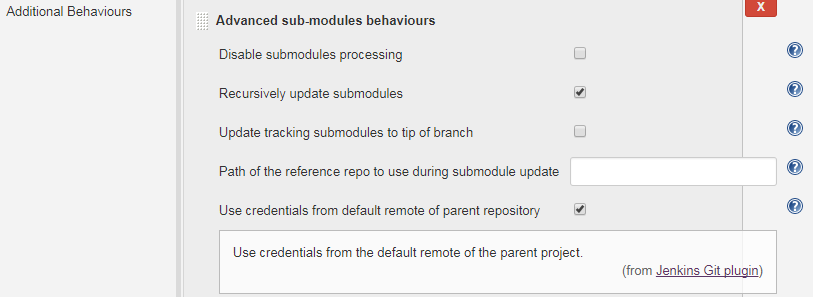
Could it be the reason why I do not get the same behavior as before with the git client ??
Note: the "git submodule" man page does not mention the crendentials management. So, I will have to look at the source of the plugin to see what is behind this checkbox... :/
re-schneider
on 13 Nov 2017
I just ran into the same issue today.
@kgybels Thanks a lot of your minimal example! That should help me to debug the issue. Stay tuned!
 larsxschneider
on 12 Dec 2017
larsxschneider
on 12 Dec 2017
Seems like there are some improvements with git version 2.15.1.windows.2: I am now able to do a "git submodule update --remote --recursive" without re-editting the .gitmodules to add my username@ in the https URL.
However, I still need to edit the .gitmodules when creating a fresh clone otherwise the "submodule init" & "submodule update" will not use my username as defined in the clone URL (no inheritance there). And from previous tests, the --submodule-recurse option in the clone command behaves exactly like the init+update run separately.
re-schneider
on 27 Dec 2017
Debugging the issue with @kgybels test case is a bit harder than I thought. I don't know how to perform a git bisect because the credentials dialog is only supposed to come up in an interactive session.
@stefanbeller is an expert on submodules. Maybe he can give us a hint what might be wrong?
larsxschneider
on 27 Dec 2017
the credentials dialog is only supposed to come up in an interactive session.
The credentials dialog can be overridden by providing your own, custom credential helper. E.g. write into your $HOME/bin/git-credential-larsxtest:
#!/bin/sh

echo "I can write to /dev/tty!" >/dev/tty ||
exit 1
Then, you would configure this helper via the credential.helper setting (personally, I would open a dedicated Terminal session and then export GIT_CONFIG_PARAMETERS="'credential.helper=larsxtest'" (note that this is quoted twice: the outer double quotes are needed to preserve the inner single quotes that Git wants to see in GIT_CONFIG_PARAMETERS).
Since this helper would fail whenever /dev/tty is inaccessible, you should be able to use git bisect run <script> with a script that requires the helper to be able to access that device.
dscho
on 3 Jan 2018
I just came across this issue too with a git clone --recursive https://[repoUrl]. Very annoying that this bug exists for such a basic operation. It prompts me at the bash shell for my password for the main clone, but then presumably when it wants to prompt me again for the submodule clone I get the error bash: /dev/tty: No such device or address. And no, I don't want to use the Windows GUI credential manager. I like typing in my password in bash shell. As far as I can tell this actually prevents you from initializing submodules from the bash shell in Git for Windows. This bug needs fixing urgently!
 jez9999
on 20 Oct 2018
jez9999
on 20 Oct 2018
This bug needs fixing urgently!
@jez9999 as I am sure you are aware, this is an open source project, which is carried forward essentially by volunteers. So please feel free to let your enthusiasm fuel your efforts to work toward a solution.
dscho
on 22 Oct 2018
@jasjuang @jez9999 hi ,guys ,this error will be resolved by updating your git Git SCM to Windows to the latest version . I have tried this .
 1547318816
on 20 Dec 2019
1547318816
on 20 Dec 2019
This isssue is not resolved.
tty error on submodule pw prompt in git clone --recursive when not using a credential helper
I can reproduce it on windows server 2019 1809 with the current git for windows version 2.25.0.
The Problem is also in 2.22.1.
my solution is to use git 2.21.0, which does not exhibit the problem
 wknupe
on 14 Feb 2020
wknupe
on 14 Feb 2020
The Problem is also in 2.22.1.
There was no such version. Are you talking about v2.22.0? That version corresponds to commit d003d728ffa6c0006da875ec6318d3f6b28a4ddb. Between that, and v2.21.0 (corresponding to commit 2481c4cbe949856f270a3ee80c802f5dd89381aa), could you pinpoint the breakage a bit further by looking through the snapshots? (Sadly, we do not have any snapshot corresponding precisely to v2.21.0, but 233535ee04 is pretty close.)
You would _really_ be able to help here, as I am pretty much out of time for this week.
dscho
on 14 Feb 2020
The Problem is also in 2.22.1.
There was no such version. Are you talking about v2.22.0?
you are correct, the problem could also be seen on
git version 2.22.0.windows.1
also i can point out that the handling slightly differs between 2.25 and 2.22.0:
2.25 just spits out errors without prompt or waiting for input
Submodule 'mysubmodule' (https://submoduleurl.example.com) registered for path 'submodulepath'
Cloning into 'parentpath/submodulepath'...
bash: /dev/tty: No such device or address
error: failed to execute prompt script (exit code 1)
fatal: could not read Username for 'https://submoduleurl.example.com': No such file or directory
while 2.22.0 prompts, errors, waits for input and then continues erroing out (end result is the same)
Submodule 'mysubmodule' (https://submoduleurl.example.com) registered for path 'submodulepath'
Cloning into 'parentpath/submodulepath'...
Username for 'https://submoduleurl.example.com': bash: /dev/tty: No such device or address
and then waits for input - and then
error: failed to execute prompt script (exit code 1)
bash: /dev/tty: No such device or address
error: failed to execute prompt script (exit code 1)
stty: 'standard input': Inappropriate ioctl for device
wknupe
on 14 Feb 2020
could you pinpoint the breakage a bit further by looking through the snapshots?
yes, i can, as i have the system to install git on and test right here, however, not this week. its late friday already :)
if it helps i can continue testing on snapshot builds on monday to find out which snapshot began breaking things.
wknupe
on 14 Feb 2020
@wknupe I would appreciate that very much, and in return I will do my best to help you, too.
dscho
on 14 Feb 2020
well, the analysis revealed two regressions.
up to revision 59a40eeaf4 everything was good as expected ('ok' int the list below)
beginning with revision a930c5a836 the git clone would decorate the username and pw prompt of the submodule fetch only with
'bash: /dev/tty: No such device or address', 'error: failed to execute prompt script (exit code 1)',' stty: 'standard input': Inappropriate ioctl for device'
but then after the user inputs username and password git succeeds in fetching and checking out the submodule. ('okWithErrorMsg' int the list below)
beginning with revision baa8b8a6fa2f3355d00bb24fc5923b64cdadbf80 the prompts for the submodule would still emit the error messages, but directly
fall through to the error state, no waiting for keyboard input, twice, trying to fetch and checkout the submodule - no submodule checkout is happening at all ('badSubmoduleFail' in the list below)
in the tests i had one anomaly with b330925f35f62081ca616a4f5787034bc3391676 - it would not check out anything due to an schannel error - i skipped that revision.
the individual tests are as follows (unmarked revisions were not tested)
badSubmoduleFail        Thu, 13 Feb 2020 22:54:14 +0100 (commit 69c22a9a95b09e50b2eb871a5e333a8e50f3adef)
                        Tue, 11 Feb 2020 19:57:50 +0100 (commit fae73c7d25e99fa441095eb16a80d4f3abbe7947)
                        Mon, 10 Feb 2020 17:57:04 +0100 (commit 2c4b5e42627de8e3f6a52d7aed7458b7a527a495)
                        Mon, 10 Feb 2020 14:11:20 +0100 (commit 04f29d8f6342d9370cdaee3a699ae424ff449180)
                        Sat, 1 Feb 2020 12:13:45 +0100 (commit 89a5bbfd1ecb97040a1133d9eef9a7d8b2409580)
                        Thu, 30 Jan 2020 23:18:53 +0100 (commit 5f4dea1e4663a60f6246fc6f1eca739fad8056ba)
                        Wed, 29 Jan 2020 13:26:29 +0100 (commit 4b1502b33a3ac1d024f781a03eb0d11d920b7172)
                        Wed, 22 Jan 2020 19:42:25 +0100 (commit 387e7103e8c0d41fa1291b6a2c9447fe936a4805)
                        Thu, 16 Jan 2020 10:54:08 +0100 (commit 8f03c5ece6b73e7facf93b354b0fd8705d064dd2)
                        Thu, 16 Jan 2020 00:04:40 +0100 (commit 4001aef3b37f97d159cbe2952def0ec7f31f7d98)
                        Wed, 15 Jan 2020 22:29:45 +0100 (commit f92c7e03019a178596f3bcbda88c1dd3bdc2c299)
                        Mon, 13 Jan 2020 20:21:32 +0100 (commit 7c71c859c97853ed057da5cbab12f3c13b5554df)
                        Thu, 9 Jan 2020 12:28:53 +0100 (commit a4e27d92442945807b57b9bce776cae3d32f784a)
                        Fri, 3 Jan 2020 23:23:39 +0100 (commit 79208035afdb095548daae82679b7942c6bb9579)
badSubmoduleFail        Fri, 3 Jan 2020 20:55:08 +0100 (commit d16625cfcdc0ec5243de624811994360978d7587)
                        Fri, 3 Jan 2020 20:41:38 +0100 (commit 8fc9b8676baccdd26490e051691709929b07cfcd)
badSubmoduleFail        Fri, 3 Jan 2020 20:34:06 +0100 (commit 0c54f7689472a87357aa56f33cad4a6361e7cde2)
badSubmoduleFail        Fri, 27 Dec 2019 09:26:30 +0100 (commit 2249a76fa1534aaa9960575f217378529cd208d9)
badSubmoduleFail        Thu, 26 Dec 2019 18:39:52 +0100 (commit baa8b8a6fa2f3355d00bb24fc5923b64cdadbf80)
okWithErrMsg            Fri, 13 Dec 2019 14:47:22 +0100 (commit b5deb24d740a272cc792a529d10f9dc09a00dd4f)
                        Sat, 7 Dec 2019 20:10:12 +0100 (commit 992f0773022527b1b0cb1e0c13aec97dd5248053)
okWithErrMsg            Fri, 6 Dec 2019 21:17:14 +0100 (commit 3e0eb6427d6d507ee6ffa893b4a3478783707753)
                        Mon, 25 Nov 2019 23:21:29 +0100 (commit 8715ee2266484bcec24dc2ab0de68f13ab739856)
                        Mon, 25 Nov 2019 14:32:52 +0100 (commit 99d1fe0702b976b511579ac07b8f9b7a355b07a6)
                        Sat, 16 Nov 2019 00:47:52 +0100 (commit a4c71cf24325ab5debdec047570135fa6936f160)
                        Wed, 6 Nov 2019 10:24:11 +0100 (commit 02af2cc5bfc37d4500e8a09333269e57f442198a)
                        Tue, 5 Nov 2019 23:56:34 +0100 (commit ffb6f1ced214e999c81ac3065e200527f1f08866)
fail_schannel           Tue, 5 Nov 2019 00:11:27 +0100 (commit b330925f35f62081ca616a4f5787034bc3391676)  -- odd: fatal: Could not set SSL backend to 'schannel': already set
                        Mon, 4 Nov 2019 07:35:12 +0100 (commit 6a3fa2a1833f3c7ac71cefefe44b3a4b4138e220)
                        Sun, 3 Nov 2019 00:23:26 +0100 (commit 44c15909b8e6d701b451851fb64c00fbbfa9fdd0)
okWithErrMsg            Wed, 30 Oct 2019 11:56:09 +0100 (commit 9356bff6c536a0145c574ecafcd672e49a0763d5)
                        Wed, 30 Oct 2019 11:49:06 +0100 (commit cd663ba57979f78f2598ea628b985056f363aba8)
                        Wed, 30 Oct 2019 11:44:31 +0100 (commit e96e0b4be65f8c162ebf805bf7267c0563ab91cc)
                        Wed, 30 Oct 2019 09:18:45 +0100 (commit 578744fc0ff512f0b1fba93212707b2f8d067b9e)
okWithErrMsg            Fri, 25 Oct 2019 16:09:52 +0200 (commit d1d8fc26450905cfd36428749bdd6e58330ac0e4)
                        Thu, 24 Oct 2019 12:41:28 +0200 (commit b1b9387e59916d870025e95c70dc7603785d4081)
                        Fri, 18 Oct 2019 09:06:18 +0200 (commit c25f2092ab56ec4af831c88a1c5c857c6b4d06e6)
                        Thu, 17 Oct 2019 14:12:43 +0200 (commit 144cb183aba9ef2ed1a3b09bca92611e147467f4)
                        Thu, 17 Oct 2019 10:36:57 +0200 (commit b2da288352e8640a35e678df023c934b2f208e23)
                        Mon, 7 Oct 2019 12:06:14 +0200 (commit cd9994f969c5c3c9cf071b4577f026942a359204)
                        Wed, 2 Oct 2019 14:38:02 +0200 (commit d01cfebc01dcf22fa10030860a9a82ffdc0350ed)
                        Mon, 30 Sep 2019 20:21:44 +0200 (commit 8c5225c2594b8002d3d2380d3cdaaa8c0c924614)
                        Tue, 24 Sep 2019 17:33:59 +0200 (commit 89eadabf8039fb815021b8bb000e232cb8a49d23)
                        Mon, 2 Sep 2019 15:08:50 +0200 (commit de7827bd274f5788aaa1b2a1992e45120aa9249b)
                        Mon, 2 Sep 2019 13:53:04 +0200 (commit 94ef49fdd48363589721fd0db64014907d970315)
                        Fri, 23 Aug 2019 16:42:07 +0200 (commit d7ae4d7b27fd5dc334ada4d74e698f9543fe0ae3)
                        Sat, 17 Aug 2019 00:15:16 +0200 (commit 4db2e5cc9e1522131a039cbad3970f147a39f0ce)
                        Tue, 30 Jul 2019 09:11:48 +0200 (commit eafc02c9be962f8cb61bdd95bb1b4c34e4471c32)
                        Mon, 29 Jul 2019 19:58:22 +0200 (commit ddd892d6a105e62d2a1b8748e8493d37054eaff4)
                        Mon, 29 Jul 2019 19:58:22 +0200 (commit ddd892d6a105e62d2a1b8748e8493d37054eaff4)
                        Tue, 23 Jul 2019 21:57:12 +0200 (commit 32a748d5c6b0989c0b2b6e7c82f728c554fa5c38)
                        Thu, 11 Jul 2019 14:08:15 +0200 (commit 271c090e89a9b85b0f9cde7e943e329019362ca8)
                        Mon, 8 Jul 2019 12:29:39 +0200 (commit fcf334eb78f1901eca8b227966486e0fceac56d0)
                        Tue, 18 Jun 2019 10:05:16 -0400 (commit e21386722b8bad309319f827420d77007f5ca242)
okWithErrMsg            Fri, 7 Jun 2019 23:14:44 +0200   (commit d003d728ffa6c0006da875ec6318d3f6b28a4ddb)
                        Mon, 3 Jun 2019 23:04:59 +0200   (commit 9c8cba6862abe5ac8212c7036a042c97069c1e49)
                        Sat, 25 May 2019 20:51:09 +0200  (commit 34b8e39205)
                        Wed, 22 May 2019 16:37:50 +0200  (commit 046e6ffe7c)
                        Tue, 21 May 2019 20:42:58 +0200  (commit 97d91401ea)
                        Sun, 19 May 2019 19:09:39 +0200  (commit 69e7a4cd2f)
                        Mon, 13 May 2019 22:57:10 +0200  (commit 898cf2707e)
okWithErrMsg            Mon, 13 May 2019 19:33:22 +0200  (commit d4e5e1ea92)
                        Fri, 10 May 2019 22:55:48 +0200  (commit e3538d8eb3)
                        Thu, 9 May 2019 23:04:27 +0200   (commit 81a060a4d1)
                        Thu, 9 May 2019 16:31:19 +0200   (commit 2ac5f424d8)
okWithErrMsg            Wed, 8 May 2019 23:54:15 +0200   (commit 65f1570624)
okWithErrMsg            Wed, 8 May 2019 21:30:53 +0200   (commit a930c5a836)
ok                      Tue, 7 May 2019 16:20:08 +0200   (commit 59a40eeaf4)
ok                      Tue, 7 May 2019 15:16:58 +0200   (commit c63a3d503f)
                        Mon, 6 May 2019 23:04:27 +0200   (commit 1059065509)
                        Mon, 6 May 2019 21:44:39 +0200   (commit 3a29b232a0)
                        Fri, 26 Apr 2019 08:37:30 -0400  (commit 233535ee04)
                        Tue, 16 Apr 2019 09:44:21 +0200  (commit 231c608cd3)
                        Thu, 11 Apr 2019 14:54:32 +0200  (commit d3e1cc2cc1)
                        Wed, 10 Apr 2019 17:03:15 +0200  (commit 873ebcb330)
                        Fri, 5 Apr 2019 20:26:09 +0200   (commit 61224e4fc6)
                        Fri, 5 Apr 2019 13:43:35 +0200   (commit a7f813c3c0)
                        Mon, 11 Mar 2019 19:58:29 +0100  (commit dc2ae9a382)
                        Sun, 10 Mar 2019 17:37:25 +0100  (commit eb5d06f545)
                        Thu, 7 Mar 2019 16:34:37 +0100   (commit 1a02835a1e)
                        Thu, 7 Mar 2019 13:39:19 +0100   (commit 89cb7de2a1)
                        Thu, 7 Mar 2019 12:56:36 +0100   (commit 6b27cae126)
                        Thu, 28 Feb 2019 13:37:18 +0100  (commit da5a923050)
                        Thu, 28 Feb 2019 13:15:03 +0100  (commit fcbaede58b)
ok                      Tue, 26 Feb 2019 17:13:28 +0100  (commit 2481c4cbe9)
Related issues
 michaelblyons
·
5Comments
michaelblyons
·
5Comments
 daxelrod
·
4Comments
daxelrod
·
4Comments
 jesterKing
·
3Comments
jesterKing
·
3Comments
 rangka-kacang
·
3Comments
rangka-kacang
·
3Comments
 drewnoakes
·
5Comments
drewnoakes
·
5Comments
Most helpful comment
@jez9999 as I am sure you are aware, this is an open source project, which is carried forward essentially by volunteers. So please feel free to let your enthusiasm fuel your efforts to work toward a solution.