Git-updater: GitLab API subtab not visible (but present)
Hi,
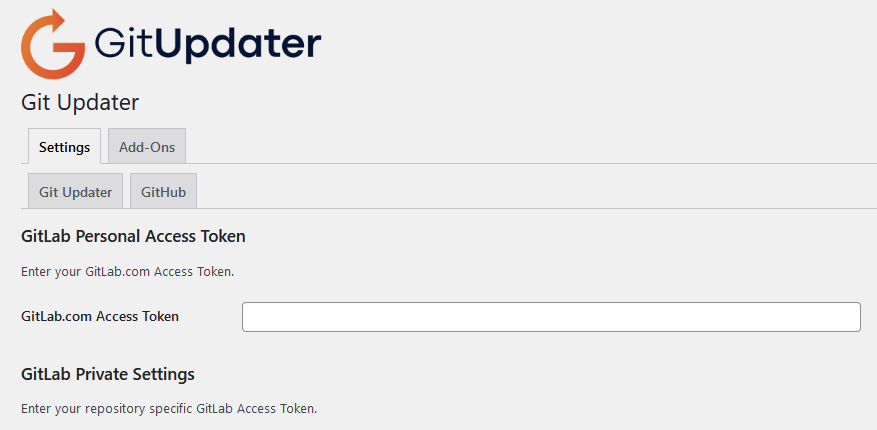
I just updated to v10 of the Git-Updater plugin, and while I seem to have resolved most of the update issues, and seemingly successfully installed and configured the GitLab API add-on, the actual tab/subtab for GitLab isn't appearing under the Settings tab in the plugin's settings screen. I can navigate to the tab by adjusting the URL parameters to use "subtab=gitlab", but the subtab itself doesn't appear even when I'm on it.
I don't know if this was caused by updating from an older version of the github-updater plugin, and renaming the plugin subdirectory has caused some sort of confusion, but it may be a useful data point for those of us updating to the new version. And kudos for all the hard work and enhancements to this plugin, btw!
 kmitch-duke-edu
All 40 comments
This is a big update and the API plugins, other than GItHub, were split out into individual API plugins. The Add-Ons tab has a one-click Install and Activate button for each of the API plugins. The API plugins are free OSS.
 afragen
on 18 May 2021
afragen
on 18 May 2021
Part of the update was the renaming of the plugin. This will cause the user to need to activate/re-activate the plugin until the built-in renaming code correctly renames the plugin to git-updater/git-updater.php. Just let the plugin do this.
I does mean that unattended updates will be a one time issue. Sorry about that.
afragen
on 18 May 2021
I am seeing the same thing. I have also installed and activated the GitLab Add-On.
 AMCodeHub
on 18 May 2021
AMCodeHub
on 18 May 2021
Thanks for the quick feedback and tips!
Because we have a network/multisite installation, I was using the mu-plugins method for activating the git(hub)-updater plugin, and this was the first thing to break (since the ghu-loader.php file was renamed gu-loader.php). In order to fix this, I found I had to manually rename the plugin directory from github-updater to git-updater, so I never gave the built-in renaming code a chance to fire, I suspect. However, the plugin works properly, as far as I can tell.
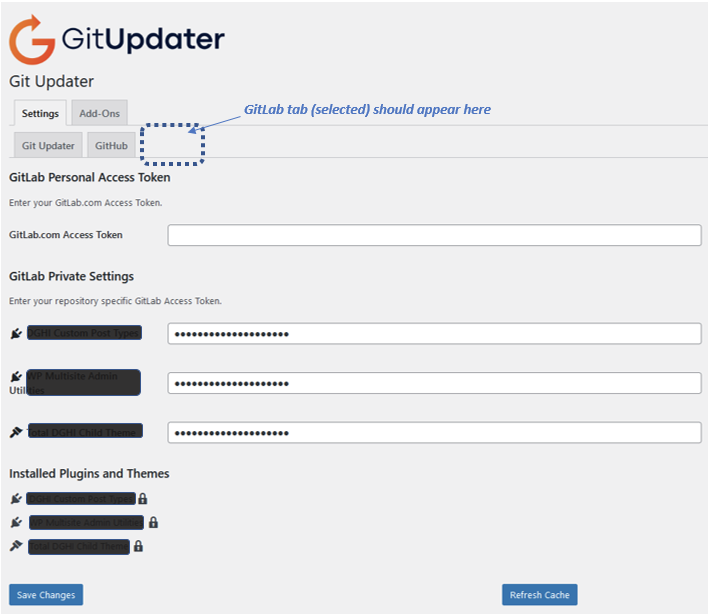
I was also able to install and activate the GitLab API companion plugin, and once I realized I could navigate to that subtab by adjsuting the URL parameters in the browser, I re-configured that properly, and it's showing the three GitLab themes/plugins that were formerly configured in the github-updater version. The GitLab plugin also appears to be working properly too, except that I can't see the subtab itself in the Git-Updater interface, under the "Settings" tab for Git-Updater. (The screenshot I shared was meant to illustrate that, as it's showing the GitLab API subtab contents but no actual visible subtab to indicate you're viewing the GitLab settings.)
I noticed that there was a minor point-release update to Git-Updater just now, and installed that update succesfully, but sadly the GitLab subtab is still invisible in the plugin's interface.
This could easily be something unique to our environment that's preventing the subtab itself from displaying, although I'm not seeing any errors with debug output set to true, and the GitLab API calls for the subtab (in the API plugin code) look identical to the ones used in the main git-updater plugin code, so I'm not seeing anything obvious for why the subtab graphic isn't displaying.
kmitch-duke-edu
on 18 May 2021
For the transition to the new version, it might be simpler to:
- network activate the plugin directly
- go through the deactivate/reactivate process while the plugin is renamed
- create a new symlink to the
gu-loader.phpfile.
Unfortunately while the mu-plugin loader is convenient, it will make this transition a bit more _hands on_.
After the above, are there issues?
afragen
on 18 May 2021
The GitLab subtab should automatically display if there are properly configured repositories with the GitLab Plugin URI or GitLab Theme URI in the main plugin file or style.css, respectively.
afragen
on 18 May 2021
The GitLab subtab should automatically display if there are properly configured repositories with the
GitLab Plugin URIorGitLab Theme URIin the main plugin file or style.css, respectively.
Yep, should be good to go, the plugins using the properly configured repositories with "GitLab Plugin URI" have been working for the last few years. However, I saw this message for a few hours: "Please be patient while WP-Cron finishes making API calls." which is fine, and normal, but then the notice comes and goes. I used WP Crontrol to see that 'gu_get_remote_plugin' is running, but with varying arguments. Sometimes it has all of the available plugins listed, other times it has one plugin, then a few. Not sure if that behavior is expected.
In addition, unfortunately, still no 'GitLab' tab. I can access it the same way, using the query sting (subtab=gitlab), but even trying to save values there doesn't seem to work. However, the access keys that were previously saved before updating to version 10.0.1 did remain. After refreshing the page, the newly added and saved values are no longer in the input fields, even though the old ones remain. Curiously though, there was still a plugin update registered during this time. So clearly the API calls to GitLab are working.
Also, I am testing on a single install (not multisite). I did try uninstalling and re-installing, which is probably what triggered the new crons.
AMCodeHub
on 18 May 2021
Try checking the Bypass WP-Cron option in the Settings until this is resolved. It's possible that WP-Cron is causing an issue.
afragen
on 18 May 2021
Unfortunately, saved settings for the APIs will be removed as the API plugins are activated and deactivated.
afragen
on 18 May 2021
I'll second @AMCodeHub comments. I did find that the option to "Bypass WP-Cron Background Processing" seems to have stopped the "Please be patient while WP-Cron finished making API calls" messages, although that could have simply been coincidental timing. Otherwise, the main plugin seems to be working properly. (I did not try to follow your (@afragen) steps to uninstall and re-install the main git-updater plugin, as it appears to be working properly as-is.)
And as far as I can tell, the Gitlab API plugin is also working properly for us, aside from the missing visual subtab. After I installed and activated it, and visited the subtab by adjusting the browser URL parameter, I had to re-enter our token for the three Gitlab-based themes/plugins that the plugin re-discovered, and once I saved those settings, the GitLab subtab showed everything properly. (See screenshot below for the whole subtab contents, including the semi-redacted themes/plugins information.)
To confirm that everything was working properly with the GitLab API plugin, I made a small change to one of our theme repositories, updated the version number in the style.css file, and committed/pushed the change to the GitLab repo. After I refreshed the cache in the Git-Updater plugin, I saw the new theme version update show up in the WordPress dashboard, just like it worked in pre-v10 versions of Git(hub)-Updater, so I'm pretty sure everything is working properly for us, with the lone exception of the missing visual subtab for the GitLab settings. (I should also note that updating the theme via the wp-admin interface worked properly as well, and just like before.)
I hope this helps in tracking this down, and thanks again for all your work on this plugin!
kmitch-duke-edu
on 18 May 2021
Thanks for all your help @afragen !
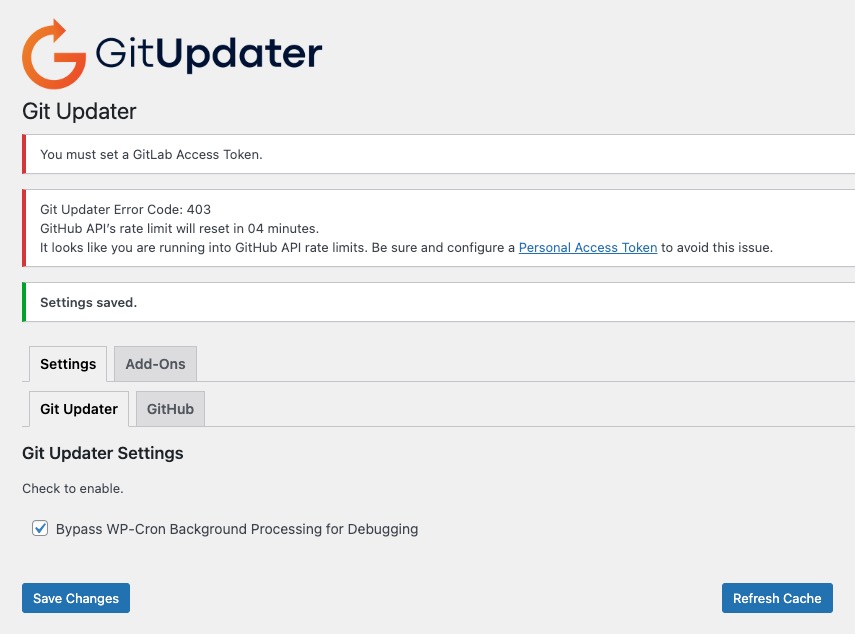
I think you're right, there is something going on with the crons... After using the setting to bypassing the cron, I get this:
AMCodeHub
on 18 May 2021
@AMCodeHub that error is about not having a GitHub Personal Access Token set. https://git-updater.com/knowledge-base/general-usage/
afragen
on 18 May 2021
@kmitch-duke-edu _working properly_ is a relative term. Not seeing the GitLab tab is not working properly.
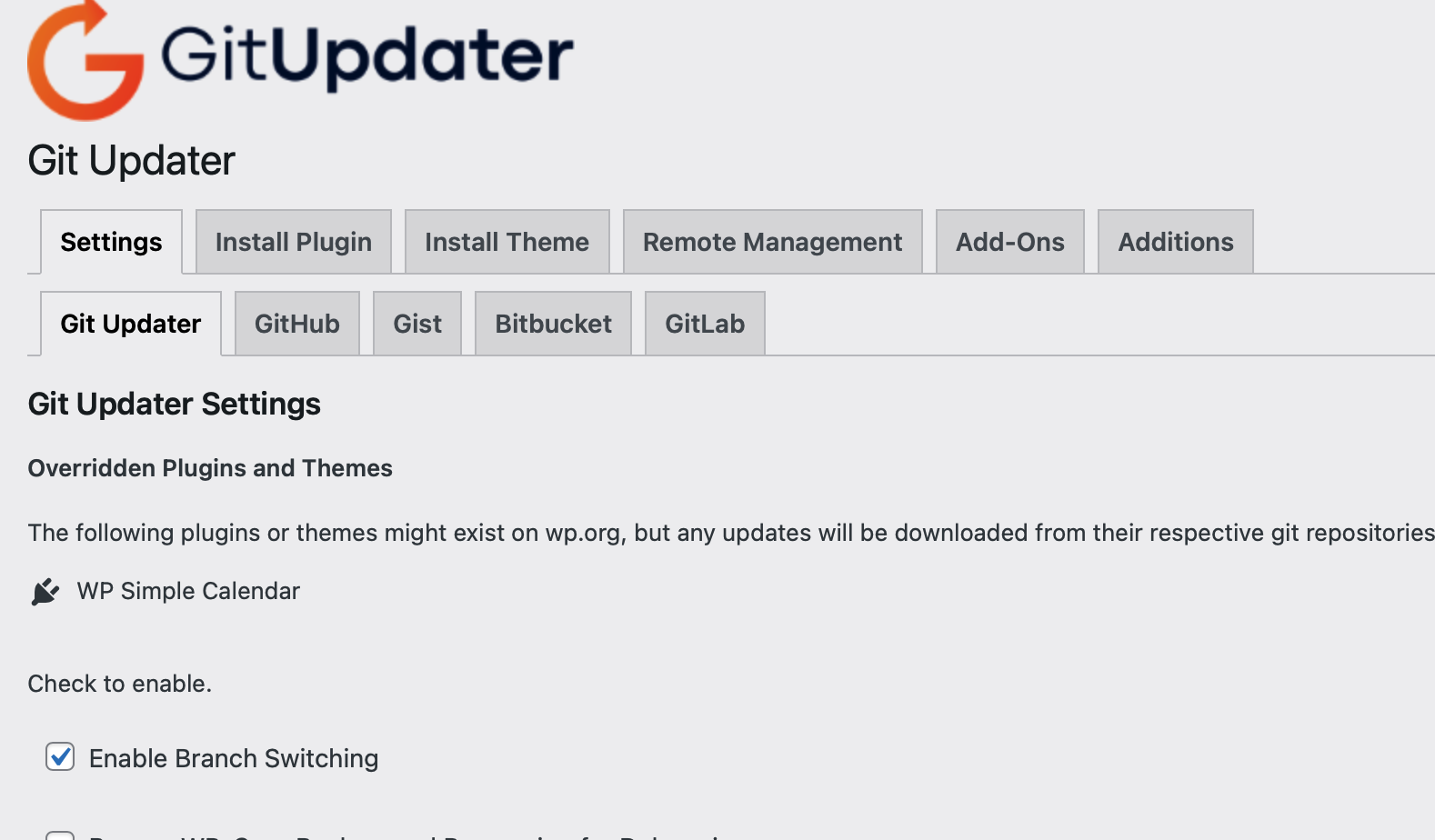
Yes, I have all these additional API plugins installed and active. Also, the Git Updater PRO and Git Updater Additions plugins.
afragen
on 18 May 2021
To be clear, after all the renaming is complete the it will be wp-content/plugins/git-updater/git-updater.php replacing wp-content/plugins/github-updater
afragen
on 18 May 2021
@kmitch-duke-edu you might need to clear all your site/browser caches.
afragen
on 18 May 2021
It wasn't to uninstall and re-install, it was simply to re-activate the plugin and allow the renaming process to complete.
(I did not try to follow your (@afragen) steps to uninstall and re-install the main git-updater plugin, as it appears to be working properly as-is.)
afragen
on 18 May 2021
I'm trying to address these issue here, https://git-updater.com/knowledge-base/updating-from-github-updater-to-git-updater/
Please LMK if I'm missing something or the instructions aren't clear. Thanks.
afragen
on 18 May 2021
@afragen thanks again for all your help with this.
I went ahead and uninstalled the git-updater plugin (and the GitLab API plugin), as I wasn't able to get things back to a state where I could let the renaming process continue. I then installed the git-updater plugin with network activation, entered my Github.com token information, selected the bypass-WP-Cron option (to make sure background API calls wouldn't be a factor), and then installed and activated the GitLab API plugin.
After the GitLab API plugin was activated, I could see a message at the top of the git-updater plugin interface indicating I needed to provide a GitLab token. However, there was no "GitLab" subtab in the "Settings" tab interface (only "Git Updater" and "Github"). I navigated to the invisible "GitLab" subtab settings page by adjusting the browser URL to use the "subtab=gitlab" parameter, and provided the appropriate GitLab private tokens for all three themes/plugins that the plugin recognized as valid GitLab repositories. The "GitLab" subtab label never appeared before or after any of these steps, but the GitLab settings appear to be working properly.
My last steps were to uncheck the "Bypass WP-Cron" setting, and then to network deactivate the git-updater plugin, and provide a "gu-loader.php" symlink in the wp-content/mu-plugins subdirectory, and once again WordPress recognizes that Git-Updater is activated via mu-plugin. This puts me back more or less where I was, I believe, but unfortunately still without a GitLab subtab label.
Just to see if I could get any other add-on subtabs to appear, I installed and activated the Gist API plugin. This too did not appear as a "Gist" subtab in the settings tab, but is accessible if you modify the URL parameters with "subtab=gist". However, I don't have any Gist repositories defined for themes or plugins in our WordPress installation, so that may be a factor in this case. It almost seems as if the main git-updater plugin can't access the API plugins namespaces or something to detect whether they're installed and activated, but that's obviously not a very informed guess.
That may or may not be helpful information, especially given that you're not seeing this problem on your end.
And thanks for the link to the knowledge base article on updating from github-updater to git-updater--that's very nicely done! The only caveat I might add is that for some users the GitLab settings subtab (and possibly other API subtabs?) may not appear even after all of the token information is provided.
kmitch-duke-edu
on 18 May 2021
The API subtabs will only display if you have at least one plugin or theme with the correct header.
afragen
on 18 May 2021
@kmitch-duke-edu I would really like to drill down a figure out why you don't see the GitLab tab.
Let's switch to DM on the Git Updater Slack
afragen
on 18 May 2021
@afragen yes, I suspected that was the case with the Gist subtab not appearing. Ah well.
And thanks for your persistence on this! I'm afraid I don't really have the bandwidth to dig deeper on this issue, at least right now, especially since everything seems to be working correctly at this point despite the missing subtab visual. I'm sorry to bail on this for now, especially since I/we appreciate all your hard work on this plugin, but sadly other fires are burning on my plate. (Or whatever the right metaphor might be....)
Thanks again, though!
kmitch-duke-edu
on 18 May 2021
@kmitch-duke-edu please circle back when you have the time. I'd like to know why it's behaving this way.
afragen
on 18 May 2021
@afragen Sure thing! It may be a while, but I'll do my best to get back to you as soon as I can. And thanks again in the meantime!
kmitch-duke-edu
on 18 May 2021
@kmitch-duke-edu I think I know the problem. You're starting the plugin in mu-plugins. Unfortunately this means all the hooks in the core plugin are firing before the setup hooks in the API plugin can load. I need to think about how to accommodate for this.
I was incorrect about the above.
afragen
on 18 May 2021
However, I am not starting the plugin in mu-plugins and still don't see the tab.
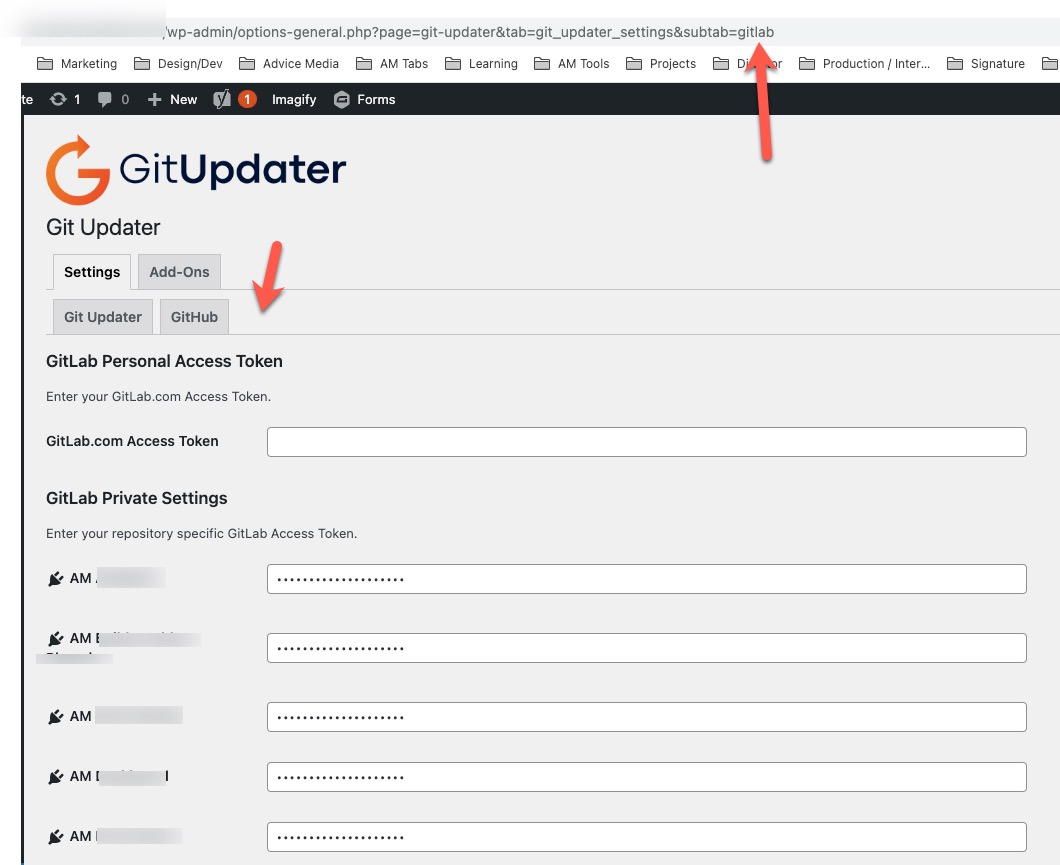
AMCodeHub
on 18 May 2021
My last steps were to uncheck the "Bypass WP-Cron" setting, and then to network deactivate the git-updater plugin, and provide a "gu-loader.php" symlink in the wp-content/mu-plugins subdirectory, and once again WordPress recognizes that Git-Updater is activated via mu-plugin. This puts me back more or less where I was, I believe, but unfortunately still without a GitLab subtab label.
Made me think you were using the mu-plugin loader.
afragen
on 19 May 2021
I'll keep trying to replicate this locally. If you have any additional info about your server/site etc it might be helpful.
afragen
on 19 May 2021
@afragen Thanks for all your continued work on this, and sorry I haven't been able to provide the needed clue so far to figure this out.
One thing I'm noticing about both my and @AMCodeHub GitLab setup is that we're not using a GitLab Personal Access Token, but rather individual tokens for the private repositories. (In my case, we're connecting to a GitLab server run locally at Duke, not to GitLab.com.) Perhaps that could explain why git-updater isn't recognizing our valid GitLab settings and showing a subtab? (Unlikely, I know, but all I can think of in terms of local server/site configuration that might be different from yours, and potentially hard to replicate.)
Thanks again!
kmitch-duke-edu
on 19 May 2021
We are also self hosting gitlab. However, I am using a single GitLab Personal Access Token that has permissions for all of our private repos. I would be happy to DM you access to a dev install that you could look at if that helps.
AMCodeHub
on 19 May 2021
Sorry, yes, we're doing that too (a single GitLab personal access token that has access to all of our private repos). I meant to say that neither of us have filled in the "GitLab.com access token" field.
kmitch-duke-edu
on 19 May 2021
I'm not sure the GitLab installation has much to do with this. This part should work even if you have no net connection.
afragen
on 19 May 2021
@afragen Ah, that's good to know.
On a whim, I tried plugging in our GitLab personal access token value in the "GitLab.com Access Token" field and saving the GitLab subtab settings page, to see if that might make the subtab label become visible. However, the value doesn't seem to stick (it disappears from the GitLab settings page when I view another subtab page and then go back to the GitLab settings page), and the subtab label never appears.
I'm not sure if this is a helpful clue, or expected behavior. I'm guessing the latter, as none of our GitLab repositories use GitLab.com URLs or the GitLab.com service.
kmitch-duke-edu
on 19 May 2021
Saving a value there doesn't have any relationship to GitLab.com
afragen
on 19 May 2021
Hmm, I just tried to replicate locally in a new installation. Created site, added a couple of GitLab plugins, Added and activated Git Updater. Went to Add-Ons and installed Git Updater - GitLab. It works as expected.
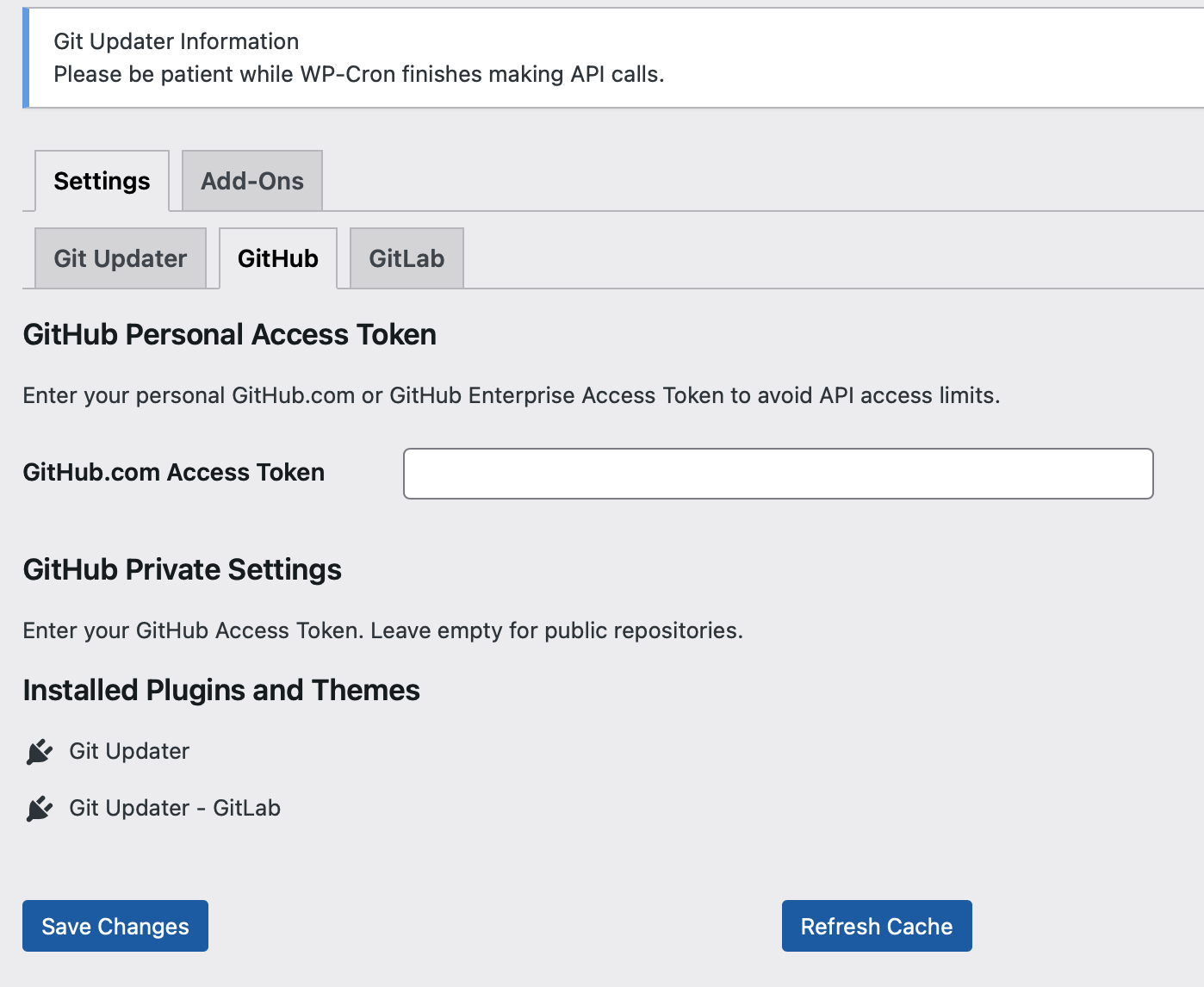
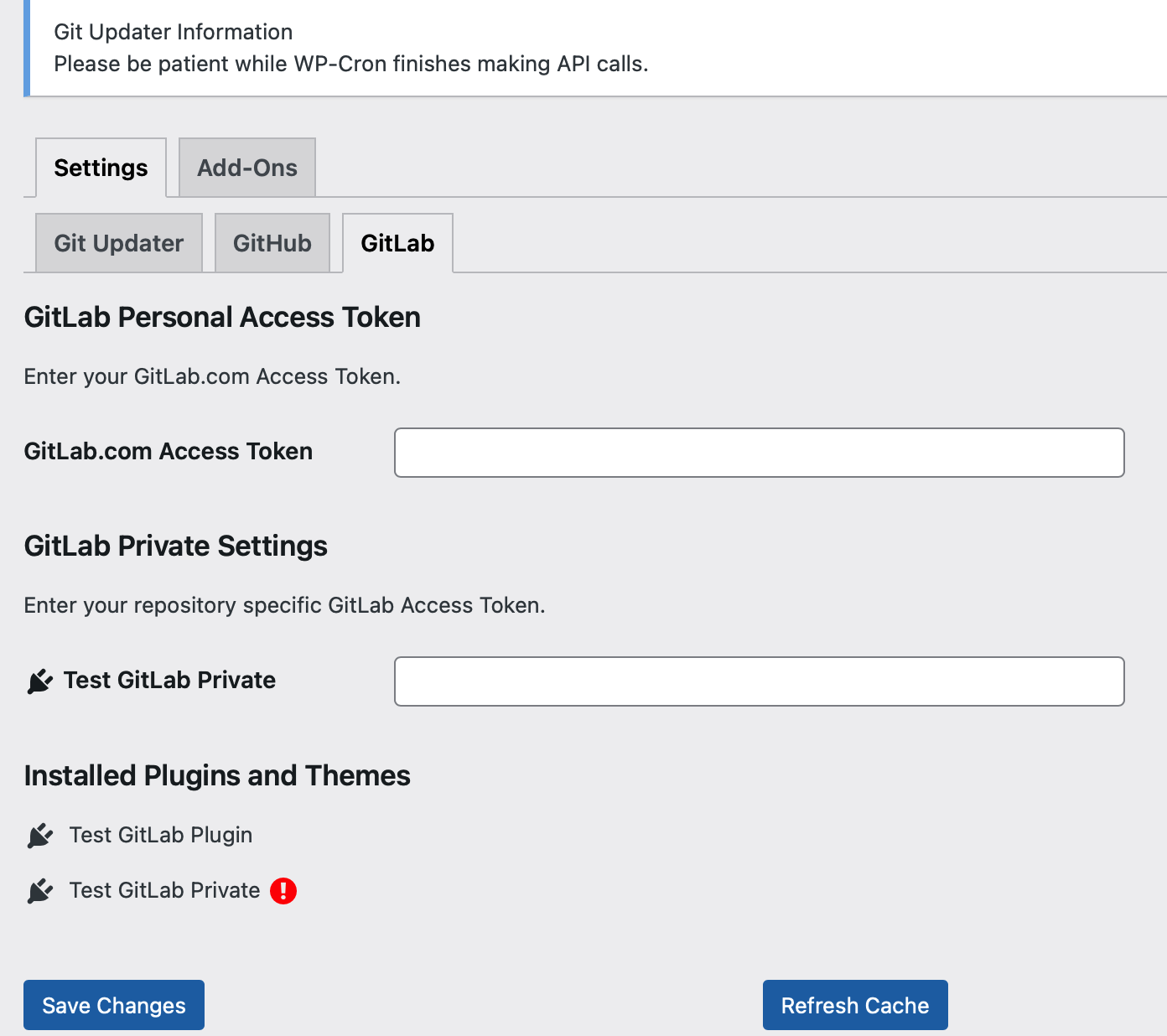
Not sure how to replicate this.
afragen
on 20 May 2021
@kmitch-duke-edu is it possible to pull the site down locally and see if the issue still exists?
afragen
on 20 May 2021
We are also self hosting gitlab. However, I am using a single GitLab Personal Access Token that has permissions for all of our private repos. I would be happy to DM you access to a dev install that you could look at if that helps.
@AMCodeHub this might be very helpful to test a few theories. I might be simpler to join the Git Updater Slack and continue via DM. A link to the Slack invite is in the README.
afragen
on 20 May 2021
This should be fixed in 10.0.2.
afragen
on 20 May 2021
@afragen That's great news, and great to hear! Thanks for working on this and figuring it out. (And thanks to @AMCodeHub as well for working on this too.)
I suspect it's not helpful at this point, but I finally had a chance to try installing Git-updater in a relatively clean/fresh WordPress install, and installed a Theme using a GitLab URI, and installed and activated the GitLab API plugin, and after providing the appropriate Gthub and GitLab token information, I too am seeing the GitLab subtab in the Git-Updater settings tab.
This would seem to confirm that there's something different about a fresh install as opposed to an update (whether or not it's a multisite/network installation), but I'm sure there are a number of other possibilities too, since our multisite installation has a large number of other plugins that could easily be an issue as well.
Either way, that's great news about a potential fix in the next version of git-updater! We're looking forward to seeing it the GitLab subtab shows up when the update becomes available.
Thanks again for all your work on this, and for the great plugin!
kmitch-duke-edu
on 21 May 2021
@kmitch-duke-edu if you're using v10.0.2 then it should be working as that contains the fix.
Fresh install shouldn't matter as long as Git Updater is v10.0.2 😉
afragen
on 21 May 2021
Hi @afragen -- I just wanted to provide a quick confirmation that the fix in 10.0.2 for #949 is indeed working on our multisite installation. Thank you! (And you're right that the test installation I did on a single-site WordPress install was using v10.0.2--I didn't notice which release of Git-Updater I was installing, so it wasn't a very good test....)
Thanks again for all your work on this, and for a great plugin!
kmitch-duke-edu
on 24 May 2021
Related issues
 andruwa13
·
3Comments
andruwa13
·
3Comments
 uturnr
·
14Comments
uturnr
·
14Comments
 alexjose
·
14Comments
alexjose
·
14Comments
 therealgilles
·
4Comments
therealgilles
·
4Comments
 jasonjersey
·
3Comments
jasonjersey
·
3Comments