Git-updater: No Theme update shown on MainWP
The site the theme is on shows that there is an update for it available, but on MainWP I see 0 theme updates available. I am not sure what I missed. Is there any chance the fact that the repo is private might cause issues with MainWP?
 Twilkey
All 44 comments
When I last checked it shouldn’t matter if the repo is public or private. If it shows an update on the site it should show an update on MainWP.
I do know that MainWP doesn’t work with multisite. Other than having some cache issue I’m not sure what to tell you. You could try using webhook for updating. https://github.com/afragen/github-updater/wiki/Remote-Management---RESTful-Endpoints
 afragen
on 14 Aug 2019
afragen
on 14 Aug 2019
Same problem here. When i sync in mainwp with the site - the theme update is not displayed in mainwp.
But when i go to the WP Backend of the site the update cron is triggered. The update is shown in the WP backend and in mainwp.
So, how can mainwp show me Theme Updates, without going to the Backend of every site?
 espiat
on 16 Sep 2019
espiat
on 16 Sep 2019
In a quick test using a local install, WP 5.2.3, I have only the current MainWP Child plugin and GitHub Updater installed and active. I have also installed a test theme that I have on Bitbucket. Be sure to select a setting in the Remote Management tab and save. Go to the site's index.php page.
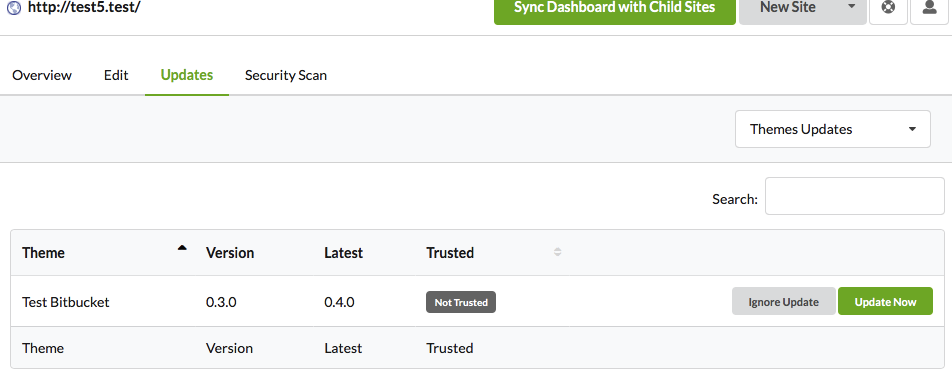
Clearly showing the site has a theme update.
FYI, MainWP Child plugin doesn't connect to WP trunk at this time. Issue reported to MainWP.
afragen
on 16 Sep 2019
FWIW the index.php page if the site must be visited for MainWP to pick up the update.
afragen
on 16 Sep 2019
Thank you for the answer.
I'm really interested in solving that problem.
My theme is on Github in a private repo.
When I go to the homepage of my website (not logged in), the theme update will not be triggered.
But if I go into the Wordpress backend of the site, it will be displayed immediately.
I have updated all plugins and now wait 12 hours for the cache to be updated by Github Updater.
FWIW the index.php page if the site must be visited for MainWP to pick up the update.
You mean the frontpage or the wp-admin/index.php?
FYI: the function:
add_filter( 'github_updater_disable_wpcron', '__return_true' );
didn't help.
espiat
on 17 Sep 2019
Can you confirm that MainWP is checked in the Remote Management tab?
afragen
on 17 Sep 2019
Yes. This is set in all my 30 WP installations. All installations point to the same theme with github updater.
Yesterday, the new Yoast SEO release 12.1 was shown in the mainwp updates for all the sites, but not the updates from my private github theme.
espiat
on 18 Sep 2019
Do you have any other GitHub, public or private, repos that do show up in MainWP?
As you can see this is tricky to debug. Have patience, we will figure it out.
afragen
on 18 Sep 2019
Same is happening to me. I have several repos in private and they are not showing on MainWP.
 Tragio
on 20 Sep 2019
Tragio
on 20 Sep 2019
I will try to test specifically with a couple of private repos and report back.
afragen
on 21 Sep 2019
FYI: In the next days i will test mainwp (devserver A) and a development child site (devserver B) on other servers. Maybe it's the actual host settings. We will see and i will report.
espiat
on 21 Sep 2019
There is a new MainWP Dashboard update. In my local testing I can see updates to private GitHub plugins and themes.
afragen
on 24 Sep 2019
I saw the new mainwp dashboard Version yesterday. I updated.
So i was going into the backend of some of my sites and then the theme update appeared.
The updates displayed 1 minute later in the mainwp dashboard.
So i updated 5 sites or so. I knew there were some sites left. (in this child sites the theme update appeared but not in mainwp).
Now the case will be strange. Today (i am located in europe - the reason why this conversation is continueing every 12 hours ;-) ) i was looking into the backend of the child sites and the update wasnt there till i triggered. WP deleted the update notification in the backend for github updates.
Now i am doing this:
https://developer.wordpress.org/plugins/cron/simple-testing/
Result:
(
    [1569314552] => Array
        (
            [ghu_get_remote_plugin] => Array
                (
                    [73980c64749f168015761cd752caacb5] => Array
                        (
                            [schedule] =>
                            [args] => Array
                                (
                                    [0] => Array
                                        (
                                        )
                                )
                        )
                )
            [ghu_get_remote_theme] => Array
                (
                    [73980c64749f168015761cd752caacb5] => Array
                        (
                            [schedule] =>
                            [args] => Array
                                (
                                    [0] => Array
                                        (
                                        )

                                )

                        )

                )

        )

    [1569317754] => Array
        (
            [wp_version_check] => Array
                (
                    [40cd750bba9870f18aada2478b24840a] => Array
                        (
                            [schedule] => twicedaily
                            [args] => Array
                                (
                                )

                            [interval] => 43200
                        )

                )
......
You can see that the shedule of "ghu_get_remote_theme" has no time shedule. Could that be the reason for no automatic update notifications?
So if users only go the frontend the github plugin updates doent will be triggered. I think the cron is triggered when the front end of a wordpress site is visited, right?
espiat
on 24 Sep 2019
Those cron events run when the caches empty. That’s why they have no data, they don’t need to run.
It now seems that you are intermittently able to update your theme using MainWP. If you don’t go to your site as the admin user you might need to use the Refresh Child Sites button in the MainWP dashboard to help trigger a cron event or you might need to set an actual cronjob in cPanel for your site.
When the Remote Management tab has one of the options checked, an admin user going to an index.php page will trigger the API check process. This is what is supposed to happen when the MainWP dashboard syncs with child sites.
As the updates do show up in the MainWP dashboard, albeit intermittently, I’m not sure what else to check.
afragen
on 24 Sep 2019
If you don’t go to your site as the admin user you might need to use the Refresh Child Sites button in the MainWP dashboard to help trigger a cron event
This is exactly my problem. Every update from "normal" Plugins are triggered and shown in my mainwp dashboard, but not the github updater updates.
I installed the child site and the mainwp dashboard on another hosting server. i will wait 12 hours, if the update is automatically shown in my mainwp dashboard. I hope the server enviroenment is the main problem. I will give you an update.
espiat
on 25 Sep 2019
I have an idea for another solution using the webhook updating function. It will likely take me a little while to code but if you’re interested in testing. Let me know. I’ll see how quick I can get a proof of concept working.
afragen
on 25 Sep 2019
@espiat
So here's my idea. https://github.com/afragen/git-remote-updater
You populate a JSON file with data for each site and each site's repositories that are _managed_ by GitHub Updater.
Look for the Git Remote Updater under Tools on single site or under Settings on multisite.
The Update button will update all the plugins/themes listed on the page for that site.
It works under local testing for me and should be more reliable than any other remote management software for use with GitHub Updater as it uses the built in RESTful endpoint updating.
afragen
on 26 Sep 2019
Just an FYI, I’m going to change to re-engineer the JSON files so only use for testing in small numbers.
afragen
on 26 Sep 2019
Just an FYI, I’m going to change to re-engineer the JSON files so only use for testing in small numbers.
Thank you very much. I did not use the solution because I would have to maintain a json to the style.css release number.
I used another server environment 2 days ago for the dashboard and an example child site. Exactly the same problem.
At this point I can state the following and split the problem into 2 areas:
I currently have 40 child sites with a private repo theme in your plugin.
- The sync from mainwp Dashborad does not tiggerd the update message.
- If I go to all 40 child sites and delete the cache of the Github-Updater plugin there, only about 20 pages in the Dashboard will be displayed as an update.
espiat
on 27 Sep 2019
So the new GitHub Updater has a built in button to create and download a JSON file. It’s in the Remote Managment tab. It doesn’t require version numbers, but you will need to regenerate a new JSON file if you reset the RESTful API key. Each site needs its own JSON file.
The way the remote updater works is by sending a REST API endpoint to GHU which will then perform an update/re-install over the existing plugin/theme. It doesn’t have the ability to check whether an update is pending. It essentially just does an install over the existing plugin/theme. This is just like branch switching.
Currently the remote updater has 2 sections. The top section will update all the repositories in the entire site and the lower portion will update the repository on all sites.
If the plugin works like I expect you should be able to update any single plugin or theme on all installed sites with a single click. It can take about 5 seconds per update.
Give it a try and let me know how the setup is and/or if you have any issues.
Functionally the plugin works. It will log results to the debug.log file of each site. There is also feedback from within the app.
afragen
on 27 Sep 2019
So latest develop version of GitHub Updater v8.8.2.4 has a functioning button to create a custom downloaded JSON file. This would only need to be refreshed if the RESTful API key changes or when repositories are added or removed from the site.
The latest version of Git Remote Updater v0.0.4 allows for a _Settings_ page that can be toggled to show repositories per site or sites per repository. You can run this plugin from a local development environment. 😉
afragen
on 29 Sep 2019
Question:
Do i need the github-updater Plugin to run the Git Remote Updater plugin?
espiat
on 30 Sep 2019
GitHub Updater needs to be running on the sites that you have repositories that need updating. Just like now.
The Git Remote Updater hooks into features of the GitHub Updater plugin to function.
afragen
on 30 Sep 2019
Git Remote Updater is a replacement for MainWP to update the repositories normally updated with GitHub Updater.
Note: Git Remote Updater will not update any plugins or themes not using GitHub Updater.
afragen
on 30 Sep 2019
I will need to make at least one further update to the Git Remote Updater. Storing JSON files outside of the plugin, or they will be wiped with any updates to that plugin.
afragen
on 30 Sep 2019
The update to Git Remote Updater has been pushed. JSON files are now stored in wp-content/uploads/git-remote-updater to avoid being overwritten with a plugin update.
afragen
on 30 Sep 2019
Just now an info appeared - never saw this before on a mainwp child site:
Just now an info appeared: GitHub Updater errorcode: cURL error 28: Resolving timed out after 5513 milliseconds
espiat
on 1 Oct 2019
That's an timeout issue from your site. Nothing to do but retry the update.
afragen
on 1 Oct 2019
Is everything working either with MainWP or with Git Remote Updater?
FYI, the solution plugin was rebranded to Git Remote Updater.
afragen
on 7 Nov 2019
Hi. I gave it up. I was inventing so many time to run this in my sites. No luck.
I switched to YahnisElsts / plugin-update-checker and it works like a charm.
It runs the wp core update api and everything works fine.
Sorry.
espiat
on 7 Nov 2019
No problem. Glad you found a solution.
afragen
on 7 Nov 2019
This is happening to me. They don't appear on my MainWP. What should I do? Thank you!!!
Tragio
on 11 Nov 2019
Take a look at Git Remote Updater. You will need to use the develop branch of both this plugin and GHU, until they're released.
afragen
on 11 Nov 2019
Take a look at Git Remote Updater. You will need to use the
developbranch of both this plugin and GHU, until they're released.
I'm using GHU 8.9.0. I installed and activated Git Remote Updater. Is there anything I need to configure or do? Thank you!!
Tragio
on 11 Nov 2019
Take a look at the README for the Git Remote Updater Plugin and read back through this issue.
You will need to use the branch switching to switch to the GHU develop branch.
I prefer to use the Git Remote Updater plugin from a local development site.
afragen
on 11 Nov 2019
Take a look at the README for the Git Remote Updater Plugin and read back through this issue.
You will need to use the branch switching to switch to the GHU develop branch.I prefer to use the Git Remote Updater plugin from a local development site.
Summing up:
Change the GHU to 9.0.0
Install, activate and create JSON with Git Remote Updater
Put/Confirm that it is on wp-content/uploads/git-remote-updater/
And that's it? After the JSON is created I can disable Git Remote Updater?
Thank you for all the love and support!
PS: I'm not using WP Cron. How can I disable the error message? "GitHub Updater Error Code: There may be a problem with WP-Cron. There is a late GitHub Updater event in WP-Cron."
I already put this code on the functions.php
add_filter( 'github_updater_disable_wpcron', '__return_true' );
Tragio
on 12 Nov 2019
I haven’t released 9.0.0 yet so you’ll have to use the develop branch. JSON file created from GHU and user for Git Remote Updater.
Git Remote Updater is what does the updates along with GHU. Consider Git Remote Updater just like MainWP or ManageWP or some other remote management plugin.
afragen
on 12 Nov 2019
To clear the error message you may need to run wp-cron.php
afragen
on 12 Nov 2019
I haven’t released 9.0.0 yet so you’ll have to use the develop branch. JSON file created from GHU and user for Git Remote Updater.
Git Remote Updater is what does the updates along with GHU. Consider Git Remote Updater just like MainWP or ManageWP or some other remote management plugin.
Understood, but that kinda loses the point. I use MainWP to unify and control several aspects of my website and now I'll have to have two remote management interfaces.
Tragio
on 17 Nov 2019
@Kulcanhez agreed, but I have no ability to debug MainWPs interactions and focused on a solution to the problem. You might try running an automated cron job to run wp-cron and see if doing that allows MainWP to _see_ updates that GitHub Updater is reporting.
afragen
on 17 Nov 2019
@Kulcanhez agreed, but I have no ability to debug MainWPs interactions and focused on a solution to the problem. You might try running an automated cron job to run wp-cron and see if doing that allows MainWP to _see_ updates that GitHub Updater is reporting.
What should be the Cron Job for it?
Tragio
on 19 Nov 2019
Take a look in the wiki, https://github.com/afragen/github-updater/wiki/Background-Processing
afragen
on 19 Nov 2019
You might also want to try the develop branch. I've been trying a few changes to make GHU always check for updates when wp-cron runs and not only for an admin user on specific pages.
afragen
on 11 Dec 2019
This issue should be fixed in https://github.com/afragen/github-updater/tree/9.1.0
afragen
on 16 Dec 2019
Related issues
 alexclassroom
·
5Comments
alexclassroom
·
5Comments
 alexjose
·
14Comments
alexjose
·
14Comments
 hell-w-rld
·
7Comments
hell-w-rld
·
7Comments
 pnoeric
·
9Comments
pnoeric
·
9Comments
 andruwa13
·
3Comments
andruwa13
·
3Comments
Most helpful comment
I will try to test specifically with a couple of private repos and report back.