Git-updater: Issues with manual Cron
Hi,
I have disabled WP Cron using this line in wp-config.php:
define( 'DISABLE_WP_CRON', true );
And then added a real Cron job via cPanel to run every minute:
curl https://website.com.au/wp-cron.php?doing_wp_cron >/dev/null 2>&1
But I always see the "GitHub Updater Error Code: There may be a problem with WP-Cron. A GitHub Updater WP-Cron event is overdue." in GitHub Updater settings:
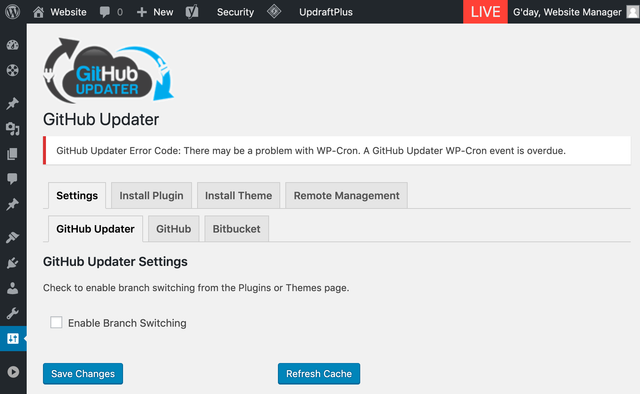
And just now realised that even GitHub Updater itself hasn't updated to it's latest version (I was on 8.4.0 and you are already on 8.8.0).
Why is it not updating properly? All my other cron events & regular plugin updates are running fine. Just the GitHub Updater & all of it's managed GitHub/BitBucket plugins are not updating.
Regards,
Alex
 alexanderkladov
All 31 comments
@alexanderkladov take a look at https://github.com/afragen/github-updater/wiki/Background-Processing
You will need to use a Cron job to run the due wp-cron events. It possible that you don’t have this set up correctly and may need to ask for help from your host. You can install WP-Crontrol plugin to see if other Cron events are overdue.
 afragen
on 10 Jun 2019
afragen
on 10 Jun 2019
Thanks for getting back to me so quickly, @afragen. I have installed WP Crontrol and I can see that there is 1 hanging event at the very top of the list with the following properties:
Hook Name: ghu_get_remote_plugin
Actions: Fragen\GitHub_Updater\Init->run_cron_batch()
Next Run: 2018-11-21 17:13:56 (now)
Recurrence: Non-repeating
Arguments:
[
    {
        "wp-sync-db-cli": {
            "type": "plugin",
            "git": "github",
            "uri": "/slang800/wp-sync-db-cli",
            "enterprise": null,
            "enterprise_api": null,
            "owner": "slang800",
            "slug": "wp-sync-db-cli",
            "branch": "master",
            "file": "wp-sync-db-cli/wp-sync-db-cli.php",
            "local_path": "public_html/staging/_template_diviwp-content/plugins/wp-sync-db-cli/",
            "author": "Sean Lang",
            "name": "WP Sync DB CLI",
            "local_version": "1.0b1",
            "sections": {
                "description": "An extension to WP Sync DB, allows you to execute migrations using a function call or via WP-CLI By Sean Lang."
            },
            "languages": null,
            "ci_job": false,
            "release_asset": false,
            "broken": false,
            "banners": {
                "high": null,
                "low": null
            },
            "icons": {
                "svg": null,
                "1x": null,
                "2x": null
            }
        }
    }
]
I don't even have that plugin installed anymore, I don't know why it's still trying to update it.
I tried deleting the event using Crontrol tools, but it won't let me either.
alexanderkladov
on 10 Jun 2019
If you have wp-cli access you can run the command listed in the wiki or see if there’s a command to delete pending Cron events.
afragen
on 10 Jun 2019
afragen
on 10 Jun 2019
No, I don't have wp-cli. Very few web hosts provide it, unfortunately.
Had to clear it by erasing the cron entry in wp_options table manually in phpMyAdmin using this MySQL script:
UPDATE wp_options SET option_value = '' WHERE option_name = 'cron';
That seemed to have resolved it. Not sure why GitHub Updater got stuck on that. I haven't had that plugin installed for a while.
alexanderkladov
on 10 Jun 2019
Looks like it’s been stuck for a while judging from the date. Hopefully all your wp-Cron events continue to fire. If you wish to bypass the background updating there are instructions in that wiki page.
afragen
on 10 Jun 2019
Curious that you don’t see an update for GHU itself. You can use the GitHub Updater Support plugin to see if there are any issues. It will turn off background updating and install some debugging plugins.
afragen
on 11 Jun 2019
I did install the GitHub Updater Support.
And it's dependancy, WP Debugging, bricked my site completely:
Fatal error: Uncaught Exception: Unable to locate placement anchor. in /home/website/public_html/wp-content/plugins/wp-debugging/vendor/wp-cli/wp-config-transformer/src/WPConfigTransformer.php:144 Stack trace: #0 /home/website/public_html/wp-content/plugins/wp-debugging/vendor/wp-cli/wp-config-transformer/src/WPConfigTransformer.php(184): WPConfigTransformer->add('constant', 'WP_DEBUG', 'true', Array) #1 /home/website/public_html/wp-content/plugins/wp-debugging/src/Settings.php(152): WPConfigTransformer->update('constant', 'WP_DEBUG', 'true', Array) #2 /home/website/public_html/wp-content/plugins/wp-debugging/src/Bootstrap.php(166): Fragen\WP_Debugging\Settings->add_constants(Array) #3 /home/website/public_html/wp-includes/class-wp-hook.php(286): Fragen\WP_Debugging\Bootstrap->activate(false) #4 /home/website/public_html/wp-includes/class-wp-hook.php(310): WP_Hook->apply_filters('', Array) #5 /home/website/public_html/wp-includes/plugin.php(465): WP_Hook->do_action(Array) #6 /home/website/public_html/wp-admin/incl in /home/website/public_html/wp-content/plugins/wp-debugging/vendor/wp-cli/wp-config-transformer/src/WPConfigTransformer.php on line 144
Had to go into cPanel and remove both manually, because GitHub Updater Support kept re-installing the WP Debugging over and over.
But funny enough, after I removed them both, I was able to update GHU. That was weird.
alexanderkladov
on 11 Jun 2019
Sorry about that.
You have a non-standard wp-config.php. The wp-cli code in the plugin requires the line /* That's all, stop editing! Happy publishing. */ to be present.
afragen
on 11 Jun 2019
WP Debugging is a required dependency. Deactivating the support plugin makes it possible to deactivate the WP Debugging plugin.
afragen
on 11 Jun 2019
I’ll leave this issue open for a bit to see if the problem returns.
afragen
on 11 Jun 2019
Sorry about that.
You have a non-standard wp-config.php. The wp-cli code in the plugin requires the line
/* That's all, stop editing! Happy publishing. */to be present.
I do have a non-standard wp-config.php, but only slightly. I still have the /* That's all, stop editing! Happy publishing. */ line.
I think the problem is that I have a WP_DEBUG variable defined, but outside of wp-config.php, because my configs are built following this method https://github.com/studio24/wordpress-multi-env-config/
alexanderkladov
on 11 Jun 2019
Strange as that’s the the error you cited.
I’m not familiar with that method, but the WP Debugging plugin is designed for a standard installation wp-config modified or not.
afragen
on 11 Jun 2019
Never mind, I just checked wp-config.php and you are right, it was modified, so it doesn't have that exact string. Sorry for any confusion. :)
alexanderkladov
on 11 Jun 2019
I just checked another site and I have the same issue again - GHU v8.4.2 refuses to update to v8.8.0. When I say "refuses" I mean it just doesn't see it.
GHU also doesn't see any already installed GitHub/BitBucket plugins. It's so strange.
I removed the whole Cron tasks list again via phpMyAdmin to eliminate the possibility of a hanging task. All Crons are running smooth, triggered by manual server-side Cron. I even triggered the ghu_get_remote_plugin manually and it disappeared from the Cron Events, so I assume it finished executing.
And still nothing..
alexanderkladov
on 12 Jun 2019
Here are the Cron event details:
Hook Name: ghu_get_remote_plugin
Actions: Fragen\GitHub_Updater\Init->run_cron_batch()
Next Run: 2019-06-12 08:23:59 (now)
Recurrence: Non-repeating
Arguments:
[
    {
        "github-updater": {
            "type": "plugin",
            "git": "github",
            "uri": "https://github.com/afragen/github-updater",
            "enterprise": null,
            "enterprise_api": null,
            "owner": "afragen",
            "slug": "github-updater",
            "branch": "master",
            "file": "github-updater/github-updater.php",
            "local_path": "/home/domain/public_html/staging/_template_divi/wp-content/plugins/github-updater/",
            "author": "Andy Fragen",
            "name": "GitHub Updater",
            "local_version": "8.4.2",
            "sections": {
                "description": "A plugin to automatically update GitHub, Bitbucket, GitLab, or Gitea hosted plugins, themes, and language packs. It also allows for remote installation of plugins or themes into WordPress. By Andy Fragen."
            },
            "languages": "https://github.com/afragen/github-updater-translations",
            "ci_job": false,
            "release_asset": false,
            "broken": false,
            "banners": {
                "high": null,
                "low": null
            },
            "icons": {
                "svg": "https://staging.domain.com.au/_template_divi/wp-content/plugins/github-updater/assets/icon.svg",
                "1x": null,
                "2x": null
            }
        },
        "kirki": {
            "type": "plugin",
            "git": "github",
            "uri": "/aristath/kirki",
            "enterprise": null,
            "enterprise_api": null,
            "owner": "aristath",
            "slug": "kirki",
            "branch": "master",
            "file": "kirki/kirki.php",
            "local_path": "/home/domain/public_html/staging/_template_divi/wp-content/plugins/kirki/",
            "author": "Aristeides Stathopoulos",
            "name": "Kirki Toolkit",
            "local_version": "3.0.34.1",
            "sections": {
                "description": "The ultimate WordPress Customizer Toolkit By Aristeides Stathopoulos."
            },
            "languages": null,
            "ci_job": false,
            "release_asset": false,
            "broken": false,
            "banners": {
                "high": null,
                "low": null
            },
            "icons": {
                "svg": null,
                "1x": null,
                "2x": null
            }
        },
        "wp-local-toolbox": {
            "type": "plugin",
            "git": "bitbucket",
            "uri": "https://bitbucket.org/domain/wp-local-toolbox",
            "enterprise": null,
            "enterprise_api": null,
            "owner": "domain",
            "slug": "wp-local-toolbox",
            "branch": "develop",
            "file": "wp-local-toolbox/wplt-loader.php",
            "local_path": "/home/domain/public_html/staging/_template_divi/wp-content/plugins/wp-local-toolbox/",
            "author": "Pro Web Assist",
            "name": "WP Local Toolbox",
            "local_version": "1.3.2",
            "sections": {
                "description": "A simple plugin to set different defaults for production, staging and local servers. By Pro Web Assist."
            },
            "languages": null,
            "ci_job": false,
            "release_asset": false,
            "broken": false,
            "banners": {
                "high": null,
                "low": null
            },
            "icons": {
                "svg": null,
                "1x": null,
                "2x": null
            }
        },
        "wp-sync-db": {
            "type": "plugin",
            "git": "github",
            "uri": "/wp-sync-db/wp-sync-db",
            "enterprise": null,
            "enterprise_api": null,
            "owner": "wp-sync-db",
            "slug": "wp-sync-db",
            "branch": "master",
            "file": "wp-sync-db/wp-sync-db.php",
            "local_path": "/home/domain/public_html/staging/_template_divi/wp-content/plugins/wp-sync-db/",
            "author": "Sean Lang",
            "name": "WP Sync DB",
            "local_version": "1.5",
            "sections": {
                "description": "Export, push, and pull to migrate your WordPress databases. By Sean Lang."
            },
            "languages": null,
            "ci_job": false,
            "release_asset": false,
            "broken": false,
            "banners": {
                "high": null,
                "low": null
            },
            "icons": {
                "svg": null,
                "1x": null,
                "2x": null
            }
        },
        "wp-sync-db-cli": {
            "type": "plugin",
            "git": "github",
            "uri": "/slang800/wp-sync-db-cli",
            "enterprise": null,
            "enterprise_api": null,
            "owner": "slang800",
            "slug": "wp-sync-db-cli",
            "branch": "master",
            "file": "wp-sync-db-cli/wp-sync-db-cli.php",
            "local_path": "/home/domain/public_html/staging/_template_divi/wp-content/plugins/wp-sync-db-cli/",
            "author": "Sean Lang",
            "name": "WP Sync DB CLI",
            "local_version": "1.0b1",
            "sections": {
                "description": "An extension to WP Sync DB, allows you to execute migrations using a function call or via WP-CLI By Sean Lang."
            },
            "languages": null,
            "ci_job": false,
            "release_asset": false,
            "broken": false,
            "banners": {
                "high": null,
                "low": null
            },
            "icons": {
                "svg": null,
                "1x": null,
                "2x": null
            }
        },
        "wp-sync-db-media-files": {
            "type": "plugin",
            "git": "github",
            "uri": "/wp-sync-db/wp-sync-db-media-files",
            "enterprise": null,
            "enterprise_api": null,
            "owner": "wp-sync-db",
            "slug": "wp-sync-db-media-files",
            "branch": "master",
            "file": "wp-sync-db-media-files/wp-sync-db-media-files.php",
            "local_path": "/home/domain/public_html/staging/_template_divi/wp-content/plugins/wp-sync-db-media-files/",
            "author": "Sean Lang",
            "name": "WP Sync DB Media Files",
            "local_version": "1.1.4b1",
            "sections": {
                "description": "An extension of WP Sync DB that allows the migration of media files. By Sean Lang."
            },
            "languages": null,
            "ci_job": false,
            "release_asset": false,
            "broken": false,
            "banners": {
                "high": null,
                "low": null
            },
            "icons": {
                "svg": null,
                "1x": null,
                "2x": null
            }
        }
    }
]
May want to install/activate the support plugin and install Query Monitor at it’s suggestion.
This will bypass background updates and allow you to see if there are any issues with HTTP requests.
Remember to check your wp-config.php for that anchor line.
afragen
on 12 Jun 2019
Remember to check your
wp-config.phpfor that anchor line.
I just need to add /* That's all, stop editing! Happy publishing. */ to the bottom of wp-config.php, right?
alexanderkladov
on 12 Jun 2019
You might see some error about redeclaring WP_DEBUG if it’s not in that file.
afragen
on 12 Jun 2019
More weird things happening. Just me downloading GitHub Updater Support via GHU settings, has now allowed GHU to see it's own new version & new versions of it's managed plugins. I haven't even activated the GHU Support plugin and WP Debugger hasn't been installed.
alexanderkladov
on 12 Jun 2019
It's like GHU settings were corrupted. And the moment I installed something using it's installer GUI, they got somehow magically restored and now everything is working again.
I even noticed that my GitHub/BitBucket tokens were gone. But the moment I installed a public GitHub plugin (GHU Support) without them, everything got reset & restored to it's original state, even the tokens are now back.
Sure haven't seen something like that before. But it's working now. 🤷♂️
alexanderkladov
on 12 Jun 2019
Really strange. Not sure I can explain it.
Using Refresh Cache will clear the cache.
You can completely reset the options by deactivating, deleting, and reinstalling GHU.
afragen
on 12 Jun 2019
Using Refresh Cache will clear the cache.
I tried clearing the cache, it didn't do anything.
You can completely reset the options by deactivating, deleting, and reinstalling GHU.
Well I don't think I need to do that anymore. After I simply installed GHU Support, without even activating it, everything is now working like it was supposed to.
I did end up activating GHU Support though, just to see if WP Debugger will crash the site or not (after I added the sacred text at the bottom of the wp-config.php, of course). And everything went smooth, no crashes.
One thing I might suggest is maybe GHU Support should check if WP_DEBUG, WP_DEBUG_LOG, SCRIPT_DEBUG & SAVEQUERIES have already been defined. I already had all of those enabled in my LOCAL/STAGING environments (the definitions are just compartmentalised according to the WP Multi Environment Config method, so they are not in wp-config.php), so it's throwing unnecessary errors:
Notice: Constant WP_DEBUG already defined in /home/domain/public_html/staging/_template_divi/wp-config.php on line 23

Notice: Constant WP_DEBUG_LOG already defined in /home/domain/public_html/staging/_template_divi/wp-config.php on line 24

Notice: Constant SCRIPT_DEBUG already defined in /home/domain/public_html/staging/_template_divi/wp-config.php on line 25

Notice: Constant SAVEQUERIES already defined in /home/domain/public_html/staging/_template_divi/wp-config.php on line 26
I think I also know what was causing the update issues - failing API request to WP Sync DB CLI, because in it's plugin header the GitHub Plugin URI is set to the old slang800/wp-sync-db-cli instead of the new wp-sync-db/wp-sync-db-cli:
So we get a 404 response.
alexanderkladov
on 12 Jun 2019
WP Debugging does check to see if you have any of the constants it adds already defined. It records them in an option and resets them to your settings upon deactivation.
Having multiple wp-config files is not really something I can account for in the plugin.
If everything seems to be working again you can deactivate the support plugin and return to background updates with wp-cron. A quick test will be to Refresh Cache and when your cronjob runs all the data should be refreshed. If not, there may still be an issue. But this clearly shows the issue is with how wp-cron is being run.
afragen
on 12 Jun 2019
Having multiple wp-config files is not really something I can account for in the plugin.
Fair enough. I don't really have separate wp-config.php, I just have automatic environment detection, which then add/enables/disables tailored scripts/variables/plugins, depending on whether it's a DEV, STAGING or LIVE site, all upon wp-config.php load.
The wp-config.php is basically untouched, with the exception of:
// Load the Multi-Environment Config
require_once( ABSPATH . 'config/wp-config.load.php' );
Just before:
// Sets up WordPress vars and included files
require_once( ABSPATH . 'wp-settings.php' );
But that's ok, no big deal. Those notices don't brick the site, so that's fine.
A quick test will be to Refresh Cache and when your cronjob runs all the data should be refreshed. If not, there may still be an issue. But this clearly shows the issue is with how wp-cron is being run.
I just did this and you are right, all plugins disappeared again from GHU Settings. But there aren't any failed HTTP calls anymore. Not sure what's going on.
I am sure that the cron is called correctly too. I am calling it using:
wget -t 1 -q -O - https://staging.domain.com.au/_template_divi/wp-cron.php?doing_wp_cron=1 >/dev/null 2>&1
But I can see that ghu_get_remote_plugin keeps sitting in the job queue and not being processed. And in GHU Settings all I see is:
GitHub Updater Information
Please be patient while WP-Cron finishes making API calls.
All I can say is there's something about how you're calling wp-cron in your cronjob that doesn't seem to work.
If you load https://staging.domain.com.au/_template_divi/wp-cron.php from the browser does it kick it off?
afragen
on 12 Jun 2019
You might try using this command
wget -q -O - http://yourdomain.com/wp-cron.php?doing_wp_cron >/dev/null 2>&1
From Siteground.
afragen
on 12 Jun 2019
Are you certain your host can't provide WP-CLI access. That would certainly be best.
afragen
on 12 Jun 2019
wget -q -O - http://yourdomain.com/wp-cron.php?doing_wp_cron >/dev/null 2>&1
I've seen & tried this before, but it didn't work.
If you load
https://staging.domain.com.au/_template_divi/wp-cron.phpfrom the browser does it kick it off?
You are right, that did it. So it must've been a broken Cron command. Weird, because I logged into the server over SSH and ran wget manually to test it and it worked just fine.
I just switched the Cron to use curl instead and it seems to be working fine now. This is the new Cron command I have, in case anyone has the same issue:
curl https://staging.domain.com.au/_template_divi/wp-cron.php?doing_wp_cron >/dev/null 2>&1
alexanderkladov
on 12 Jun 2019
Are you certain your host can't provide WP-CLI access. That would certainly be best.
Unfortunately, in my experience working with different web hosts over the years, I got tired of begging them for basic "human rights" for developers, like jailed SSH access and WP-CLI.
Yes, my servers have WP-CLI, but when working on website templates for clients, I stick to the "lowest common denominator", which usually means I can kiss WP-CLI goodbye on most shared hosting accounts outside the US (funny enough even those claiming to be WordPress hosting, still don't have WP-CLI).
alexanderkladov
on 12 Jun 2019
Looks like we’ve solved this issue.
afragen
on 22 Jun 2019
Related issues
 soderlind
·
10Comments
soderlind
·
10Comments
 klihelp
·
4Comments
klihelp
·
4Comments
 wormeyman
·
5Comments
wormeyman
·
5Comments
 therealgilles
·
4Comments
therealgilles
·
4Comments
 PthPndr
·
11Comments
PthPndr
·
11Comments